Billing & Payment of Linkjob AI — What You Need to Know

Welcome to the Linkjob AI Billing & Payment Support Center. We are here to help you with common questions about free trials, account activation, subscription pricing, plan changes, cancellations, and refunds.
How to Start A Free Trial?
After downloading and installing Linkjob AI from the official website, please run the software and click the "gear" icon on the right side of the floating window to open the control panel. Then click Dashboard.
Then please enter your email address in the Start Trial section (this email must not have been registered with Linkjob AI before). The system will automatically generate a 32-character activation code containing letters and numbers in the license key box below.
Example Activate ID Form: XXXXXXXX-XXXX-XXXX-XXXX-XXXXXXXXXXX
Click the "key" icon beside license key box to activate and start your free trial.
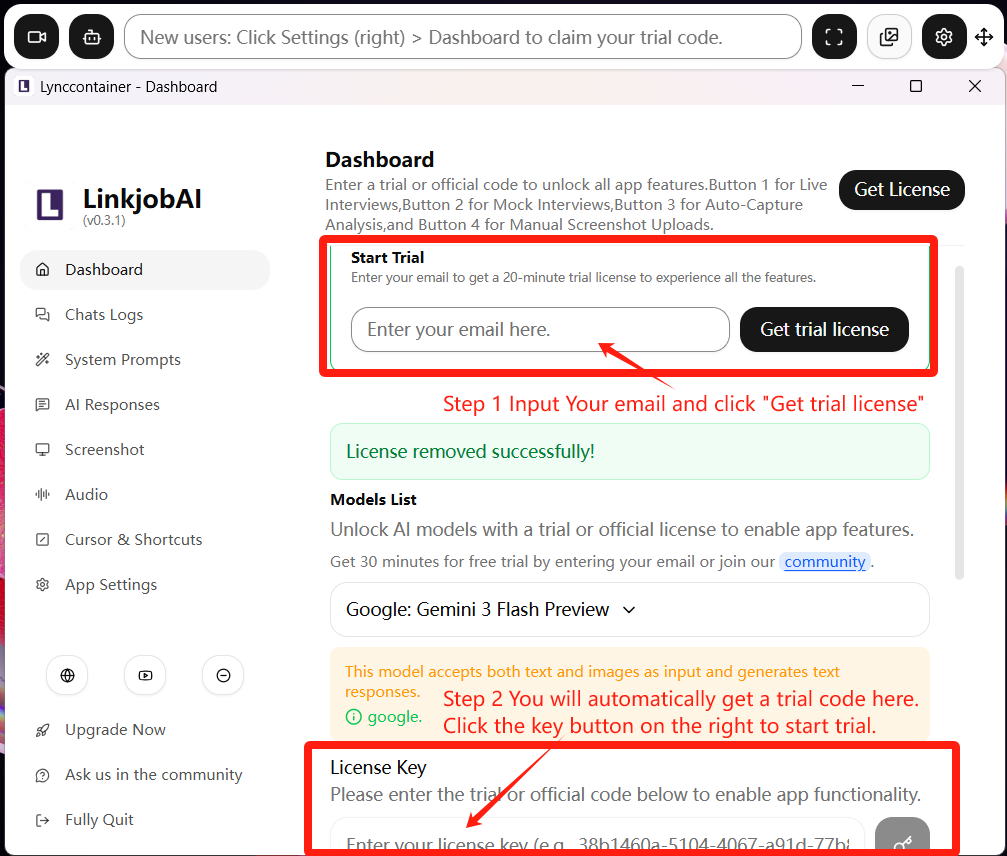
The trial activation code is valid for 30 minutes. During this period, you can experience all premium settings, 3 basic models, and all AI Interview Mock features.
If you feel that 30 minutes is not enough, you may visit our community to request a new trial activation code.
How to Activate a Formal Account?
After payment, the system will send a 32-character activation ID consisting of letters and numbers to your e-mail in 10 mins.
Example Activate ID Form: XXXXXXXX-XXXX-XXXX-XXXX-XXXXXXXXXXX
This activation code is bound to your registered email address and is non-transferable. Each activation code can only be used once.
The activation method is as follows: after you have successfully downloaded and installed the software, launch it and click the gear icon on the right side of the control panel, then select Dashboard in the settings panel. You need to copy and paste the activation code into the activation section in the Dashboard to activate your account:
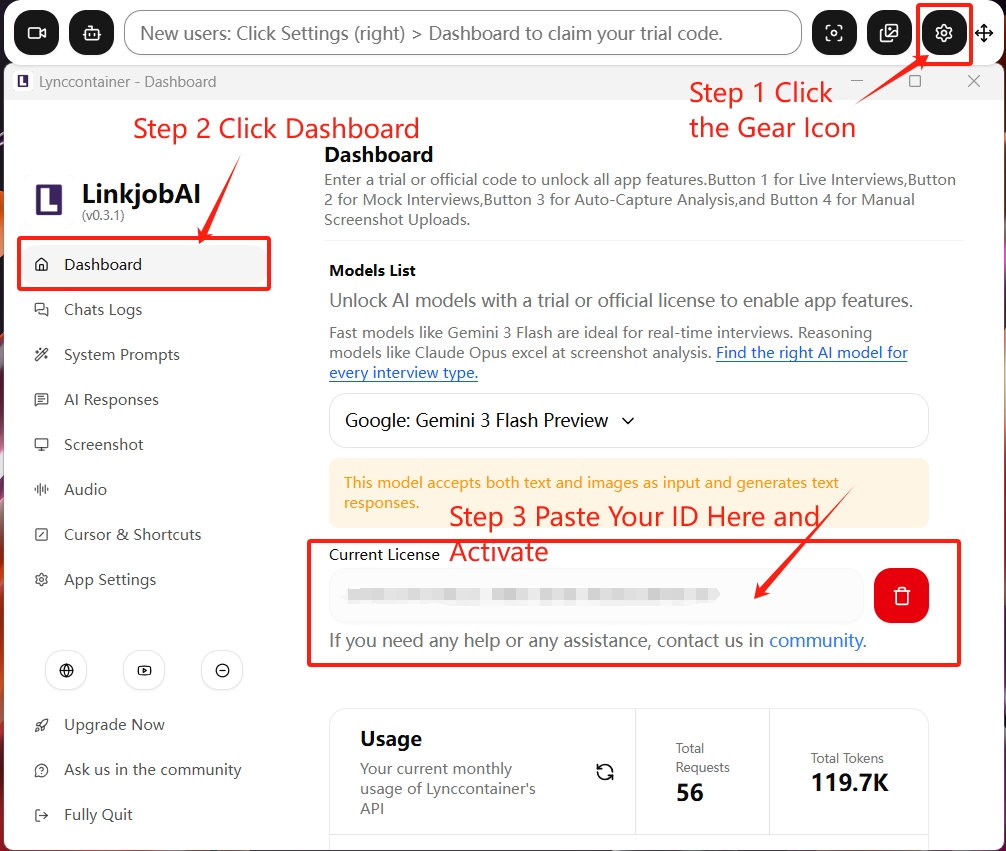
If activation is unsuccessful, please contact us in our community.
Should I Delete Data when Updating App?
For Windows users, please DO NOT click “Delete Data,” as the data contains your activation information. If it is deleted, your original activation information will be lost, and the activation code will become invalid.
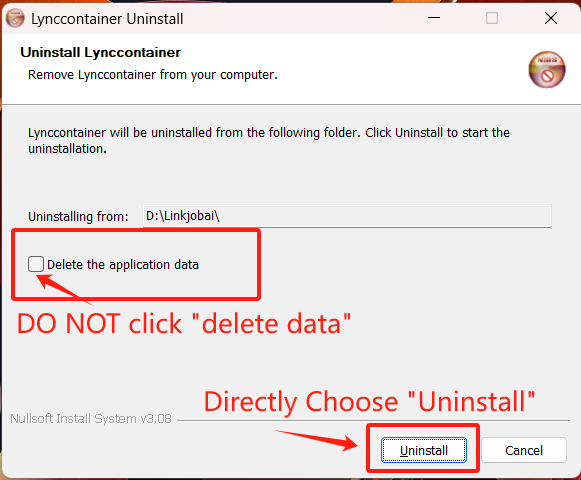
For Mac users, downloading the new version will automatically replace the old one, so there is no need to uninstall it in advance. However, please DO NOT delete the activation ID code of the old version before downloading and installing the new version, otherwise the activation code will become invalid.
How to Reactivate if I Mistakenly Delete the ID Code?
After activating the product, please DO NOT click the "trash bin" button next to the activation code unless you are changing your subscription plan or unsubscribing. Otherwise, this will remove your activation information and cause the software features to stop working properly.
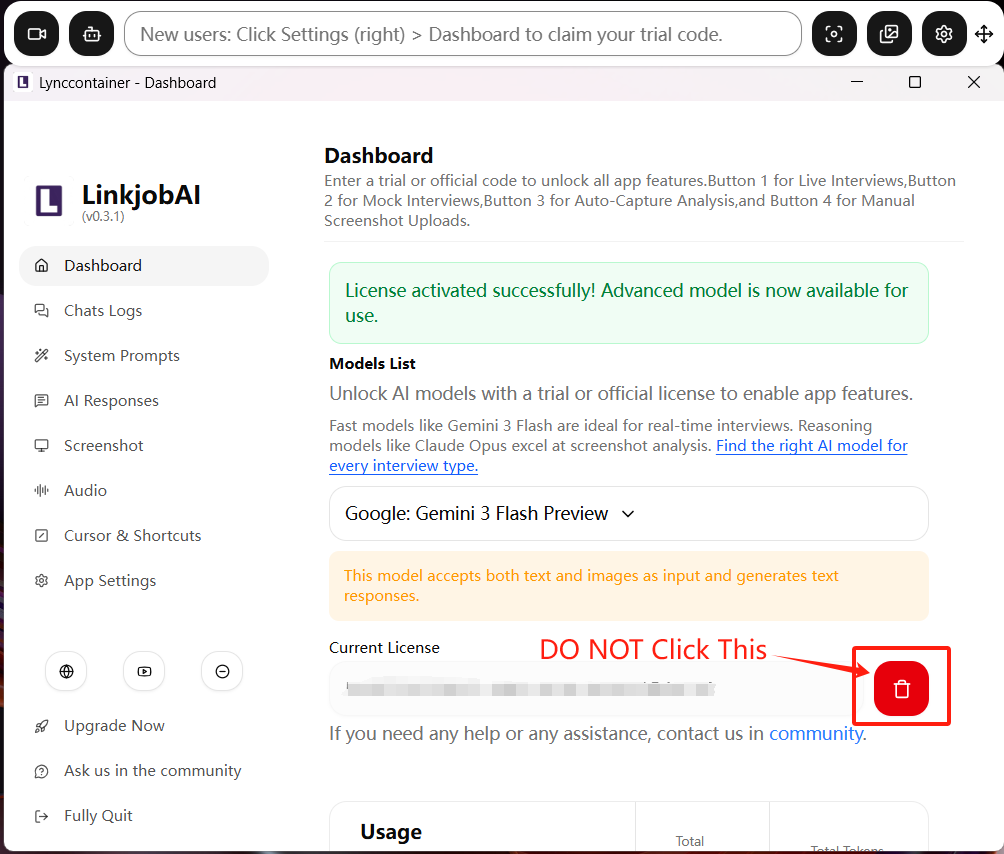
If you accidentally delete the activation code, please contact our community and we will help you reactivate it.
Why Does Activation Code Has Reached Its Usage Limit?
If your license was once activated sucessfully, you may encounter this issue in the following situations:
You accidentally deleted your activation code, causing the activation info to be lost. (The previous question explains how to avoid this.)
You changed your subscription plan, which made the old activation invalid.
Your subscription expired, which made the activation code invalid.
You clicked 'Delete user data' when uninstalling and updating the software. (The previous question explains how to avoid this.)
You try to activate your account on another device if the activation code has been used previously on a device.
In these cases, you just need to reactivate your account to use it normally. Please contact our community, and we will help you recover it as soon as possible.
Why Haven't I Received My Activation Code after Payment?
After payment, the system will send a 32-character activation ID consisting of letters and numbers to your e-mail in 10 mins.
If you don't receive your activation code within 10 minutes, please contact our community support immediately.
What‘s the Difference between Subscription Plans?
Subscription plans are divided into "One-Time Payment" and "Subscription Payment." Both support monthly, quarterly, and annual billing. One-Time Payment also offers a lifetime purchase option.
The main difference between plans is the number and quality of available models. Premium subscription plans support more advanced reasoning models and coding models (such as GPT 5.1 and Claude 4.7 Opus). You can reach our pricing page for detailed information.
How to Switch/Change/Upgrade Subscription Plans?
If you need to change your plan, please contact our community or the founder's email (p56935424@gmai.com) directly. You can upgrade to a premium plan by paying the price difference and receive a new activation code.
How to Cancel My Subscription?
If you need to cancel your subscription, please contact our community or the founder's email (p56935424@gmai.com) directly. You are free to cancel your subscription at any time.
However, we still want to understand your issue first. This may help us solve your problem and improve our product. We'd be appreciate if you can report bugs or issues to us.
Why People Choose Linkjob AI
Smoother interviews, coding challenges cleared, and job offers landed. See how users describe their experience with Linkjob AI—in their own words.


© Copyright 2026 Linkjob AI - All Rights Reserved.