My Honest InterviewBee Review & Experience(2026 Update)

After some searching and comparing of several top AI interview assistants, I gave InterviewBee a go, but to be honest I was a bit disappointed. The feedback I got was pretty generic, and its desktop app isn't available for Mac now, which was quite disappointing.
Also, I had a few issues during both mock and live interviews, like failing to upload the resumes, signing up and also being detected when sharing the screen during a test interview meeting. When I tried out LockedIn AI, I found that Lockedin AI‘s web-based service was totally visible (wrote it in my lockedin ai review). I even saw in a Sensei AI review that the interview platform has something called a detection sandbox mechanism.
In this InterviewBee review, I'm going to share my honest experience of the free trial and discuss how I found another AI tool useful: Linkjob AI.
My Experience With InterviewBee and Its Main Features
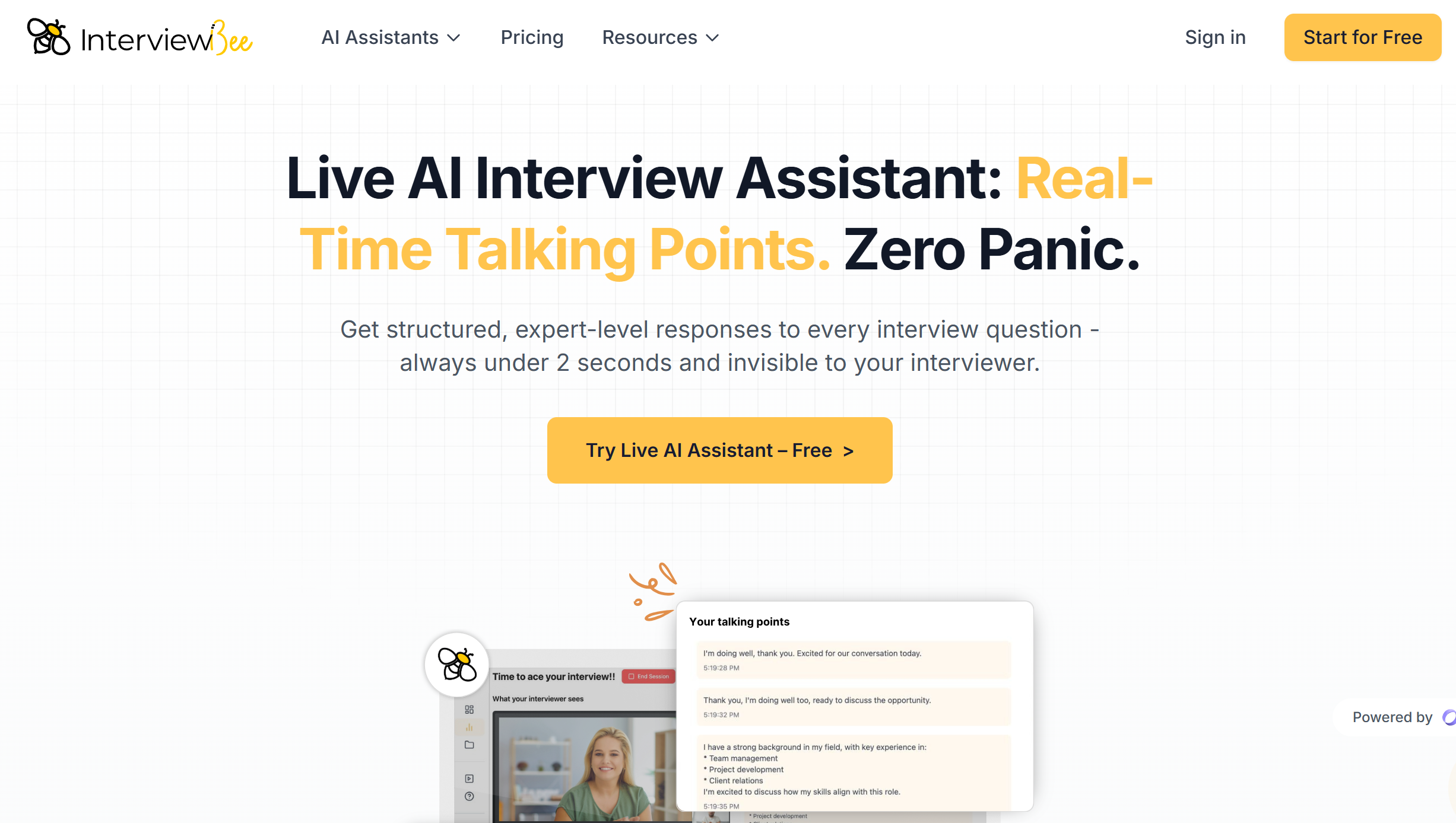
From the homepage, I found out that InterviewBee is an AI-powered tool for job interviews. It analyses your CV and specific role and gives users live interview practice. The big thing that sets it apart is its voice-based mock interview feature, which lets users practise their speaking. It makes custom work experience stories from one resume, and offers a web-based solution.
Generally speaking, here are InterviewBee's pros and cons I know about:
Pros:
Fast response time
Resume and JD-tailored responses with work experience stories
Realistic voice-based mock interviews
Free tier (1 live + 2 mock interviews)
Cons:
Session limits on all plans (2-10 live, 5-25 mock)
No automated job application feature
Only for English language support
Chances of failing in the free trial when uploading resumes.
Live Interview AI Assistant
After experiencing the ai mock interviewer, I turned to what really drove me to it: the live ai assistant. Before the real experience in a meeting with my friend for tests, InterviewBee reminded me that never share window or entire screen, so I realized how its brower-based ai assistant for interviews worked:
Another ai tool that is only invisible for one tab, and would be spotted immediately if I switch the tab from the meeting to the ai helper.
Yup, like all AI interview assistants that operate via shared tabs, InterviewBee gets detected when switching. My friend said he saw me switch from the meeting interface to its AI assistant interface—it doesn't achieve the complete invisibility they claim.
For more details about other browser-based live interview assistants, check our Sensei AI review and Verve AI review in 2026.
In this regard, Linkjob, which I ultimately chose, holds a significant advantage. By downloading an app onto your computer, it solves the issue of tab switching detection, achieving a fully invisible state.

Mock Interview Sessions
As the mock interview feature is one of InterviewBee's main selling points, I was quite interested in that part, and it turned out to be above the average level.
When I started using its ai mock interview tools, I wanted sessions that felt real. As a platform for voice-only mock interviews, Interviewbee's features are actually pretty full-featured. The platform uses a mock AI interviewer that simulates actual interview conditions.
One thing to mention is that my friend faced errors when uploading his CVs, and didn't make it to the mock interview page. It seemed that there was something unstable there.
Other Tools & Resources
Not only does InterviewBee have AI mock interviews and a real-time AI interview assistant, it also offers extra features such as an interview question bank and job board. These features are pretty broad, especially the job listings. They don't give detailed job descriptions, and there are no clickable links to confirm the job postings are up to date. So here was another point that made me feel a little bit down.
My Honest Feeling About InterviewBee
Signup & Setup: 4/5
In the free trial, all I needed to do was upload my resume, add the company name, and provide a detailed JD about the specific role I was applying for.
The InterviewBee 3-Step Process
Upload CV & Job Description: The AI uses this to personalize its responses and questions, making the practice highly relevant, usually taking about 2-3 minutes.
Connect to Video Meeting: The tool is designed to work alongside 3 platforms: Zoom, Microsoft Teams, and Google Meet. Other platforms were not mentioned; they may have some technical issues in integration.
Get Real-Time Assistance: During a live interview, it provides instant talking points in a separate web tab, helping users structure answers and recall key experiences. And it could be detected as cheating if users try to switch tabs.
Overall, the process is quite fluent, and I have not met much trouble, so it was definitely worth a 4 of 5.
Usability & Undetectability: 3/5
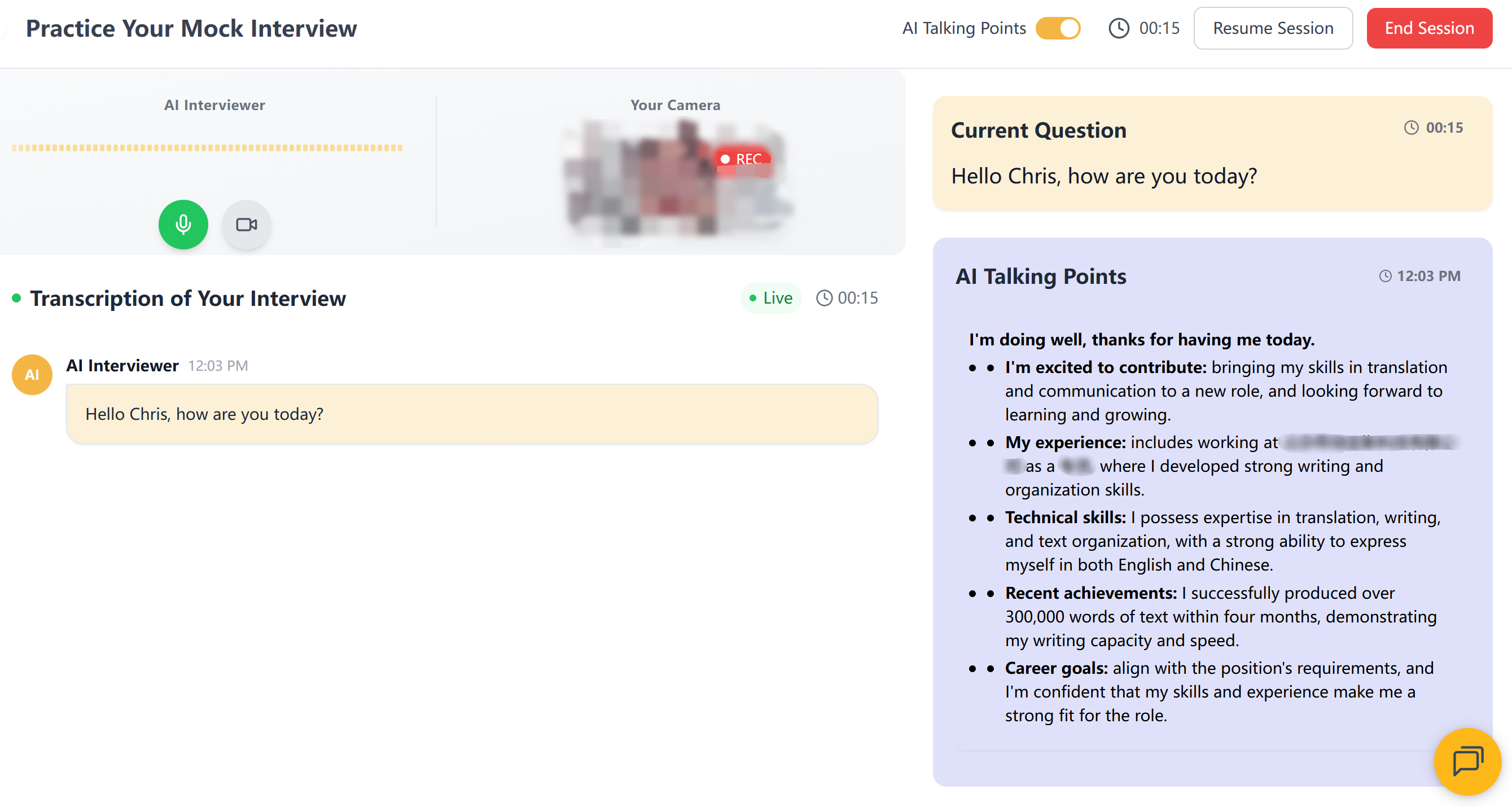
During my tests, the free trial provides something average to the ai interview helper market: resume uploading, tab sharing options, ai responses available in one tab, etc. I could stop and end the interview process by clicking two buttons above the transcriptions and answer windows, which was straightforward.
Here’s what troublesome to me:
Its tab-sharing mode was detectable and easy to spot.
Only 1 live interview and 2 mock interview trials for free, and had a strict time limit.(15 minutes each)
The split-screen mode made it hard to concentrate on interview questions.
So I could only give InterviewBee a 3 out of 5, even though the whole workflow was great and smooth.
Plan & Price: 3.5/5
I was quite disappointed with InterviewBee's paid plans after taking the mock and live tests.
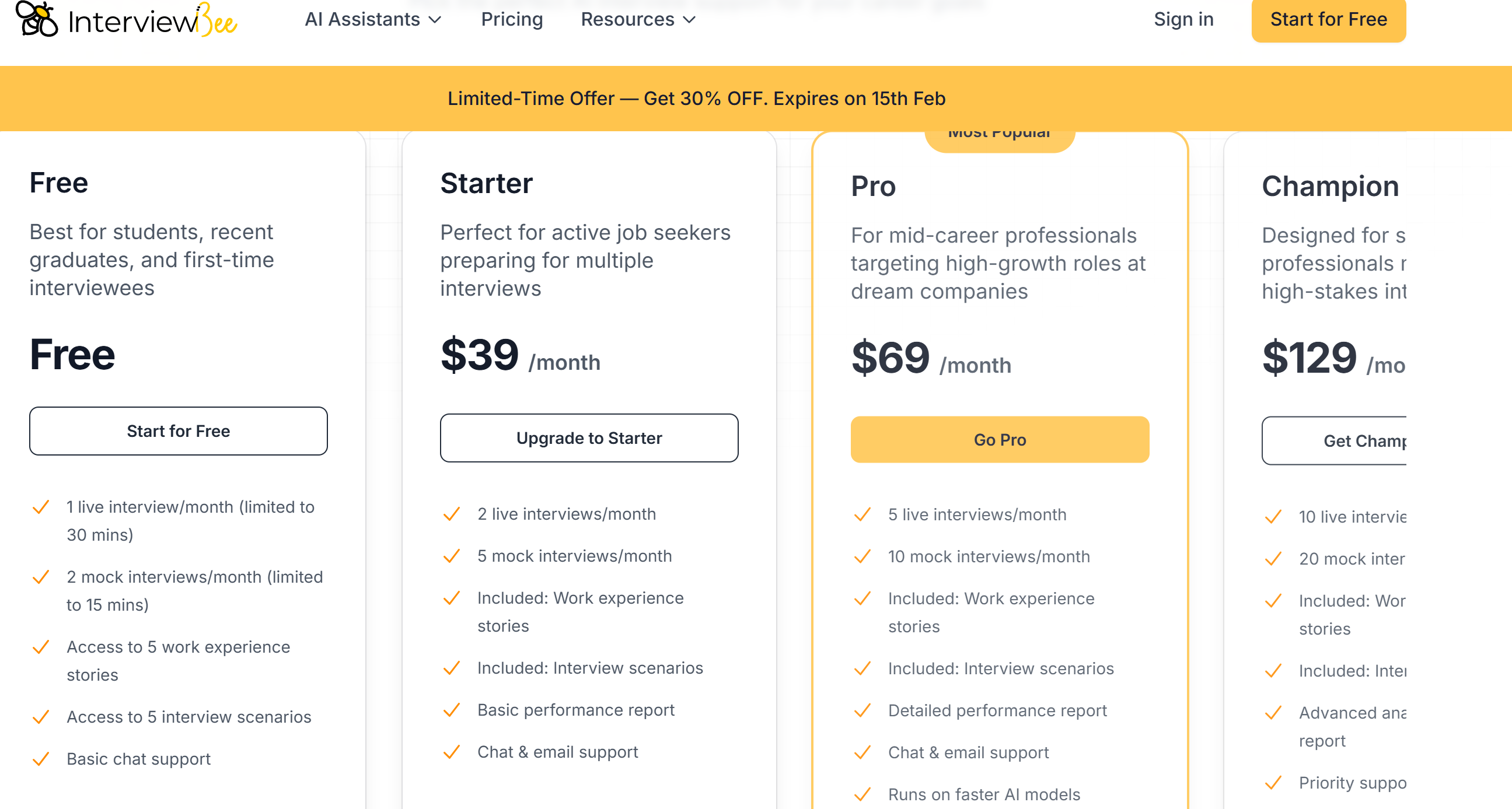
It's pretty clear that InterviewBee's subscription fees are way higher than other similar products on the market, and it's got some pretty tight usage limits: you're capped at 20 mock interview attempts a month (5 at the lowest tier), and there's a limit of 10 live interview assistance sessions (5 at the lowest). I knew the model's response speed was pretty impressive, but I still don't think it's worth the price.
But some folks looking for jobs don't care how much it costs, so that's why I'm giving it a 3.5 out of 5.
Comparison to An Alternative
Similar to InterviewBee, I will evaluate Linkjob based on three aspects: Signup & Setup, Usability & Undetectability, and Plan & Price. I will also explain the comprehensive considerations that led to my final choice.
Signup & Setup:4/5
After downloading Linkjob, it appears as a long pop-up window on my desktop. Before using it, I need to click the settings button on the pop-up, enter a trial or full version code to activate the application, and select my most frequently used AI model. It's worth noting that Linkjob offers an extensive selection of AI models, including the latest ones, which is a key reason I chose it.
Similar to InterviewBee, Linkjob can also provide more precise and tailored answers based on the resume I uploaded in the settings.
Usability & Undetectability:4.5/5
Linkjob remains invisible across all meeting software. For Zoom meetings, enable “Advanced capture with window flicking” to ensure its invisibility. Also capable of doing mock interviews by chatbot, its live interview copilot really stands out.
With a friend's help, I also tested it on Zoom and other meeting platforms. It remains invisible during screen sharing because it doesn't require switching tabs and thus isn't detected by the meeting software. Of course, it's important to note that staring at one spot for too long might raise suspicion of cheating in the interviewer's eyes. It's best to position it below the camera or shift its location occasionally.
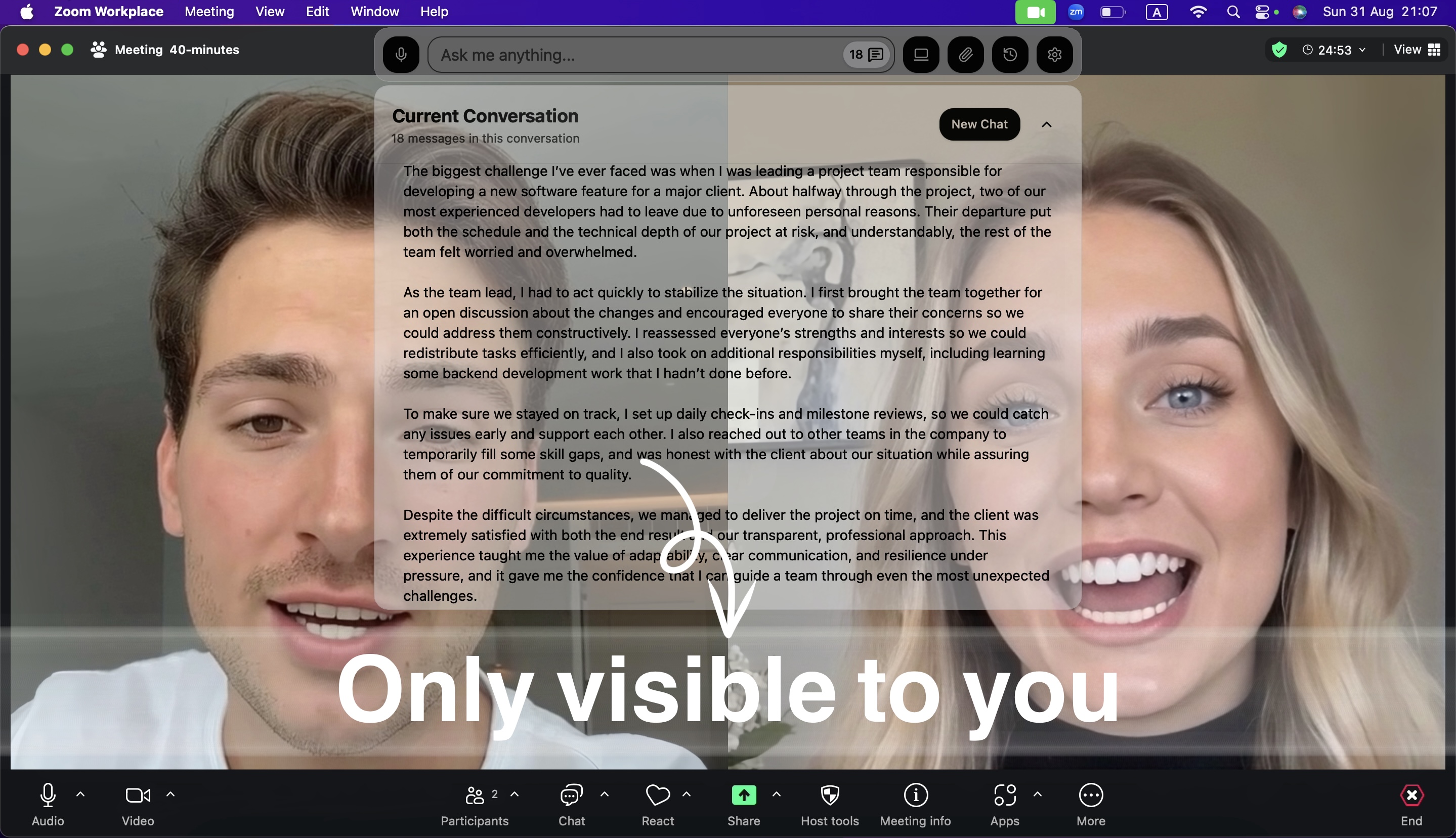
By the way, in Linkjob's settings, I have chosen to hide its icon on my desktop, making the product completely invisible during formal interviews.
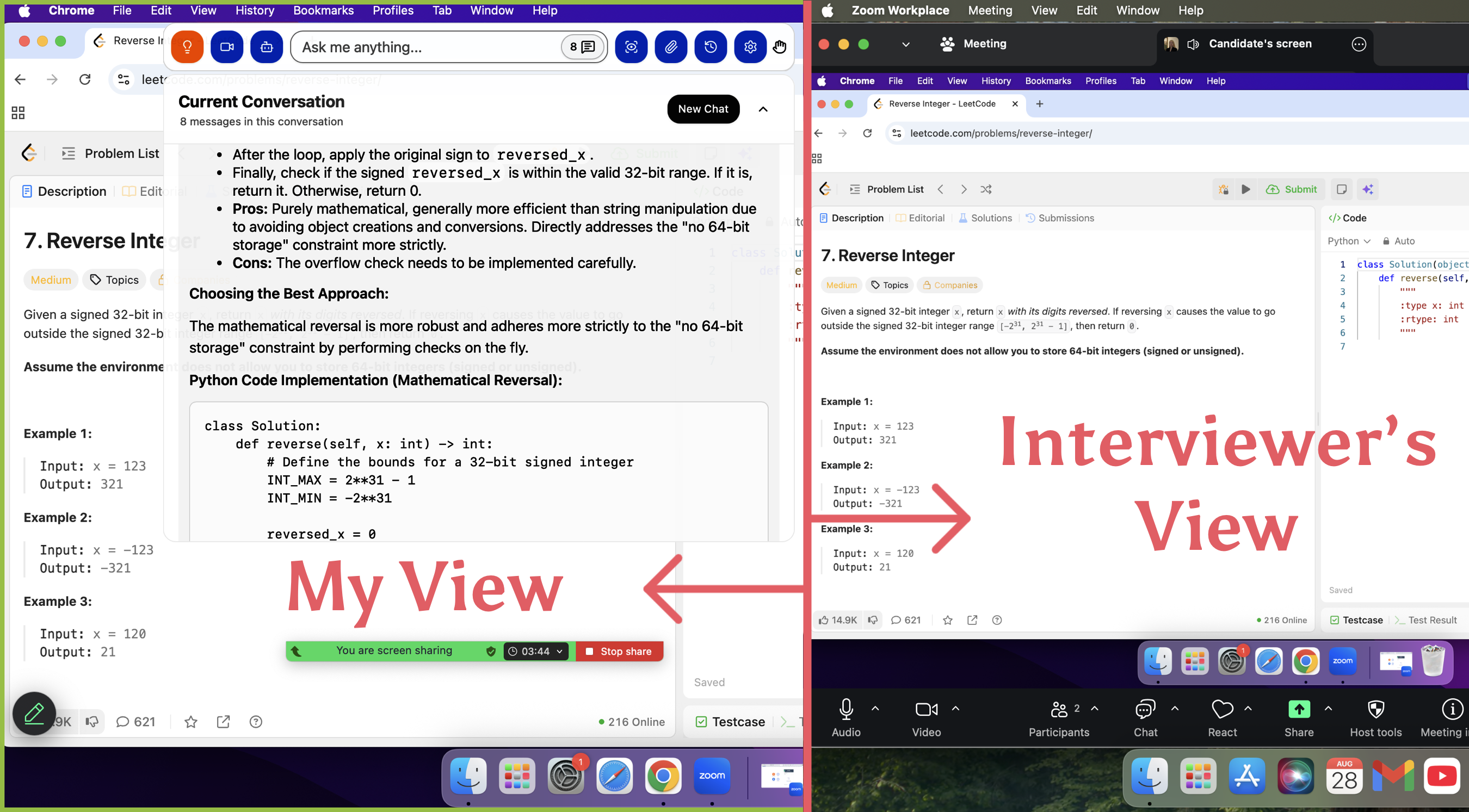
And most importantly, Linkjob is also completely invisible on coding platforms like HackerRank and CodeSignal. As long as I don't directly copy and paste, there's absolutely no risk of being detected.
Plan & Price:4/5
Linkjob AI offers unlimited use of all features under a subscription. This is priced at $99.99 per month if purchased on a monthly basis, $44.99 per month if purchased quarterly, and $24.99 per month if purchased annually.
While not the cheapest interview assistant on the market, I believe it offers the best value for money. During the subscription period, I can use any AI model without limits, including the latest versions. I think this fully justifies its monthly price of just a few dozen dollars.
Final Recommendation
InterviewBee covers the basics, but it doesn't quite measure up to today's high standards for technical interviews when it comes to true AI coding copilots. It also doesn't support different interview platforms, which is a big gap in scenarios where interviewees need to cope with coding.
Overall, Linkjob is on par with InterviewBee in terms of usability and performance. Both platforms offer lightning-fast response times when solving problems and feature AI mock interview capabilities. However, Linkjob operates more discreetly during live interviews, with no risk of detection, the capability for multi-round scenarios, and also more powerful AI models.
FAQ
How do I get started with InterviewBee’s ai interview copilot?
3 steps needed. First, start InterviewBee by clicking the button. Then sign up for the account and finish editing the personal information related to the job. Finally, select a live interview by adding the meeting url or a mock interview by using the microphone and camera.
Can InterviewBee's ai interview copilot help with technical interviews?
Okay, but it was not that good. It has the option for coding interviews, but during my tests, its help was limited and quite basic. Turning to other professional AI tools for coding interview, like Linkjob AI, is a good choice.
Is the ai interview copilot useful for behavioral questions?
Yes. But for live behavioral interviews, InterviewBee seemed to be a little basic when it came to detailed questions, and the STAR method was not quite right.
See Also
Evaluating Verve AI's Effectiveness in Live Interviews for 2026
In-Depth Review of Parakeet AI: Interview Results and Insights
2026 Review of Interview Coder: Strengths, Weaknesses, and Gaps
Top Chat Alternatives for AI-Powered Interview Assistance
Best Interview Sidekick Alternative for AI Interview Assistant

© Copyright 2025 linkjob.ai - All Rights Reserved.