My Experience Using a LeetCode Interview AI Assistant for Coding

A LeetCode Interview AI Assistant refers to an AI-powered tool designed to solve LeetCode-style problems during coding interviews for candidates. It remains invisible to both testing platforms (such as HackerRank, CodeSignal, and CoderPad) and meeting software (such as Google Meet, Microsoft Teams, and Zoom). These assistants provide real-time support—solving coding challenges and offering guidance—without being flagged by platform security or noticed by the interviewer. Their capabilities include providing problem-solving logic, full code solutions, optimization strategies, and debugging tips.
In this guide, I will use Linkjob AI as an example to share my strategies and experience using a LeetCode Interview AI Assistant. I will also explain how these tools successfully bypass strict anti-cheating detections, and successfully fuck LeetCode with LinkJob AI's help.
If you are facing upcoming OAs for a better job, and are willing to find some undetectable AI tools to help you bypass Coderpad's anti-cheating checks, click to read more about a invisible helper for your hackerrank test.
Key Takeaways
Thoroughly verify the invisibility of your LeetCode Interview AI Assistant before the interview to avoid any exposure during the session. It is highly recommended to have a friend help you test its functions and features.
Use the LeetCode Interview AI Assistant as a supportive tool, not a crutch. Otherwise, even if you land the offer, you may face significant pressure at work due to a lack of genuine technical proficiency.
Prepare your setup before interviews. Ensure your laptop is compatible, the app is updated, and you know the hotkeys for quick access.
Practice with the assistant in mock interviews. This helps you get familiar with its features.
Select the latest and most advanced AI models for your interview, such as ChatGPT-5 or Gemini 3.
Undetectable Leetcode Interview AI Assistant
The most critical requirement for a LeetCode Interview AI Assistant is its ability to remain completely undetectable during a technical interview. This is the absolute prerequisite for me. Below are several detection methods that an undetectable LeetCode Interview AI Assistant must be able to counter.
Active Tab Detection
Most interviews take place within a browser, where interview platforms are restricted by a core security feature known as "Sandboxing." This ensures that a single tab cannot access or influence anything outside of itself. Consequently, while a platform can detect if you have switched away from the active tab, it has no way of knowing which specific page you visited or monitoring your broader system activity.
Similarly, the browser lacks the permission to scan other applications running on your computer. Therefore, using a standalone LeetCode Interview AI Assistant like Linkjob AI allows you to completely bypass Active Tab Detection, as the software remains invisible to the browser. In contrast, web-based apps or browser extensions are easily flagged because they require tab-switching or operate directly within the monitored browser environment.
Screen Sharing
Web apps operate within browser tabs and require you to share the interview tab with the AI tab. Since they must remain within the same browser for the AI to "see" the interview questions, this creates another major drawback: they are unusable if the interviewer requires you to share your screen. Because the AI tab or the sharing notification will be immediately visible, you will inevitably be caught, as shown here:
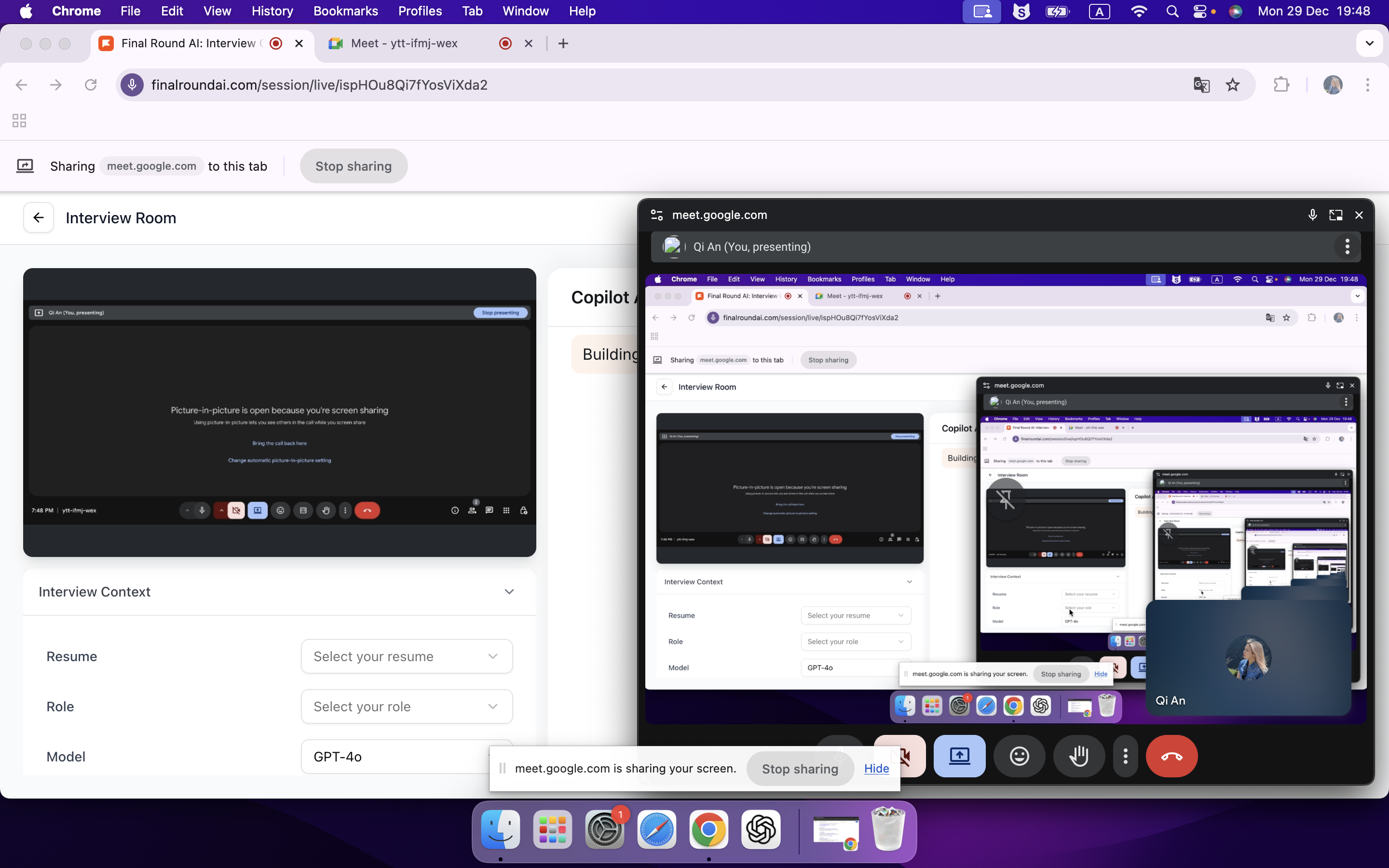
The image above is a screenshot I took to demonstrate the consequences of using a Web-app AI while sharing my screen. I simulated a scenario where a video meeting is active and the Web-app AI is being used to view suggested answers. As seen on the right (the view from the shared screen) the AI assistant is fully exposed.
However, these issues do not occur with a desktop-based LeetCode Interview AI Assistant. When sharing my screen, the interviewer's view remains completely clear of any AI interface, as shown here:
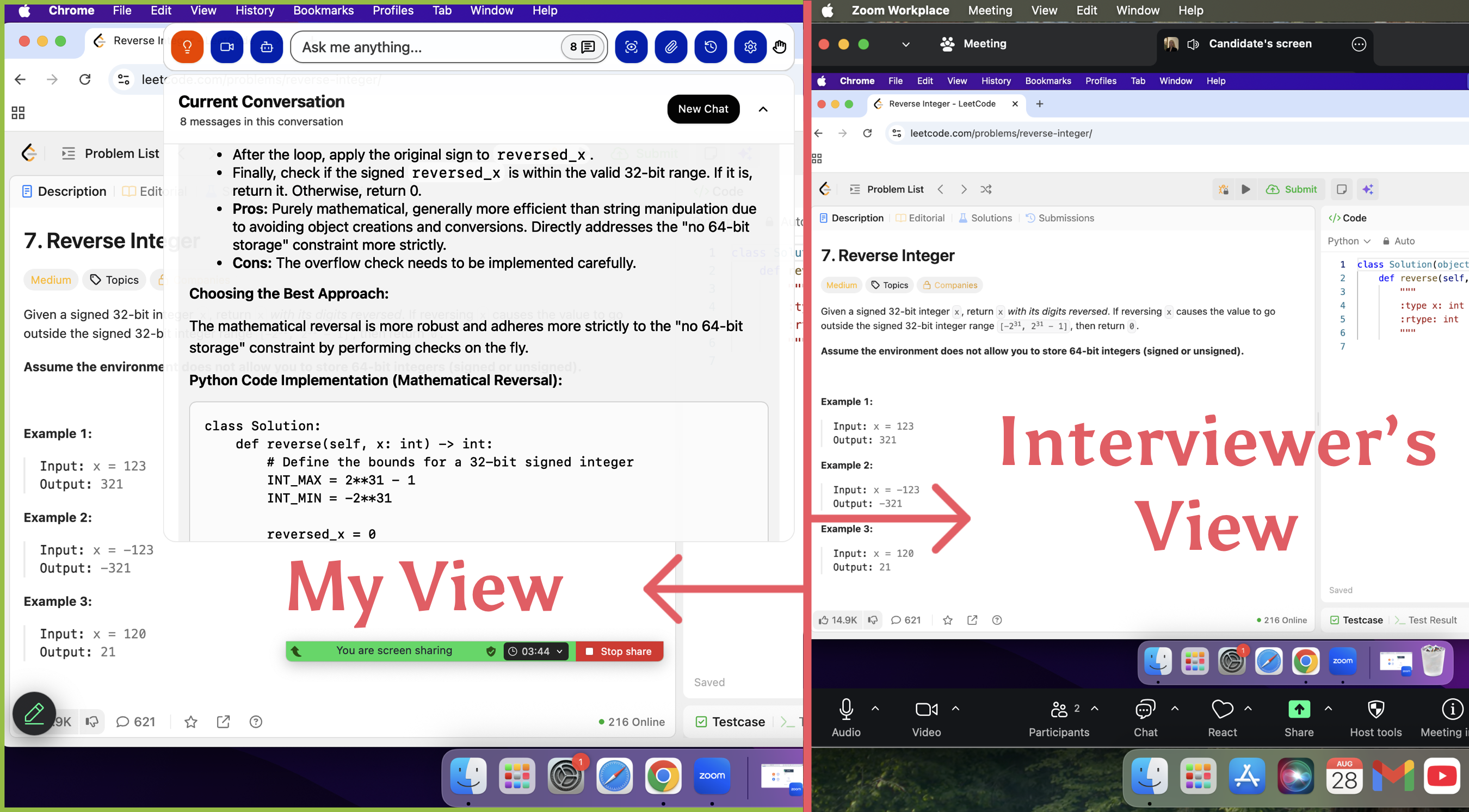
This is an official demonstration image. Since the product is designed to be invisible to screen-capturing software, I cannot capture the AI interface from my own perspective using screenshot tools. However, in my personal experience, the performance and visibility match exactly what is shown in the official demo.
Webcam Monitoring
Since interviewers rely on webcams to monitor my facial expressions and demeanor, any unnatural eye movement can be a red flag. If my eyes are constantly wandering, it looks very unnatural. To address this, Linkjob AI designed the answer panel as a movable, top-level, transparent floating window that is invisible to screen sharing. I can freely position it wherever is most appropriate. For example, I can overlay it on the problem description to make it look like I am focused on the question while thinking through my solution.
Copy-Paste Detection
Interview platforms also detect whether code is being copied and pasted. However, this is relatively easy to handle: I simply type out the code manually instead of copying the AI's answer.
AI Usage Detection
Some highly restrictive platforms, such as Coderbyte, even perform AI usage detection. They compare a candidate's code against answers generated by ChatGPT to determine if any cheating has occurred. In my opinion, the best way to counter this is to provide the AI with my previous code snippets within the prompt. By using Linkjob AI’s "Custom Prompt" feature, I can instruct the AI to mimic my personal coding style. Furthermore, I can customize the output instructions to include "obfuscated variables" or temporary logic blocks. This ensures that the resulting code remains distinct from standard ChatGPT-generated answers.
Cursor Tracking
Some platforms also monitor mouse clicks and movement trajectories. To counter this, most of Linkjob AI’s features can be operated using undetectable global hotkeys so that you can avoid interacting with the AI via the mouse in most cases. For actions that strictly require a mouse, such as selecting a specific area for a partial screenshot, it provides an "Invisible Cursor" option that can be enabled before the interview.

Leetcode Interview AI Assistant: Features & Benefits
Live Screenshot
When tackling LeetCode-style coding interviews, I use the "Live Screenshot" feature to capture the problem description, providing the AI with the necessary context. I have the flexibility to capture either the full screen or just a specific area. For longer problems that span multiple pages, Linkjob AI can process up to six images simultaneously, making it incredibly convenient for handling complex, lengthy descriptions.
Undetectable Global Hotkeys
Undetectable global hotkeys make the tool much more convenient to use, but more importantly, they allow me to interact with the AI without touching the mouse. This is a huge advantage for staying under the radar of cursor tracking while I focus on the interview.
Fully customizable global shortcuts for instant access. Toggle window (Cmd+\), Dashboard (Cmd+Shift+D), System Audio (Cmd+Shift+M), Voice Input (Cmd+Shift+A), Screenshot (Cmd+Shift+S), and more.
Provide Full Code Solutions
The AI provides comprehensive code solutions, including problem analysis, suggested approaches, full code implementation, and optimization strategies. If there are specific programming language requirements, I can set my preferences directly in the prompt. However, I never simply copy the AI's answer, as that would look highly unnatural. Instead, I follow a standard coding interview workflow: I take a moment to think, clarify the problem with the interviewer, and ask about specific requirements. I only start coding based on the AI’s answer after I’ve run my approach by the interviewer and got their approval. Furthermore, I avoid typing out the entire solution at once to maintain a natural, human-like pacing.
Real-Time Interaction
Since technical interviews involve constant back-and-forth with the interviewer, I also use the 'Live Interview Assistant' feature. It can hear the interviewer’s voice in real-time, automatically identify the questions, and generate instant answers. This makes it much easier to handle unexpected questions or deep-dive follow-ups on the fly.
Debugging Support
Demonstrating self-correction during debugging is a major plus in coding interviews. That’s why, after I finish writing the code, I have the AI double-check my answer one more time.
Personalized Answer Generation
There are a few preparation steps before the interview that can help the AI generate more personalized responses. First, I can upload my resume and the target role's information. Second, I can choose my preferred AI model. Third, if there are specific requirements, I can pre-set the AI prompts. This ensures that the AI can start working immediately after a screenshot is taken, avoiding any wasted time adjusting prompts mid-interview.
FAQ
Does the Leetcode interview AI assistant support all programming languages?
The assistant works best with popular languages like Python, Java, and C++, though it also supports most other mainstream programming languages. You can set your preferred language in the app settings. Read my picks for the best free ai interview assistant tools to get more detailed information.
Can the Leetcode interview AI assistant handle system design or behavioral 1uestions?
Yes, it is a versatile tool for more than just coding. You can use the Live Screenshot feature to analyze system architecture diagrams. For BQs, the Live Interview Assistant listens to the interviewer’s questions and generates responses based on the resume and target role information you uploaded during setup.
See Also
How I Used AI to Pass the Interview on Microsoft Teams
The Best AI tools for job interviews I've tried-My Top 8 Picks
6 Best AI Coding Interview Assistants in 2025: Review & Comparison
5 Powerful Interview Help AI Platforms That Will Transform Your Job Search
How to Cheat on CodeSignal Proctored Tests in 2026: My Tricks

© Copyright 2025 linkjob.ai - All Rights Reserved.