Linkjob AI Review : What Real Users Are Saying Across Reddit, Discord, and Trustpilot

If you have an upcoming technical assessment on HackerRank, a pair programming session on Zoom, or a final-round behavioral interview on Microsoft Teams, searching for a Linkjob AI review usually comes down to three urgent questions:
Is Linkjob AI actually 100% undetectable when sharing my full screen?
Are the answers fast and accurate enough for live conversations and complex coding problems?
Is it legit, or is it just another overhyped AI wrapper?
Normally, reading a product review published on the company’s own blog feels biased. We get it. When your career and next job offer are on the line, the last thing you want to read is generic marketing fluff. You want to know what happens when real candidates open the app during a nerve-wracking interview.
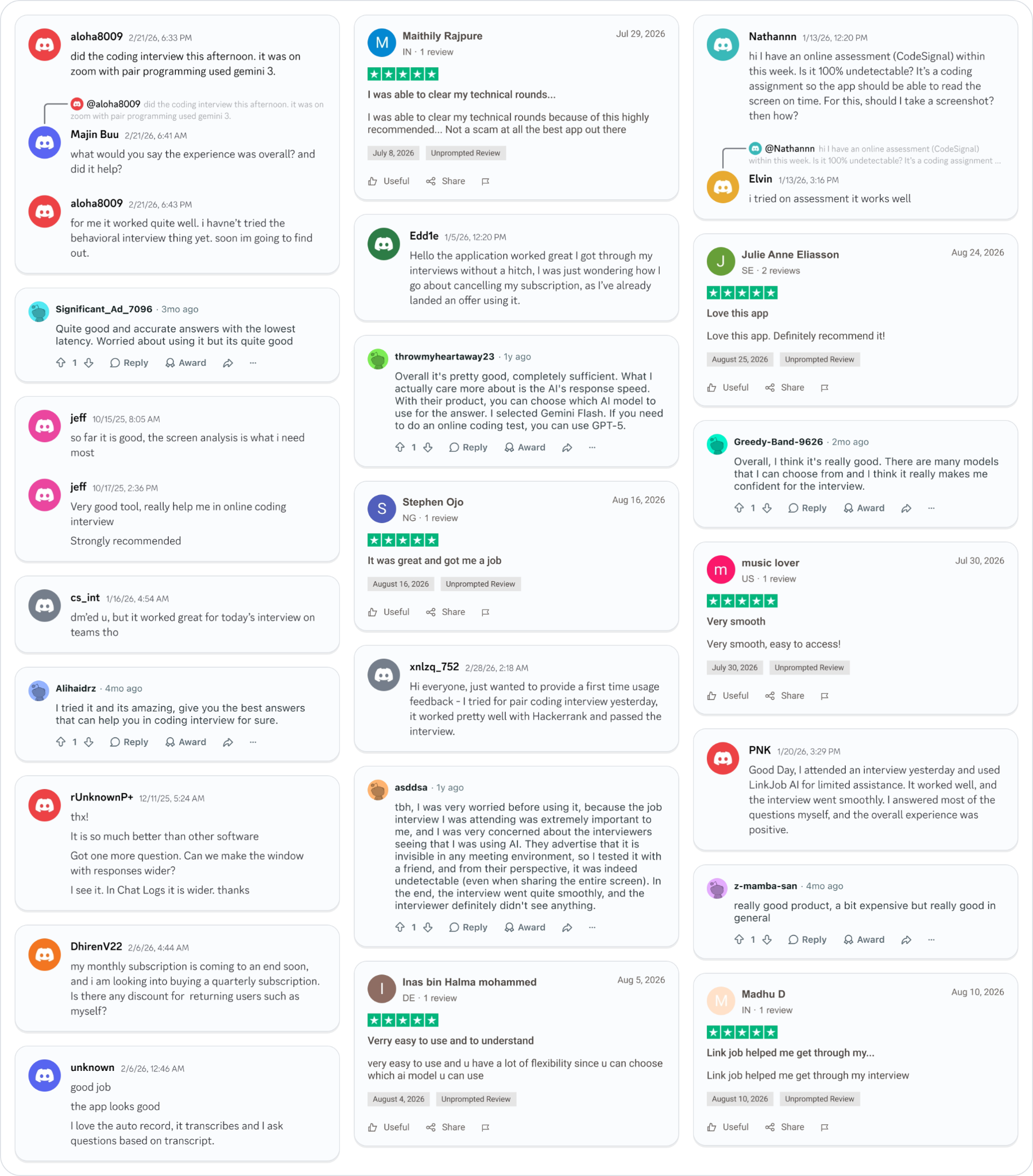
So instead of writing a self-congratulatory sales pitch, we pulled the actual threads from Reddit (r/jobs), verified reviews from Trustpilot, and raw, unedited daily feedback from our community Discord server. Below, we break down everything real users say about Linkjob AI—including how it performs under pressure, which AI models work best, and even the complaints users have shared about pricing and UI.
https://www.reddit.com/r/jobs/comments/1oburqn/has_anyone_used_linkjob_ai_and_how_was_the/
https://www.trustpilot.com/review/linkjob.ai
Executive Summary: Linkjob AI Rating & Breakdown
Before diving into individual user stories, here is a snapshot of how Linkjob AI performs across the metrics that matter most to job seekers:
Review Category | Community Verdict | Key Highlight from Real Users |
|---|---|---|
Stealth & Undetectability | 4.9 / 5.0 | Remains completely invisible even during full-screen sharing on Zoom, Teams, and proctored platforms. |
Coding & OA Performance | 4.8 / 5.0 | Direct full-screen screenshot capture solves HackerRank and CodeSignal problems in seconds. |
Response Latency | 4.8 / 5.0 | Near-instant generation when paired with Gemini Flash or Gemini 3. |
Model Flexibility | 5.0 / 5.0 | Users can switch freely between GPT-5, Gemini 3, Gemini Flash, and Claude based on interview type. |
Value & Pricing | 4.4 / 5.0 | Noted by some Redditors as "a bit expensive," though quarterly/annual plans lower the monthly cost significantly. |
Why Job Seekers Are Turning to Linkjob AI in 2026
Modern technical and corporate interviewing has become brutally unforgiving. Candidates are expected to solve LeetCode Hard dynamic programming problems in 20 minutes while talking out loud, recall obscure framework syntax on the spot, and deliver flawlessly structured STAR behavioral stories without stumbling.
Even senior engineers and experienced professionals freeze up under artificial time constraints.
However, generic AI tools like a standard ChatGPT browser tab fail completely in live interviews for three reasons:
Eye-Tracking & Tab Switching: Looking away at another monitor or clicking out of a browser triggers proctoring flags and makes it obvious to the interviewer that you are reading from a script.
Manual Typing & Cropping Delays: Typing a question or manually dragging a cropping box around a coding prompt takes 15 to 30 seconds—creating awkward, suspicious silence.
Audio Confusion: Standard voice transcription tools transcribe everyone in the room, cluttering your screen with your own voice while you are trying to speak.
Linkjob AI was engineered from the ground up to eliminate these exact friction points. And as the user reviews below show, those architectural differences are what separate a passed interview from an awkward rejection.
1. Stealth & Undetectability: "Can Interviewers See It?"
Let’s address the elephant in the room first. If an interviewer asks you to "Share Your Entire Screen" during a live coding session or system design round, will Linkjob AI show up?
The short answer is no. Linkjob AI operates with system-level stealth rendering on both macOS and Windows, combined with an optional dual-device mode and a neutral process footprint. To the operating system's screen-capture pipeline (used by Zoom, Microsoft Teams, Google Meet, HackerRank, and CodeSignal), the Linkjob AI overlay simply does not exist.
Don't just take our word for it. Read how Reddit user asddsa tested Linkjob AI's invisibility before walking into a high-stakes interview:
"tbh, I was very worried before using it, because the job interview I was attending was extremely important to me, and I was very concerned about the interviewers seeing that I was using AI. They advertise that it is invisible in any meeting environment, so I tested it with a friend, and from their perspective, it was indeed undetectable (even when sharing the entire screen). In the end, the interview went quite smoothly, and the interviewer definitely didn't see anything." — asddsa on Reddit
Inside our Discord server, users regularly report back right after finishing their calls on enterprise video platforms:
Microsoft Teams Verification: "dm'ed u, but it worked great for today's interview on teams tho" — cs_int (Discord)
Natural Co-Pilot Experience: "Good Day, I attended an interview yesterday and used LinkJob AI for limited assistance. It worked well, and the interview went smoothly. I answered most of the questions myself, and the overall experience was positive." — PNK (Discord)
Why this matters in practice: As PNK pointed out, the best way to use Linkjob AI isn't to read robotic paragraphs word-for-word. Because the translucent overlay sits right over your meeting window, your eyes stay naturally focused toward your webcam. You can answer what you know, and glance at the bulleted reference points whenever you hit a mental block.
2. Real-Time Interview Help vs. Coding Help: How Users Tackle Both
One of the most frequent misconceptions about AI interview tools is that voice transcription and coding assistance are the same thing. In Linkjob AI, Real-Time Interview Help and Coding Help are built as two distinct features optimized for completely different workflows:
Workflow A: Real-Time Interview Help (Voice-Driven)
When you are in a behavioral, product management, or technical Q&A round, you don't have time to press buttons.
Interviewer-Only Voice Isolation: Linkjob AI’s audio engine specifically detects and responds to the interviewer's voice while ignoring your voice. When you speak, the AI stays quiet and doesn't overwrite your screen. The moment the interviewer finishes asking a question or follows up, Linkjob AI generates a structured, tailored reference answer based on the live transcript and your uploaded resume.
Transcript-Based Follow-Ups: As Discord user unknown shared: "good job, the app looks good. I love the auto record, it transcribes and I ask questions based on transcript."
Workflow B: Coding Help & Online Assessments (Full-Screen Screenshot Driven)
When you are facing an Online Assessment (OA) on CodeSignal or HackerRank, or doing live pair programming on Zoom, nobody is reading the problem statement out loud.
Zero-Crop Full Screenshot Upload: Users don't want to waste precious seconds dragging a selection box around a coding prompt—especially when a live interviewer is watching their cursor movement. With Linkjob AI, you hit a single global hotkey to upload a full, uncropped screenshot directly. Our vision-OCR pipeline automatically isolates the coding problem, reads your starter code template, and outputs the optimal solution alongside time and space complexity explanations.
Here is what developers across Discord, Reddit, and Trustpilot said after putting our Coding Help feature through real technical rounds:
"Hi everyone, just wanted to provide a first time usage feedback - I tried for pair coding interview yesterday, it worked pretty well with Hackerrank and passed the interview." — xnlzq_752 on Discord
"did the coding interview this afternoon. it was on zoom with pair programming used gemini 3." (When asked by another user: "what would you say the experience was overall? and did it help?") "for me it worked quite well. i havne't tried the behavioral interview thing yet. soon im going to find out." — aloha8009 on Discord
Screen Analysis in Live Coding: "so far it is good, the screen analysis is what i need most... Very good tool, really help me in online coding interview. Strongly recommended" — jeff (Discord)
CodeSignal Proctored OAs: In our Discord community, user Nathannn asked: "hi I have an online assessment (CodeSignal) within this week. Is it 100% undetectable? It's a coding assignment so the app should be able to read the screen on time. For this, should I take a screenshot? then how?" Community member Elvin, who had already gone through the process, replied simply: "i tried on assessment it works well."
Algorithm Accuracy: "I tried it and its amazing, give you the best answers that can help you in coding interview for sure." — Alihaidrz on Reddit
Clearing Multi-Round Tech Interviews: "I was able to clear my technical rounds because of this highly recommended.. Not a scam at all the best app out there" — Maithily Rajpure on Trustpilot (5/5 Stars)
3. Speed, Latency, and Multi-Model Freedom (GPT-5, Gemini 3, Gemini Flash)
If you read threads on r/jobs or r/cscareerquestions, the #1 complaint about first-generation AI interview copilots is latency. If an interviewer asks, "How would you handle a race condition in a distributed cache?" and your tool takes 8 seconds to start streaming text, the silence becomes painfully obvious.
At the same time, speed isn't everything. If you are taking a 60-minute untimed or semi-timed online coding assessment, you care far more about deep algorithmic reasoning than saving 1.5 seconds.
That is why Linkjob AI gives you complete control over which foundational AI model powers your session. Reddit user throwmyheartaway23 summarized this exact strategy in a recent review thread:
"Overall it's pretty good, completely sufficient. What I actually care more about is the AI's response speed. With their product, you can choose which AI model to use for the answer. I selected Gemini Flash. If you need to do an online coding test, you can use GPT-5." — throwmyheartaway23 on Reddit
Other users across Reddit and Trustpilot pointed to latency and model switching as the main reasons they felt calm during their interviews:
Lowest Latency Under Pressure: "Quite good and accurate answers with the lowest latency. Worried about using it but its quite good" — Significant_Ad_7098 on Reddit
Confidence Through Model Choice: "Overall, I think it's really good. There are many models that I can choose from and I think it really makes me confident for the interview." — Greedy-Band-9628 on Reddit
Flexibility & Ease of Use: "Verry easy to use and to understand. very easy to use and u have a lot of flexibility since u can choose which ai model u can use" — Inas bin Halma mohammed on Trustpilot (5/5 Stars)
How Real Users Pair AI Models with Interview Types
Based on community feedback from power users like throwmyheartaway23 and aloha8009, here is the optimal way to configure Linkjob AI before your call starts:
Interview Format | Recommended Model in Linkjob AI | Why Users Prefer This Setup |
|---|---|---|
Behavioral & HR Screening | Gemini Flash | Sub-second time-to-first-token. Gives you instant bullet points the moment the interviewer stops speaking. |
Live Pair Programming (Zoom/Teams) | Gemini 3 / Claude Sonnet | Balances fast screenshot parsing with clean, human-readable code and inline comments. |
Hard Coding OAs (HackerRank/CodeSignal) | GPT-5 | Maximum reasoning depth for complex graph theory, dynamic programming, and edge-case optimization. |
System Design & Architecture | Gemini 3 / GPT-5 | Structures trade-offs, database schemas, and scalability bottlenecks clearly. |
4. User Experience, Customization, and the "Human Touch"
When you are mid-interview, tiny UI details make a massive difference. If the text window is too narrow, you end up scrolling too much; if the app requires complex setup, you get stressed before the call even begins.
In our Discord server, users frequently share feedback on how Linkjob AI compares to other desktop overlays they have tested:
"thx! It is so much better than other software. Got one more question. Can we make the window with responses wider? I see it. In Chat Logs it is wider. thanks" — rUnknownP+ on Discord
And on Trustpilot, users who aren't necessarily hardcore software engineers praised the plug-and-play simplicity:
"Very smooth, easy to access!" — music lover on Trustpilot (5/5 Stars)
"Love this app. Definitely recommend it!" — Julie Anne Eliasson on Trustpilot (5/5 Stars)
"Link job helped me get through my interview" — Madhu D on Trustpilot (5/5 Stars)
"It was great and got me a job" — Stephen Ojo on Trustpilot (5/5 Stars)
5. Honest Criticisms: What Users Complain About (And Why They Cancel)
If a review page tells you a product has zero flaws, close the tab. We believe in complete transparency, so let’s talk about the criticisms and friction points users have brought up on Reddit and Discord.
Criticism #1: "It’s a bit expensive"
Unlike basic Chrome extensions that ask you to plug in your own rate-limited API key, Linkjob AI runs dedicated, ultra-low-latency audio streaming pipelines, high-speed OCR screenshot servers, and direct enterprise routing to flagship models like GPT-5 and Gemini 3.
Because of that infrastructure cost, some users note that the single-month price tag feels steep. As Reddit user z-mamba-san candidly wrote:
"really good product, a bit expensive but really good in general" — z-mamba-san on Reddit
How users save money: If you are actively job hunting across a full recruiting cycle (which typically takes 1 to 3 months for experienced hires), paying month-to-month isn't the most economical route. Many users start with a monthly plan to test the waters, and once they see it works, switch to a quarterly or annual billing cycle to lock in a significantly lower monthly rate. As Discord user DhirenV22 asked in our support channel:
"my monthly subscription is coming to an end soon, and i am looking into buying a quarterly subscription. Is there any discount for returning users such as myself?" — DhirenV22 on Discord
Criticism #2: High Churn from Users Landing Job Offers
In traditional SaaS businesses, when a customer cancels their subscription, it means the product failed. In the AI interview copilot space, our #1 reason for subscription cancellations is actually our favorite metric: the user landed the job offer and doesn't need to interview anymore.
Here is a message from Edd1e in our Discord server that sums up the lifecycle of a typical Linkjob AI user:
"Hello the application worked great I got through my interviews without a hitch, I was just wondering how I go about cancelling my subscription, as I've already landed an offer using it." — Edd1e on Discord
When you look at the cost of a subscription through that lens—spending a fraction of a single day's salary to secure a $100,000+ software engineering, finance, or corporate role—the return on investment speaks for itself.
Pros & Cons Summary
To help you decide if Linkjob AI fits your interview prep workflow, here is the balanced breakdown based on all community feedback:
Pros
Verified 100% Undetectable: Tested by skeptical users in full-screen sharing mode across Zoom, Microsoft Teams, HackerRank, and CodeSignal without triggering detection.
Interviewer-Only Voice Recognition: Automatically ignores your voice and only generates answers for the interviewer's questions, keeping the UI clean and distraction-free.
Dedicated Coding Help with Full-Screen Capture: Upload uncropped full screenshots via global hotkeys—no suspicious mouse dragging or manual boundary cropping required.
Multi-Model Switching: Choose Gemini Flash for instant conversational speed or GPT-5 / Gemini 3 for complex coding and system design.
Proven Track Record: Hundreds of verified users across Reddit, Discord, and Trustpilot credit the tool with helping them clear technical rounds and land offers.
Cons
Premium Pricing: More expensive than DIY browser scripts, though quarterly and annual plans reduce the effective monthly price.
Requires Pre-Interview Familiarity: While the UI is intuitive, jumping into a live interview cold without testing your hotkeys and window width (
Chat Logsview) first can cause unnecessary nervousness.
Who Should Use Linkjob AI (And Who Shouldn't)?
Linkjob AI is ideal for you if:
You are an experienced professional or software engineer who knows how to do the job in the real world, but suffers from performance anxiety during timed LeetCode OAs or high-pressure live questioning.
You are a non-native English speaker interviewing at global tech or multinational companies, and want real-time, well-structured phrasing prompts so you never blank out on vocabulary.
You want a safety net during pair programming on Zoom, Teams, HackerRank, or CodeSignal where sharing your full screen is mandatory.
Linkjob AI is NOT for you if:
You have zero foundational knowledge of the role and expect to read 500-word AI responses verbatim like a teleprompter without understanding what you are saying. Interviewers can tell when someone doesn't understand their own code; Linkjob AI works best when used as a smart copilot—just like PNK and aloha8009 described.
Frequently Asked Questions (FAQ)
1. Is Linkjob AI legit or a scam?
Linkjob AI is a 100% legitimate desktop AI interview assistant backed by verified 5-star reviews on Trustpilot, active discussions on Reddit (r/jobs), and an open Discord community where hundreds of candidates share daily feedback. As Trustpilot reviewer Maithily Rajpure noted: "I was able to clear my technical rounds because of this highly recommended.. Not a scam at all the best app out there."
2. Can interviewers see Linkjob AI if I share my entire screen?
No. Linkjob AI uses OS-level stealth overlay technology (and also supports dual-device mode on mobile). Even if an interviewer requires you to share your entire desktop screen on Zoom, Microsoft Teams, Google Meet, HackerRank, or CodeSignal, the Linkjob AI window is completely invisible to them. We always encourage new users to hopped on a test call with a friend—just like Reddit user asddsa did—to verify its invisibility firsthand before their real interview.
3. Will Linkjob AI transcribe my own voice and get confused while I am speaking?
No. Unlike generic meeting transcription tools, Linkjob AI is specifically designed to detect and respond only to the interviewer's voice while ignoring the candidate's voice. You can speak naturally for as long as you want without triggering unwanted AI responses.
4. How does Linkjob AI handle coding interviews and Online Assessments (OAs)?
In Linkjob AI, Real-Time Interview Help and Coding Help are two separate features. During a coding assessment or pair programming session, you simply press a global hotkey to take a direct, full-screen uncropped screenshot. You never have to drag a cropping box around the problem. Linkjob AI reads the entire screen, extracts the coding prompt, and generates the solution with full explanations.
5. Which AI model should I select inside Linkjob AI?
It depends on your interview round! Based on feedback from Reddit users like throwmyheartaway23, we recommend selecting Gemini Flash or Gemini 3 for live behavioral and conversational interviews where ultra-low latency is critical. For complex online coding assessments on HackerRank or CodeSignal, switching to GPT-5 gives you maximum analytical depth.
6. How do I cancel my subscription once I get a job offer?
Just like Discord user Edd1e, once you land your offer, you can cancel your subscription anytime directly from your account dashboard or by reaching out to our support team in Discord—no hidden hoops or lock-in contracts.
Ready to Walk Into Your Next Interview With Total Confidence?
You don't have to take our marketing word for it—and you don't have to let interview anxiety cost you your dream offer. Join thousands of engineers, analysts, and professionals who use Linkjob AI as their invisible safety net.
Download Linkjob AI Now and test the stealth overlay with a friend before your next call.
Want to ask real users about their experience first? Join our official Discord community, read the full thread on Reddit (r/jobs), or check out our verified ratings on Trustpilot.
Why People Choose Linkjob AI
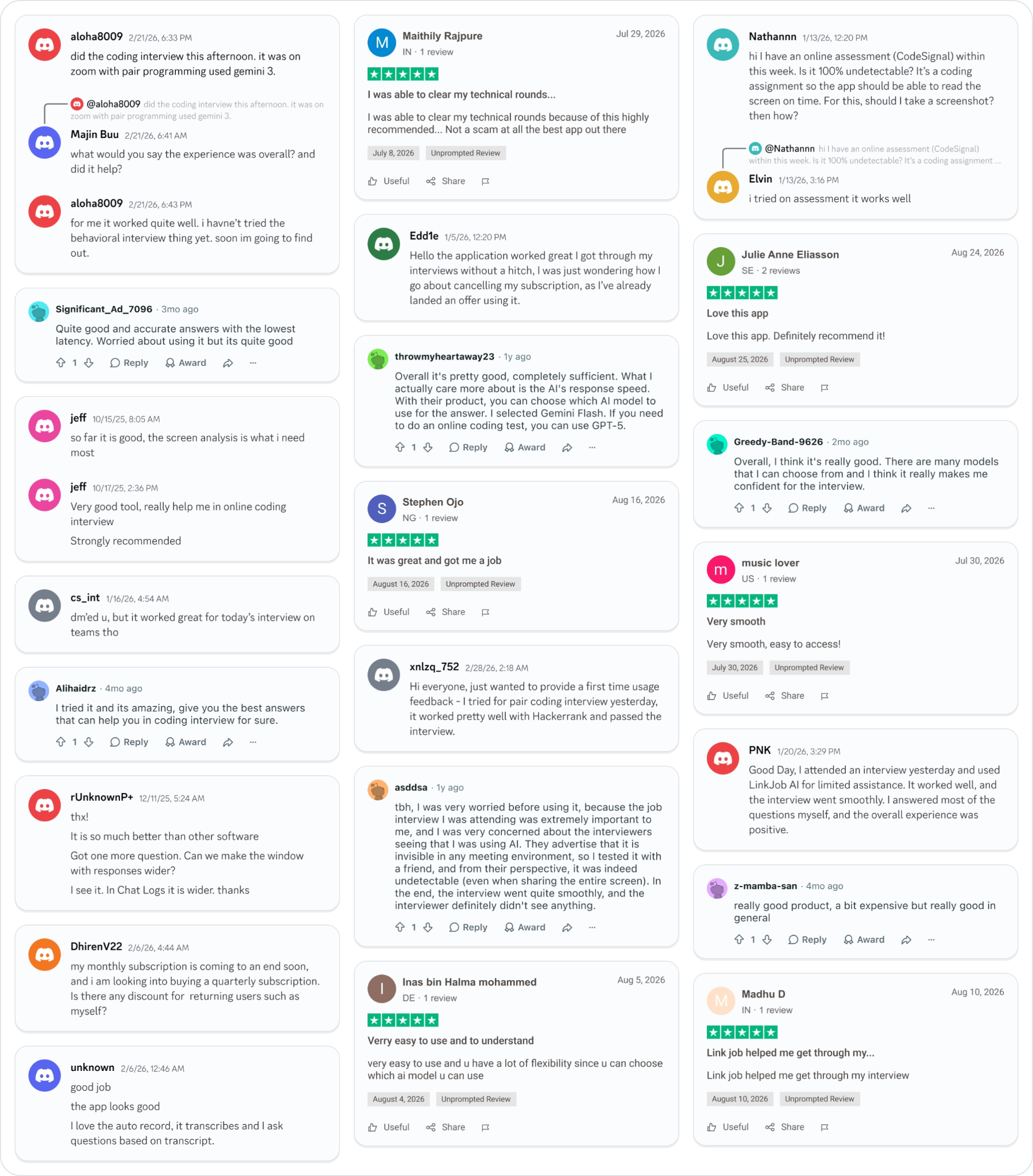
Smoother interviews, coding challenges cleared, and job offers landed. See how users describe their experience with Linkjob AI—in their own words.
© Copyright 2026 Linkjob AI - All Rights Reserved.