Parakeet AI Review: Real Interview Performance, Pros and Cons

Parakeet AI works well for basic interview support—but it is not fully invisible, has noticeable interaction friction, and offers limited AI model flexibility.
Parakeet AI’s strengths are clear. It provides real-time interview assistance, supports major platforms like Zoom, Microsoft Teams, and Google Meet, and uses a credit-based pricing model that works well for occasional users. For standard behavioral interviews or last-minute preparation, it can genuinely boost confidence.
However, Parakeet AI also has structural drawbacks that surface quickly in real interview conditions. As was stated in the Interview Coder review and the Final Round AI review, other AI interview assistants of this kind show similar issues.
It requires manual triggering to generate answers, introduces small but awkward delays, and is not completely invisible—especially during screen sharing, coding rounds, or fast-paced technical discussions. Cursor movement, overlays, and interaction patterns can still be noticeable to attentive interviewers.
In addition, Parakeet AI relies on a relatively limited set of AI models. While sufficient for common questions, this can feel restrictive when deeper reasoning, faster response times, or more advanced technical understanding is required.
Through my real test about parakeet ai, I found a better AI interview assistant, which is Linkjob AI.
This is where Linkjob.ai enters the picture. Designed to run fully in the background, Linkjob.ai removes manual interaction entirely, stays truly invisible during live interviews, and gives users access to the latest and most powerful AI models available. For many candidates, that combination—full invisibility plus stronger AI reasoning—results in a noticeably smoother and less stressful interview experience.
Key Takeaways
Parakeet AI provides real-time interview coaching, offering on-the-fly suggestions that can help reduce anxiety and improve structure during live interviews—especially for common behavioral and technical questions.
The credit-based, pay-per-session pricing model gives flexibility for occasional users, but session time limits may feel restrictive in longer or unpredictable interview rounds.
While Parakeet AI emphasizes discretion, it is not completely invisible in practice. Manual triggering, interface interactions, and mouse movements during screen sharing can be noticeable in certain real interview settings.
The limited selection of underlying AI models works well for standard use cases, but may feel constraining for advanced technical or coding interviews where speed and reasoning depth matter more.
Recent graduates and job seekers can benefit from Parakeet AI, particularly for last-minute preparation and confidence-building—but more experienced candidates may start to notice friction during high-stakes interviews.
The 2026 updates improve speed and usability, making Parakeet AI a solid entry-level AI interview assistant, though not necessarily the best fit for users who prioritize full invisibility, automation, and flexibility.
What Is Parakeet AI?
Parakeet AI is a real-time AI interview assistant designed to support candidates during live interviews. It listens to interview questions, transcribes them automatically, and generates suggested responses or guidance in real time.
Parakeet AI positions itself as a discreet tool, aiming to provide on-screen assistance during interviews on platforms such as Zoom, Microsoft Teams, Google Meet, and popular coding environments. The goal is to help candidates receive timely support without drawing attention during the interview process. In practice, however, how “stealthy” the experience feels can depend on factors such as manual interactions, screen-sharing behavior, and visible on-screen activity.
In terms of AI capabilities, Parakeet AI relies on a relatively limited selection of underlying models. While these models perform adequately for common behavioral and standard technical questions, users looking for access to newer, faster, or more specialized models may find the options somewhat constrained—particularly in advanced technical or coding interviews.
Unlike traditional mock interview tools that focus solely on preparation, Parakeet AI is built for live interview use, allowing candidates to receive suggestions as the conversation unfolds. That said, the overall experience can vary depending on interview complexity, required response speed, and the level of flexibility a candidate expects from the AI.
Parakeet AI Review: Features
Core Features
When I started using Parakeet AI, I noticed how much it focuses on making interview prep easier. The tool gives you voice-driven coaching, which means you get feedback and suggestions while you talk. I like that it works in real time, so you don’t have to wait for answers. If you upload your resume, Parakeet AI tailors its responses to fit your background. That makes the advice feel personal.
Here’s a table that shows what I think are the most important features:
Feature | What It Means for You |
|---|---|
Real-time assistance | Get instant suggestions during interviews |
Stealthy operation | No one knows you’re getting help |
Multi-language support | Use it in 52 languages |
Context-aware answers | Advice matches your resume and experience |
Post-interview summaries | Review your performance after each interview |

Where Parakeet AI Starts to Struggle
Despite its strengths, Parakeet AI is not without limitations, especially when used in complex, technical, or high-stakes interview situations.
1. Manual Triggering Creates Awkward Delays
One frequently reported issue is the manual “start answering” action. In real interviews, needing to click before responses are generated can break flow. Even a short delay forces candidates to stall verbally, which undermines confidence.
2. Mouse Interaction Is Not Fully Invisible
Another subtle but important limitation is that Parakeet AI’s mouse interactions are not fully invisible.
During real interviews—especially when screen sharing or using online coding platforms—the mouse cursor behavior can give away unusual movements. Clicking to trigger responses or interacting with overlays may appear unnatural, increasing the risk of being noticed by interviewers.
For candidates in high-stakes interviews, even small visual cues like unexpected cursor movement can raise suspicion. This is particularly problematic in technical interviews where interviewers closely observe how candidates navigate the screen.
3. Limited AI Model Selection
Parakeet AI currently supports only a small number of underlying models (such as GPT-4-level options). While these models are capable, users who want access to newer or more specialized models have no flexibility.
This becomes noticeable in:
Complex system design questions
Advanced coding problems
Industry-specific technical interviews
4. Session-Based Time Limits
Parakeet AI uses a credit-based, session-limited model. While this appeals to occasional users, it can be restrictive if:
An interview runs longer than expected
You have multiple back-to-back rounds
You want to practice extensively
There is subtle time pressure during sessions, which some users find distracting.
5. Coding Assistance Is Functional but Basic
For coding interviews, Parakeet AI relies largely on manual screenshots. This works, but it requires extra steps and mental effort at moments when speed matters most.
6. Privacy and Data Transparency
Parakeet AI markets itself as privacy-first, but data handling details are not always explicit. While there is no clear evidence of misuse, some users prefer tools that state exactly where data is stored and processed.
For highly sensitive interviews, this ambiguity can matter.
7. Pricing: Fair, but Not Flexible for Power Users
Parakeet AI’s credit-based pricing means:
You pay per session
Credits do not expire
No subscription lock-in
This is excellent for occasional interviews. However, users who interview frequently or practice heavily may find the cost accumulates quickly compared to unlimited subscription models.
What Real Users Say About Parakeet AI (Reddit Feedback)
Beyond personal experience, it’s worth looking at how Parakeet AI performs for users in uncontrolled, real-world situations. One place where candid feedback often surfaces is Reddit—particularly in threads discussing AI tools for interview preparation.
In a Reddit discussion titled “AI for interview prep?”, Parakeet AI was mentioned as a simple and accessible option. However, the responses quickly revealed a more mixed reality.
One user initially described Parakeet AI as “super simple” and easy to subscribe to. But a follow-up reply from another user painted a very different picture:
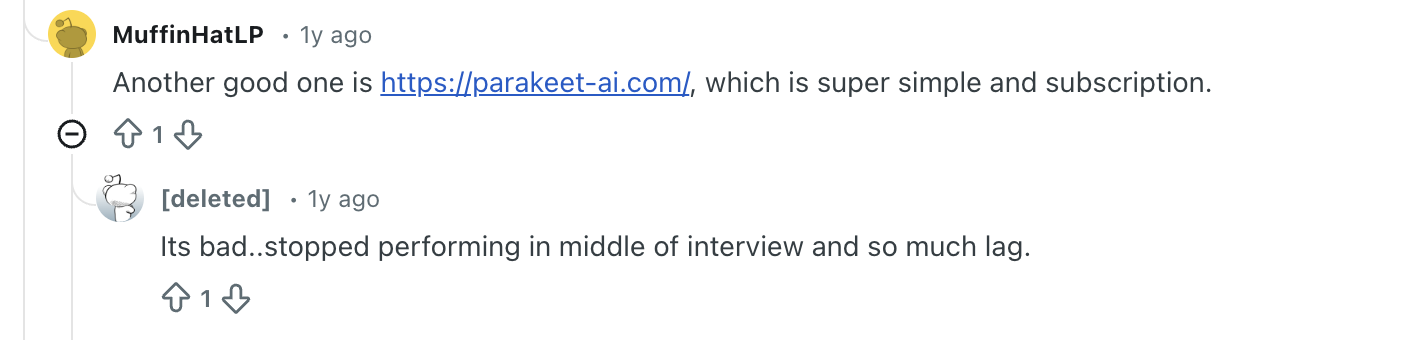
This kind of feedback aligns closely with a recurring theme seen across user experiences: reliability under pressure. While Parakeet AI may work adequately in controlled or low-stakes settings, issues such as lag, interruptions, or sudden failures become far more serious when they happen mid-interview.
In live interviews—especially technical or coding rounds—there is little margin for error. Even brief delays or unexpected tool failures can disrupt flow, increase stress, and negatively impact performance. When combined with manual interaction requirements and session-based limitations, these reliability concerns help explain why some users begin to look for alternatives after initial trials.
Real-world feedback like this doesn’t suggest that Parakeet AI is unusable—but it does highlight an important distinction between working in theory and holding up in real interviews, where timing, stability, and invisibility are non-negotiable.
A Natural Alternative Worth Considering
Because the interview mattered so much to me, I didn’t just want help — I wanted certainty.
I initially tried Parakeet AI, and while it worked in basic scenarios, real interviews quickly exposed several friction points. During live interviews, I had to manually click “Start Answering” before any response appeared. Even small delays felt amplified when nerves were already high. I often found myself filling the silence just to buy time, which directly affected how confident and composed I sounded.
More importantly, I was constantly aware of the tool.
Between clicking, waiting, and managing the interface, part of my attention was always split — not ideal when an interviewer is watching your every move.
The session-based time limits added another layer of pressure. Interviews are unpredictable. Some rounds end early, others unexpectedly run long, and coding challenges rarely fit into neat time boxes. Having to think about whether a session might end at the wrong moment was distracting.
And while the AI models worked reasonably well, the limited selection made me feel constrained — especially for technical and coding interviews where speed and depth really matter.
At that point, I realized I wasn’t looking for another interview assistant.
I was looking for one that would completely disappear from my awareness.
That’s when I switched to Linkjob.ai.
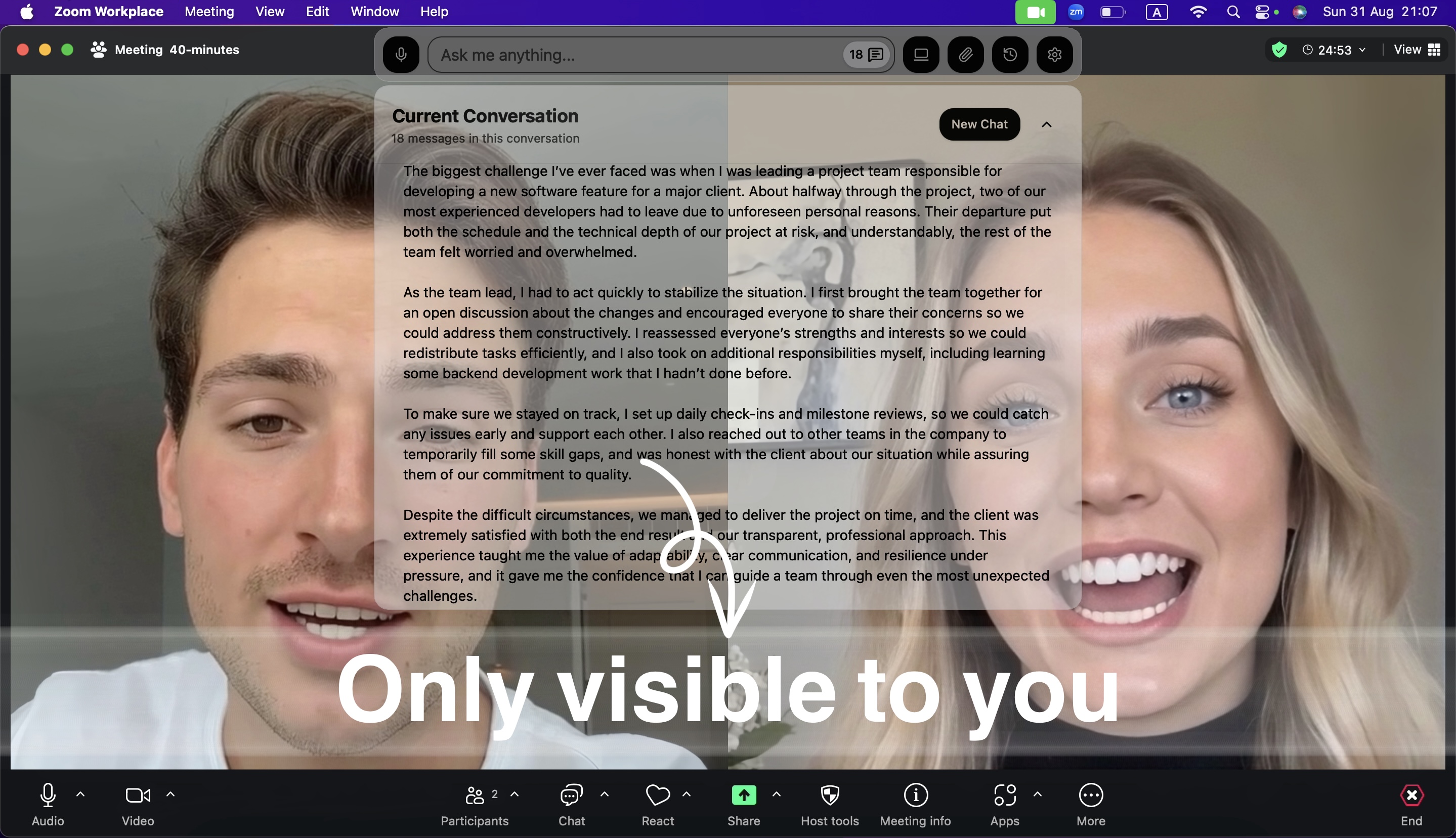
What stood out immediately was how invisible it felt. The AI listens automatically, generates answers instantly, and stays entirely off the radar — no manual clicks, no unusual cursor movements, and undetectable overlay. Whether I was on Zoom, Microsoft Teams, Google Meet, or platforms like HackerRank and CodeSignal, it blended seamlessly into the background.
For the first time, I wasn’t thinking about how to use the tool.
I was simply focused on the interview itself — which is exactly how it should be.

Why Linkjob.ai Felt Like the Right Tool
What stood out immediately was how frictionless everything felt.
There was no need to click anything to trigger answers. Responses appeared automatically and almost instantly, which completely changed my interview flow. I could focus on listening, structuring my thoughts, and speaking naturally—without managing the tool in the background.
Before the interview, I could also configure very specific requirements: my resume, the role, the industry, and even bilingual expectations. During the interview, the AI responses felt tailored and context-aware, not generic.
This was the first time an AI interview assistant felt like an invisible support system, rather than an extra thing to manage.
Coding Interviews: Where Linkjob.ai Really Shined
I later had to take a CodeSignal test, and this is where Linkjob.ai truly differentiated itself.
Instead of relying only on manual screenshots, I could predefine tasks for the AI—such as analyzing the problem, explaining the approach, and providing a final solution after capturing the question. That workflow felt natural and efficient, especially under time pressure.
What impressed me most was the ecosystem around it. The Linkjob.ai website includes many real, user-shared CodeSignal interview experiences, some even documenting actual questions. That level of specialization made it clear the product was built with serious candidates in mind.
A Pricing Model That Removes Mental Overhead
One thing I didn’t expect to appreciate so much was the pricing structure.
With Linkjob.ai’s subscription model, I never had to think about whether a question, round, or interview was “worth” using the tool. Everything was available whenever I needed it. No sessions ending unexpectedly. No clock in the back of my mind.
For me, the math was simple: spending a few dozen dollars a month is trivial if it helps secure a role that pays thousands—or tens of thousands—per month.
Everyday Experience and Reliability
From day-to-day use, Linkjob.ai felt polished and dependable. The interface is clean, features are easy to find, and switching between live interviews, coding assistance, and mock sessions is effortless. There’s also a short trial period, which made it easy to experience the full workflow before committing.
It works invisibly across all the platforms I actually use—Zoom, Microsoft Teams, Google Meet, HackerRank, CodeSignal, LeetCode, and even less common platforms. I never had to worry about compatibility or last-minute surprises.
Final Thoughts
The most important difference comes down to visibility.
In real interview settings, Parakeet AI is not completely invisible. While it is designed to be discreet, certain interactions—such as manual triggering, interface overlays, or mouse movements during screen sharing—can still be noticeable. In high-stakes interviews, especially technical or coding rounds where interviewers closely observe your screen activity, this can create unnecessary risk or distraction.
Linkjob.ai takes a different approach.
It is designed to run fully in the background, without requiring manual clicks or visible on-screen interactions. From listening to questions to generating responses, everything happens automatically, with no unusual cursor behavior or interface elements appearing during the interview.
For many users, this difference is decisive. Instead of managing the tool or worrying about being noticed, they can focus entirely on the conversation, problem-solving, and delivery.
In practice, Parakeet AI aims to be discreet, while Linkjob.ai is built to be truly invisible—and that distinction becomes very clear once you experience both in real interviews.
FAQ
What are the biggest drawbacks of Parakeet AI?
Based on real interview usage, the most common drawbacks include:
Needing to manually click “Start Answering” during live interviews
Small but noticeable response delays under pressure
Session-based time limits that add mental overhead
Limited choice of underlying AI models
A more manual workflow for coding interviews
Mouse interactions that are not fully invisible during screen sharing
None of these are deal-breakers on their own, but together they can affect confidence in critical moments.
Is using Parakeet AI safe and undetectable?
Parakeet AI is designed to be discreet and generally works invisibly on platforms like Zoom, Microsoft Teams, and Google Meet. That said, users still need to be careful—especially when screen sharing—since cursor movements and manual interactions may appear unusual.
As with any AI interview assistant, discretion depends on how it’s used.
Can Parakeet AI help with coding interviews and platforms like CodeSignal?
Yes, Parakeet AI can assist with coding interviews, but its workflow relies mainly on manual screenshots. This works, but it can feel slow or disruptive during time-sensitive coding challenges such as CodeSignal or HackerRank.
Candidates who want a more automated or task-driven coding workflow often look for alternatives.
What is a good alternative to Parakeet AI?
If you’re looking for an alternative that focuses on speed, automation, and flexibility, many users explore Linkjob.ai after trying Parakeet AI.
Linkjob.ai removes the need for manual triggering, supports a wider range of AI models, offers unlimited usage under a subscription, and provides more advanced workflows for coding interviews. For some candidates, this results in a smoother and less stressful interview experience.
Is Linkjob.ai better than Parakeet AI?
It depends on your needs.
Parakeet AI works well for simple, occasional interview support.
Linkjob.ai tends to suit candidates who:
Interview frequently
Care about response speed
Want access to newer AI models
Take technical or coding-heavy interviews
Prefer not to think about session limits
Many users start with Parakeet AI and later switch once they notice friction during real interviews.
See Also
Final Round AI Review: Why It Didn't Meet My Hopes
Does Verve AI Work for Live Interviews? An Honest 2026 Test
Sensei AI Review: Does It Act Well in 2026?

© Copyright 2025 linkjob.ai - All Rights Reserved.