Sensei AI Review: Does It Act Well in 2026?


Recently, I ran into an AI copilot called Sensei AI, which stood out as an AI job interview tool that actually delivers personalized assistance. I tried out different AI tools to help me with my mock and real interviews, and I decided to give this one a go, but only used it for a short time during the free trial.
I remember that Sensei AI was quite a topic one or two years ago, and I might have tried it in my earlier journey, but can't recall it now. I've tried out a bunch of AI interview assistants that were recommended to me, but to be honest, I wasn't impressed with most of them. I've gone into the reasons why in my Cluey review, Verve AI review, and Final Round AI review, as well as their strengths and weaknesses. If you're interested, feel free to click through to read them.
Having used Linkjob.ai for a while and going smoothly with its help as a desktop-based live interview coding copilot in several interviews of mine, I will introduce not only Sensei AI review, but also list some things I found confusing and needing improvement about Sensei AI.
Firsthand Experience
At first glance, I opened Sensei AI's homepage, realizing that it is actually a quite simple tool with customised options. But unlike Linkjob.ai, Sensei AI only provides for the Interview Copilot free trial.
Here’s a quick look at Sensei AI’s main features, and I will crack its free trial abilities in the following paragraphs.
Feature | Description | Available in Free Trial |
|---|---|---|
Personalized Assistance | Gives tailored feedback to improve communication skills. | YES |
Coding Copilot | Helps complete OA questions and also other interview occasions | NO |
STAR Format Emphasis | Encourages structured answers for storytelling. | YES, but limited |
Desktop-based Environment | Accessible through a desktop-based APP | NO (risks of being detected!) |
AI Playground | AI-based Chatbot to communicate before taking an interview | NO |
Detection Avoidance
First, just to be clear, all AI interview assistants claim they can't be detected! I wasn't surprised to see that Sensei AI claims that it can't be detected.
As I mentioned above, during the trial period, Sensei AI can't guarantee that interviewers won't spot you using AI to cheat. It works differently from Linkjob.ai, using a Google Chrome extension and tabs. Compared to a standalone AI interview assistant that runs as an app, it's been shown that this method can still be detected.
Why? Well, here is a list of how online interview platforms monitor candidates:
Screen Sharing: Anything you share via Zoom, Google Meet, or the platform’s built-in tool is fully visible to the interviewer/proctor—no exceptions.
Webcam Eye Tracking (on select platforms): Tracks where you’re looking; excessive gaze away from the screen can trigger flags.
Code Pasting Detection: Flags large or frequent pastes in the code editor—seen as potential cheating.
Tab Switching / Window Focus Loss: Detects when you leave the interview tab or click outside the browser, but can’t see what you switched to.
Typing Speed Analysis (less common): Some platforms look for suspicious patterns (e.g., sudden bursts of perfect code), though this method is generally unreliable and rarely used as strong evidence.
See? Obviously, Sensei AI's tab-and-extension-based option still risks being detected. And I was not surprised to see that during one of the testing meetings, my friend typed that she could see me switching tabs and also my screen with the answer tab.
Real-Time Interview Assistance
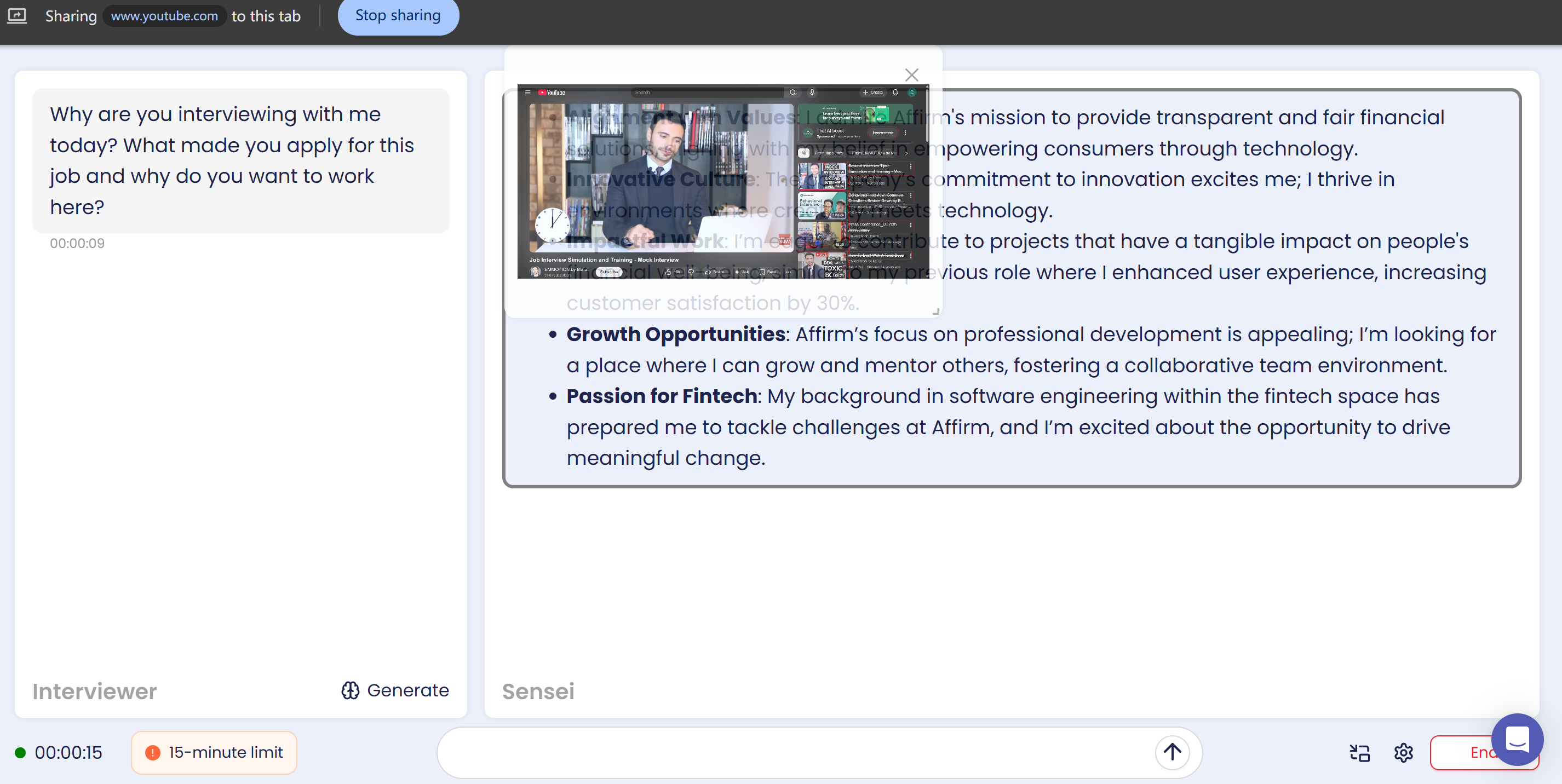
When I started using Sensei AI for interview prep, I noticed how its AI Copilot system gave me almost instant replies after transcribing questions from the video.
But, as you can see in the image, when I was testing it, the movable tab window kept getting in the way. I had to use the mouse to move it aside to read Sensei AI's responses and key points.
This isn't exactly an advantage in a formal interview setting. Even after Sensei AI adjusted the transparency of the shared tab, I still wasn't able to see the answers clearly.
I'd say I can see pretty clearly the transcript of each interviewer's question. Well, at least they're good at this, as the transcript appears really quickly, almost word-for-word, on the far left of the screen.
Personalized Answer Generation
Like most AI interview assistants, when I first went into the Sensei AI trial interface, I was asked to:
Choose the job I was applying for
Upload my CV
Choose a channel where I heard of Sensei AI
I DO think there is a difference between getting asked to create a bunch of information profiles and being willing to provide your AI interview assistant with some things about your dream job.
As some of the other products I tested don't require this at first when someone opens them, their AI coding copilots still support specifying the applied position and uploading a resume afterwards, thus leading to personalized results during interviews.
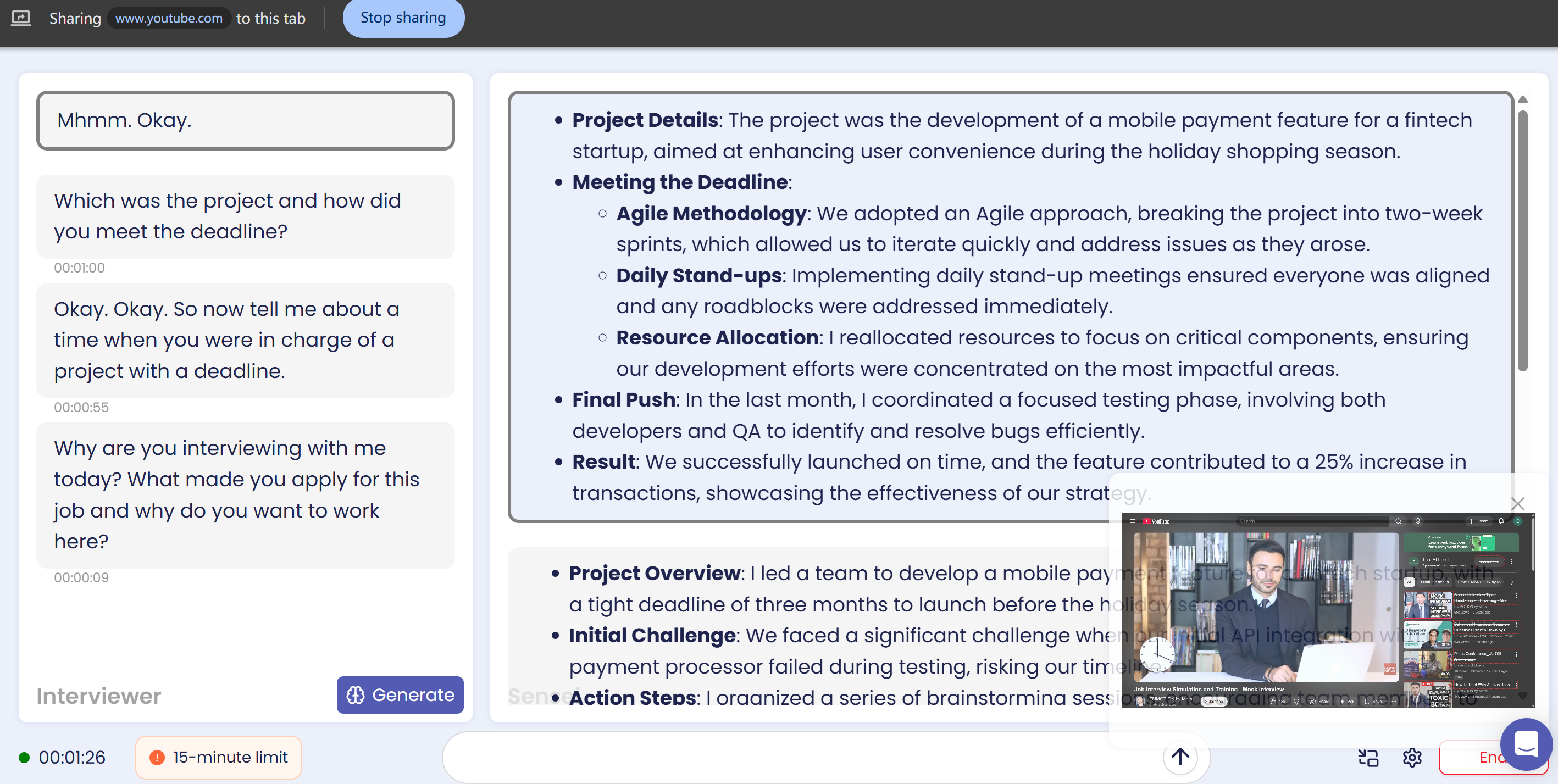
It's pretty obvious that Sensei AI comes up with answers based on the job information and resume details I put in. But when I was testing it, the answers felt really AI-generated, so I had to edit the text when I was getting my responses together. It seems that even if you provided enough information about yourself and the job position, there is still something Sensei AI's model can't handle.
Tbh, if I was actually being interviewed, this would probably mess up my flow.

Integration with Video Platforms
It was said that Sensei AI works seamlessly with Zoom, Teams, and Google Meet. So I tried opening a Zoom meeting as a test.
It's basically the same as before – it's still got that tab-based system and I can't really see much difference. The thing is, there's still no way to read AI-generated responses in the interview window without getting in the way.
And btw, I got caught during two of the five test meetings with my friends. Both happened when I tried to switch the tab after starting screen sharing. That's not a very good signal for other users.
Sensei AI Honest Review: Pros, Cons, and Problems
Pros: Response Speed and Accuracy
Speed and answers were decent. As the basic free trial was able to get answers based on the position, company, and the uploaded resume details, all the responses were linked to the information I provided to it. Its transcription was awesome, almost never failed or made mistakes, with clear and solid sentences to read and react.
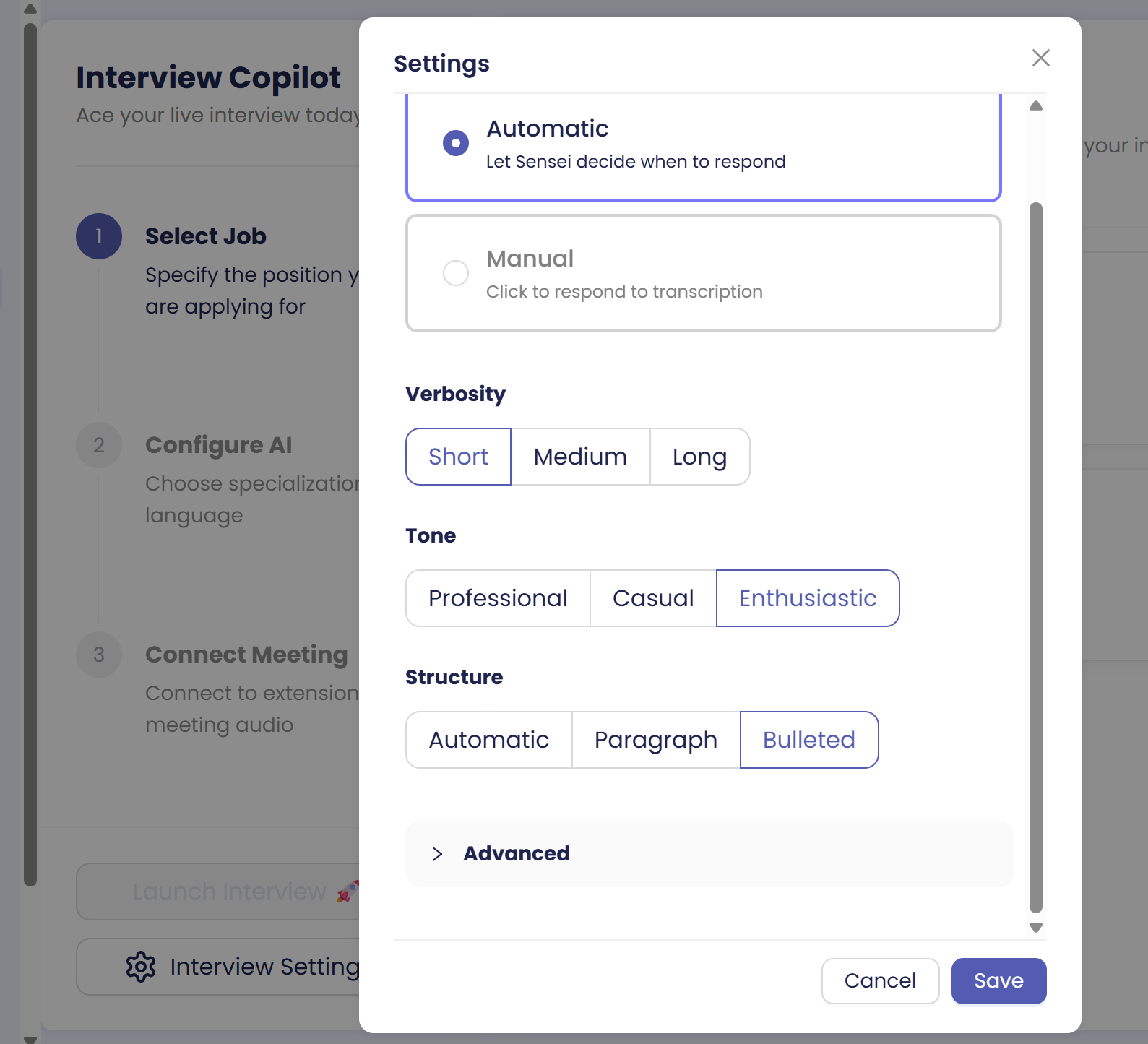
Also, the bullet list form of answer was clear to read, and Sensei AI provides choices for other types of tone.
Cons: Confusing Flow of Work
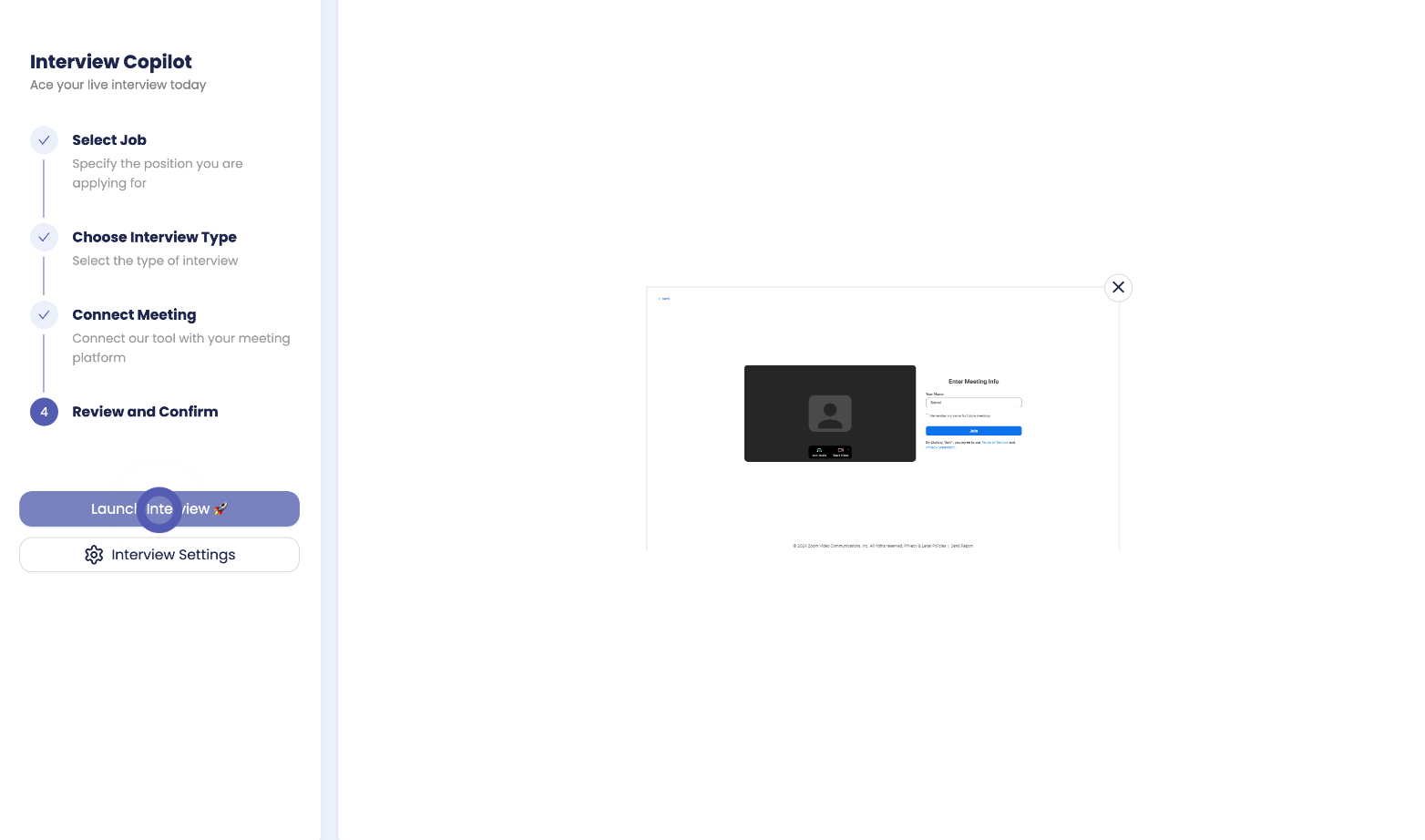
Finding the actual copilot is confusing. I kid you not, but I can't even find where to start at the beginning, and I have to try to click every button on the screen to see what it's really designed for.
For example, the pic below shows where you should click when the meeting is already happening:
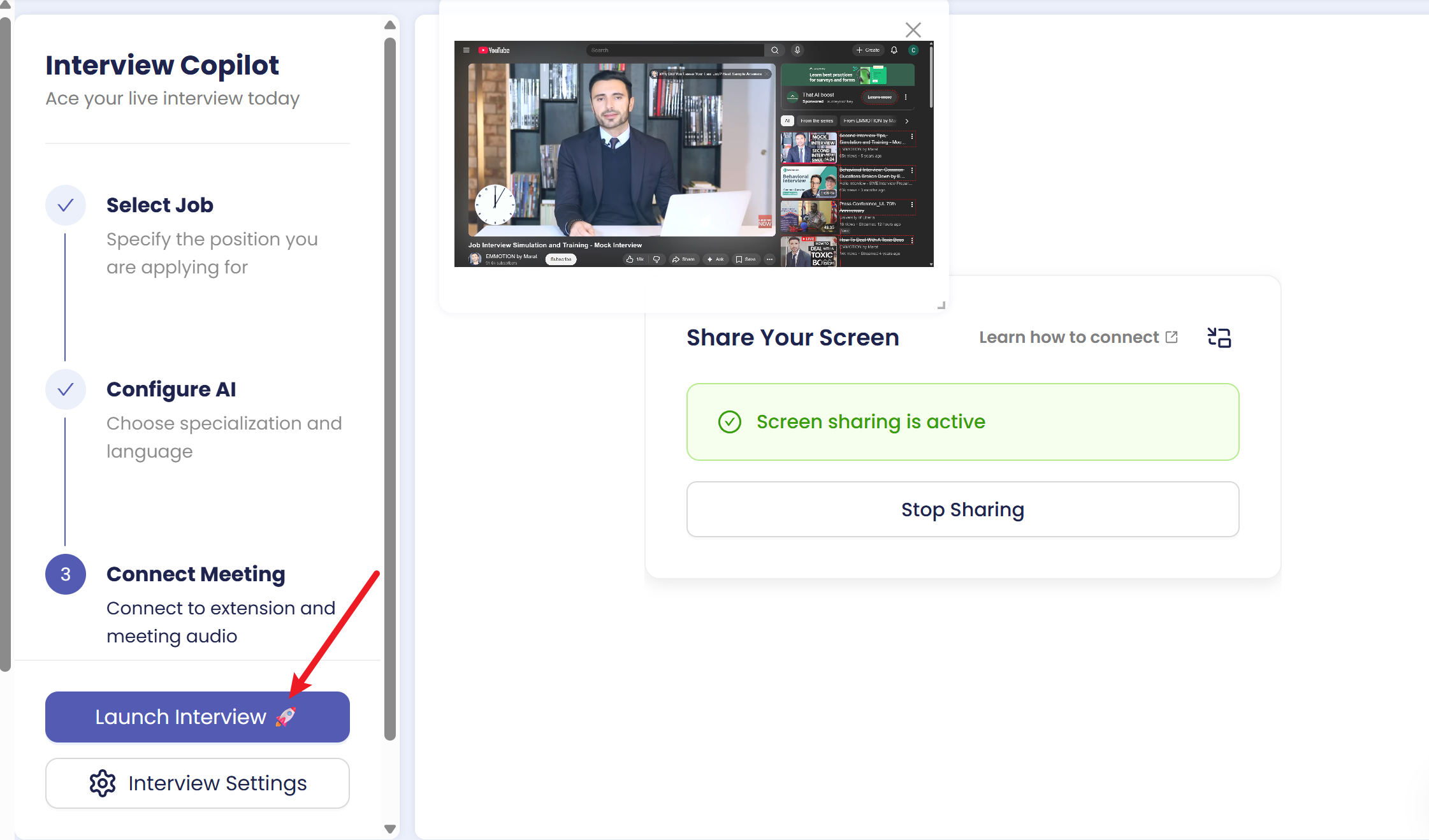
I mean, seriously, I was confused about the launch button's position, and it took me more than 3 seconds to find the right spot. For a tool that markets itself as live assistance, it took way too long to understand where and how to start the real-time copilot. Not ideal under interview pressure.
Problems: Pricing and Refund Policy
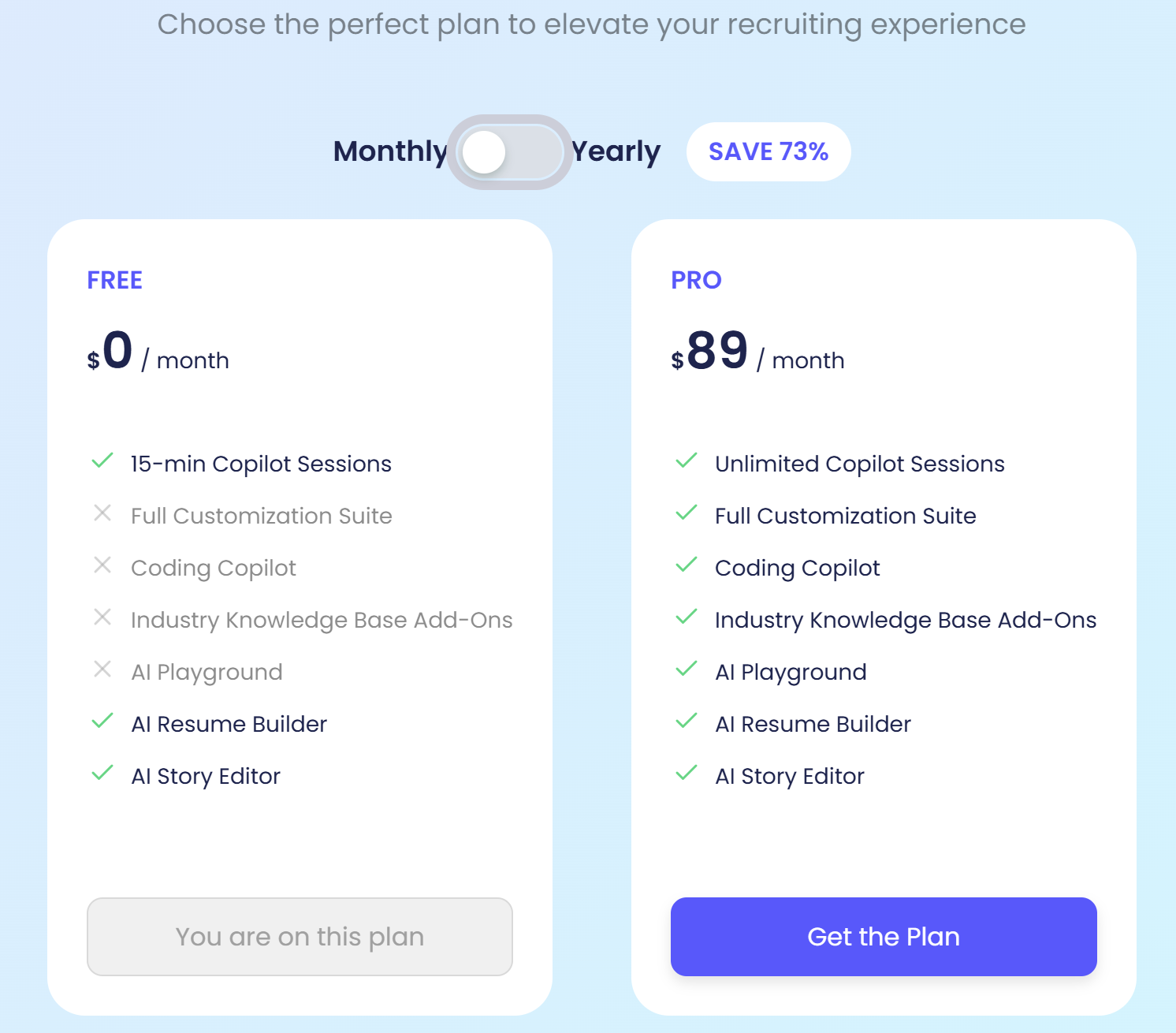
Firstly, Sensei AI offers a Pro plan at $89 per month, or $24 per month if billed annually, which is an average level price. Fair and fine.
But here comes a problem when I turned to refund policies, which looks like:
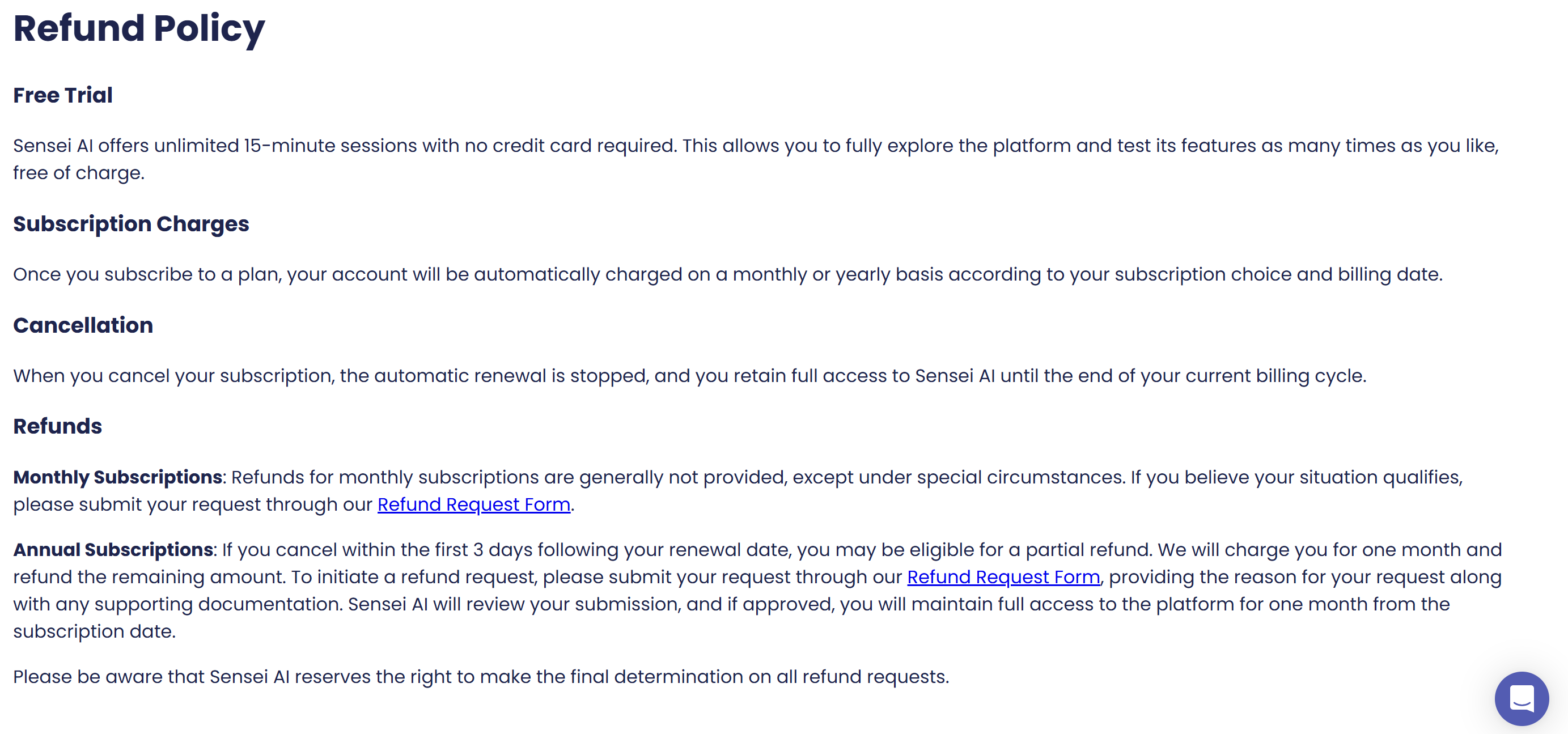
It is obvious that if I purchased Sensei AI for a month, and felt unsatisfied the first day I used it, it is possible that I can't get my money back, unless it's under special circumstances.
And here is another problem. When I clicked the link to see what the refund request form looked like, what I jumped into was:
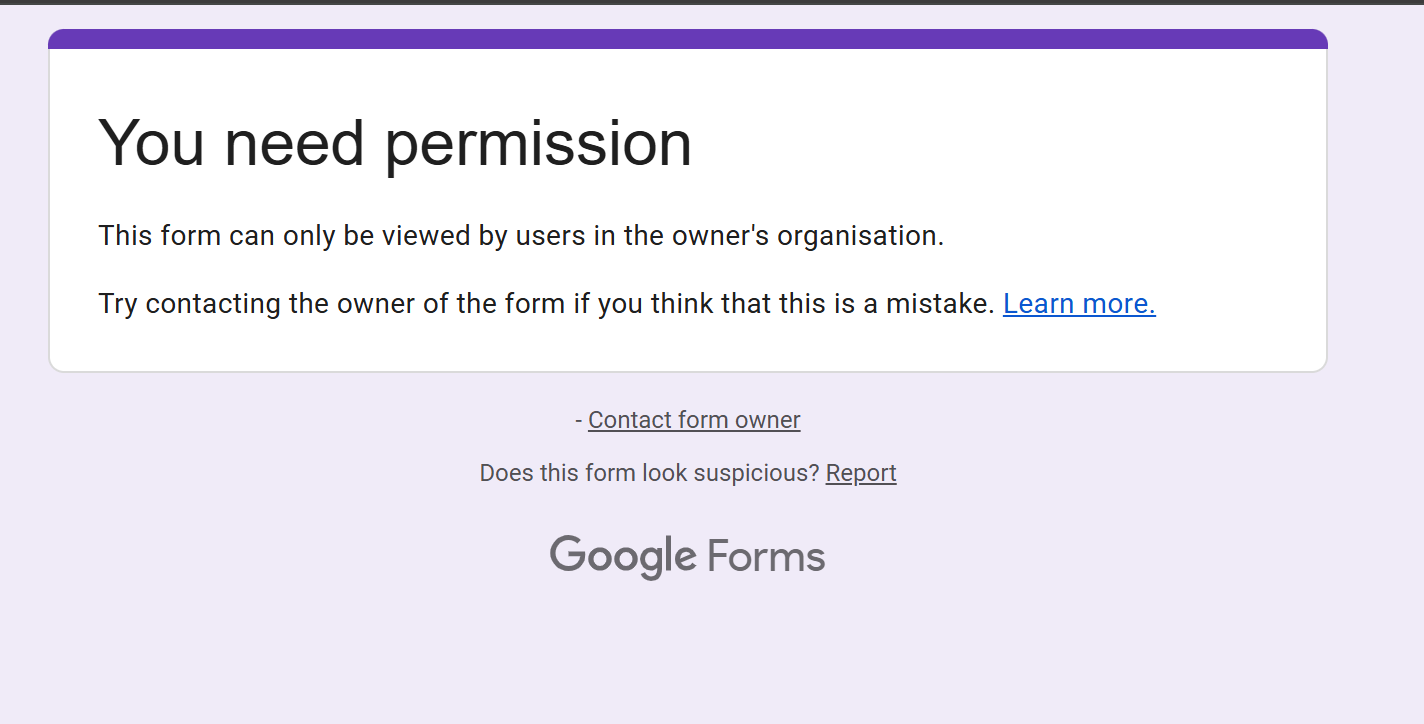
I couldn't find a different way to get in touch, so I just left a message in the chat box at the bottom of the website. I haven't gotten any reply yet as I am writing this passage. Hopefully there is another way to contact Sensei AI's team, although I didn't find any.
How I Compromised Sensei AI's Cons
Desktop Application Choice Available
Speaking of the possibilities that risk being detected, it was the main reason why I didn't use any of those AI interview tools based on extensions in my interviews. But luckily, I found something else that is undetectable technically: Desktop-based ones to comprise Sensei AI's weaknesses.
One of them, and also the best one after testing and actual use, is Linkjob AI. It managed a pretty neat trick of staying out of sight but keeping all the main features active. When I was testing it with some videos and meetings, I played it in the background on Windows, shared my screen loads of times, and never saw it pop up or interfere.
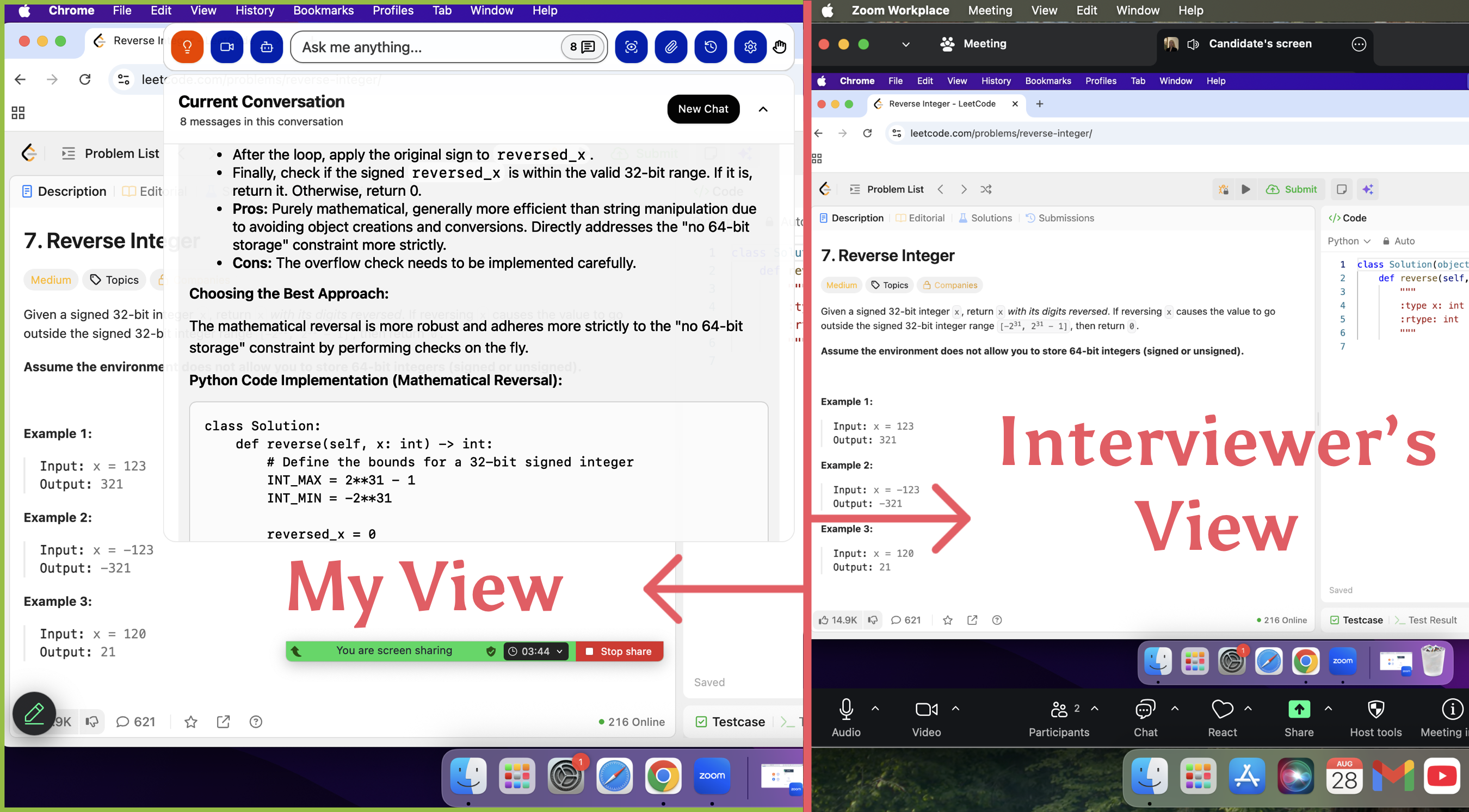
It can automatically recognize the voice and transcribe it, along with answers generated in the same window, without any position changing or future movement needed.
Even better, everything kept working: It's awesome that I can upload multiple screenshots at once (super helpful for those tricky coding problems that are split into multiple parts). And the fact that it can take both image and voice input and provide real-time suggestions without any switching is just fantastic.
Check the Undetectability Confirmation
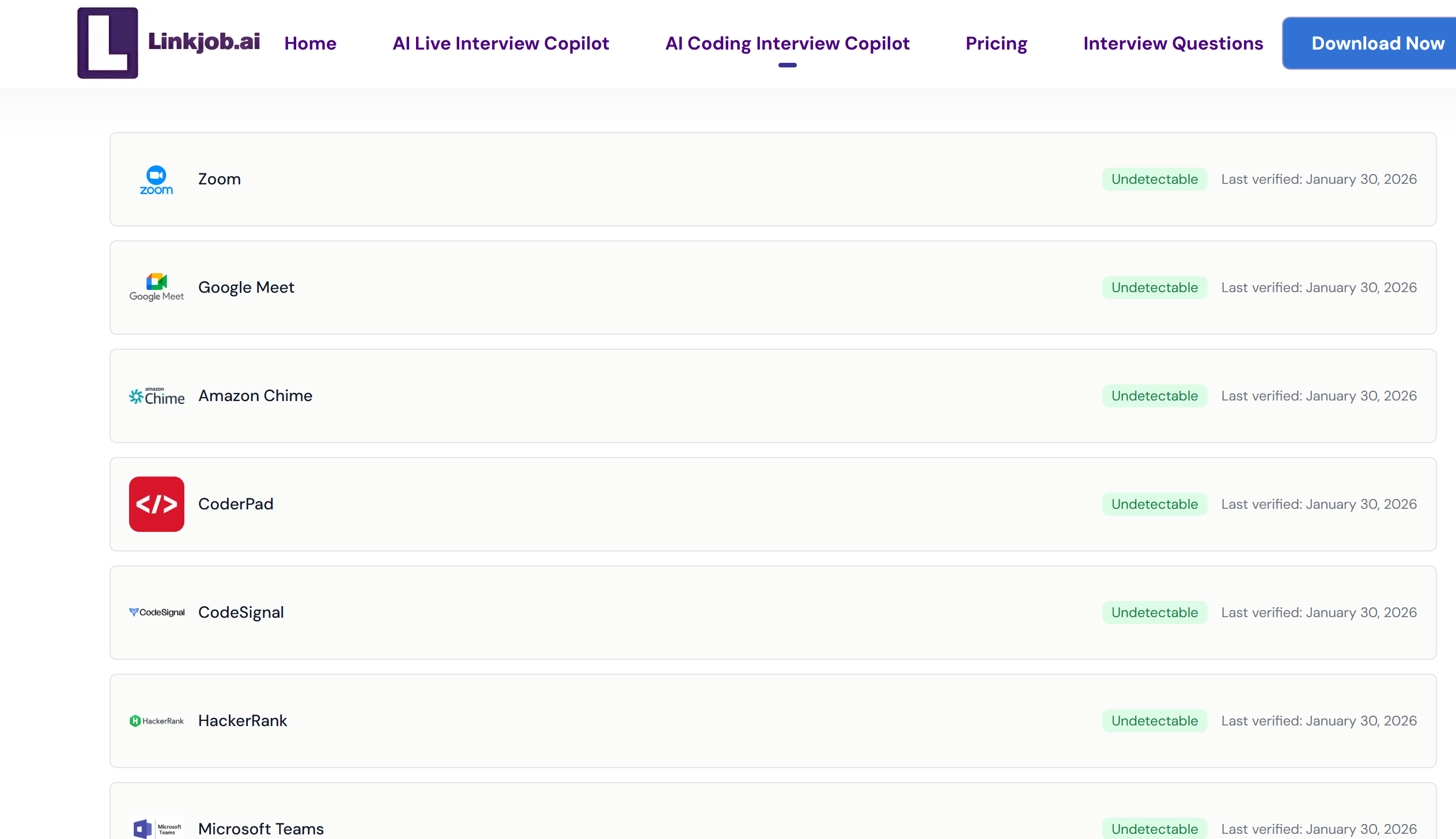
I know Sensei AI can be risky, as I've found out before when it was caught cheating (like switching tabs during tests). So, I always make sure it's undetectable, even when I try out other AI interview assistants.
Linkjob AI, which is used for desktop-based interview coding assistance, has never been caught out during testing. It always gives pretty accurate answers, and this is true of formal interviews, too. Other AI tools like Interview Coder are just like that too.
Final Verdict
After days of hands-on testing and experience, I’ve concluded that Sensei AI is more suitable for mock interviews instead of real ones. It promises advanced features and strong privacy, but the browser extension is visibly active during screen sharing, making it unusable in real interviews. Customer support, Copilot work flow and refunds were equally frustrating.
For most people, desktop application choices like Linkjob.ai are the clearer winner: they are truly invisible, consistently smooth across meetings and code testing platforms, focusing on what actually matters and delivering reliably.
FAQ
How did Sensei AI and Linkjob.ai handle real-time interview questions?
I noticed Sensei AI gave me instant suggestions during interviews. Linkjob.ai responded even faster and with more accurate results, especially in coding tests.
Which tool felt more reliable during interviews?
I never worried about screen sharing or detection when I used Linkjob.ai. As I can tell, sharing the screen doesn't mean I'm being detected, but on the contrary, I 100% sure I'm safe. But there is still a risk for Sensei AI, as it provides service using my Chrome tabs.
Did both tools support coding interviews?
Sensei AI didn't offer a coding copilot demo for try, so I can't guarantee that it can provide some sort of help, but there are other choices like Linkjob.ai that specialize in coding assessments.
See Also
I Tried LockedIn AI(3.6⭐/5) & Here is My Lockedin AI Review
In-Depth Review of Parakeet AI: Interview Performance Insights
Top Alternatives to AI Apply for Interview Assistance

© Copyright 2025 linkjob.ai - All Rights Reserved.