How I Managed to Ace My Internship Interview in 2026


To be honest—I cheated on my internship interviews in 2026. Let me give you an idea of the situation this year: for technical internship roles, each position averaged about 75 applications, up 27% from last year. In finance and automation, internships averaged around 120 resumes per position, a 10% increase.
During the internship application season, I was anxious every day about what questions top companies would ask. The stress kept building. I tried to prepare for every possible interview question, even ones I’d never seen before, but I still worried about messing up and how that could affect my career.
I started considering some unconventional methods, including using a popular AI interview assistant to cheat. I know a lot of people think the same way, so I want to share my experience about the interview processes at different companies and how to safely use AI tools. Linkjob.ai helped me pass interviews at Amazon, TikTok, and Google, which is why I highly recommend giving it a try.
I want to make it clear that using the AI interview assistant didn’t mean I stopped preparing seriously for my interviews. Even if I passed the OA, I still had to ace the in-person interview. I just felt that using the AI assistant increased my chances of being “seen” by interviewers instead of getting filtered out by algorithms. Whether this choice is ethical is up to you; I’m just sharing my experience.
My 2026 Internship Application Season-Key Timelines
From June to August 2025, before school started, I applied for some early summer 2026 SDE intern positions at companies like Google, D.E. Shaw, and Citadel. The results weren’t great. Starting in September, I revised my resume and applied to almost all well-known tech companies and finance tech roles. My plan was to get interviews early and, if I secured a position, take a two-month vacation afterward. Unfortunately, by the end of October, I hadn’t passed the OA for most applications, and online interview opportunities were rare.
By November, I knew that if I couldn't get through the OA and online interviews, just modifying my resume and practicing LeetCode wouldn’t help.
Fortunately, with the help of an AI interview assistant, I got an in-person interview for the Amazon 2026 Summer SDE Intern position. I applied on November 17, passed the OA on November 28, received a warm-up email on December 10, confirmed my video interview schedule on January 22, and had my B2B interview on March 22. I got the summer intern offer on March 30. Besides Amazon, I also passed the OAs and online interviews for summer internships at TikTok, Stripe, and DoorDash.
Internship Interview Formats & Cheating Detection Methods
Many people are hesitant to use AI interview tools because they're worried about whether they can really bypass the increasingly strict anti-AI cheating measures. I hesitated for a long time too, fearing that if I got caught. So, I did some research to see what anti-cheating measures major tech companies might be using in their internship interviews.
Most companies use a combination of OA screenings and online video interviews. The OA usually consists of LeetCode or HackerRank tests. In the online interview phase, recruiters typically ask basic behavioral questions about your background and motivations, followed by a short coding challenge. These coding questions are often adapted from LeetCode and HackerRank. If you want to learn how to use AI tools to cheat on the platform's OA tests, you can read (internal link article). The anti-cheating methods on these platforms mainly include.
Screen Track and Copy/Paste Detection
This method uses strict and smart tech to control the exam environment and time for test-takers. It includes monitoring with webcams, recording voice interactions, and screen recording. In this case, if I want to look up answers to the test questions, it’s tough. Features like tab-switching warnings force me to take the exam in full-screen mode and disable copy/paste, making it hard to access external resources or tools.
Active Tab Track and Webcam Proctoring
This method usually involves browser-level restrictions and automatic detection. For most coding interviews, screen sharing is required. Interviewers often ask me how I approach problems or how I would optimize certain parts of the code. This is tough because I need to respond to their questions or modify the code on the spot. This is when I really need AI support during live coding interviews. However, since I’m sharing my screen, the interviewer can see every move I make.
Speed Signals and Behavior Detection
This method usually involves tag monitoring, copy/paste tracking, image monitoring, and image analysis. For example, if the camera detects an unusual typing pattern—like a sudden burst of code after a long pause—the system may suspect I’m using external tools. Every action I take generates a detailed activity log, including session playback and evidence collection.
Geological and Coding Signals
The OA platform also checks the quality of answers by analyzing IP addresses, coding behavior, submission patterns, and question features. It looks for inconsistencies in code structure, timing patterns, and submission behavior compared to human coding patterns. For example, if I copy code from a similar project on the platform, it will compare my code against past submissions in areas like logic, control flow, and variable naming. If my code is too similar to previous content, I’ll get a warning.
AI Cheating Tools for Internship Interview & Tech Tactics
Before using AI tools for interview prep, I looked into the eight best AI interview assistants on the market. I ended up choosing Linkjob.ai because it’s specifically designed for students in finance and tech. It has over 74,000 exclusive coding problems and more than 60,000 interview questions from finance and consulting. The model is really smart, and with the latest base models like Claude Code Opus and GPT 5.1, it has very low latency (the website claims just 0.23 seconds). This saves a lot of valuable time during interviews.

Next, I want to highlight some features of the HackerRank AI assistant that made the whole process more efficient.
Virtual Overlays to Avoid Screen Tracking
One of my biggest concerns was screen tracking. But Linkjob AI figured out how to use virtual overlays to handle it. These overlays cover the interview window (whether it’s a video call or coding tool), and since the window is external to the system, I can see the AI-generated answers without switching tabs, making it untraceable.
Microphone Detection for Real-Time Answers
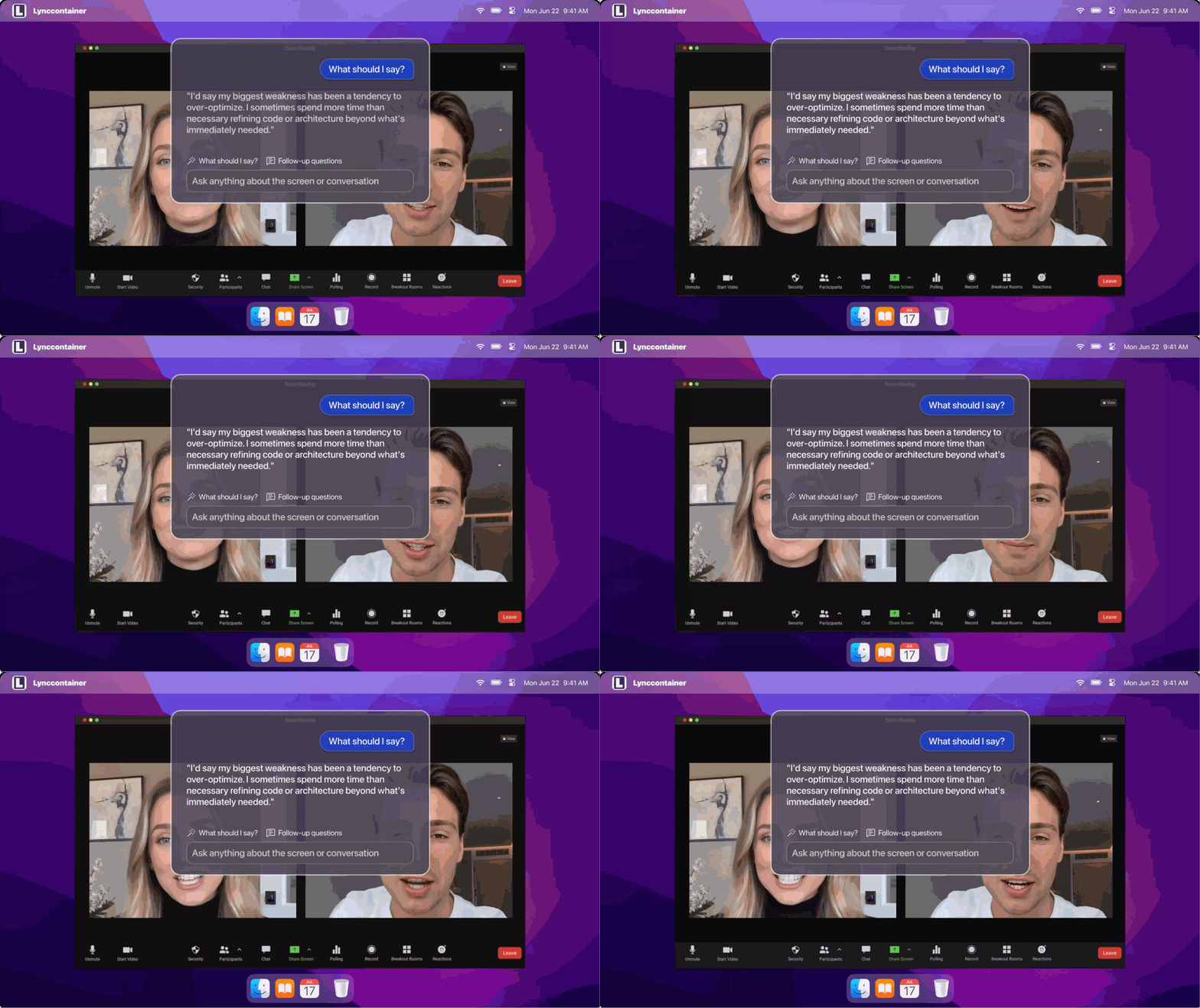
During the video interview, since the interviewer could see my movements, I couldn't type or click around to search for answers. I also couldn't look away from the screen. Linkjob.ai listens to the interviewer’s questions through my computer's microphone and generates answers in real time on a virtual overlay. The interviewer can't notice this. To make it look like I'm actually making eye contact, I placed the answer box in the center of the screen and adjusted its transparency. This way, I could see the interviewer’s reactions while still checking the answers without breaking eye contact.
Resume Analysis for Interview Question Forecast
I think the biggest difference between Linkjob.ai and other AI interview tools is that you can input your resume and job description into the AI model in advance. It predicts the interviewer’s next question based on your background and gives you a prompt at the bottom during the interview. This feature not only helps me mentally prepare during the stressful Q&A but also makes it easier to review the interview later—like considering other angles the interviewer might take on my experience. This is valuable for any interview.
Capture Live Screenshot
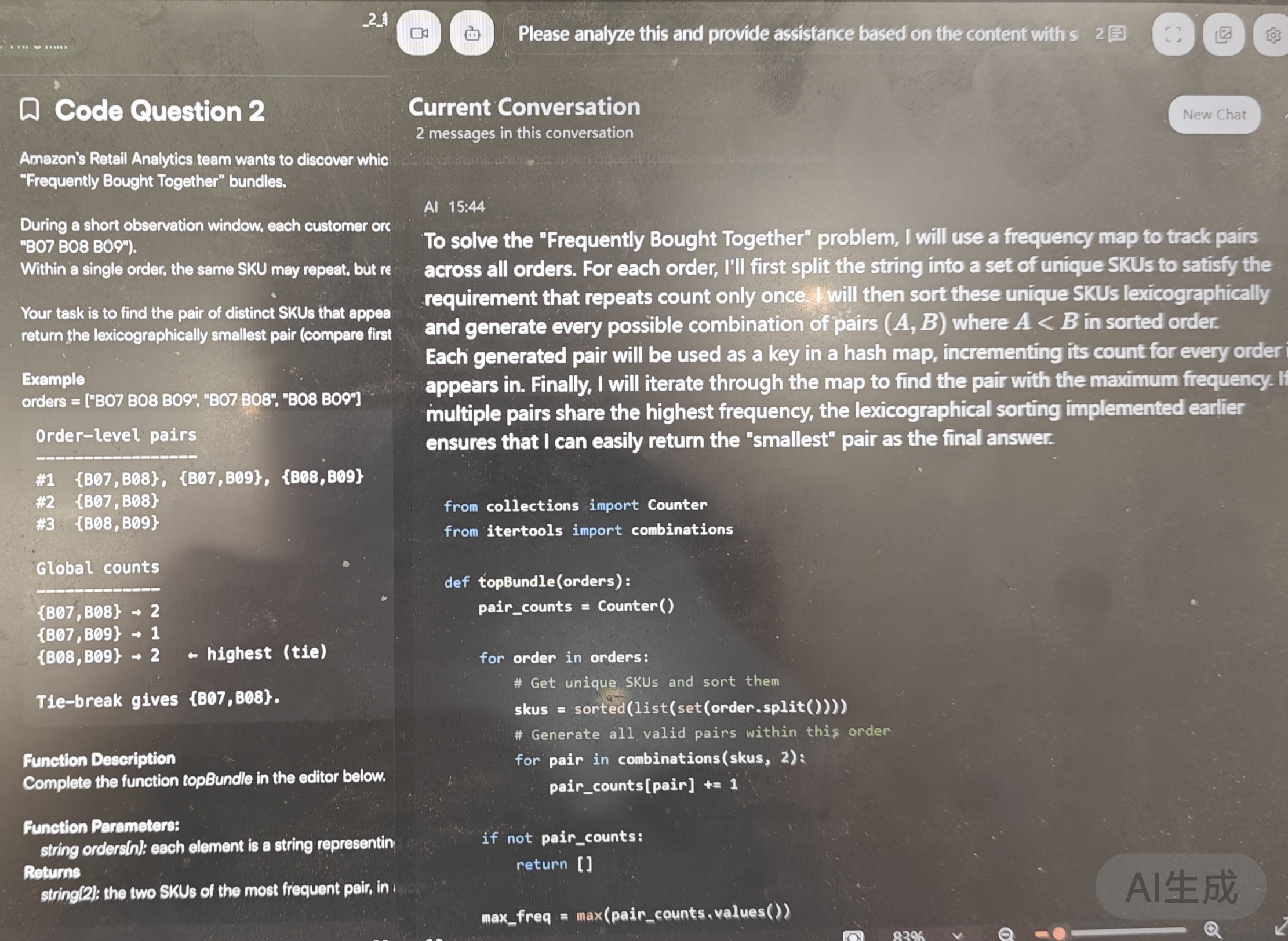
For me, the screenshot answering feature is definitely the most useful tool in HackerRank interviews. I can have Linkjob AI capture the entire screen or a selected area. If one screenshot isn’t enough to cover the whole question, I can take multiple ones. It can handle up to six images at once, which is really handy for complex problems.
I set up AI prompts in advance. This saves me a lot of time because during the actual interview, I don’t have to waste time telling the AI what to do with the images. For example, my prompt is: “Here’s my programming question; please provide the solution logic and complete code answer.”
Even though the tool has a one-click code copy feature, I never use it during interviews. I always manually type out the code to avoid being detected.
Attach Images / Upload File
I haven’t actually used this feature in an interview yet. I think it’s better suited for case studies. I only use AI during technical and behavioral interviews, so this feature isn’t very useful for me.
Streaming Conversation AI Copilot
This feature is really helpful for conversational interviews. For example, it comes in handy when the interviewer asks follow-up questions during a technical interview or when I need to organize my thoughts more clearly in a behavioral interview.
Linkjob AI can automatically recognize the interviewer’s questions and generate answers. This means I don’t have to explain the question to the AI manually.
However, it doesn't always get the question's cutoff point right. If the interviewer speaks too fast or doesn’t pause enough, the AI might combine two separate questions into one. But it does show the conversation history in real-time, so I can still get all the answers I need.
Personalized Service
To make the AI's responses more relevant to my situation, I upload my resume, target position, and company info. Before each interview, I tweak the AI prompts to ensure the output matches my tone and background.
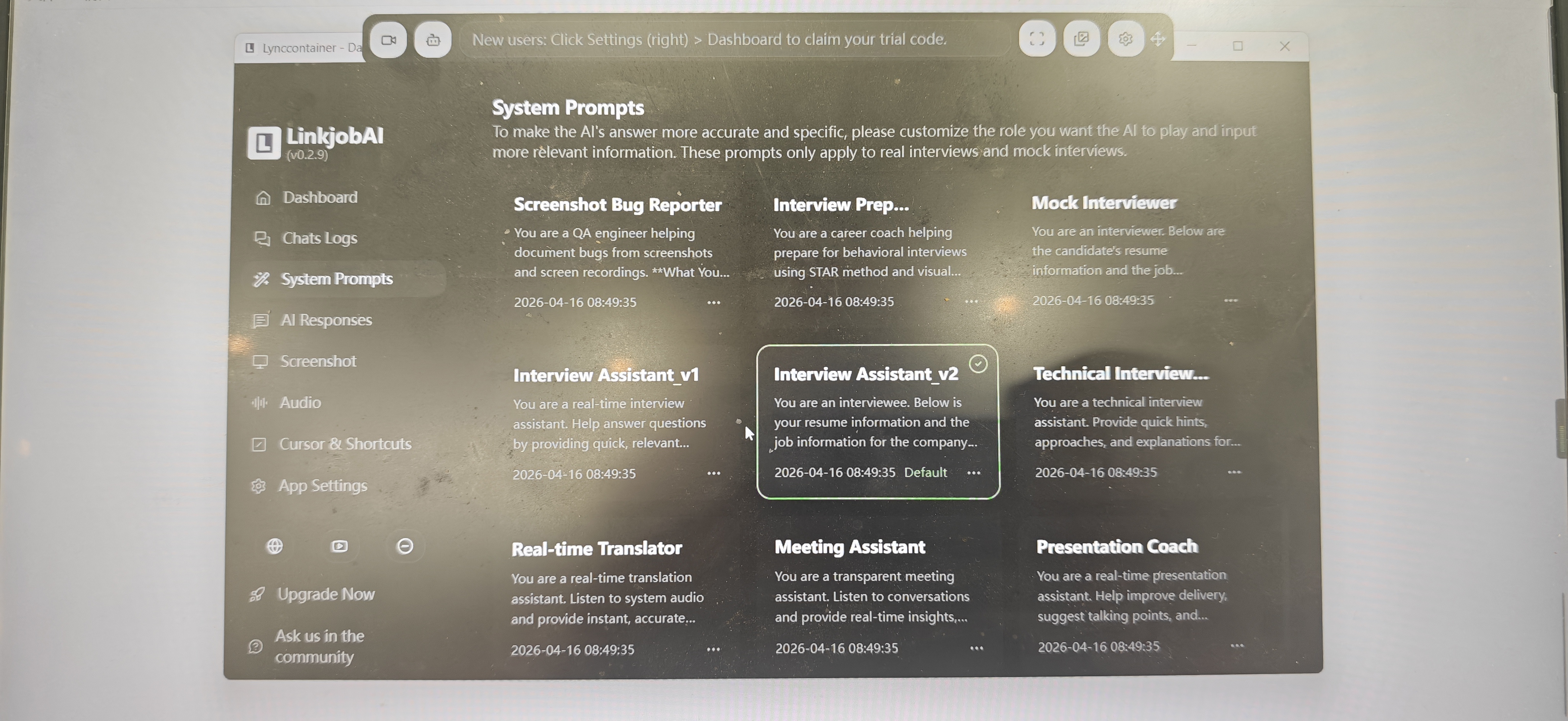
By the way, there's a new version out now. The dashboard offers more customization options. For example, there are more choices for system prompts, and you can fine-tune the AI's responses better.
Bypass Copy/Paste Detection
This problem is also easy to solve. I just need to manually input the code based on the AI assistant's answers. The only thing to watch out for is my typing speed; I should slow down a bit on the tougher parts. That way, I can submit my answers in a reasonable time.
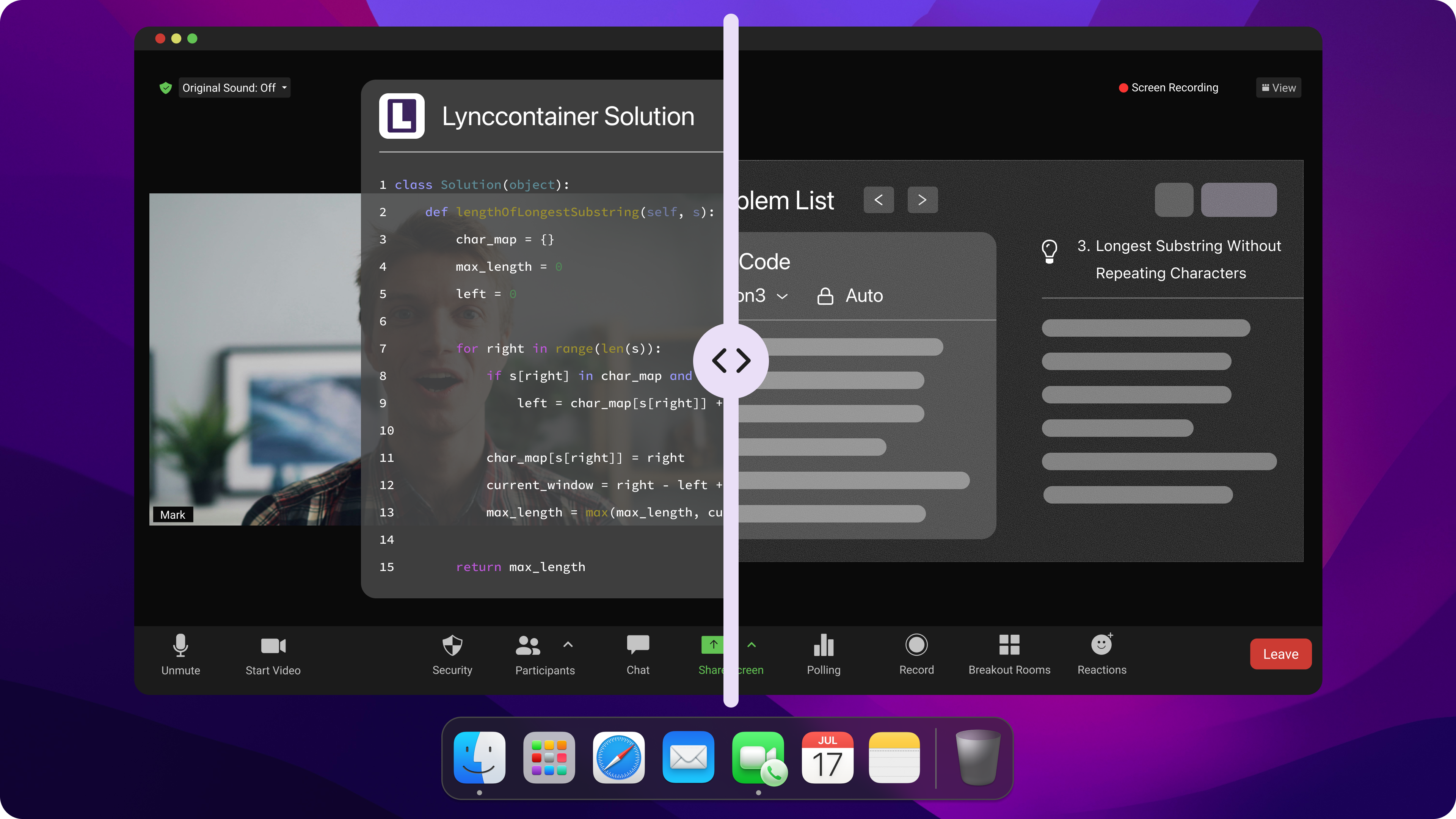
Internship Interview Cheating Tips: Use AI Assistant Flexibly to Avoid Plagiarism Detection
Critical Thinking & Soft Skills
I’ve always known that interviewers aren’t fools. So even with powerful tools, I don’t just copy the AI’s answers word for word. Instead, I adjust my wording and viewpoints based on my experiences, intuitive thinking, and the other person’s expressions and tone to avoid sounding too formal or absolute.
I also understand that problem-solving isn’t always a quick fix. So for each question, I don’t rush to give a perfect solution. Sometimes, I even intentionally add small “flaws” or thought processes that don’t affect the final result. This compromise makes my answers feel more real and relatable.
Coding Habits
The same goes for coding interviews. I know that if my code is too perfect and bug-free, it’ll raise suspicion. So when I write code based on AI answers, I try to add some reasonable “flaws” and personal comments to show my understanding of the problem.
Also, in real coding, a normal person writes the main logic first, then tackles edge cases or fixes bugs during code review. So I avoid handling all edge cases perfectly from the start, as that would look suspicious. I try to make my coding process follow a more natural flow.
At the end of the day, AI is just a tool—you can’t rely on it 100%. Before the interview, you still need to review your resume and past projects carefully and do thorough research on the company and the role you’re applying for.
Risk Management
AI tools can help with your internship interview, but every method has risks. Here are a few tips:
If you wear glasses, watch out for reflections—interviewers might see your screen in the glare.
Even though I didn’t experience delays with the AI interview assistant, that doesn’t mean your device won’t have issues, so test your mic and internet speed before the interview to avoid surprises.
AI can help you answer questions, but factors like professional attire, a quiet environment, and natural expressions also impact the interviewer’s impression, so make sure you look presentable.
Adjust your font size, language style, and base model settings before the interview—you probably don’t want to use GPT for a coding test. Linkjob.ai has various models to choose from, but make sure to pick one that fits the interview context.
Even with an AI assistant, I still recommend preparing answers for simple questions. If you ace the tough questions but stumble on easy ones, it can hurt your interview performance.
Outcome and Consequences-Was My Internship Interview Cheating Successful?
Many people wonder if using an AI assistant for internship interviews really works. Honestly, my “cheating” strategy helped me pass most of my interviews. I confidently answered various tough questions. The AI tools helped me with technical issues, while my notes covered behavioral questions. Every time I nailed a question that used to stump me, I felt super excited. The interviewers seemed impressed with my answers, especially during the coding parts. When they threw unexpected questions at me, I didn’t panic. I stayed calm and used all the skills I practiced.
That’s my experience to share. I hope it helps you, and good luck with your job search!
See Also
My 2025 ES6 Interview Questions And Answers That Secured My Job
My Strategies for Cheating on CodeSignal Tests in 2026
Navigating My 2026 Bloomberg New Grad Interview Experience
Leveraging AI to Succeed in My Microsoft Teams Interview
Essential Responses for 2025’s Top Competency Interview Questions