How to Use AI in Google Meet Interviews—Without Detection

Google Meet interviews have become one of the most common formats in remote hiring, especially for technical screening and final rounds. While platforms like Coderbyte or HackerRank enforce strict anti-cheating measures—such as keystroke logging and code playback—Google Meet itself doesn’t natively record your coding process. However, interviewers often require screen sharing, live coding, or continuous camera monitoring to assess authenticity.
If you are facing upcoming interviews on OA platforms, you can read more detailed info in my articles talking about how to cheat on Codility, and how I passed Hackerrank cheating detection. Also, if your interviews were taken using Teams or HireVue, you can also click to read how to cheat on Teams and my sharing of how I used a HireVue interview assistant to pass interviews.
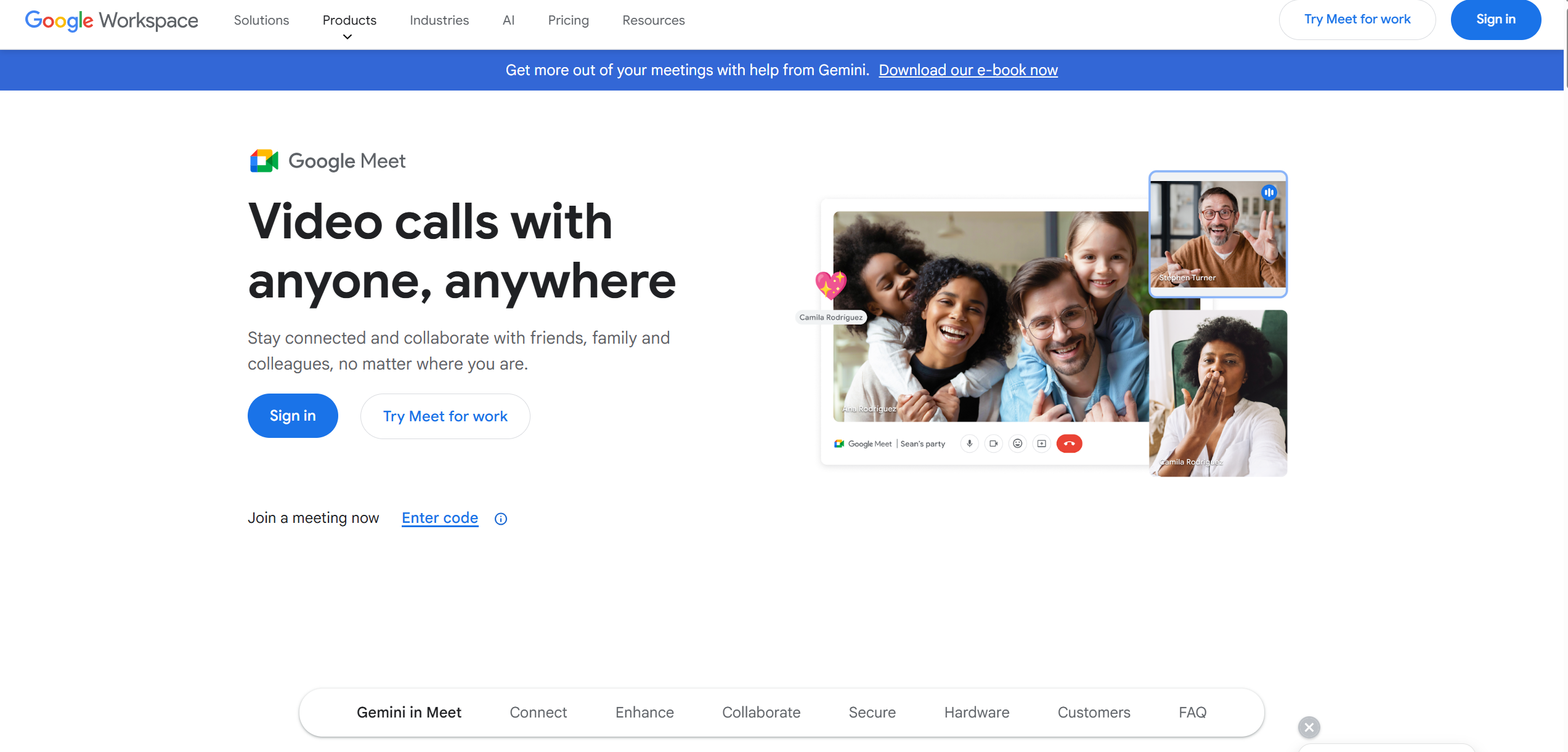
heDespite these safeguards, it’s still possible to discreetly leverage AI assistance without raising suspicion. Take Linkjob AI, for example—a next-generation, undetectable AI interview copilot designed to provide real-time hints, code suggestions, and even system design guidance—all while mimicking natural human pacing. In this post, I'll share my firsthand experience on how to seamlessly integrate AI support during a Google Meet technical interview and pass even the toughest coding challenges without getting flagged. I've tried a few different tools, but the one that actually worked—without any detection issues—was Linkjob AI. Let me walk you through what I did and how you can do the same.

Can Google Meet Detect Cheating? What I Found Out
Contrary to popular belief, Google Meet itself does not have built-in plagiarism detection or code similarity analysis features. It is primarily a video conferencing tool—not an automated proctoring or coding assessment platform like Coderbyte, HackerRank, or Codility. However, many people mistakenly assume that “being on Google Meet” means they’re being monitored for cheating in the same way as on dedicated coding platforms. The reality is more nuanced and depends heavily on how the interviewer or company chooses to conduct the session. Below are key aspects that influence how “cheating” or “plagiarism” might be detected during a Google Meet interview:
No Automated Code Monitoring
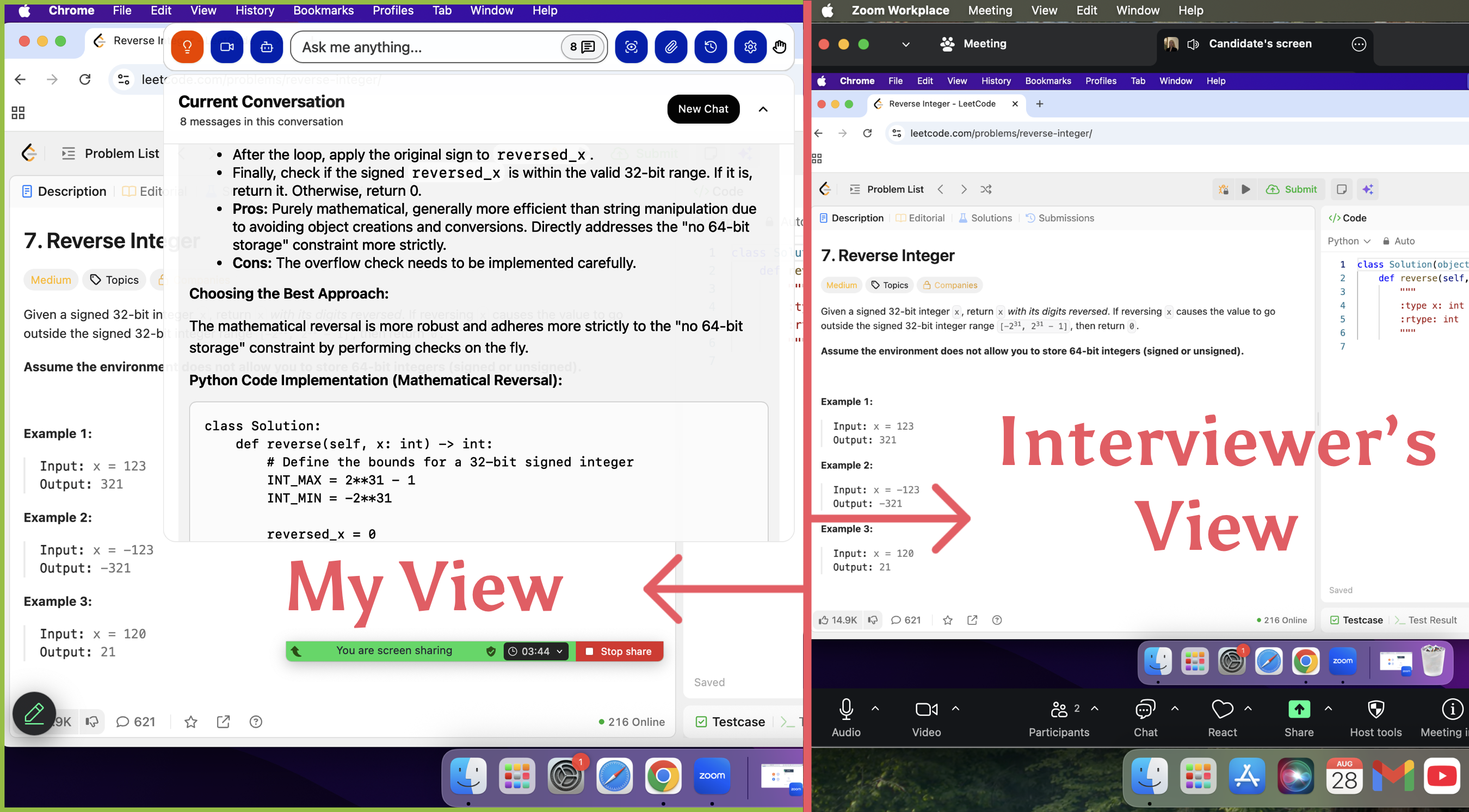
Google Meet does not scan your screen content, clipboard, or open tabs for copied code. It doesn’t log keystrokes, track window switches, or analyze your IDE for suspicious patterns. If you’re coding locally (e.g., in VS Code or IntelliJ), Google Meet has zero visibility into what you’re typing unless you share your screen.
Screen Sharing Is the Primary Surveillance Method
Most technical interviews on Google Meet require candidates to share their entire screen—often with camera on—to simulate an in-person whiteboard or coding session. In this setup, the interviewer watches your coding process in real time. While this isn’t “plagiarism detection” in the algorithmic sense, it allows human proctors to:
Notice if you suddenly paste large blocks of code.
Observe unusual pauses followed by rapid typing (suggesting copy-paste).
Detect if you switch to browser tabs containing solutions (e.g., LeetCode discussions or GitHub gists).
To avoid these pitfalls, Linkjob AI uses invisible overlays that appear only on your local display and never render in screen-sharing streams—ensuring prompts stay private while you maintain natural coding flow.
Interviewer-Driven Verification
Many companies pair Google Meet with manual verification tactics:
Asking follow-up questions about every line of code you write.
Requesting you explain time/space complexity on the spot.
Modifying the problem slightly to see if you can adapt your solution.
This “interactive auditing” acts as a soft but effective anti-plagiarism measure—because memorized or copied code often collapses under scrutiny.
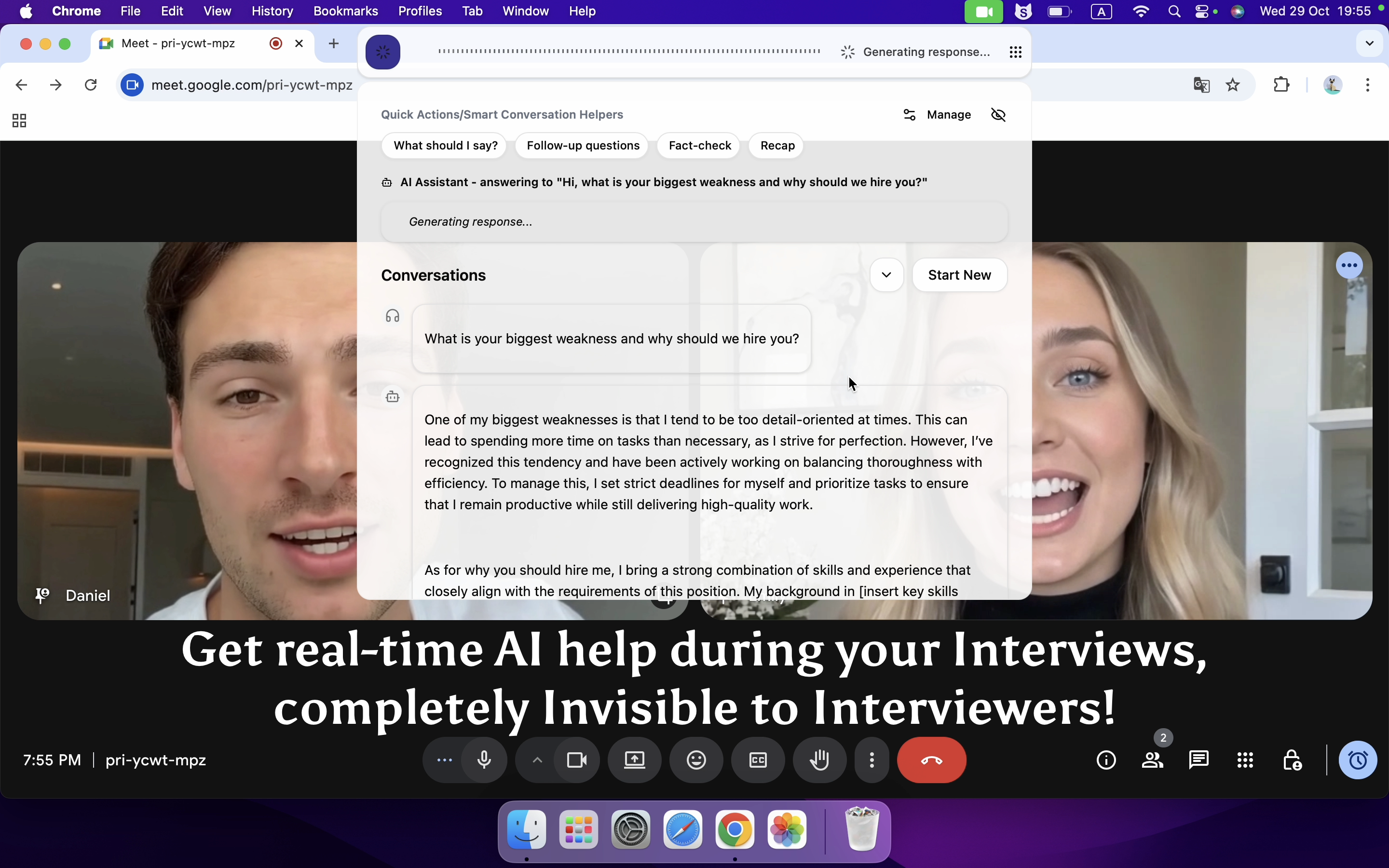
In this regard, Linkjob AI’s voice mode redefines real-time assistance: once activated, it listens directly to the interviewer’s spoken questions through your microphone and instantly generates precise, concise answers—delivered silently to you via an invisible overlay. You see the response in real time, allowing you to paraphrase or speak it confidently as your own, without delay or hesitation. Because the AI tailors each reply to the exact wording and context of the question, even sharp follow-ups feel natural and consistent—no memorization, no panic, just seamless fluency.
Integration with External Coding Platforms
Some teams embed Google Meet alongside a shared coding environment like CoderPad, CodeSandbox, or Replit, which may include limited logging (e.g., edit history). In such cases, the plagiarism risk comes from the coding tool—not Google Meet. Interviewers can review your edit timeline afterward to spot inconsistencies (e.g., 5 minutes of idle time followed by a perfect solution).
Thanks to its global hotkey-powered screenshot feature, Linkjob AI lets you instantly capture the coding problem—whether it’s displayed in a shared Google Doc, a browser tab, or an IDE—and send it directly to the AI for analysis, all without moving your mouse or switching windows. With a single key combo, the tool grabs the selected screen region, extracts the question text, and delivers contextual hints or solutions in real time. This eliminates the need to manually retype lengthy prompts, saving precious seconds during time-sensitive interviews and ensuring your focus stays on solving—not transcribing.
Post-Interview Code Review & Cross-Checking
Even if no red flags appear during the call, companies may:
Save your shared code snippet.
Run it through internal or public plagiarism checkers (e.g., Moss, GitHub search).
Compare it against known solution templates or past submissions.
This is especially common in later interview rounds or for high-stakes roles.
Behavioral and Temporal Red Flags
Human interviewers are trained to detect anomalies:
Solving a hard problem faster than expected.
Using advanced syntax or libraries inconsistent with your stated experience level.
Hesitating on basic concepts while acing complex ones.
These aren’t “detections” by Google Meet—but they can trigger suspicion that leads to deeper investigation.
In summary, Google Meet doesn’t detect plagiarism directly. Instead, cheating is deterred through a combination of real-time human observation, screen transparency, post-hoc code analysis, and behavioral consistency checks. This hybrid approach makes undetectable AI assistance—like subtle, context-aware prompting from tools such as Linkjob AI—particularly valuable, as it mimics natural problem-solving rather than delivering full solutions.
My Google Meet Interview Tips: How I Stay Undetected With AI
After multiple successful interviews using AI assistance, I’ve refined a set of disciplined practices that help me blend AI support seamlessly into my natural workflow—without raising suspicion. Here’s what I consistently do:
Never Recite AI Output Verbatim
Interviewers are trained to spot unnatural fluency. I treat AI responses as reference material, not scripts. I rephrase ideas in my own voice, insert personal examples, and occasionally “stumble” mid-sentence to mimic genuine cognitive processing. Authenticity beats perfection every time.
Simulate a Realistic Coding Workflow
In real development, we rarely handle all edge cases upfront. I deliberately write the core logic first, then circle back to refine it—adding input validation, null checks, or comments like // consider overflow here a minute later. This staged approach mirrors how engineers actually think and code under pressure.
Control Your Delivery Pace
Speed is a red flag. Even when Linkjob AI gives me an instant answer, I pace my response: ask clarifying questions, sketch a high-level plan, and build the solution incrementally. A 30-second pause before typing isn’t hesitation—it’s perceived as thoughtful deliberation.
Softening AI’s Overconfident Tone
AI tends to use absolute language (“This is optimal,” “Always use X”). I consciously replace those with tentative phrasing: “I’d probably go with…”, “One option could be…”, or “I’m not 100% sure, but…” This signals humility and critical thinking—traits interviewers value more than flawless answers.
Mind the Physical Environment
Small details betray you. If you wear glasses, screen glare can reveal secondary monitors or floating AI overlays. I position my screen slightly below eye level and use matte-finish anti-glare film. Lighting is warm and diffuse—enough to look engaged, not so bright that it creates reflective hotspots.
How I Use AI for Google Meet Interviews (Without Getting Caught!)
When I join a Google Meet interview, I want every moment to count. I rely on real-time AI interview tools to help me solve difficult problem and get instant feedback. Let me walk you through how I use this tool to boost my performance and stay focused.
Feature | Description |
|---|---|
Real-time Listening | Linkjob AI listens to the interviewer's questions as they are asked, analyzing context and requirements. |
Tailored Response Generation | It crafts relevant answers based on my profile and job requirements. |
Suggestions Display | I see suggestions on-screen or hear them, so I keep eye contact and stay engaged. |
Immediate Feedback | I get instant feedback on my answers, helping me improve on the spot. |
Contextual Responses | The AI offers intelligent responses tailored to the specific job and interview questions. |
Anxiety Reduction | I avoid losing my train of thought because the AI provides instant prompts as questions arise. |
1. Instant Problem Capture with Global Hotkey Screenshots
The moment an interviewer shares a coding problem—whether in a Google Doc, a shared IDE, or even a slide—I press my pre-configured global hotkey (I use Ctrl + Alt + S) to capture just the question area. Linkjob AI supports multi-region selection, so if the problem spans two screens or includes diagrams, I can grab everything in one go. The AI extracts text instantly and starts analyzing—no manual typing, no wasted seconds. This is especially critical in time-boxed interviews where every moment counts.
2. Voice Mode for Real-Time Listening & Response
For system design or open-ended questions, I switch to Voice Mode. Once enabled, Linkjob AI listens through my mic as the interviewer speaks. The moment they finish a question—say, “How would you design a URL shortener?”—the AI generates a concise, structured answer that appears silently on my screen via an invisible overlay. I don’t read it aloud; I absorb the key points and rephrase them naturally. Because the response is triggered by actual speech, it adapts to nuances like follow-ups or mid-question clarifications.
3. Manual Typing Only—No Copy-Paste, Ever
Even though Linkjob AI offers one-click code copying, I never use it during interviews. Instead, I glance at the suggested solution and type it out line by line. This does two things: first, it avoids any behavioral red flags (like sudden bursts of perfect code); second, it gives me time to internalize the logic so I can explain it confidently if asked. I’d rather take 30 extra seconds typing than risk looking robotic.
4. Pre-Loaded Context for Personalized Responses
Before each interview, I update my profile in Linkjob AI with the job description, company tech stack, and even recent engineering blog posts from the team. I also upload my resume. This way, when the AI generates answers, they reflect my background—not some generic template. For example, if I’m interviewing at a fintech startup that uses Kafka and Go, the AI will frame solutions using those tools, matching what’s on my resume. It feels less like AI and more like muscle memory.
5. Strategic “Imperfections” to Maintain Credibility
I deliberately introduce small, harmless flaws: I’ll write a loop that assumes non-empty input, then “realize” the edge case 30 seconds later. Or I’ll say, “I think this works, but let me double-check the base case.” These micro-pauses and self-corrections signal active thinking. Linkjob AI helps me stay ahead, but I control the pacing—because flawless execution under pressure is suspicious; thoughtful iteration is believable.
6. Post-Interview Reflection & Prompt Tuning
After each session, I review what worked and tweak my system prompts. For instance, I once noticed the AI kept suggesting recursive DFS for tree problems, but the interviewer preferred iterative BFS. So I updated my prompt to: “Prefer iterative solutions unless recursion significantly simplifies the logic.” Over time, this fine-tuning makes the AI feel less like a crutch and more like an extension of my own problem-solving style.
In my experience, Linkjob AI stands out as the most reliable and undetectable AI copilot for live technical interviews. Unlike generic assistants that dump raw code or sound robotic, it’s designed with real interview dynamics in mind—offering contextual hints, voice-triggered responses, and seamless screen integration that adapt to how humans actually think and code under pressure. It doesn’t just give answers; it helps you own them.
Post-Interview Improvement with AI For Google Meet Interview
Performance Analysis with AI
After my Google Meet interview, I always want to know how I did. I use AI tools to review my interview transcripts and spot areas where I can improve. These tools act like a personal coach, giving me feedback I might miss on my own. Here’s what I usually get from AI-driven performance analysis:
Objective feedback on my communication, like body language, vocal confidence, and how clear my answers sound.
The chance to review my tone, speaking rate, and word choice in real time.
Instant tips on how to boost my confidence and clarity for next time.
I find this process super helpful. I can see exactly where I did well and where I need to practice more. It takes the guesswork out of self-improvement.
Personalized Feedback and Suggestions
AI doesn’t just point out mistakes. It gives me personalized suggestions that help me grow. I often get recommendations on how to structure my answers better or use stronger language. Sometimes, the AI even highlights specific moments in the interview where I could have shown more enthusiasm or explained my experience more clearly.
I get targeted advice based on my actual responses.
The feedback feels tailored to my style and goals.
I can track my progress over time and see real improvement.
FAQ
Does Linkjob AI support bypassing platforms other than Google Meet?
Yes. Linkjob AI can also be used for interviews on other platforms. It supports all common meeting platforms and online testing environments. Furthermore, it frequently checks for its own invisibility to ensure it remains undetected.
Can the Linkjob AI icon be hidden from the Dock?
Yes. You can toggle off its visibility in the settings.
Is it safer to use AI assistance in a Google Meet interview compared to platforms like HackerRank or Coderbyte?
Generally, yes—because Google Meet lacks automated monitoring. Platforms like Coderbyte record every keystroke and replay your entire session; Google Meet does not. However, this also means detection shifts from algorithmic to behavioral. You might avoid technical flags, but if your coding pace, explanation style, or problem-solving flow seems unnatural, a skilled interviewer can still suspect AI use. That’s why authenticity—typing manually, showing your thought process, and pacing yourself—is critical.
See Also
Top Alternatives to AI Interview Assistants You Should Try
How to Cheat on CodeSignal Proctored Tests in 2026: My Tricks
Utilizing AI Assistants on Zoom for Seamless Support
Leading Verve AI Alternatives for Interview Assistance
Top AI Tools for Cheating in job interviews: My Honest Picks for 2025
Why People Choose Linkjob AI
Smoother interviews, coding challenges cleared, and job offers landed. See how users describe their experience with Linkjob AI—in their own words.


© Copyright 2026 Linkjob AI - All Rights Reserved.