My Ultimate Guide to AI Tools for Remote Interviews in 2026


Let’s be honest: remote interviews are weird. You’re staring at a tiny green dot on your laptop, trying to look charismatic while your cat screams in the next room. I’ve found that AI tools for remote interviews are the ultimate cheat code to bridge that gap.
Whether it’s HireVue or Interviewer.AI, these aren't just "apps"; they catch the "ums," the awkward pauses, and the weak answers before you ever go live. If you’re still winging it without these, you’re essentially leaving easy wins behind.
Key Takeaways
AI tool like Linkjob.ai simplify the interview process, providing instant feedback and personalized answers.
The best AI platforms for remote interviews personalize responses based on your resume and job description. It makes your responses sound like you, rather than some generic script.
Live AI assistance works best with a desktop-based tool that stays invisible during whole screen sharing, avoiding detection completely.
Mock interview practice with AI is most effective when you combine it with resume optimization and company research before every session.
Choosing the right AI interview tool for each stage — job discovery, interview prep, and live support — matters more than finding one app that does everything.
Why Use AI Tools for Remote Interviews
Key Benefits for Job Seekers
When I first integrated AI into my prep, the most immediate shift wasn’t the quality of my answers - I already knew my stuff. The real shift was how I felt on camera. Using an AI tool during remote interviews is like having a digital safety net. Instead of freezing when a curveball question arrived, I remained composed because I had already simulated that exact scenario dozens of times.
From a professional standpoint, the benefits are quantifiable:
Objective Analysis: You get specific feedback (e.g., "Your response lacked a measurable result; add a data point").
Personal Customization: Coaching is based on your resume and that specific job description.
Real-Time Intervention: Stealth tools act as a silent partner, keeping your flow consistent if you lose your place.
Note: Research shows that candidates who use structured feedback during prep are 4x more likely to perform well. That confidence isn’t just psychological; it translates to better body language and clearer communication.
Essential Features to Look For
The market is flooded with tools, but not all are created equal. To save you time, I’ve narrowed down the professional-grade features you should prioritize:
Feature | Why It Matters |
|---|---|
Real-time feedback | Corrects delivery (pacing, tone) during practice or live calls. |
Job-specific mock questions | Ensures practice isn't generic but targeted to the role. |
Resume-based personalization | Keeps your answers grounded in your authentic work history. |
Stealth / Undetectable mode | Critical for live support without triggering red flags or "proctoring" alerts. |
Platform compatibility | Must work seamlessly with Zoom, Google Meet, Teams, HackerRank, and CoderPad. |
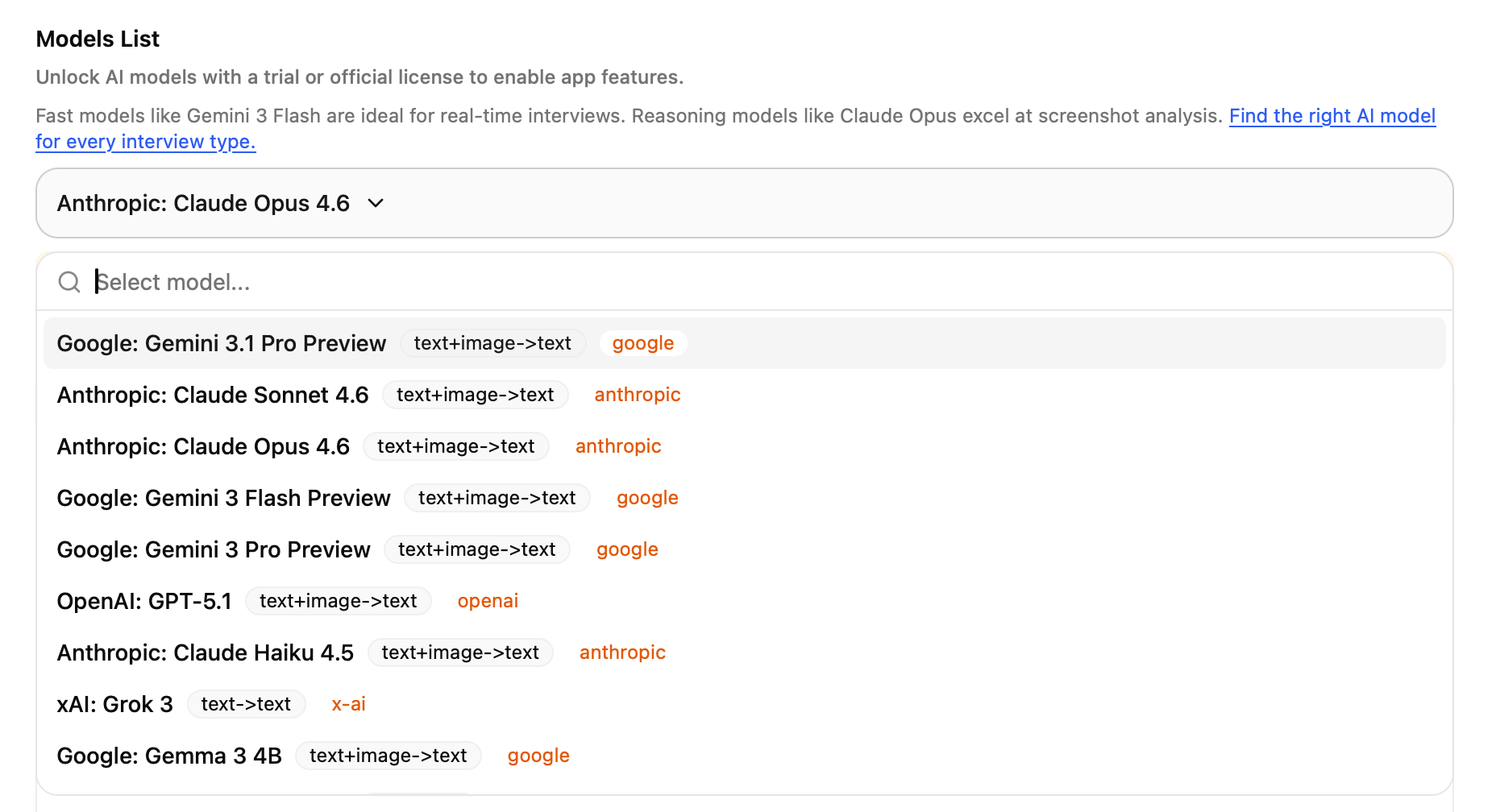
I also recommend looking for model selection. Linkjob AI, for example, allows you to switch between faster or deeper AI models. For technical or coding roles, a screenshot feature that reads code problems off your screen is a massive competitive advantage.

Top AI Tools for Remote Interviews for Job Seekers
When I started using AI tools for remote interviews for job seekers, I realized how much easier and less stressful the process could be. Let me walk you through some of the popular platforms and how I use them to prepare for interviews, improve my resume, match jobs, and also provide live support synchronously for remote interviews.
The live supporting Copilot - Linkjob.ai
If you need real-time support during a live session, linkjob.ai is the holy grail, functioning as an invisible AI interview assistance. Unlike older tools that required awkward tab-switching, this is built for invisible searching.
One of its key features is a semi-transparent overlay that is invisible to screen-sharing software, such as Zoom, Teams, Google Meet, HackerRank, and CoderPad.
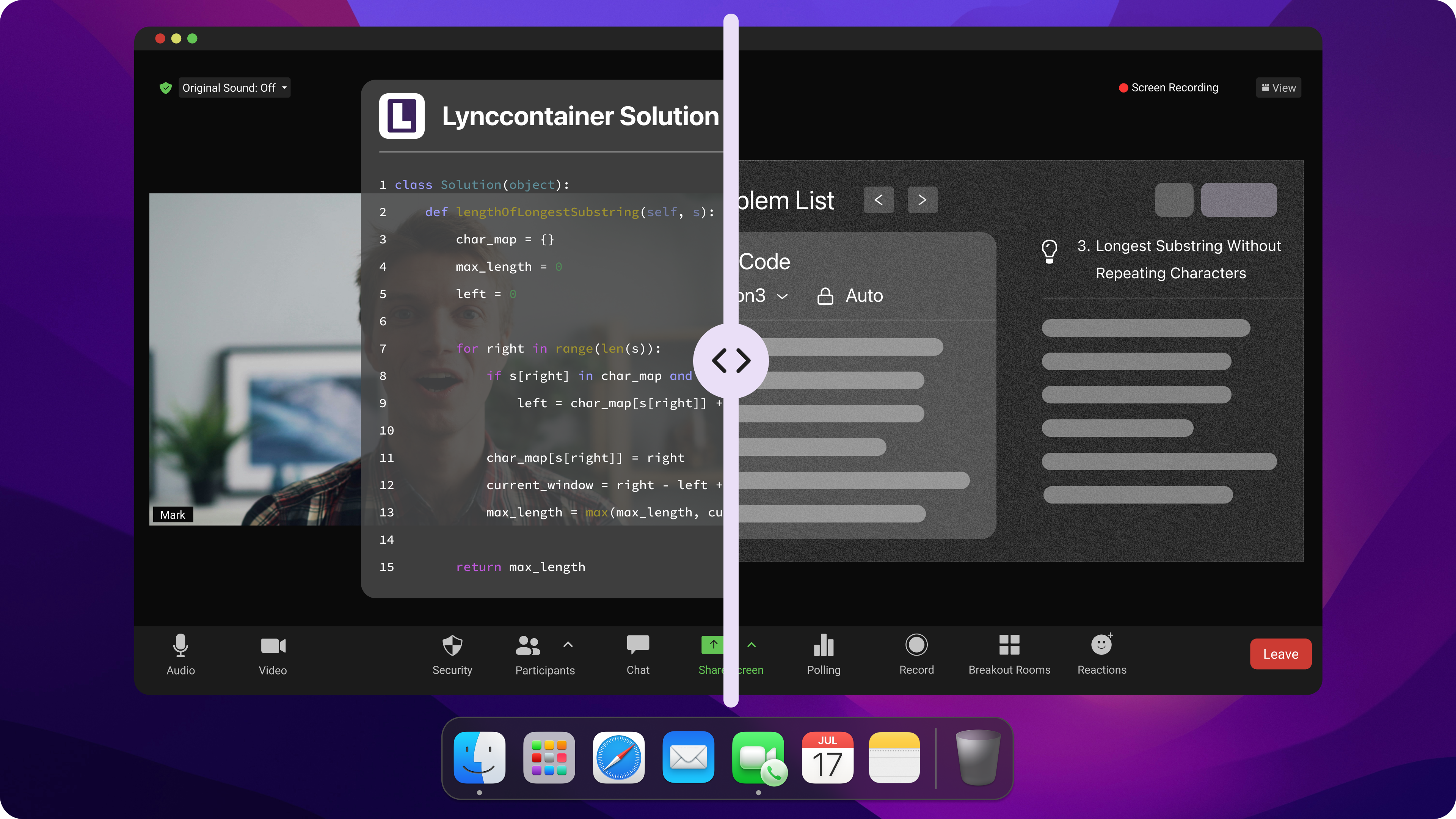
Instant real-time assistance: We’ve all had that moment where a recruiter asks a curveball question like, "How would you handle a sudden 10x spike in users without the whole site breaking," and your brain just...resets. In 2026, those awkward "umms" and "let me thinks" are deal-breakers. That’s honestly why I started using this. The response time is basically instant.
Because it’s listening to the audio and running on the latest GPT-5.1, Gemini 3.1 Pro, and other top-tier models, the key points start appearing on my screen before the interviewer has even finished their sentence. I don't use it to read word-for-word since that sounds really robotic. Instead, I use the bullet points to keep me on track. It’s like having a whisper in my ear, reminding me of the technical details I might have forgotten under pressure. It lets me pivot without missing any info and stay focused, so I still sound like me—just a much more composed version of myself.
Live coding interview support: For the senior-level roles I'm targeting, the right answer alone isn't enough — it's about the vibe. How you construct your thoughts, how you formulate your point, how you carry yourself when the pressure is on. And nowhere is that more exposed than in live coding rounds, where most people quietly fall apart — not because they don't know the material, but because thinking out loud while someone watches your every keystroke just breaks your flow. With Linkjob.ai running in the background, I get real-time hints on approach, edge cases I might've missed, and complexity trade-offs I can naturally weave into the conversation to signal genuine architectural thinking. So instead of freezing on a dynamic programming problem or blanking on the optimal data structure, I'm already walking through my reasoning like someone who's been here a hundred times. The interviewer sees someone calm, methodical, and sharp — because the cognitive load of retrieval is handled, leaving me free to actually connect with the problem in front of me.
HireVue Virtue Job Tryout- The Best Remote Interview Simulation Tools
We all recognize HireVue as the industry standard on the recruiter side, but for job seekers, it could also functioned as a "delivery coach". In 2026, it has expanded beyond simple video recording to include game-based psychometric assessments and virtual job tryouts. Since you'll run into this at places like Goldman or Amazon, it’s all about mastering that 'interview mode' version of yourself.
Optimizing Your Performance
To really nail a HireVue interview, I’ve found that understanding their Skills Validation Framework is key. It’s designed to assess job-specific skills, cognitive abilities, and behavioral traits all at once. Because the system also uses Automated Candidate Screening to route qualifications efficiently, I always make sure to prepare STAR stories (Situation, Task, Action, Result) before I hit record. I’ve learned the hard way that using specific numbers and keywords from the job description helps the AI recognize my fit for the role.
Pros and Cons:
Pros: It allows me to showcase my personality and speaking skills in a way a resume can't in a remote interview, offers flexible scheduling, and helps reduce human bias in the early stages of hiring.
Cons: The "one-way" nature of the video can feel impersonal, and it’s common to feel extra stress when being recorded by an AI rather than a person when preparing for remote interviews.
Best Use Cases:
I use HireVue practice mode specifically when I know my next interview will be async — the kind of remote interview where I record my responses and a human watches later. The format is different enough from a live conversation that dedicated practice makes a real difference. My top tip: prepare three to four STAR-format stories in advance, load them with specific metrics, and run them through HireVue until your delivery feels natural rather than rehearsed.
Jobright - Bridging the Skill Gap before remote interview
Jobright stands out in 2026 because it functions as a full-cycle "copilot" rather than a simple search engine. It’s built to bridge the gap between finding a job and actually being qualified for it. Its Orion AI assistant acts like a 24/7 career mentor, analyzing over 10 million job descriptions to tell you exactly why you are a fit or what skills you’re missing.
I am a huge fan of Jobright’s job feed - everything is verified so I am not wasting anytime on ghost jobs. I can apply quickly but still personalize my applications. The clean design also help me to get stuff done without hitting hundreds of pop-ups.
Feature | Jobright | Other Tools |
AI Resume Builder | Yes (ATS-friendly in <3 ) | Varies |
Smart Job Matching | Yes (Match Score % based) | Rarely |
Mock interview Coaching | Yes (Orion assistant) | No |
Job Listings Aggregation | 8M+ active listings | Varies |
Application Tailoring | Yes (Auto-generated per JD) | Limited |
Resume Optimization | Yes (Keyword gap analysis) | Limited |
Cost | Free tier / $39.99 Turbo plan | Varies |
Another feature of Jobright that stands out to me is their Match Score. Instead of blind-applying, I can see a percentage rating of how well my resume aligns with a specific posting. The platform also squashes "ghost jobs" and fake listings in real-time, ensuring that the 400,000+ new roles added daily are actually worth your time.
Best Use Cases:
High-Precision Discovery: Sifting through 8 million+ listings to find the top 1% that actually match your skill set.
Strategic Networking: Using the "Insider Connections" feature to find alumni or mutual contacts at target companies for referrals.
Efficiency Scaling: Utilizing the Chrome extension to autofill complex application forms across major ATS platforms like Workday or Lever.
Why I Use It:
Jobright is perfect for shifting from "applying everywhere" to "applying where you can win." Their copilot provides specific company insights and culture notes that I use to "wow" recruiters in remote interviews. It’s the ultimate tool for organizing your search pipeline and tripling your interview rate through better targeting.
Interviews.Chat - Leveraging dual-model for remote interviews
If you’re looking for the best AI tools for remote interviews that provide access to multi models, Interview.chat is a top choice. This provides a level of versatility that users have noted is often lacking in other platforms.
The Dual Response Generation feature in Interviews.chat, while designed for multi-model flexibility, can be a significant drawback due to the cognitive load and interface clutter it creates during high-pressure remote interviews. Although the intent is to allow users to compare suggestions from various leading models like GPT, Claude, and Gemini, having two simultaneous sets of answers can make the screen feel overwhelming. In a live, high-stakes remote interview, the primary goal is to maintain an authentic voice and keep eye contact with the camera. Attempting to parse and choose between two different response sets in real time—often with only a 1–2 second window—can lead to confusion and distraction from the actual conversation
Best Use Cases:
I use this ai tool for behavioral rounds for remote interviews where the conversation flows quickly. It’s particularly strong for introverted candidates by reducing the cognitive load and performance anxiety often triggered by traditional interview settings.
How to Use AI Tools Effectively
Step-by-Step Guide
I like to keep my remote live interview organized and stress-free. Here’s how I get the most out of AI tools for remote interviews:
Curate the Context: I start by pulling verified job descriptions from Jobright. I feed these into Jobright to decode the specific "success signals" the company is looking for.
Centralized Simulation: Instead of jumping between ChatGPT for questions and feedback, I move into Linkjob.ai. It acts as a unified simulator that uses my resume to generate hyper-realistic questions while simultaneously grading my pacing and confidence.
The "Live" Safety Net: On the day of the call, I utilize Linkjob.ai’s real-time copilot. Unlike static prep tools, this provides a discreet overlay during Zoom or Teams meetings, offering instant talking points if I get hit with a curveball.
Analyze and Pivot: After the call, I review the AI-generated transcript to see where I lost my "STAR" structure. I feed those specific moments back into my practice tool to refine my delivery for the final round.
Common Mistakes to Avoid
I’ve learned that using AI tools can be a thorn if I’m not careful. Here are some mistakes I try to avoid:
Don't stare at your notes. Position your AI tool remote overlay directly under your webcam to maintain natural digital eye contact.
Blind Trust: AI can "hallucinate" answers. Never repeat a metric suggested by a tool unless you have ran a workflow at least 10 times with real examples to ensure consistent output quality before relying on it.
Stealth Failures: Ensure your support tool is a discreet desktop-level application. Browser extensions can sometimes be detected during "Full Screen" sharing sessions.
It is a mistake to build complex, multi-branch workflows when a basic AI interview assistant (like Linkjob.ai) can provides most of the benefit.
Note: The best AI tools for remote interviews should feel like a safety net, not a crutch. Use them to lower your stress so your true personality can shine through.
Choosing the Right AI Tool
Factors to Consider
When I pick an AI tool for remote interviews, I look for "stealth-first" feature. I don't just ask if it works; I ask if it can be detected by modern anti-cheating software like Glider AI or Proctorio. My decision-making process is now driven by these high-stakes factors:
Factor | 2026 Description | Why It Matters |
System-Level Stealth | Does the tool run as a desktop application with an invisible cursor and undetectable hotkeys? | Prevents detection during "Full Screen" monitoring or active tab tracking on platforms like HireVue. |
Platform Compatibility | Does it offer 99%+ compatibility with Zoom, Teams, Google Meet, and coding environments(HackerRank/CoderPad)? | Ensures seamless operation across both behavioral and technical (LeetCode/HackerRank) rounds. |
Model Intelligence | Is it powered by the latest mainstream models like GPT-5.1 or Claude 4.6 Opus? | Guarantees high-quality, human-like reasoning rather than robotic, generic responses. |
Zero-Log Privacy | Does the provider offer SOC 2 Type II compliance and data encryption? | Ensures your resume and private interview transcripts aren't used for model training or stored indefinitely. |
Real-Time Latency | Is the response speed with low latency? | A delay longer than 1 second creates "dead air" that makes it obvious you are using an assistant. |
I usually test the free version of any tool first. If it's too confusing or lacks the right integrations to major platforms, I move on. Linkjob.ai is great because it’s easy to navigate and offers a free trial, and the solid user reviews give me a lot of confidence.

Comparison Table
I like to see all my options side by side. This makes it easier to spot the best fit for my needs and budget. Here’s a quick comparison of popular AI interview tools I’ve tried:
Product | Core Features | Pros | Cons | Pricing |
Linkjob.ai | Live Copilot, Stealth Mode, Coding Assistant, & HireVue prep. | Completely invisible; uses top-tier models (GPT-5.1, Claude 4.5); 24/7 support. | Personalized settings might be confused for first time users. | $29 - $99/month |
Interviews.Chat | Real-time transcription, resume analysis, & behavioral suggestions. | Great for general behavioral rounds; supports 30+ languages. | Not optimized for advanced coding; mobile support is limited. | $19 - $69/month |
Interviewer.AI | Video screening prep, objective scoring, & emotion AI analysis. | Excellent for benchmarking soft skills & communication. | Corporate feel; focuses on screening rather than live help. | $39 - $149/month |
HireVue Virtual Job Tryout | game-based psychometric assessments and virtual job tryouts. | hands-on, realistic preview of the role to assess their own fit | can feel inhumane and anxiety-inducing | N/A (Candidate-side) |
I've spent months testing AI tools across real interviews, and the biggest shift I've seen is this: the candidates who use AI well don't use use it as a training partner and a safety net. AI prepares you to be sharper, calmer, and more specific than you'd be alone. The tools covered here address every stage of that process, from finding the right roles to walking out of the final round with confidence.
FAQ
How do I choose the best AI interview tool for my needs?
Start by identifying your biggest thorn: is it finding the right roles, preparing your answers, or staying calm during the live interview itself? Each problem has a different solution. For live support, Linkjob AI is my top recommendation — it's undetectable, fast, and works across all major platforms. For job discovery, NoDesk or Jobright. For structured practice, Interviewer.AI. You don't need one tool that does everything — you need the right tool for each stage
Will AI tools be detected when screen-sharing?
A Desktop AI interview assistance like Linkjob.ai will not be detected, other types of tools that are Chrome-Add ins and launched on mobile apps might be detected. Since most interviews happen in a browser, they’re subject to a core security rule called sandboxing. Think of it like this: the interview tab is a locked room. It can see everything happening inside that specific window, but it can’t see through the walls to look at your desktop or other open software. It simply isn't allowed to "reach out" and spy on the rest of your computer's activity
Are my personal details safe with these platforms?
This varies significantly by tool. Before uploading your resume or any personal information, read the privacy policy — specifically whether your data is used to train models and whether you can delete your data on request.
What if I’m not tech-savvy? Can I still use AI tools?
Absolutely! Most of the tools covered here were designed with non-technical users in mind. The one thing I'd emphasize: do a full test run before your first real interview. Not just launching the app, but simulating the actual screen-share environment you'll be in. That single test session will answer every question you'd otherwise have in the worst possible moment.
See Also
Top Alternatives to InterviewPal for AI Interview Help
Leading Chat Alternatives for AI Interview Support
Premier Sidekick Alternatives for AI Interview Guidance
Why People Choose Linkjob AI
Smoother interviews, coding challenges cleared, and job offers landed. See how users describe their experience with Linkjob AI—in their own words.


© Copyright 2026 Linkjob AI - All Rights Reserved.