Hiddenpro AI Review: Is This $10 Tool Worth It?


Well, it was actually during a really tough programming interview that I first gave a real-time AI interview assistant a go. At the time, I saw information about Cluely everywhere online, so I thought, why not? The features looked solid and practical in the marketing stuff, but when I tried it, Cluely's answers and feedback were often a bit too vague, and the responses too brief. I reckon this was probably down to it not being totally clear what the system was actually supposed to be used for, which eventually led me to write a full Cluely review about what frustrated me.
So I started searching for a better Cluely alternative. That's when HiddenPro AI appeared on my Instagram. Its tagline was pretty straightforward: "A compact Windows assistant designed specifically for interviews, coding challenges, screenshots, meetings and exams, featuring a discreet floating window and a $10 Premium plan."
That price piqued my curiosity enough that I decided to give it a try. I tried out HiddenPro AI myself, and I got what makes it so appealing. HiddenPro is pretty lightweight, quick to transcribe and responds with barely any delay, but compared to products like Linkjob AI, it seems a bit less polished. The interface is tiny and fixed, which makes it hard to read. You can't take screenshots while you're listening in real-time, the selection of models is limited, and HiddenPro AI's user experience feels more like a small side project.
I'd still pick Linkjob AI for my own technical interviews because I need a wider selection of models, a more practical interface, and fewer workflow compromises when programming problems get complex.

HiddenPro AI Review: What Is HiddenPro AI?
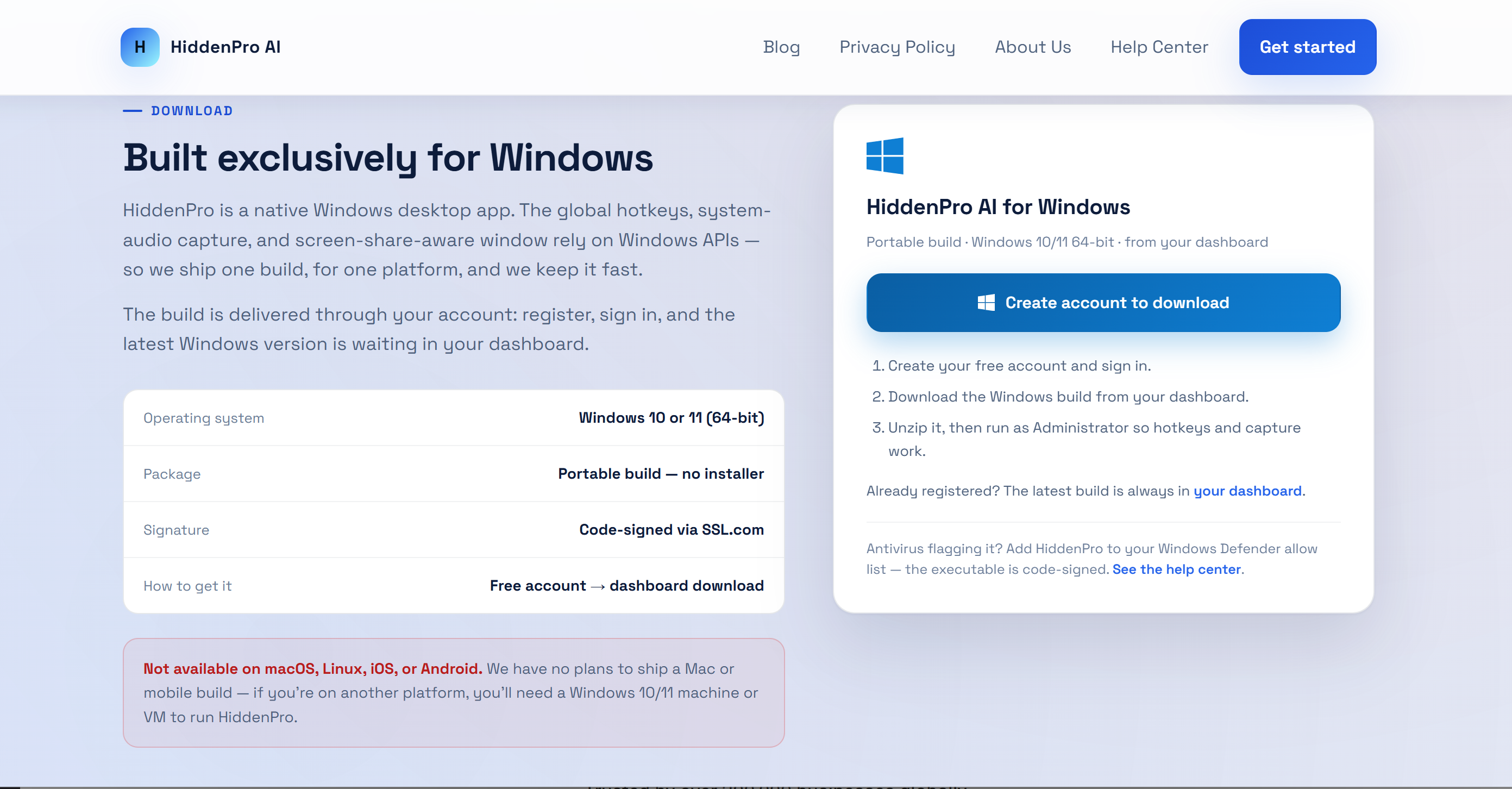
HiddenPro AI is a Windows desktop assistant. It is for interviews, meetings, studying and programming challenges. It provides AI assistance without needing to switch to a different browser tab.
It basically works like a standard AI interview assistant – a "low-key" floating assistant for Windows 10 and Windows 11. It can keep an eye on your microphone and system audio, transcribe conversations, take a look at screenshots, remember what you've been doing recently and, based on profile info like your CV and your favourite programming languages, come up with answers.
HiddenPro AI Features At A Glance
For this HiddenPro AI review, these are the features that matter most:
Feature | What HiddenPro currently offers |
|---|---|
Platform | Windows 10/11 only |
Live audio | Microphone + system audio |
Transcription | Real-time speech-to-text |
Coding help | Text and screenshot-based assistance |
Screenshots | Up to five captures supported by the current site |
Personalization | Resume/profile + programming language |
Hotkeys | Voice, screenshot, analysis, hide/restore |
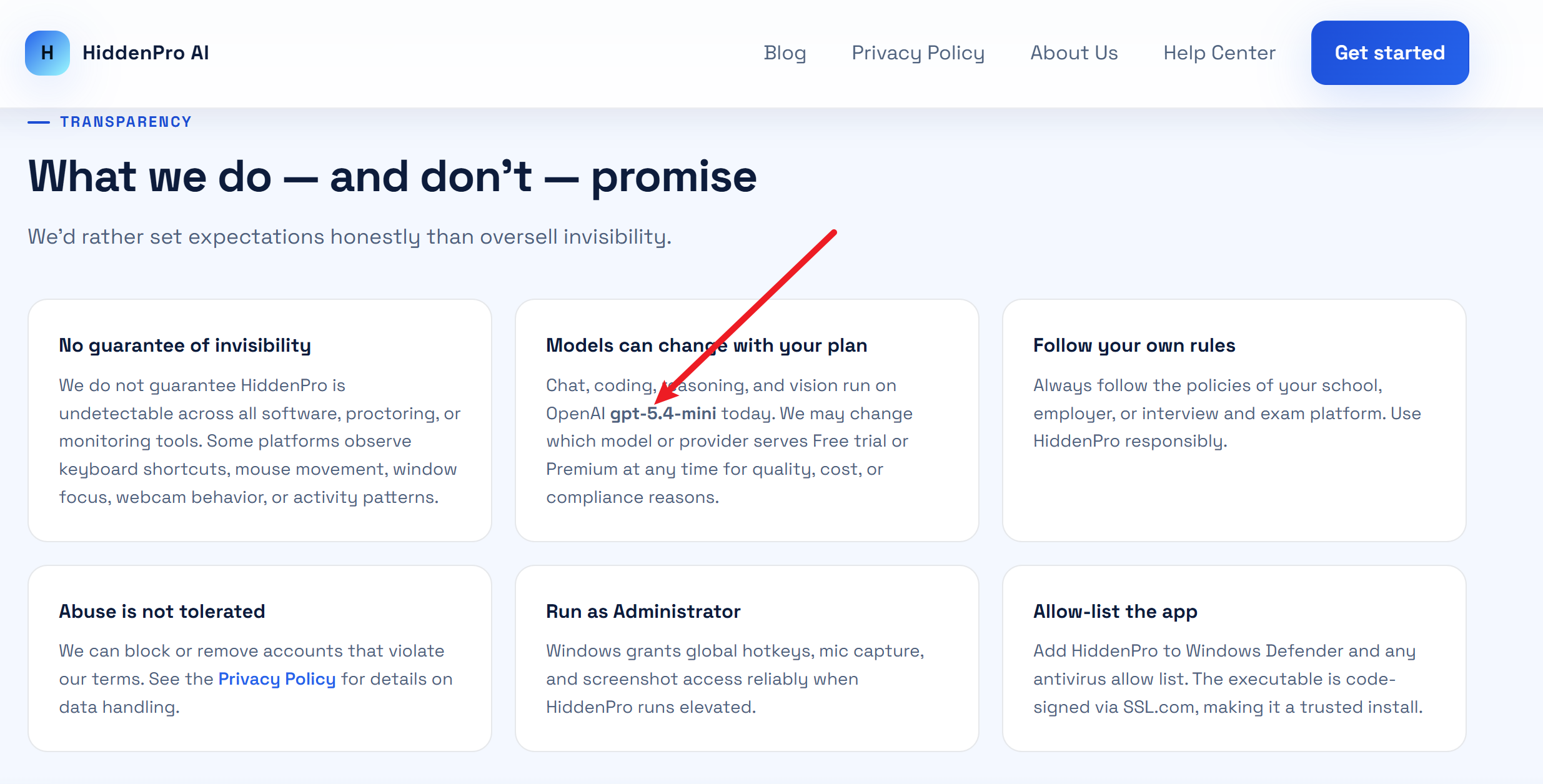
AI model | OpenAI GPT-5.4-mini |
Free use | 5 trial queries |
Premium | $10 for 30 days / 500 queries |
The text is really small and there's not much else there. Just to let you know, HiddenPro AI does actually list the model it uses. GPT-5.4-mini. This model isn't exactly cutting-edge, especially with how quickly LLMs are being updated these days. But at least it's transparent, which gives me a bit more confidence in it.
The Product Is Extremely Focused
HiddenPro does not try to become an entire career platform.
It is basically built around four actions:
Listen to a conversation.
Transcribe what is happening.
Analyze questions or screenshots.
Display a response in a small floating window.
I really like this approach – it's simple and not overly complicated, and it doesn't try to do too much and end up doing each feature poorly. So, my main question when I was doing my HiddenPro AI review was whether these four interactive features and the overall user experience are good enough to make a product that users will be able to rely on during high-pressure technical interviews.
HiddenPro AI Review: How New and Trustworthy Is It?
HiddenPro has existed online longer than its current public footprint might suggest. The hiddenproai.online domain was registered on June 14, 2025, so the website is now more than a year old. But that does not mean HiddenPro has been a mature commercial product for that entire period.
The Public Timeline Tells A Different Story
I found a few posts by the developer that help to piece together what happened at the start:
Back in September 2025, HiddenPro was still being called a side project that had only just been launched.
Back in October 2025, the developer revealed that after nine months of hard work, they'd finally landed their first paying customer.
Then in December 2025, another founder posted that HiddenPro had been developed independently for about six months and asked how to attract more users. This was because they had received almost no response on Product Hunt and Twitter up to that point.
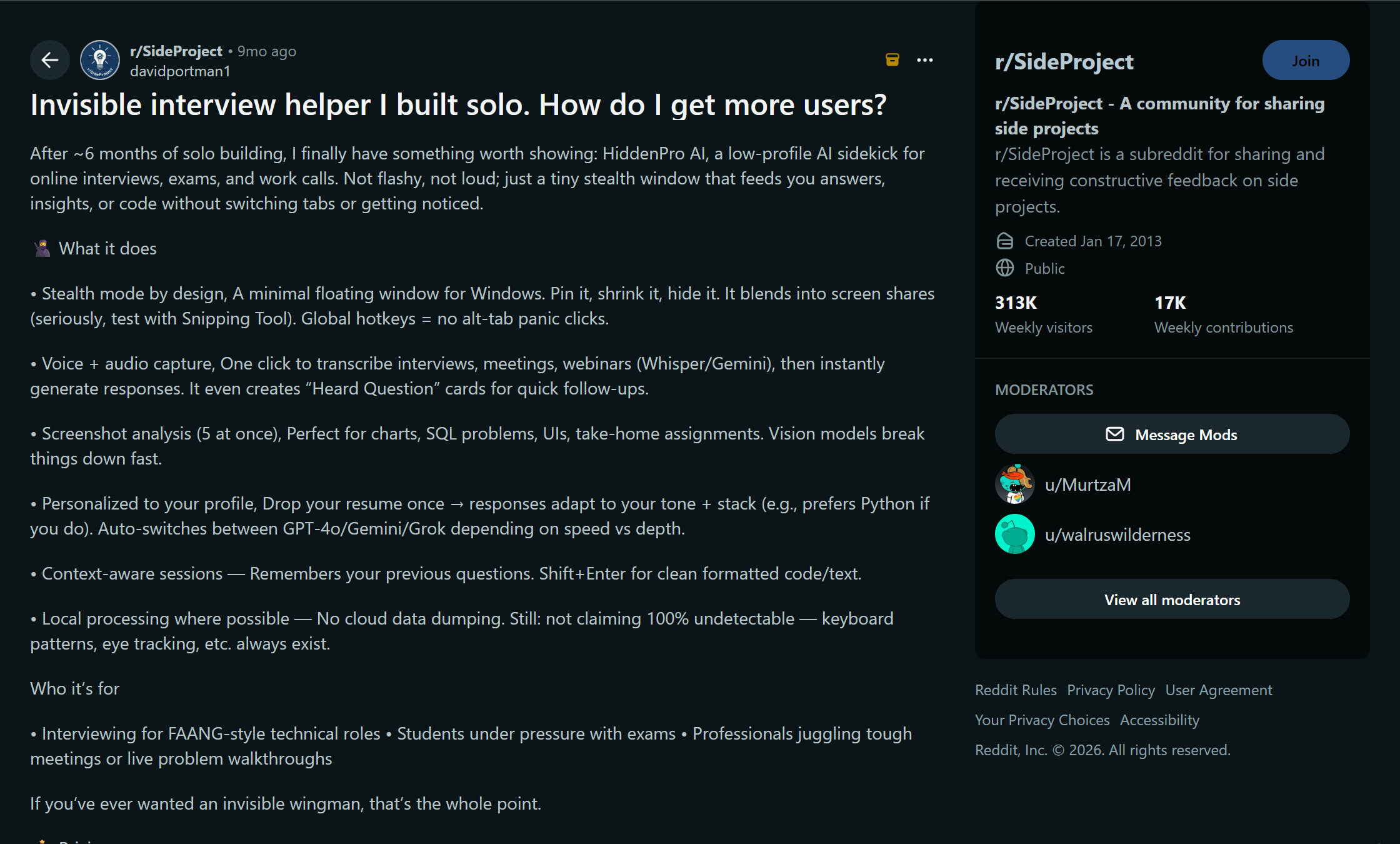
This makes HiddenPro seem more like a newbie on the scene; after all, it really hadn't been around for very long.
Independent HiddenPro AI Reviews Are Still Scarce
There's at least one third-party review of HiddenPro AI from ShadeCoder, so it's not completely accurate to say there are no related reports at all. But there's hardly any chatter about it compared to other products like Final Round AI, Cluely, Parakeet, or LockedIn AI.
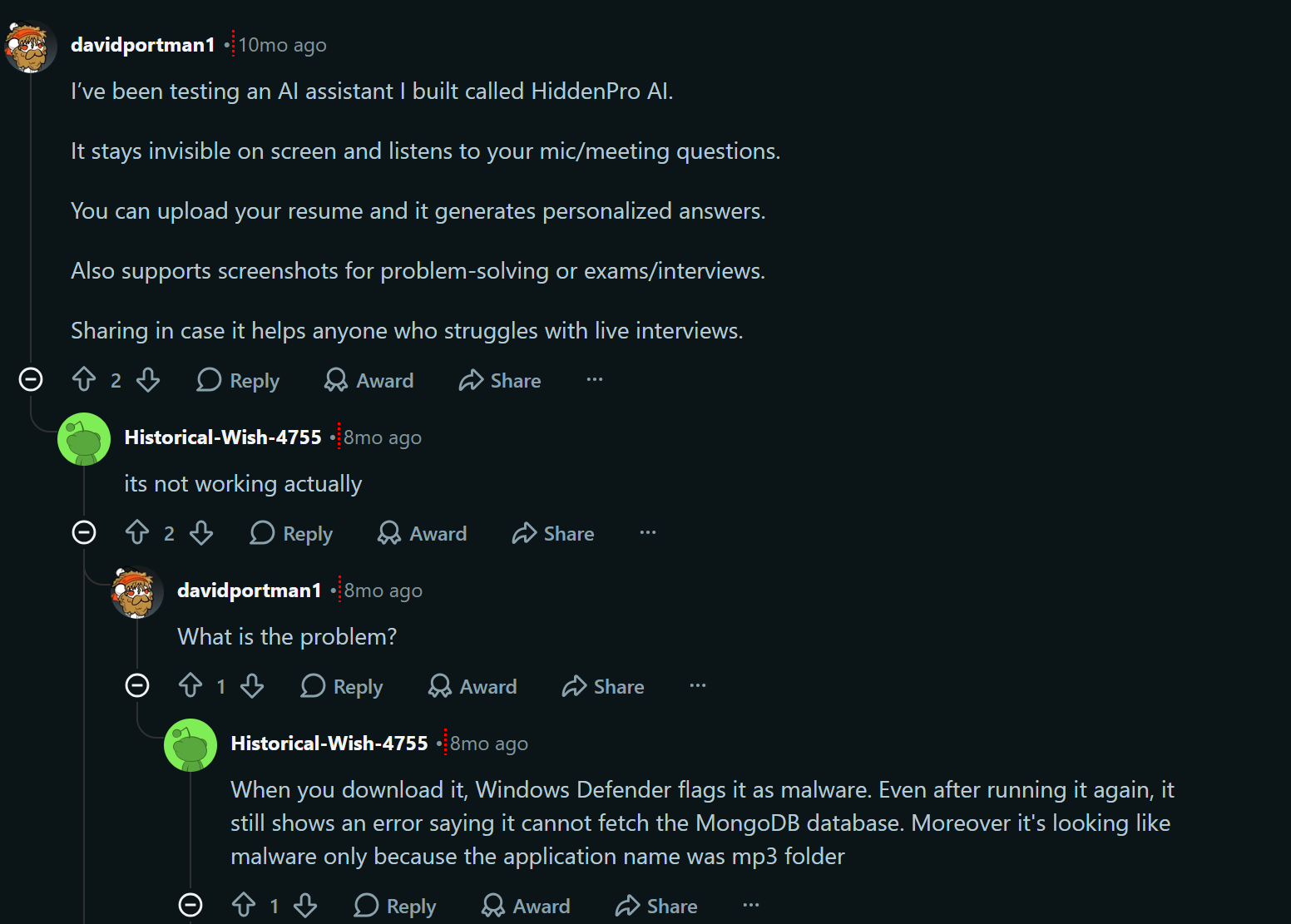
The Reddit situation isn't looking good either. When you search, the first posts that appear seem pretty dodgy, like promotional stuff, and if you scroll down, you find posts from real users saying that HiddenPro AI isn't working properly.
My credibility assessment:
HiddenPro seems to be a real, actively developed standalone product, but there aren't enough user experience reports from independent users at the moment.
It's worth pointing out that the HiddenPro website currently shows metrics related to its private beta, like an average rating of 4.9 out of 5, over 2,000 Windows downloads in 90 days, and a 92% recommendation rate. As they're the company's own metrics, I'm not that bothered about mentioning them in this HiddenPro AI review.
HiddenPro AI Review: Pricing Is One of Its Biggest Strengths
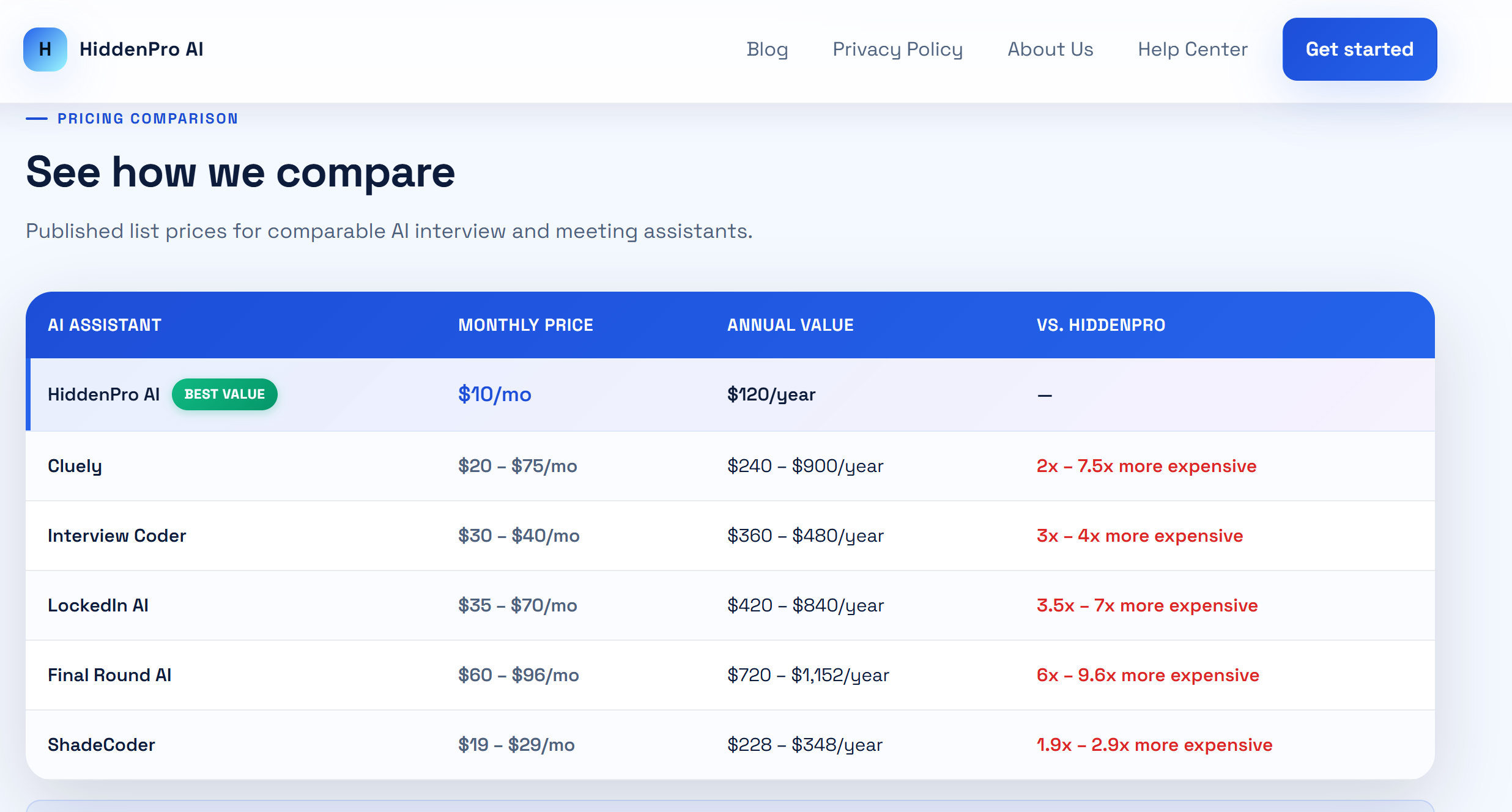
If HiddenPro has one advantage that is impossible to ignore, it is price. The current Premium offer costs $10 for 30 days and includes 500 queries. It does not automatically renew. Once the 30 days end, you choose whether to pay again.
HiddenPro Pricing
Plan | Price | Usage |
|---|---|---|
Free Trial | $0 | 5 queries |
Premium | $10 / 30 days | 500 queries |
Auto-renewal | No | Pay again only if wanted |
Why I Like This Pricing Model
In this Hiddenpro AI review, its pricing model has these pros:
No annual contract required;
No automatic renewal;
No complicated points system across the ten pricing plans;
All core features are included in a single product;
500 premium queries are more than enough for a short-term job search;
And it's only $10. I think pretty much anyone who sees it will be tempted to give it a try.
HiddenPro AI Review: My Hands-On Test
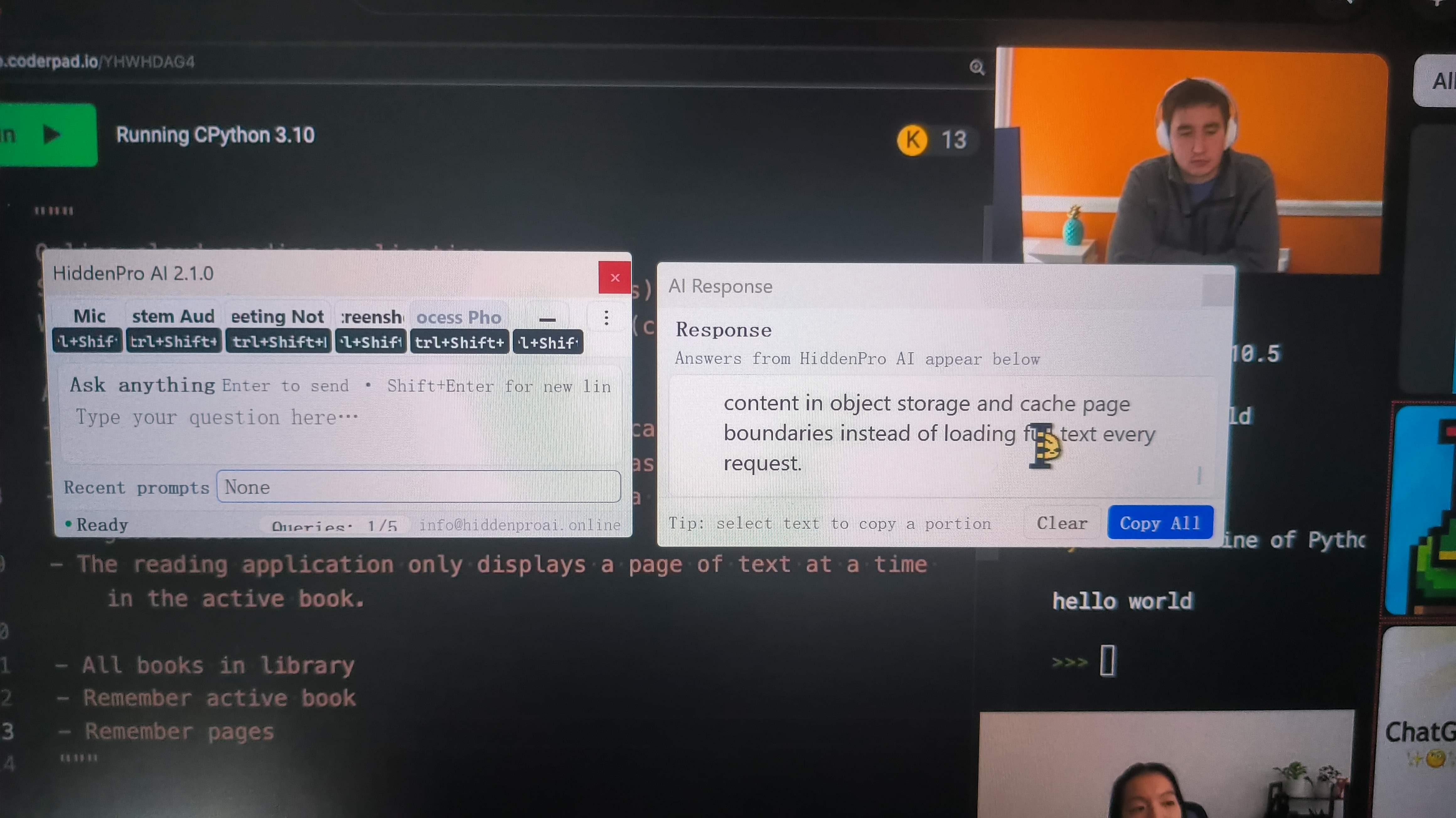
I tried out HiddenPro AI by simulating a real-life scenario of using an interview assistant. I used a mock SWE interview video that involved system design and shared my screen with a friend to check whether HiddenPro AI could remain invisible, as well as to address other questions:
Will the floating window interfere with screenshots?
Is the transcription fast enough?
Is it easy enough to read the answers?
Can I move between the live questions and the coding screenshots without interrupting the interview?
How does the AI do with technical questions?
What HiddenPro did surprisingly well
My basic results were better than I expected:
Test | Result |
|---|---|
Setup | Simple |
Transcription speed | Fast |
Transcription accuracy | Good in my test |
Answer latency | Fast / decent |
Screenshot capture visibility | Hidden in my standard test |
Recording visibility | Hidden in my standard test |
App resource footprint | Lightweight |
Price | Excellent |
Screen-Capture Behavior Was Good In My Test
I tested this floating app using standard screenshot and screen recording processes. During these tests, the HiddenPro window didn't show up in the screenshots or screen recordings. My mates also said they didn't see it.
This fits with HiddenPro's positioning as a "screen-sharing-compatible" Windows application, even though its official website currently doesn't promise "invisibility everywhere". The company that made HiddenPro AI has said that it can't guarantee the app won't be detected in all monitoring, proctoring or screen-sharing environments. I guess it won't be as hidden when certain proctoring software is running.
HiddenPro AI Review: The Tiny Window Became a Serious Problem
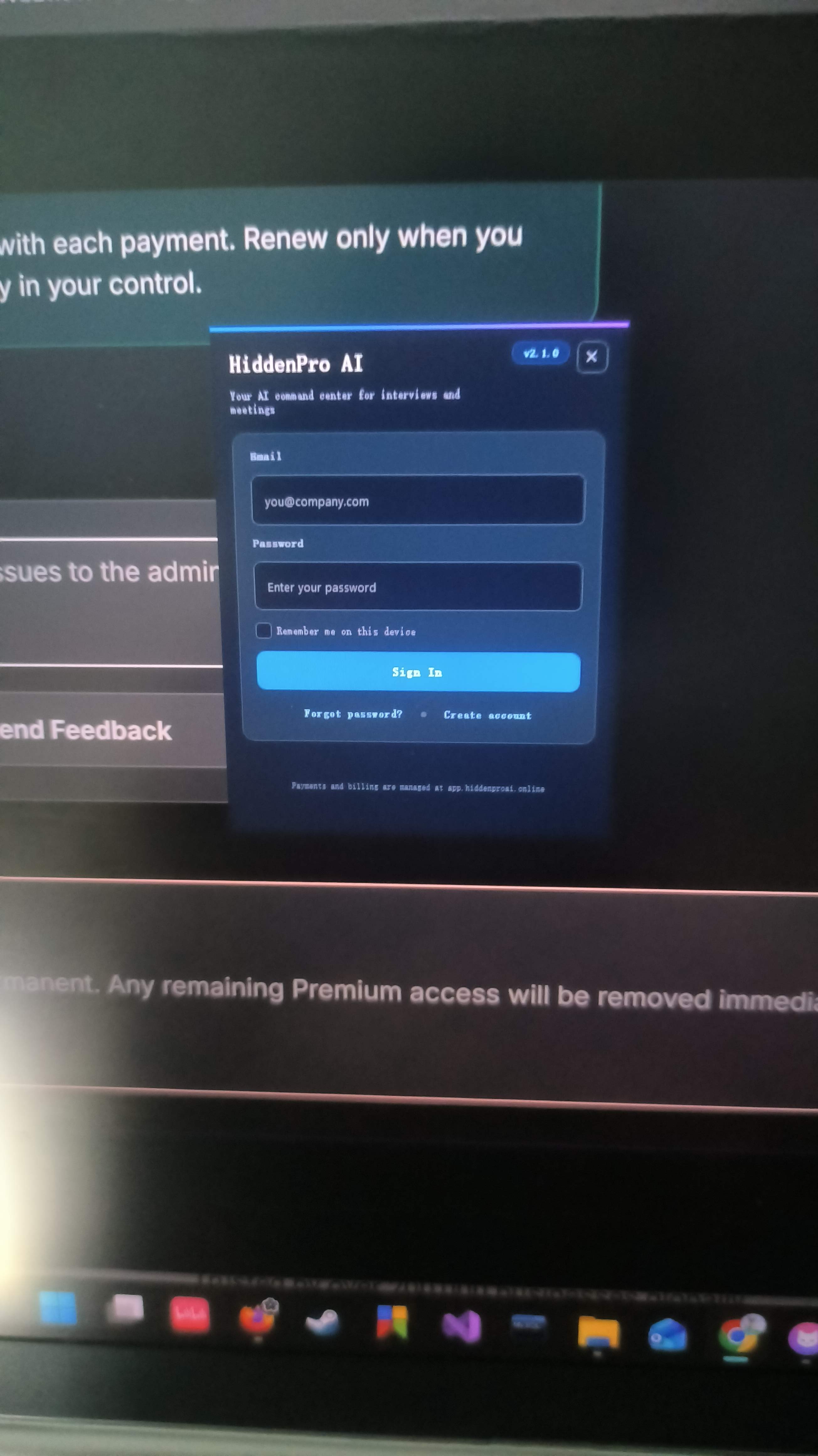
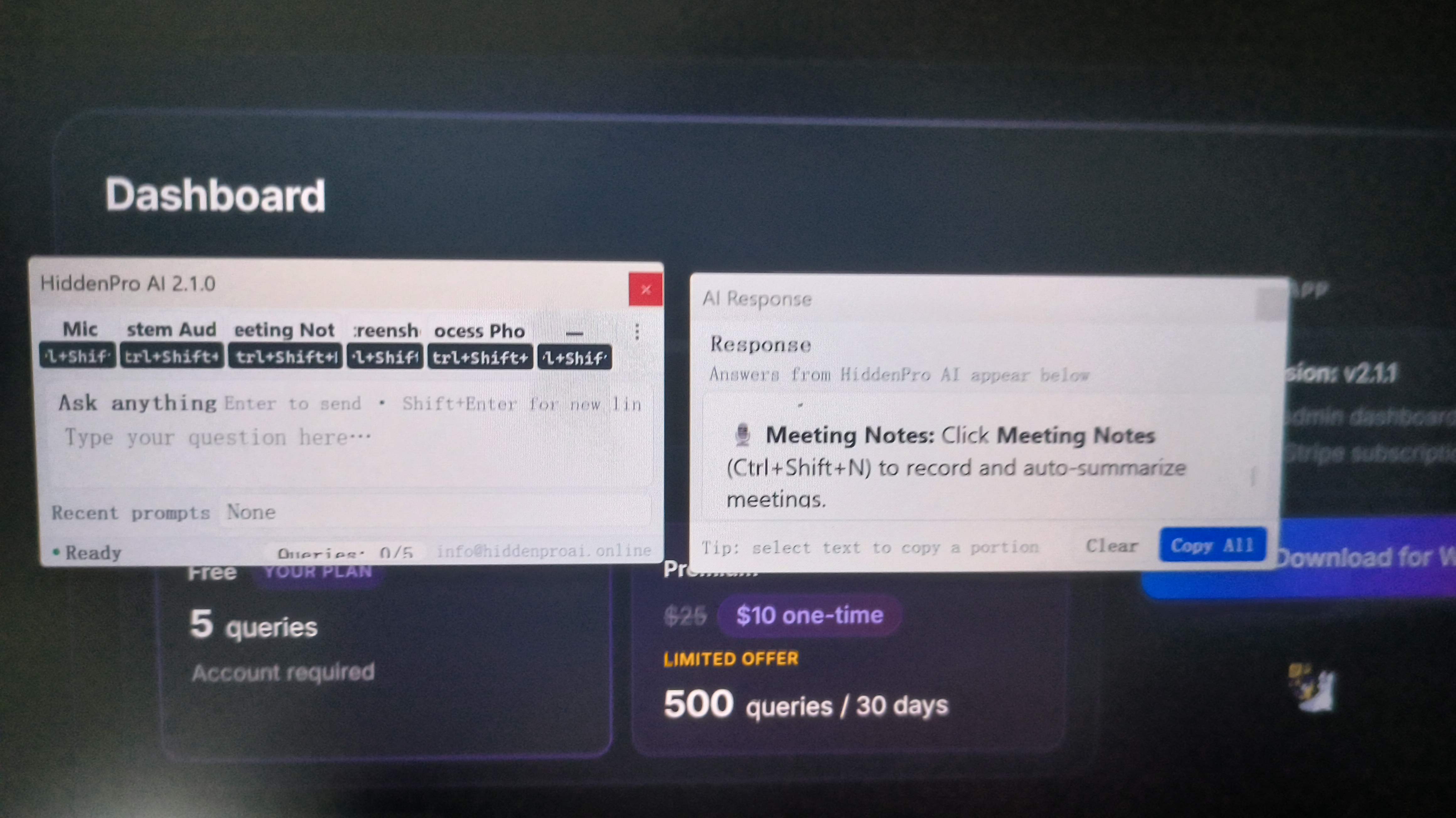
When I reviewed HiddenPro AI, the main problem I found was actually with the interface. This is probably because HiddenPro was originally designed to take up as little screen space as possible.
But the version I tried took this idea a bit too far. I mean, the window that popped up when I logged in was so small I could see the individual pixels in the font.
The Interface Problem In One Table
What HiddenPro optimizes for | What I experienced |
|---|---|
Tiny footprint | Very little readable space |
Minimal controls | Harder to understand current state |
Small answer window | Long answers difficult to scan |
Low distraction | More effort required to read |
Fast hotkey workflow | Hard to recover if I lose track of the response |
It Feels Like an Indie Side Project Rather Than a Commercial SaaS
If Hiddenpro AI is positioned as a free, open-source, nonprofit tool created by an independent developer, then its minimalist design is understandable. It doesn't take up much space on your screen, it's quick, and it can handle basic text tasks.
But as a paid commercial product designed specifically for the iterative cycles of software engineering that shape career paths, it feels a bit rough around the edges. It doesn't have the key features that modern job seekers expect, like customisable prompts, model switching, speaker identification, and syntax highlighting for structured code.
HiddenPro AI Review: Screenshot Analysis Interrupts the Live Workflow
The most frustrating user experience was when I switched from asking questions out loud to looking at content on the screen. HiddenPro AI boasts a "smart screenshot" feature, saying the app can capture up to five screenshots for thorough or personal analysis. In theory, this is perfect for programming.
But when I actually tested it, the workflow felt a bit clunky.
In standard programming interviews on platforms like CoderPad or HackerRank, you usually need to analyse on-screen prompts that include text, initial code, and sample test cases. But in Hiddenpro AI:
I can't run real-time speech transcription and screenshot analysis at the same time.
To get a handle on the problem, I have to stop the real-time speech transcription engine manually.
Then, I press the keyboard shortcut to take a screenshot and press another shortcut to send the image for analysis.
Once the output is generated, I have to squint at that tiny, non-resizable window to read the code, while the microphone's audio processing remains paused.
This manual, multi-step process will definitely disrupt the flow of the interview and cause noticeable delays, which any good interviewer will pick up on.
HiddenPro AI Review: Does GPT-5.4-mini’s Speed Really Make Up for Its Lack of Quality?
Yes, GPT-5.4-mini aligns perfectly with HiddenPro’s emphasis on a lightweight approach—but it can, and is only capable of, providing relatively good answers to the following types of questions:
Standard behavioral questions;
Basic programming problems;
SQL;
Common data structures;
API concepts;
Simple debugging;
Definitions of technical terms;
Meeting summaries;
Straightforward technical explanations.
In scenarios requiring more powerful models—and in more challenging technical interviews—other job seekers and I face the following:
Multi-step algorithmic reasoning;
Non-obvious edge cases;
Trade-offs in system design;
Concurrency;
Distributed systems;
Performance bottlenecks;
Code debugging when the initial explanation is incorrect.
I reckon that's one of the reasons HiddenPro AI is so affordable. But if it doesn't pass the interview or help me solve my problems effectively, no matter how cheap it is, I won't spend any money on it.
Comparing Alternatives: Hiddenpro AI Review vs. Linkjob AI & ShadeCoder
To put my Hiddenpro AI review into proper market context, I benchmarked it against three other prominent AI interview assistants: Linkjob AI, ShadeCoder, and Final Round AI.
If you are researching alternative copilots, reviewing dedicated industry breakdowns like our ShadeCoder review or exploring general AI interview tools provides valuable perspective on how different architecture types perform under real test conditions.
The table below provides a detailed head-to-head comparison:
Metric / Feature | Hiddenpro AI | Linkjob AI (Top Recommendation) | ShadeCoder | Final Round AI |
Stealth Architecture | Basic App Window Hiding | OS Driver-Level Stealth | Desktop Overlay Mode | Desktop Window Overlay |
Focus Theft Protection | ❌ Standard Click Capture | Mechanical Pass-Through (0 | ⚠️ Partial Focus Risk | ❌ Standard Window Focus |
LLM Tier & Transparency | ❌ Undisclosed / Unknown Model | 120+ Top LLMs (Claude Opus, GPT-5.6) | Standard GPT Models | Proprietary Managed Pipeline |
UI & Readability | ❌ Microscopic & Unresizable | Resizable Multi-Line Sidebar & Cards | Floating Code Box | Comprehensive Dashboard |
Screenshot Workflow | ❌ Manual Pause & Hotkey Required | Seamless Multi-Region Capture | Single Image Hotkey | Integrated Prompt Capture |
Audio Processing Latency | Fast (1.5 - 2.5s) | Ultra-Fast (1.1 - 1.8s) | Moderate (3 - 5s) | Fast (2 - 4s) |
Pricing & Value | Low Cost / Very Basic | $29.99/mo (Flat Annual Rate) | $49.00/mo | $25–$35+/mo (Annual Tiers) |
Why Linkjob AI Outperforms Hiddenpro AI Across Every Category
When comparing the results of this Hiddenpro AI review to enterprise alternatives, Linkjob AI clearly stands out as the ultimate choice for technical job seekers. Here is why:
True OS Driver-Level Stealth: While Hiddenpro AI uses standard window hiding, Linkjob AI operates below display capture layers at the operating system driver level on Windows and macOS. It remains 100% invisible during full-desktop screen sharing across Zoom, Teams, CodeSignal, and HackerRank.
Mechanical Click Pass-Through (Zero Focus Theft): Linkjob AI features a transparent pass-through interface. You can click, scroll, and type directly inside VS Code or browser tabs through the overlay without transferring active window focus, preventing dangerous
window.onblurtab-switch flags on proctored portals.120+ Premier Reasoning Engines: Instead of forcing you to rely on a mystery model, Linkjob AI provides instant access to world-class LLMs including Claude Opus 5, Claude 3.5 Sonnet, GPT-5.6 Sol, and Gemini 3.1 Pro. It solves LeetCode Hard problems and complex architectural questions with optimal space/time complexity in 1.1 to 1.8 seconds.
Fluid Multi-Region Screenshot Integration: You can seamlessly capture problem statements, IDE templates, and error logs simultaneously without interrupting live audio transcription.
Final Verdict: Is Hiddenpro AI Worth It After This Hiddenpro AI Review?
Summing up this Hiddenpro AI review, the platform is an interesting experiment in budget-friendly interview assistance, but it falls short of what modern developers need during high-stakes technical rounds.
+-----------------------------------------------------------------------------------+
|                               FINAL VERDICT MATRIX                          |
+-----------------------------------------------------------------------------------+
|  Hiddenpro AI Score: 5.5 / 10                                               |
|  - Pros: Cheap, basic app invisibility, fast audio transcription.           |
|  - Cons: Microscopic unresizable UI, unknown LLM quality, manual workflow clash. |
|                                                                             |
|  Recommendation:                                                           |
|  - Use Hiddenpro AI only for casual, non-proctored, low-stakes Q&A.         |
|  - Choose Linkjob AI for high-stakes technical loops and LeetCode rounds.   |
+-----------------------------------------------------------------------------------+
If you are taking casual, non-technical screening calls where you only need basic text notes and don't mind reading from a microscopic window, Hiddenpro AI offers a cheap starting point. However, if your career trajectory depends on clearing senior software engineering loops, solving dynamic programming problems on the fly, and maintaining 100% screen-share stealth, relying on an unpolished tool with an undisclosed LLM introduces unacceptable risks.
For serious candidates, investing in a robust, driver-level copilot like Linkjob AI is the smartest decision you can make for your job search in 2026.
HiddenPro AI Review FAQ
Which LLM does HiddenPro AI use?
OpenAI GPT-5.4-mini. HiddenPro currently says the same model powers text and vision, although the provider/model may change later.
Does HiddenPro AI work on macOS?
No. It currently supports Windows 10 and 11 only, and the official site says no Mac, Linux, iOS, or Android version is planned.
Is HiddenPro AI invisible during screen sharing?
Not guaranteed. It stayed outside the ordinary captures I tested, but HiddenPro itself explicitly refuses to guarantee universal undetectability.
Is HiddenPro AI good for coding interviews?
Yes for straightforward help, but I would prefer stronger model choices and a larger interface for difficult coding rounds.
Is HiddenPro AI a mature product?
Not yet, in my view. It works, but its limited interface, Windows-only availability, thin independent review history, and indie-product workflow still make it feel early-stage.
See Also
An Honest Look At Beyz AI Performance And True Value
Testing LockedIn AI In Real Conditions For An Honest Rating
Evaluating Parakeet AI Pros Cons And Actual Interview Results Daily
My Personal Experience And Complete Review Using InterviewPal This Year
Top Five Hidden Artificial Intelligence Tools For Job Interviews Today
