My Real InterviewPal Review and Experience: 2026 Update

Throughout my job search, I've consistently used InterviewPal to refine my resume and conduct mock interviews. Recently, I subscribed to its Interview Copilot feature, but it proved ineffective—it doesn't support technical interviews and lacks a dedicated page to manage subscriptions.
This falls short of my real-time interview needs. I require a comprehensive AI interview assistant to help me navigate both behavioral and technical interviews.
I ultimately chose Linkjob. It operates entirely in the background, eliminating human intervention and achieving true invisibility during live interviews while providing users with the latest, most powerful AI models. For many job seekers, this complete invisibility combined with stronger AI reasoning capabilities significantly enhances the smoothness and reduces the pressure of the interview experience.
Besides Linkjob, I also tested Parakeet AI and Final Round AI. If you're interested in them, you can read my reviews: Parakeet AI Review, Final Round AI Review.
Key Points
Equipped with a wide range of features, it can help me edit my resume and conduct mock interviews in addition to serving as an interview copilot.
Runs on desktop applications without triggering detection by interview platforms.
Unable to answer coding questions, only supports behavioral interviews, failing to meet my interview needs.
Cluttered interface design, no free trial available, lacks clear labeling of features, supported platforms, etc.
InterviewPal Real Performance in Tests
Real-Time Answers & Follow-up Questions
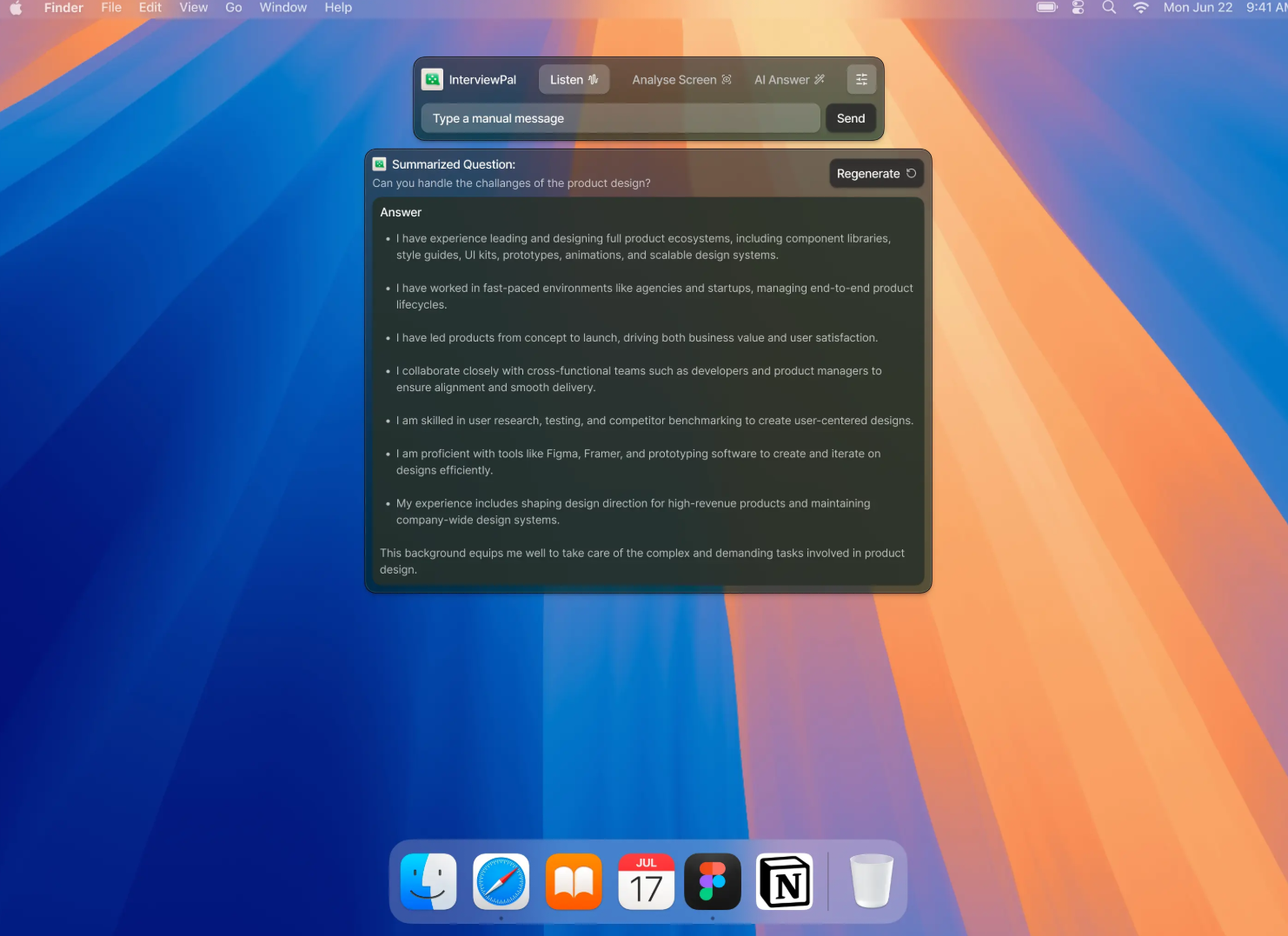
InterviewPal uses automatic speech recognition to address issues encountered during interviews, and in most cases, it's highly accurate without requiring any revisions from me.
Furthermore, since I previously edited my resume and conducted mock interviews on InterviewPal, their model has become very familiar with my personal circumstances. When answering questions, it feels remarkably human-like, aligning perfectly with my personal style. During follow-up questions, it also connects back to previous responses, performing exceptionally well. (I'm unsure whether high-quality responses would be achievable without prior use of its resume editing and mock interview features.)
However, InterviewPal's recognition and response time is somewhat lengthy, which would be extremely awkward in a real interview. I'd have to feign deep thought while waiting for its answers—a fatal flaw in live interviews that might even raise suspicions of AI cheating among interviewers.
Detection Avoidance & Stealth
Online interview platforms primarily monitor candidates through the following methods:
Screen sharing: Interviewers/proctors can view everything you share via Zoom, Google Meet, or the platform's built-in tools—with no exceptions.
Record the entire answer-submission process: A video replay featuring a live presenter will be provided later to check for any unusual actions.
Code Paste Detection: flags extensive or frequent pasting within the code editor—considered potential cheating.
Tab Switching/Window Focus Loss: Detects when you leave the interview tab or click outside the browser, though it cannot see what you switch to.
InterviewPal employs system-level integration, making it undetectable except as a transparent, always-on-top window on my physical screen.
Based on my testing, InterviewPal remains invisible even during full-screen shared sessions. As a desktop application rather than a browser-based web app, it avoids detection by active tab monitoring. They also excel in detail handling, remaining absent from the menu bar, Dock, and process lists, achieving complete concealment.
Beyond a few potential vulnerabilities that could potentially reveal its presence, I found no other significant issues with InterviewPal. However, if you plan to use a interview assistant, I strongly recommend thorough testing before interviews to ensure it remains undetectable under any circumstances.
However, the official InterviewPal website provides support documentation exclusively for the Zoom, Google Meet, and Microsoft Teams platforms. I recommend testing it or consulting its official support before your formal interview.
My Experience about InterviewPal
Cons: Unable to assist with technical interviews
One major drawback of InterviewPal is that it only works for behavioral interviews and cannot handle coding interviews—something I discovered only after paying. They don't offer a free trial, don't clearly list all features on the payment page, and provide no instructional videos. Based on previous experience, I trusted the product and paid upfront, only to find it didn't meet my needs. This left me extremely disappointed.
Problem: Chaotic Page Design and Virtually Non-existent Product Descriptions
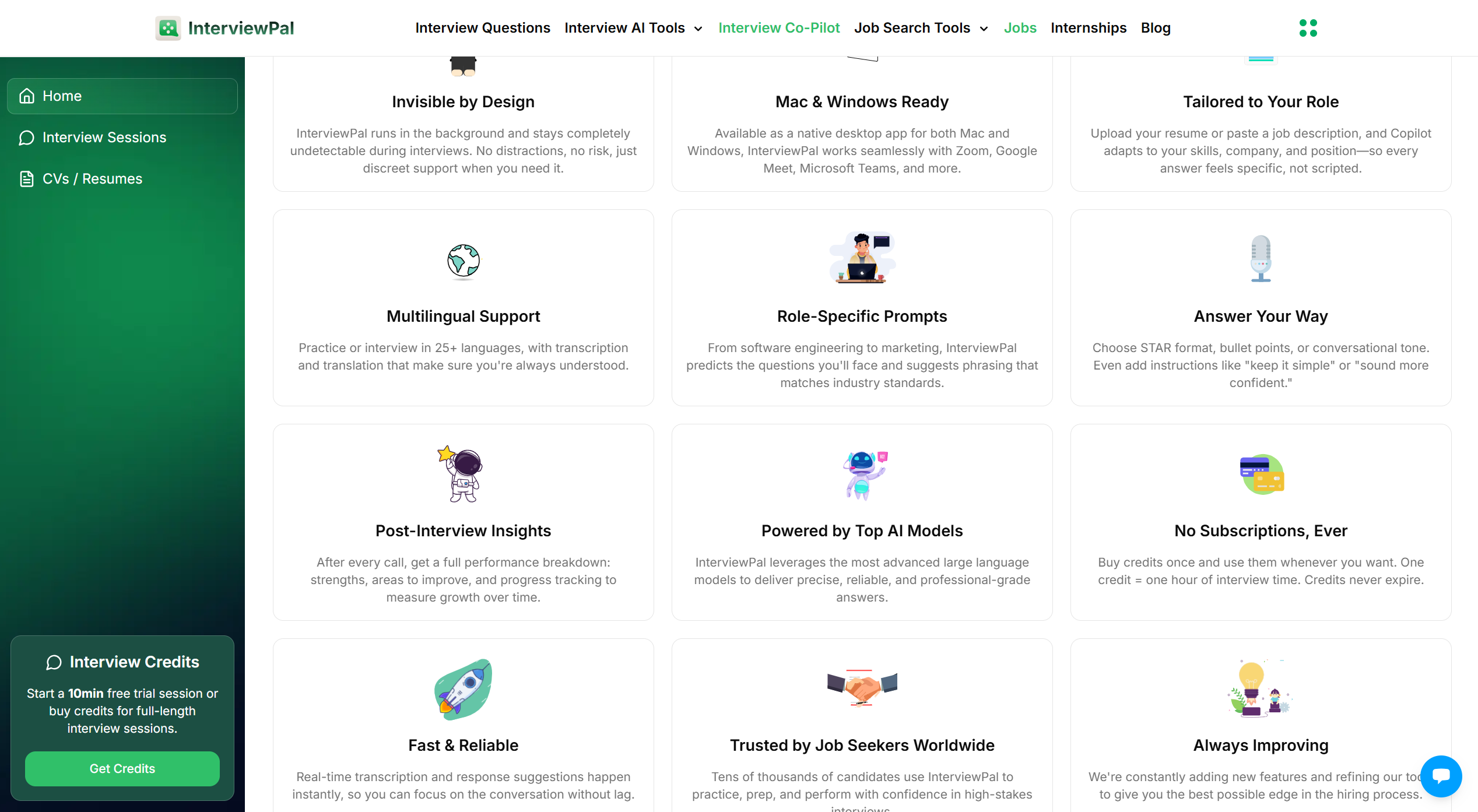
This is the introduction page for InterviewPal interview copilot. It looks pretty good, but it doesn't actually provide any useful information. It doesn't tell me it's only for behavioral interviews, doesn't provide product usage instructions, doesn't tell me which AI models it uses, and doesn't even have a clear page to manage subscriptions.
Pricing
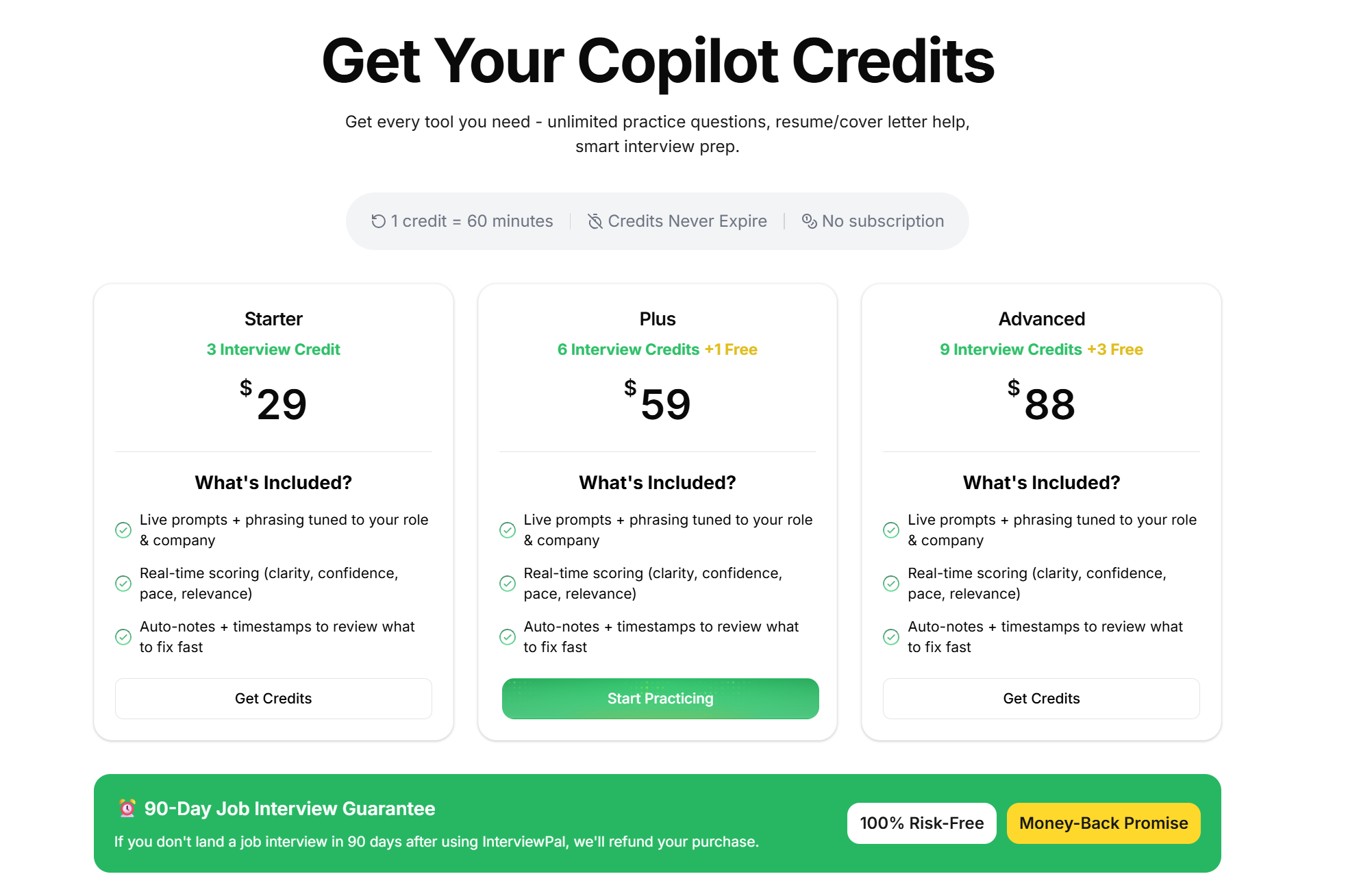
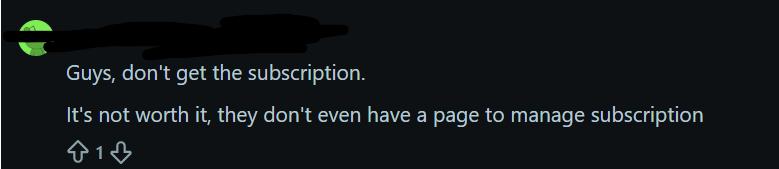
InterviewPal only offers subscription plans based on credits. Honestly, the pricing is quite affordable, but I wouldn't pay for it. First, each session has a time limit. If my behavioral interview runs over, I can't hang up and resume after resubscribing. Second, InterviewPal only supports behavioral interviews, and the user experience isn't user-friendly. If I had checked the reviews on Reddit before subscribing, I definitely wouldn't have paid.
There’s another simple reason: when a product is priced very low, it means its production costs aren’t high either, so it doesn’t include any top-tier paid AI models.
InterviewPal Alternative
I ultimately chose to use Linkjob during live interviews. Not only is it completely invisible during use—just like InterviewPal—and won't trigger detection by any video or coding interview platforms, but it's also well-suited for technical interviews, equipped with high-quality AI models to solve coding problems. Plus, the product and subscription information is very clear, and it comes with detailed instructional videos.
Additionally, Linkjob offers advanced settings to completely avoid detection by interviewers or platforms, such as hiding the icon on the desktop and pre-configuring prompts.
Outstanding Performance in Coding Interviews
Linkjob is a real-time interview assistant designed for the finance and tech industries. It leverages the latest and most advanced models to deliver high-quality answers while remaining completely invisible across all technical interview platforms (take HackerRank as an example—you can read hackerrank how to cheat to understand the underlying technology).
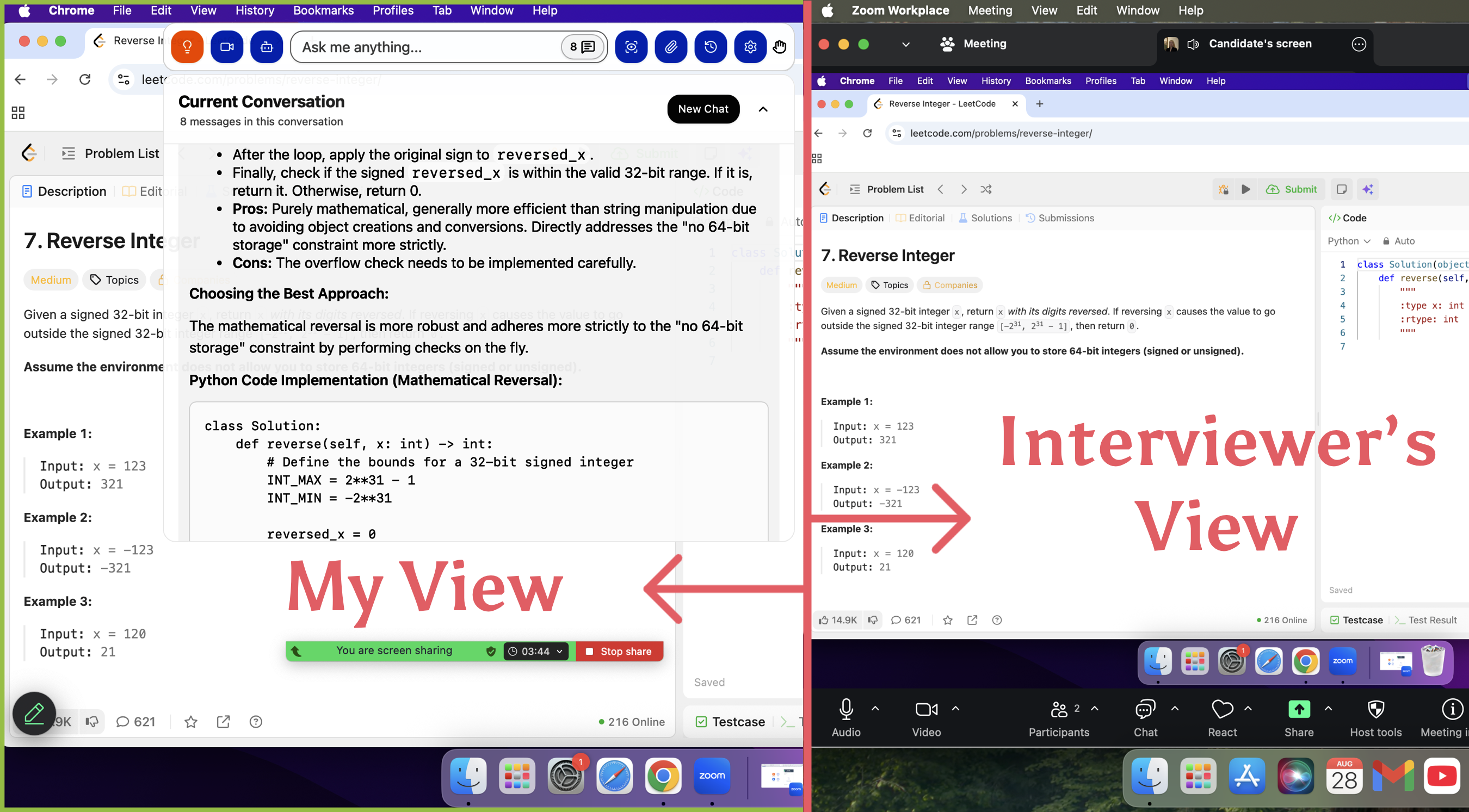
Linkjob AI's coding interview assistant can process multiple screenshots simultaneously. This way, if the question prompt is lengthy, I can capture multiple screenshots.
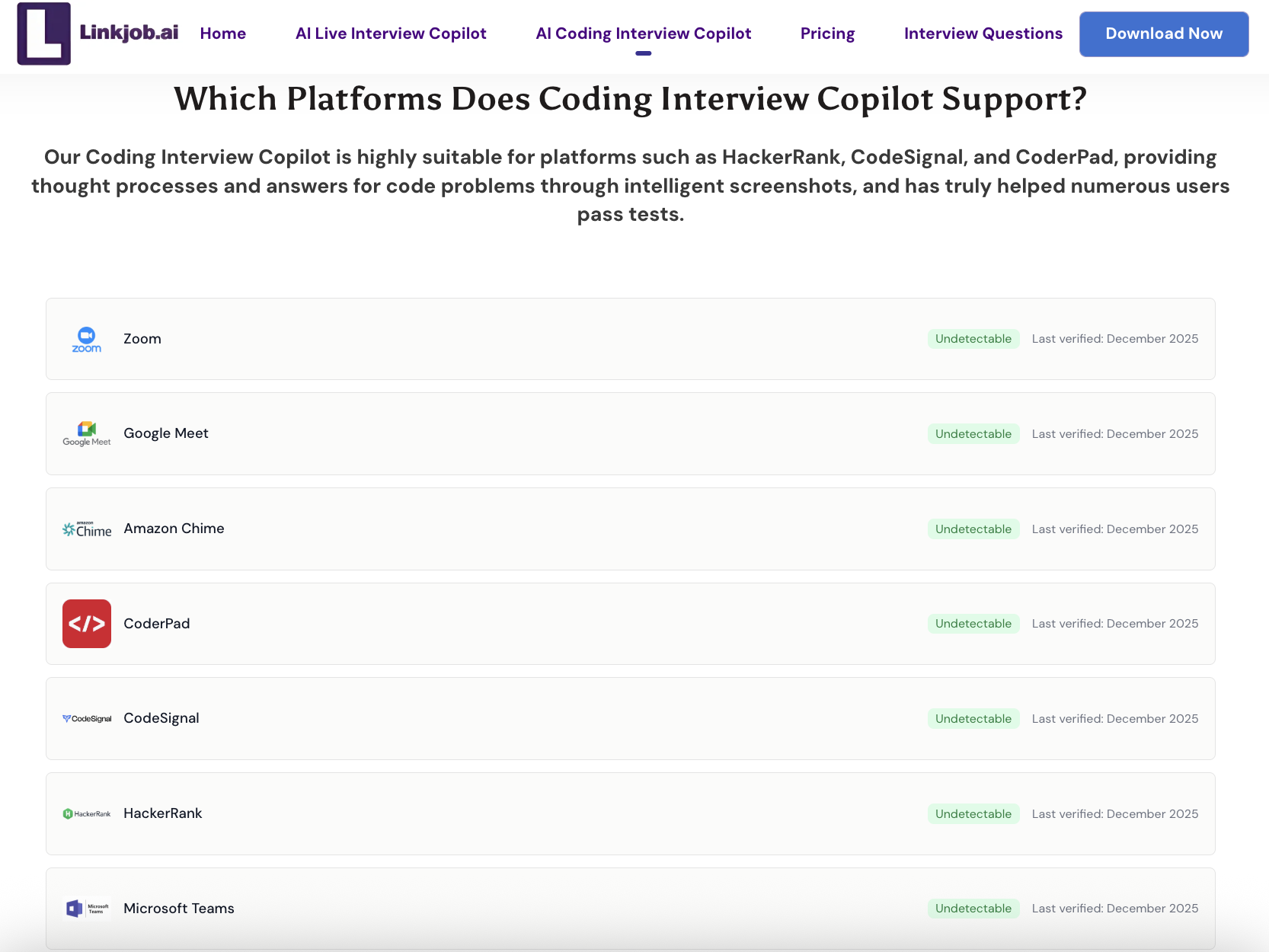
Detailed Product Description
As shown in the image above, Linkjob clearly lists the interview platforms it supports on its official page and provides detailed explanations of how it remains undetected throughout the entire interview process.
Additionally, their official site offers comprehensive instructional videos. After watching these, I was able to use the product seamlessly, saving me significant testing time.
Pricing
Linkjob operates on a time-based subscription model: Monthly subscription: $100 per month Quarterly subscription: $70 per month Annual subscription: $30 per month You can try it for 30 minutes before purchasing.
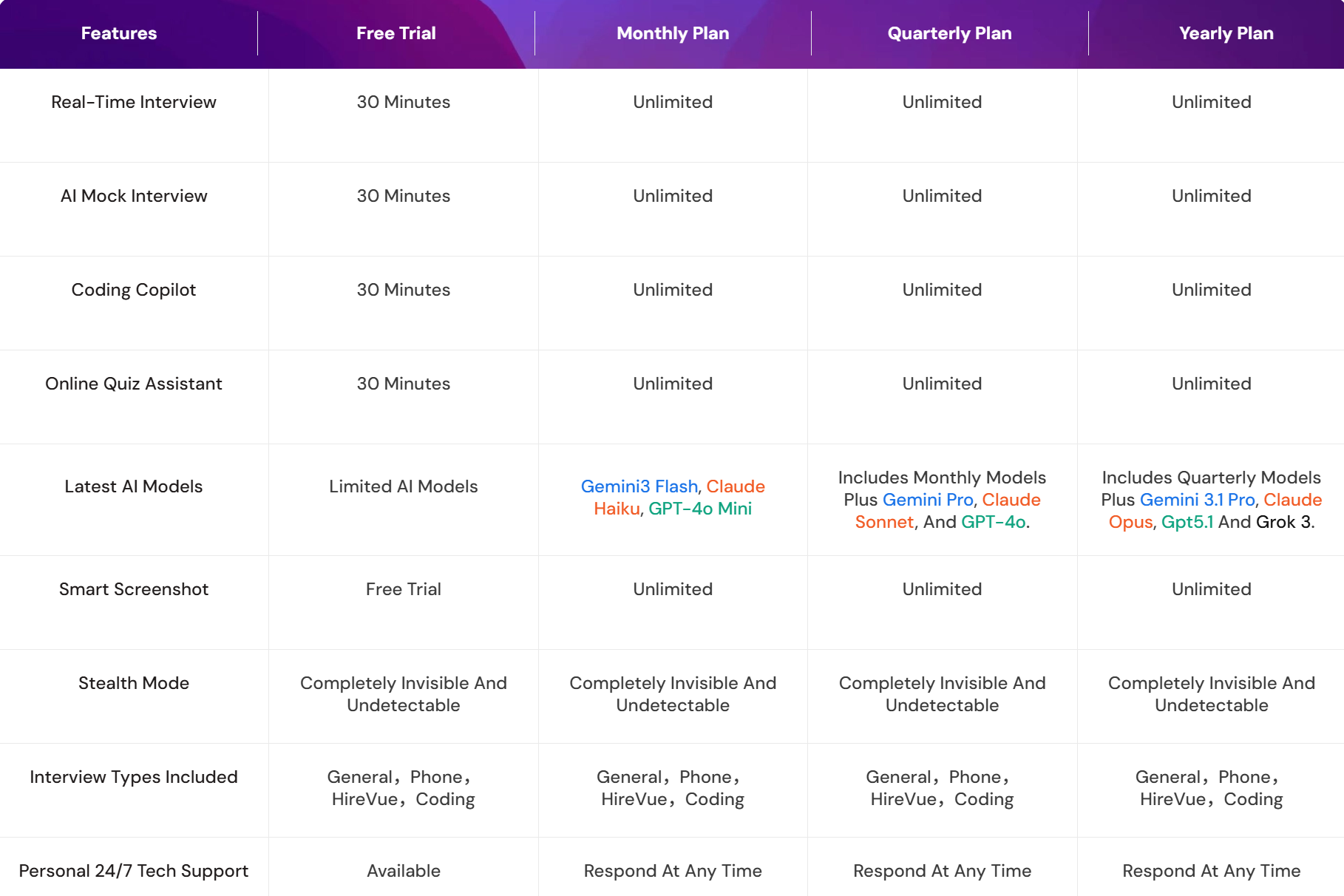
I believe Linkjob is worth the higher cost compared to InterviewPal. During the subscription period, I can use all its features unlimited times, and it comes with a high-quality AI model.
FAQ
How do I start using InterviewPal?
I signed up with my email and created a profile. I can try the resume editing and mock interview features for free, but the Interview Copilot feature requires a paid subscription.
Can I practice technical interviews on both platforms?
I practice technical interviews on Linkjob AI with instant code suggestions and real video interview simulations. IInterviewPal does not support technical interviews.
Is my data safe on both platforms?
I saw clear privacy settings in my account. InterviewPal has not provided an explanation for this. But Linkjob uses encryption to protect my information. I felt comfortable uploading my resume and practicing interviews.
While the application is running, can I hide it from Task Manager and remove its icon from the taskbar at the bottom of the screen?
Yes. In the settings, you can turn off the icon display to hide Linkjob's icon and name.InterviewPal doesn't have this setting, but you can choose not to create a desktop shortcut when you download it.
See Also
8 Best Free AI Interview Assistant Tools, 2025 Hands-on Picks
How I Cheat on Codility and Avoid Getting Caught in 2025
Why I Ditched Cluely AI :My Honest Take on the Best Cluely AI Alternatives That Actually Work

© Copyright 2025 linkjob.ai - All Rights Reserved.