Can HackerRank Detect Tab Switching? What Gets Reported

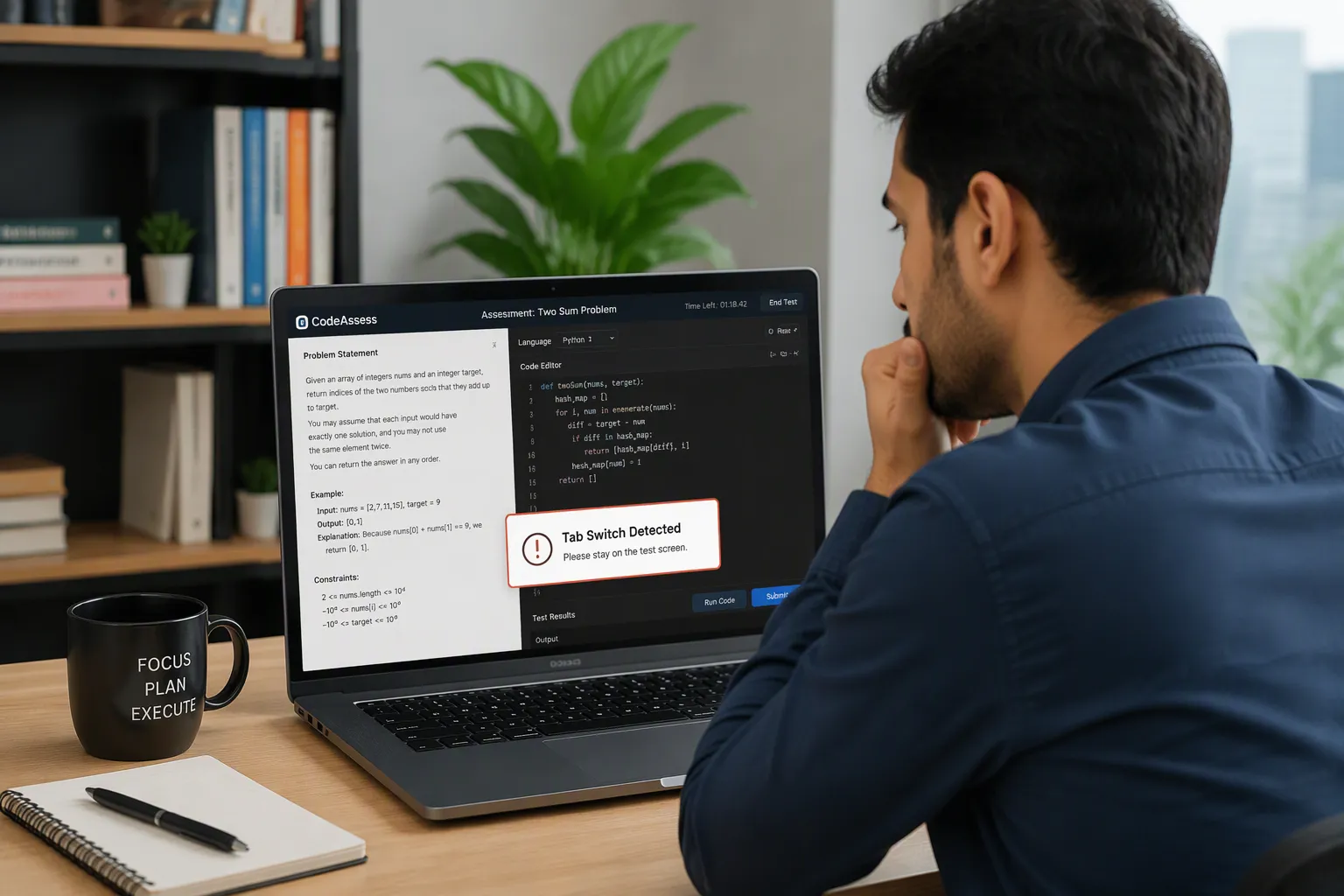
Yes. HackerRank can detect when you switch tabs or leave the test window, and the employer may receive a record of that activity. The platform’s official Test Integrity documentation describes built-in Tab Proctoring that records the number of window exits and the total time spent outside the test window. More restrictive modes add warnings, screenshots, and detailed integrity reports.
However, by using the Linkjob AI assistant, you can avoid active-tab detection. Simply download the Linkjob AI desktop app and open it before starting the test. During the test, as long as you don’t click the app’s Settings button or use keyboard shortcuts to show or hide the app, the platform won’t detect that you’ve left the active tab.
The more useful question is what HackerRank records, what the recruiter can review, and whether one accidental switch automatically means failing the assessment. Those answers are not all the same.
Key Takeaways
HackerRank documents tab and window-exit tracking in its standard integrity features.
Secure Mode adds immediate warnings when candidates switch tabs, while Proctor Mode can flag events and associate them with screenshots and session replay.
A tab switch does not, by itself, establish that someone cheated or that the employer will reject them.
I found real Reddit cases where candidates received warnings and were still invited to interviews.
Can HackerRank Detect Tab Switching Without Proctoring?
This was the first detail I wanted to verify, because many candidates assume tab tracking only exists when the test requests webcam access or screen sharing.
HackerRank’s official Test Integrity documentation lists Tab Proctoring among its built-in integrity features, which require no additional setup. It says the system tracks how frequently candidates leave the assessment window and how long they remain outside it. Those records appear in the candidate’s Summary Report and in the recruiter’s CSV export.
The report includes two specifically named fields: Number of Window Exits and Out of Window Duration.
That is more concrete than saying HackerRank somehow “knows everything you do.” The base report documents how often and how long the candidate left the test window. It does not, by itself, establish the content of every other application or website.
What Happens When You Switch Tabs in Secure Mode?
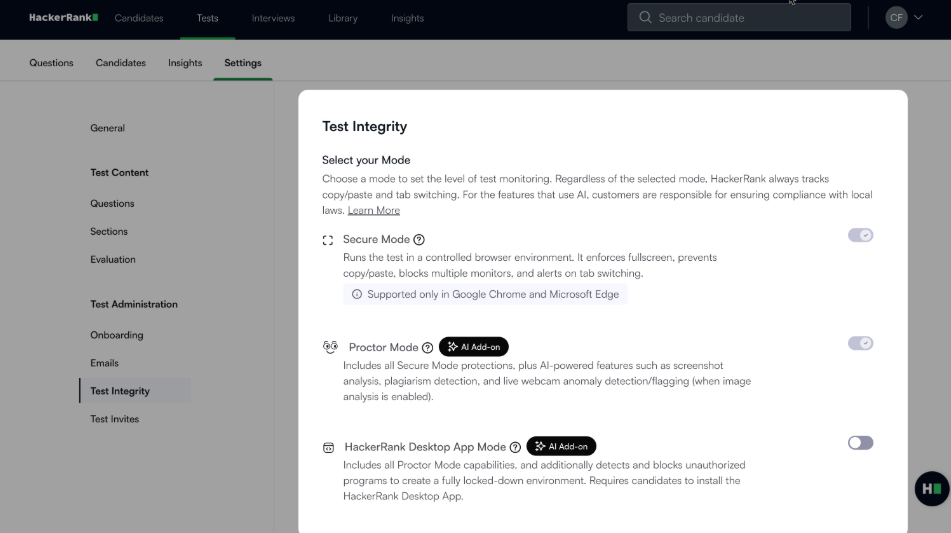
Secure Mode makes tab switching more obvious to the candidate. HackerRank’s documentation, updated April 22, 2026, says the system displays a warning immediately when someone switches browser tabs. It also enforces fullscreen mode, restricts external copy and paste, and checks for multiple monitors.
That distinction matters because a visible warning is not necessarily the beginning of monitoring. It is an additional response to a behavior that can already be tracked.
For example, someone might accidentally open another tab and return immediately. In Secure Mode, they may see a warning when they return. That tells them the assessment detected an event; it does not reveal the recruiter’s eventual decision.
Secure Mode vs. Proctor Mode vs. Desktop App
I found it easier to understand the monitoring system once I stopped treating every HackerRank test as the same product.
Test environment | Tab-switch monitoring | Additional behavior |
|---|---|---|
Standard browser assessment | Built-in Tab Proctoring records window exits and duration | Recruiter can review tab activity in reports |
Secure Mode | Tracks activity and displays tab-switch warnings | Fullscreen enforcement and other restrictions |
Proctor Mode | Flags tab exits and connects them with integrity evidence | Screen sharing, screenshot analysis, and Session Replay |
Desktop App Mode | Uses native operating-system controls | More restrictive application switching and monitoring |
These are platform capabilities. The actual test configuration depends on the employer.
The important difference is that Proctor Mode can give the reviewer much more context than a simple count of window exits. A standard report may show that the candidate left the window. A proctored report can also show what was captured on the screen during the relevant period.
What Can the Recruiter Actually See When You Switch Tabs?
This is the part I think most candidates are really asking about.
HackerRank’s basic Tab Proctoring report contains the number of window exits and total out-of-window duration. Its more advanced Proctor Mode report provides an Integrity Summary, a timeline, and a Session Replay.
HackerRank’s reviewer instructions explain that a recruiter can expand a Candidate switched tabs entry to inspect flagged time ranges and durations. They can then open the corresponding portion of Session Replay and examine screenshots around the event.
The reviewer guidance even suggests looking at what happens after the candidate returns to the coding environment, such as whether a large amount of high-quality code appears suddenly. That is a review signal, not proof by itself that outside assistance was used.
I would therefore distinguish between three things: an event being recorded, an event being flagged as suspicious, and an employer deciding that the event constitutes misconduct.
Does HackerRank Know Which Website You Opened?
The basic tab-switch record does not identify a destination website in its documented report fields. It records the exit count and duration, not a full browsing-history report.
But that does not mean every test has the same visibility limits.
In Proctor Mode, HackerRank can capture the shared screen and analyze images for unauthorized resources, including tutorial websites, external AI tools, messaging applications, and remote-desktop software. Its documentation describes screenshots captured at regular intervals, with increased capture frequency around suspicious activity.
So the answer depends on the evidence available in the particular assessment. A tab-exit count is different from a captured image showing another application.
I would not claim that HackerRank automatically retrieves every URL a candidate visits, because the documentation I reviewed does not establish that. I also would not claim that a recruiter can never see another website during a proctored test.
Can You Use an AI Interview Assistant Without Switching Tabs?
I highly recommend checking out Linkjob AI’s Coding Interview Copilot -- it's a real-time, secure, discreet, and efficient AI interview assistant. It stands out among similar products in the tech and interview space.It can help you bypass detection without tab switching and generate personalized encoded answers in real time, truly helping you pass the interview.

I Found a Reddit Candidate Who Switched Tabs for Five Seconds
One of the most useful real examples came from a November 2023 Reddit post about a J.P. Morgan HackerRank assessment.
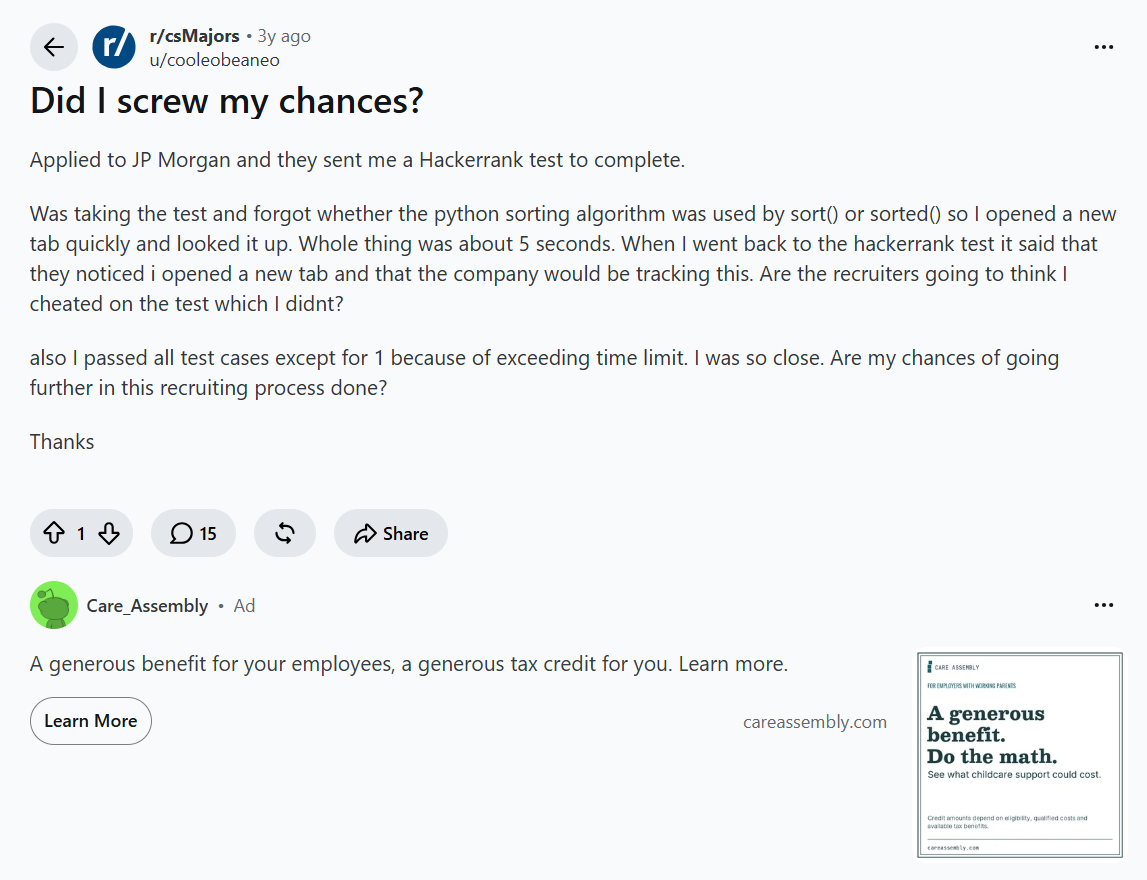
The candidate forgot whether the Python sorting method was sort() or sorted(), opened another tab to check, and returned after approximately five seconds. When they came back, HackerRank displayed a warning indicating that the company could track the tab change.
They were worried because they had otherwise completed nearly all the test cases.
A commenter working in banking said they would personally take such a warning seriously if the assessment rules prohibited external references. That was the commenter’s hiring judgment, not confirmation of what J.P. Morgan ultimately did with the candidate.
This is a useful case because the candidate did not describe opening an entire solution or copying code. They described looking up a small syntax detail. The monitoring system can record the window exit without knowing the candidate’s explanation from the base event alone.
The employer’s rules still matter, even when the information being checked seems harmless.
Another Candidate Received a Warning and Still Got an Interview
A different Reddit discussion provides an important counterexample.
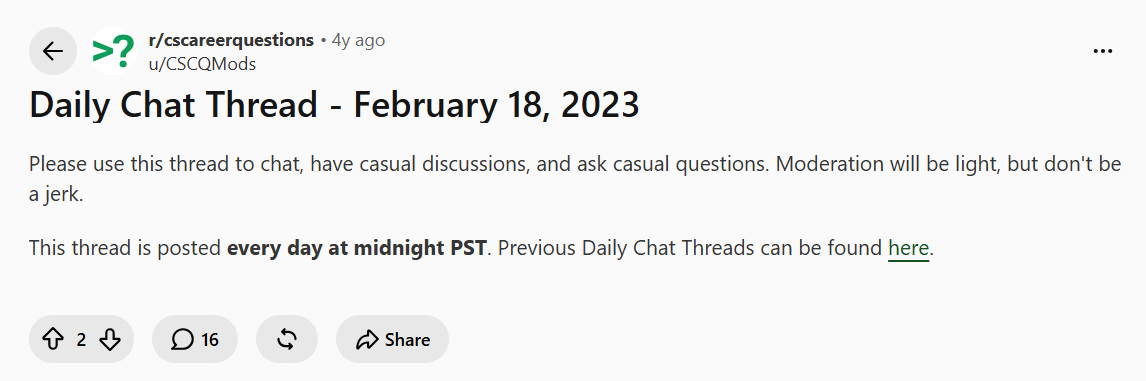
In a February 2023 r/cscareerquestions thread, a commenter said they accidentally clicked away from a HackerRank assessment and received a warning that the action would be reported. They also said the company interviewed them afterward.
That is not proof that all employers ignore a single tab switch. It is evidence that a warning does not necessarily end the application.
The outcome is controlled by the hiring company, and the available public account does not explain how the recruiter interpreted the warning. Still, it directly challenges the idea that HackerRank automatically rejects every candidate who leaves the tab once.
The 2026 Pomodoro Timer Incident
A more recent example is a March 2026 Reddit post about an accidental tab switch during HackerRank.
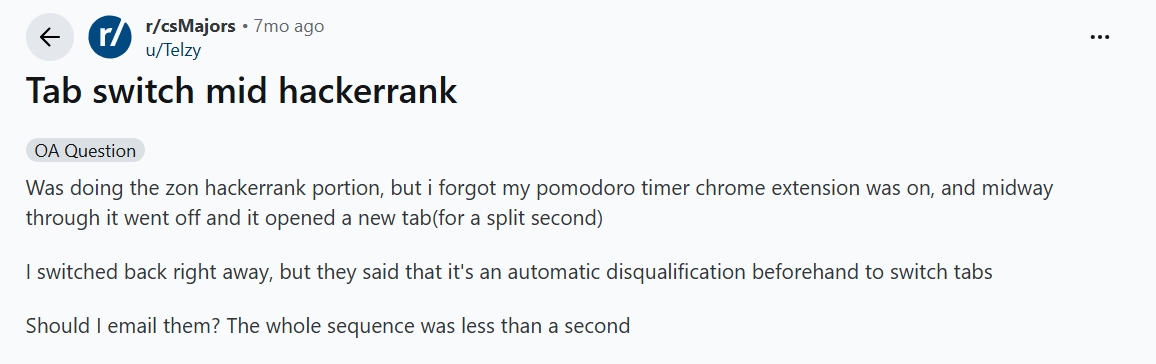
The candidate said a Pomodoro timer Chrome extension unexpectedly opened a new tab during the assessment. They returned almost immediately, but the test instructions had warned that switching tabs could result in automatic disqualification.
The post received many reassuring replies. However, those comments did not verify the candidate’s final recruitment outcome.
This is exactly why I would separate what the test instructions say from what strangers predict on Reddit. The candidate reported a very short accidental switch, but the employer’s actual decision was not established in the discussion.
The practical issue is that a tab-switch signal generally does not contain the candidate’s intent. A timer extension and a deliberate external lookup may both cause the test window to lose focus, even though the reasons are very different.
What About Switching to Another App Instead of Another Browser Tab?
This is another source of confusion.
Browser focus events can indicate that a page or window is no longer active. A candidate might trigger a focus change by switching applications, interacting with another window, or handling certain dialogs. But a focus event alone does not explain exactly why it happened.
HackerRank’s live Interview Integrity Signals documentation explicitly notes that opening the browser console or interacting with permission pop-ups may trigger an out-of-interview signal. It also documents repeated tab switching and window resizing as possible integrity indicators.
That matters because not every focus change is a deliberate attempt to look up an answer. The monitoring signal and the interpretation of that signal are separate steps.
The exact behavior can differ between a standard assessment and a live HackerRank interview, so I would not automatically apply every live-interview signal to every online assessment.
Can HackerRank Detect Tab Switching During a Live Coding Interview?
Yes, HackerRank documents integrity signals for live interviews as well as online assessments.
Its June 2026 Interview Integrity Signals documentation describes alerts that group suspicious activity such as repeated tab switching, copying and pasting, and window resizing. Interviewers can inspect out-of-interview events with timestamps and durations.
I also found a November 2025 Reddit discussion specifically about HackerRank CodePair. One commenter described an interface indicator that changed when a participant was away from the interview tab. That is an individual interface observation rather than an official guarantee about every version.
The distinction here is that a live interviewer may be able to ask for clarification during the session. A recruiter reviewing an asynchronous OA may only examine the report later.
Will HackerRank Automatically Fail You for Switching Tabs Once?
I found no official universal rule saying one tab switch always results in automatic failure.
HackerRank documents recording and flagging behaviors, but its Proctor Mode reviewer workflow is built around examining evidence. The employer decides how that evidence affects the hiring process.
That does not mean one switch is guaranteed to be forgiven. A particular employer can impose stricter rules, and the candidate may have acknowledged those rules before starting.
The two Reddit experiences above show why a universal answer would be misleading. One candidate received a warning and still reached an interview; another candidate worried about automatic disqualification after a timer extension opened a tab, without a confirmed final outcome.
I would not invent a universal “safe number” of tab switches or a guaranteed grace period. Recording, flagging, and hiring decisions are different things.
What I Would Do After an Accidental Tab Switch
If a notification, keyboard shortcut, or application unexpectedly took focus away from the assessment, I would return to the test and follow any displayed instructions.
If the incident was significant or the employer’s rules explicitly prohibited leaving the test, I would record what happened and contact the recruiter through the official channel. A short explanation should include the approximate time, the cause, and whether the test continued normally.
I would not assume that repeatedly switching away to investigate the warning would improve the situation.
For actual technical interruptions, HackerRank says the hiring company controls retake permission. The HackerRank retake guide covers the difference between a technical disruption and simply wanting another attempt.
Does HackerRank Detect Alt-Tab, Copy-Paste, and Screenshots Too?
These are related questions, but they are not the same signal.
HackerRank documents tab and window-exit tracking separately from copy/paste monitoring. Its Test Integrity page says copied or pasted content can appear in candidate reports for supported question types.
Screenshot analysis is another layer. In Proctor Mode, the system examines captured screen images for suspicious resources and applications.
A focus warning therefore should not automatically be interpreted as evidence that HackerRank read a candidate’s clipboard, saw a particular website, or detected an operating-system screenshot. Those require different evidence.
For the wider set of monitoring capabilities, see How HackerRank Detects and Prevents Misconduct. For the screenshot-specific question, see the separate HackerRank screenshot detection guide.
FAQ About HackerRank Tab Switching
Can HackerRank detect when I switch tabs?
Yes. HackerRank documents built-in Tab Proctoring that records window exits and the time spent outside the assessment. Secure Mode and Proctor Mode add further controls and reporting.
Can HackerRank detect tab switching without a webcam?
Yes. Tab Proctoring is documented separately from webcam-based monitoring. The absence of webcam access does not establish that tab activity is unrecorded.
Does HackerRank warn you when you switch tabs?
Secure Mode displays a warning when candidates switch browser tabs. The absence of a visible warning does not necessarily mean that no activity was logged.
Can recruiters see how many times I switched tabs?
Yes. HackerRank’s documented reports include Number of Window Exits and Out of Window Duration. Proctor Mode provides additional integrity-event timelines.
Can HackerRank see which tab I switched to?
The base tab-proctoring report does not document a destination URL. Proctor Mode can provide additional screen evidence, so the visibility depends on the test configuration.
Does HackerRank automatically disqualify candidates for switching tabs?
There is no universal automatic-disqualification rule established in the official documentation reviewed here. Employers can apply their own assessment policies and evaluate integrity reports.
What if I accidentally switch tabs for one second?
The action may still be recorded. Whether it is flagged or affects the result depends on the configuration and employer rules. A brief accidental switch is not proof of cheating, but it is not a guaranteed exemption either.
Does Alt-Tab count as leaving the HackerRank test?
Switching to another application can cause the test window to lose focus. HackerRank’s monitoring may record out-of-window activity, depending on the environment.
Does HackerRank detect tab switching during CodePair interviews?
HackerRank documents out-of-interview activity signals for live interviews, including repeated tab switching. The available alerts and review workflow depend on the interview configuration.
Can I retake a HackerRank test after being flagged?
Only the hiring company can approve a retake of an employer-issued assessment. HackerRank directs candidates to the recruiter or hiring team for such requests.
See Also
How HackerRank Detects and Prevents Misconduct
Does HackerRank Detect Screenshots?
HackerRank Retake: Can You Get Another Attempt?
My Experience Passing The 2026 Meta CodeSignal Assessment To Secure A Job Offer
How I Leveraged AI To Successfully Pass My Microsoft Teams Interview In 2026
Why People Choose Linkjob AI
Smoother interviews, coding challenges cleared, and job offers landed. See how users describe their experience with Linkjob AI—in their own words.