Pinterest CodeSignal Test: What It Really Measures Isn't Coding, But Efficiency

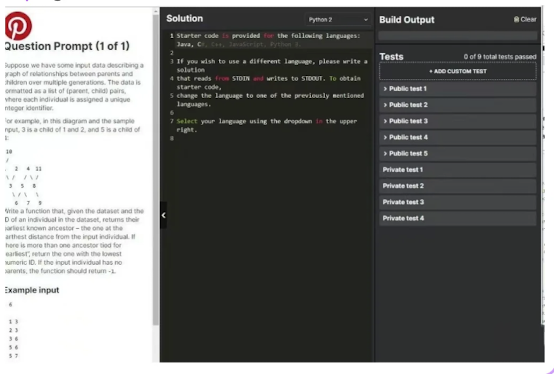
Before preparing for Pinterest’s CodeSignal assessment in 2025, I genuinely thought my daily LeetCode routine was enough. I read countless prep posts, followed everyone’s recommended problem lists, and practiced all the high-frequency tags until I could almost recite them.
But the moment I entered the actual CodeSignal timed interface, I realized something completely different — all that preparation still wasn’t enough. Not because the problems were harder, but because the entire workflow was tighter than anything I had expected: the problem statements were longer, the edge cases were messier, the time felt shorter, and the pacing between questions was brutally fast. That “you must understand the question and start coding within 30 seconds” pressure simply doesn’t exist when casually solving LeetCode. It was during that first timed simulation that I understood my real weakness wasn’t “not enough practice.”
It was slow decision-making, loose pacing, and the lack of quick support when getting stuck at critical moments. That’s when I finally understood why so many people say Pinterest’s CodeSignal feels more like an efficiency test than a traditional coding test.
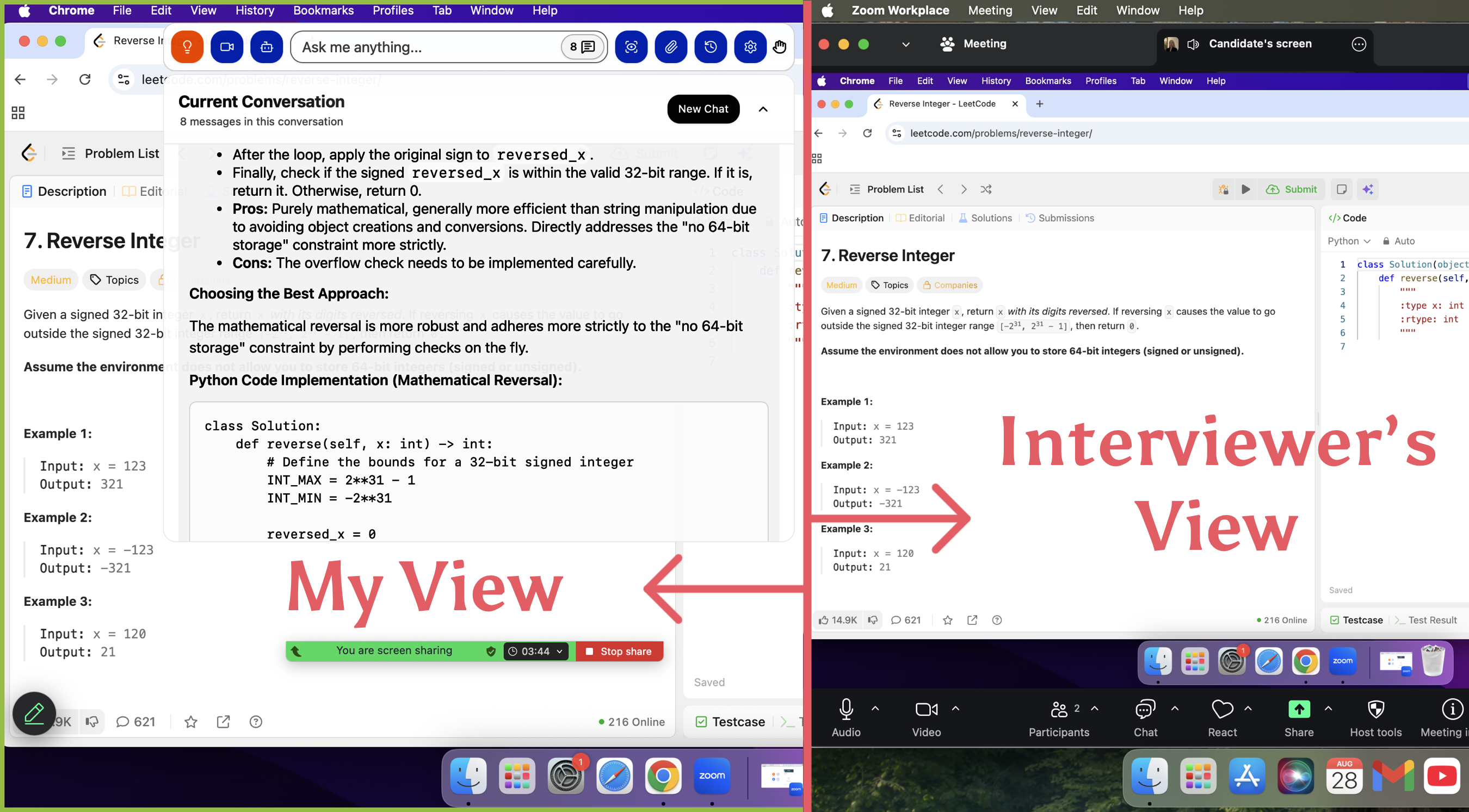
To fix this gap, I started using LinkJob.AI. It’s a AI Interview tool you can actually use during real coding exams or interviews: quietly, invisibly, without pop-ups, and without leaving any trace on screen-sharing. All you need to do is screenshot the question — and it uses its network of 120 large language models to give clear, fast guidance so you never get stuck during those crucial early minutes of a problem. It’s not a study platform.
It’s a test-time tool — simple, invisible, and extremely helpful when it matters most. To help you ace the Codesignal exam, I've also prepared comprehensive study guides. Combined with LinkJob.AI, I'm confident you'll secure all interview opportunities and land the job offer.
Pinterest CodeSignal Questions
MCQs
Evaluation Metrics (TP/FP/etc.): I was given several tables of data and had to calculate metrics like TP and FP. Based on those values, I had to identify the specific data points that met the required criteria.
Ensemble Learning: I encountered questions about ensemble methods, specifically regarding whether they can improve model interpretability.
Overfitting Scenarios: There was a question about why training accuracy would be high while test accuracy is low—a classic case of overfitting.
Classification Loss Functions: I had to identify various loss functions used for classification, such as Cross-Entropy (CE).
Model Sparsity: I was asked to explain why many model parameters might turn into zeros (e.g., L1 regularization).
Manual Neural Network Calculation:
I had to manually calculate the output of a neural network. I cannot stress this enough: prepare pen, paper, and a calculator! I had to calculate Sigmoid functions, and since there were so many intermediate values, I couldn't keep track of them in my head. Because CodeSignal requires you to stay within the camera frame, I couldn't leave to grab supplies; I ended up frantically scribbling on a piece of tissue paper—it was a total mess!
LeetCode-style Coding:
The task was to determine if a window of size $k$ was "monotonic" in a specific way—specifically, checking if values decreased from the current point toward both the left and right.
Machine Learning Coding (2 Tasks):
Bootstrap Forest: I wasn't allowed to use NumPy. The base Decision Tree code was provided, so I only had to implement the Bootstrap sampling logic using the
randomlibrary and aggregate the final results.Naive Bayes: This was straightforward; I just followed the standard formula to implement the logic.
Key Takeaways
Exam Characteristics
Pinterest's CodeSignal assessment features a fast pace and progressively increasing difficulty, requiring candidates to solve multiple algorithmic problems within a limited timeframe while maintaining clear logic and stable implementation.
Learning Efficiency Strategies
By breaking down common question types, simulating real-time pacing, identifying error patterns, and optimizing thought processes, you can significantly improve both speed and accuracy.
Performance Optimization
Training methods that integrate rhythm control, weak point identification, and real-time feedback mechanisms more closely replicate real-world pressure scenarios. Utilizing safe and reliable learning aids can further enhance overall performance.

1. What the Pinterest CodeSignal Assessment Really Looks Like
I was completely blown away when I took Pinterest's CodeSignal.
Not because the problems were particularly difficult, but because—I had completely misjudged their nature.
The biggest shock from Pinterest's CodeSignal wasn't the difficulty of the problems, but that it completely transcended the traditional framework of “practice-based exams.” Only after experiencing it firsthand did I realize its true core assessment:
the ability to write “production-grade stable code” under extreme time pressure.
The typical structure shared in public experiences is roughly 4 problems with a total time limit between 45–70 minutes.
Converted, this means an average of only a dozen minutes per problem—and that's where the real pressure begins.
In those dozen minutes, it doesn't test whether you can write the most elegant solution, but whether you can, under real engineering pressure:
Quickly abstract the problem's essence
Select the right data structure
Write clear, uncluttered logic
Comprehensively handle edge cases and exceptions
Withstand rigorous hidden test checks
While maintaining code readability, stability, and reliability
Put simply, unlike LeetCode which lets you ponder slowly, this is more like an engineer's “reliability sprint” when time is chasing you:
You must deliver production-ready code under pressure.While the problems escalate in difficulty, the real challenge lies not in complexity, but in:
Time constraints, pacing, boundary density, and logical stability.
I prepared diligently—timed practice sessions, CodeSignal platform pacing drills. Yet the actual test revealed a stark truth:
“I can write the algorithms, but maintaining an engineering mindset under intense pressure—I'm still a ways off.”
My final score was average, nothing to write home about. Yet precisely because of this, I gained a clearer understanding of the essence of Pinterest's Online Assessment:
It isn't screening for the fastest solvers, but selecting engineers who can write robust, readable, and reliable code under high pressure.
So if you're preparing for Pinterest or similar companies, my advice is simple: Instead of burying yourself in problem sets, focus on strengthening:
Pacing control
Rapid abstraction skills
Boundary sensitivity
Engineering-oriented code structure
These four competencies are the true deciding factors in this test. Below is a comprehensive guide to Pinterest's interview and written exam process. This video introduces the basic framework. My sharing post compiles questions from other test-takers and outlines a comprehensive preparation plan.
2. My Experience: Time Pressure, Question Types, and Common Pitfalls
When I finally sat for the Pinterest CodeSignal assessment, the experience felt very different from the generic practice tests circulating online. Yes, it was still four questions in a timed environment—but the tempo, the failure modes, and even the psychology of the assessment caught me off guard. And after reading through dozens of Reddit and Blind posts from previous candidates, I realized most of us face the same three bottlenecks.
To make this more concrete, here’s what I observed from both my own experience and other interviewees:
1. The Time Pressure Is Real—and It Reorders Your Priorities
The assessment gives you enough time to solve the problems, but not enough time to solve them cleanly. Many candidates say the moment they hit Question 3 or 4, their problem-solving mindset shifts into “damage control mode.”
Key patterns I saw repeatedly in other interviewees:
Candidate Trigger | What Actually Happens | Consequence |
|---|---|---|
“Q1 & Q2 look easy” | People rush straight in without structuring code | Minor logical bugs carry into hidden tests |
“Stuck on Q3” | They brute-force to get visible tests green | Fails hidden tests due to complexity |
“Q4 is too hard” | They spend 20–25 minutes searching for the trick | Time runs out for cleanup / re-testing |
The problem isn’t that the questions are impossible—it’s that you’re trying to optimize correctness, complexity, and speed at the same time.
2. The Question Types Look Familiar but Behave Differently Under Stress
Pinterest’s CodeSignal set draws from standard themes—arrays, graphs, DP, string manipulation—but candidates consistently mention one shared sensation:
“These feel deceptively easy until hidden tests hit you.”
Based on interviewees breakdowns:
Typical Slot | Common Theme | Why It Becomes Hard |
|---|---|---|
Q1 | Warm-up (arrays/strings) | + simple, but edge cases are intentionally sneaky |
Q2 | Medium (graphs or DP-lite) | + must balance readability & correctness |
Q3 | Hard (tree/graph/DP) | + brute force passes visible tests but fails hidden ones |
Q4 | Optimization / tricky logic | + requires pattern recognition, not raw coding speed |
The recurring pattern is clear:
Most failures happen not because people “don’t know algorithms,” but because the assessment punishes code that isn’t both logically clean and efficient.
3. The Most Common Pitfall: Passing Visible Tests but Failing Hidden Ones
Their reports consistently highlight a single killer:
“Everything was green—until I submitted.”
Here’s why this happens so frequently:
They write a correct algorithm but forget to handle worst-case input size
brute-force passes visible tests but times out on hidden tests
too many quick patches → code becomes fragile
small edge cases (empty array, repeating patterns, large numbers) get overlooked
One Reddit engineer described it perfectly:
“I felt like I wrote 80% of the correct solution, but the platform graded me on the missing 20%.”
This emotional pattern is remarkably consistent across reports—people leave the test feeling like “I almost had it,” which is exactly why this assessment is so tricky.
4. In Summary: The Assessment Is Not Just Algorithms—It’s Workflow Discipline
Across all experiences (including my own), three forces create the real difficulty:
time pressure (forces rushed decisions)
moderate-to-hard question progression (forces context switching)
hidden tests (punish inefficient or sloppy logic)
This is why a highly skilled candidate underperform:
Not because they lack knowledge, but because the assessment demands clean reasoning under time stress—an efficiency problem, not an intelligence problem.
3. Why Most Candidates Lose Points: Efficiency Issues in the CodeSignal Workflow
One insight that surprised me while reviewing other candidates’ experience reports—and comparing them with my own—is that the Pinterest CodeSignal assessment is not a pure test of algorithm mastery. Instead, it behaves much more like a time-compressed execution exam, where your ability to structure, prioritize, and reduce cognitive friction matters more than writing the “best possible” solution.
Many candidates shared similar patterns:
Situation | Impact on Score | What It Reveals |
|---|---|---|
Spending 20–30 minutes perfecting Q2 | Lost valuable buffer for Q3/Q4 | Over-investment in “polishing” hurts total throughput |
Using “brute force + patching” under stress | Passed visible tests but failed hidden ones | Stress reduces systematic reasoning |
Switching repeatedly between problems | Increased cognitive load; more bugs | Lack of workflow discipline becomes fatal |
Rushing the last 10 minutes | Syntax slips, missing edge cases | Time pressure degrades accuracy more than skill |
Across dozens of stories—including the ones where people barely missed the cut—one message kept repeating:
You don’t lose points because the problems are too hard; you lose points because the workflow collapses under time pressure.
This matches my own lived experience.
Even when the first two problems felt manageable, “45-70 minutes for four questions” constraint gradually compressed my decision bandwidth. The moment I hesitated on strategy—Should I optimize now? Should I brute-force first? Is my approach safe for hidden tests?—my pace slowed dramatically.
What’s counterintuitive is that brute force wasn’t the enemy—many candidates solved Q1 or Q2 with simple O(n²) approaches and still passed.
The real problem was this:
Under pressure, brute force often leads to patching, and patching leads to errors that only appear in hidden tests.
This explains the common frustration candidates mentioned:
“I solved all visible tests… but my final score dropped after hidden evaluations.”
In other words, Pinterest’s CodeSignal isn’t only checking correctness—it is a stress test of your ability to maintain structured thinking while time is collapsing around you.
This is why efficiency-focused preparation matters so much.
When you streamline your workflow, reduce re-thinking loops, and make decisions faster, you don’t just code better—you protect yourself from the penalties imposed by the assessment’s time structure.
Why “Brute-Force Solutions” Collapse Under Pinterest’s Scoring System
One misconception many candidates share—especially those coming from LeetCode practice—is that solving a problem is enough. But Pinterest’s CodeSignal scoring model is heavily weighted toward optimality. Finishing all four questions doesn’t guarantee a high score if your solutions degrade under larger input sizes.
From my own test and dozens of shared candidate reports, the pattern is consistent:
Brute-force works on visible tests, giving you a false sense of security.
Everything collapses when hidden tests hit extreme input sizes.
You lose 30–40% of your score instantly, even if the logic is correct.
One candidate shared that his DFS-based approach passed every visible case, but the hidden tests timed out because the recursion depth ballooned. Another solved a pairing problem using nested loops—fine for small arrays, catastrophic for the hidden cases with tens of thousands of elements. The system penalizes these inefficiencies quietly but decisively.
The key insight here is that Pinterest’s evaluation is not only about correctness, but about your ability to write solutions that scale. You are effectively rewarded for algorithmic intuition: whether you can reach O(n log n) when others stay at O(n²), and whether you can maintain performance under stress conditions.
The takeaway is simple but critical:
Brute-force isn’t “wrong,” but it caps your possible score to a survival level. Optimality is the only path to a competitive score.
4. The Systematic Preparation Approach I Wish I Used Earlier
If I could restart my preparation for the Pinterest CodeSignal assessment, I would not rely on intuition, scattered LeetCode grinding, or the unrealistic hope that “maybe the questions won’t be too hard.” After going through the real assessment—and comparing my experience with dozens of candidates’ stories—the biggest lesson is this:
Passing Pinterest’s CodeSignal is not about practicing more questions, but about building a repeatable system that increases your speed, accuracy, and stress-resilience under a 70-minute, four-question constraint.
4.1. Build a Pattern Library Instead of Random Practice
Most candidates waste hours doing unrelated problems. Pinterest’s patterns are predictable:
Array + HashMap fundamentals
Graph/search variants (BFS/DFS)
String parsing / sliding window
Tree recursion or iterative traversal
One optimization question requiring pruning or better time complexity
A preparation system isn’t about covering every problem—
it’s about covering the 20% patterns responsible for 80% of the questions.
Below is the framework I wish I had followed from day one.
4.2. Train With Timed Blocks, Not Endless Sessions
The assessment gives you:
45-70 minutes
4 questions
With hidden tests
This means pacing is everything. A proper prep system should include:
25–30 min sessions → simulate Q3 & Q4
10–12 min sprints → simulate Q1 & Q2
Strict coding only, no debugging comfort zone
This forces your brain to adapt to the real environment, not an ideal one.
4.3. Debug Through “Edge-Case Forcing,” Not Luck
Looking at candidate stories, most failures are:
Off-by-one errors
Failing hidden tests
Not considering empty structures
Missing large-input optimizations
A systematic approach includes building your own edge-case checklist:
Empty input
Single element
Maximum constraints
Non-sorted / duplicates
Cycles (for graphs)
Negative values
Repeated characters
In the real assessment, this checklist would have saved me 10–15 minutes.
4.4. Use Environment-Realistic Training Tools
Many people practice on LeetCode but get shocked during the real test because:
The editor is more restrictive
The test cases appear differently
The pacing feels harsher
There is no discussion or hints
A proper system includes training inside an environment that behaves like CodeSignal, including:
Timed execution
Minimal editor support
Structured test case generation
No auto-format, no AI hints
Realistic feedback cycle
This reduces psychological friction and lowers anxiety on the real day.
4.5. Track Weaknesses Like a Data Analyst, Not a Student
Most candidates don’t improve because they never measure:
Which patterns they get stuck on
Which problems take too long
Which concepts they keep forgetting
Which mistakes repeat
A systematic approach = turning preparation into a feedback loop:
Log every problem → pattern → difficulty → time used
Group problems by failure reason
Re-train only the clusters that block your score
This is how high-scoring candidates reach the 825+ zone efficiently.
4.6. Build a Pre-Assessment Routine
A real preparation system ends with a 48-hour ritual:
One full timed simulation
One hour reviewing weak areas
No new topics
Pre-built snippets for templates (BFS, DFS, two-pointer, prefix sums)
A checklist for edge cases
A breathing / reset routine before starting
It is astonishing how much performance improves when your mind is stabilized and patterns are fresh.
4.7 If You Encounter the CodeSignal Interview Format, Here’s How to Prepare
While most candidates focus on the standard 4-question timed CodeSignal assessment, Pinterest—and many other top-tier companies—sometimes follow it with a CodeSignal Interview round. This format feels closer to a live, conversational coding session, but it still carries the same efficiency pressures as the original timed test. After going through multiple formats, here’s the systematic preparation approach I now recommend:
(1) Treat it like a hybrid between LeetCode Mediums and system-style reasoning.
The interviewer will often give you a single problem that expands gradually. You’re not just solving the final version—you’re demonstrating how you structure the problem, ask clarifying questions, and refine the solution step by step.
(2) Prepare a “mini-framework” for communicating under time pressure.
A simple 4-step script works extremely well:
Restate → Define constraints → Outline approach → Code with milestones.
This reduces panic and gives your interviewer confidence in your process.
(3) Build reusable templates for the patterns that appear most frequently.
For Pinterest, this usually includes:
• Two-pointer variations
• Graph/Tree traversal
• Sliding window
• Hash-map backed counting or grouping
• Basic BFS/DFS with clear edge-case handling
Having pre-structured mental templates improves both speed and clarity.
(4) Practice “narrated coding” rather than silent coding.
CodeSignal Interview isn’t just about the final solution. Interviewers evaluate:
— whether you reason cleanly
— whether you test edge cases early
— whether you detect flaws before running
Narrating your thought process naturally boosts your perceived competence.
(5) Focus on writing less code, not more.
Over-engineering is the most common failure mode in CodeSignal Interview.
The safest strategy is:
Start with the simplest correct version → refine if asked → optimize only when needed.
(6) Simulate interview-style timing (20–35 minutes).
Create a habit of solving problems within a fixed time slot. Pinterest’s interviewers care much more about organization and execution rhythm than theoretical depth.
(7) And above all—practice maintaining flow under uncertainty.
Unlike the standard 4-question test, the CodeSignal Interview introduces new information mid-session. The efficiency skill you need is not just accuracy—it’s the ability to re-anchor your thinking quickly when the problem changes.
Preparing for this format requires a different mindset: you’re not proving raw coding ability—you’re proving that you can stay structured when the problem evolves. Candidates who train specifically for this “dynamic pressure” typically outperform those who only focus on algorithm difficulty.
One of my biggest realizations while preparing for Pinterest’s CodeSignal assessment was that real interview success depends far more on efficiency under pressure than on the sheer number of practice problems completed. During timed assessments—whether it’s Pinterest’s CodeSignal, a live HackerRank session, or a browser-based technical interview—you’re not just solving problems. You’re managing clarity, speed, structure, and error-prevention simultaneously.
I didn’t fully understand this until I tried LinkJob.AI.
5. How AI interview copilot Quietly Boosts Your Coding Test Success - With 100% Stealth During Interviews
When I first started preparing for Pinterest’s CodeSignal test, I genuinely believed efficiency was something I could “train into myself.” I thought enough timed drills, enough problem sets, enough mock exams would eventually harden me for that 45–70 minute pressure cooker. But here’s the truth I only admitted to myself after repeatedly hitting a wall:
I didn’t fail because I lacked knowledge. I failed because I lacked support at the exact moment I needed clarity.
And that’s when I began using LinkJob.AI—first as a curiosity, then as a habit, and eventually as the quiet force that changed my performance entirely. Not because it shouted instructions at me. Not because it controlled what I did. But because it stayed invisible, waited in the background, and stepped in only when I needed it the most—with one critical advantage: Even in live interviews or screen-shared coding tests, LinkJob.AI remains completely undetectable. (A capability the team tests daily across CodeSignal, HackerRank, CoderPad, and similar platforms.)
And once I experienced that kind of “silent support,” the entire way I prepared—and performed—changed. Below are the five ways LinkJob.AI became the decisive advantage I wish I discovered earlier:
1. Fully Invisible Operation During Live Interviews and Screen Sharing
The moment I realized I could safely lean on support—even under screen-share conditions—my entire mindset shifted. Unlike the intrusive extensions or floating windows that scream “detection risk,” LinkJob.AI does something fundamentally different: It runs in complete stealth mode, leaving no visible traces in Zoom, Google Meet, CodeSignal, or any coding platform.
I don’t see pop-ups.
Interviewers don’t see artifacts.
The screen stays clean—exactly as it should.
The app even allows hiding its own icon for total invisibility.
Knowing I had a safety net that nobody could see removed the single biggest psychological burden in technical interviews: the fear of freezing, the fear of “I don’t know what to do next.”
2. Customized, Context-Aware Answers During Real Interviews
One of the most mind-blowing parts came when I tested LinkJob.AI’s “formal interview mode,” which listens to the interviewer’s questions and generates tailored answers live.
No browser switching.
No distractions.
No breaking eye contact.
It hears the question.
It formulates the answer.
And you stay focused.
When I added my résumé and the job description into the settings, the responses became eerily accurate—like I had a personal coach whispering the best version of my own thoughts back to me.
Suddenly, open-ended behavioral questions and deep system design prompts didn’t feel like cliffs anymore; they felt like guided paths.
3. Real-Time Coding Guidance Through Screenshot Intelligence
During coding tests—especially CodeSignal where timing is brutal—the ability to get instant interpretation of the code on my screen changed everything.
With a single screenshot, LinkJob.AI could:
analyze the problem structure
detect logic gaps
check complexity issues
highlight missing edge conditions
and suggest more optimal solution paths
And the best part? It never interrupts your flow.
No pop-ups.
No overlays.
Just a silent layer of support whenever you choose to trigger it.
With over 100+ AI models to choose from—including models specialized for image recognition and code reasoning—the feedback was sharper than anything I’d manually diagnose under pressure.
4. Smart Preparation Mode That Asks You Questions Like a Real Interviewer
Before the real assessment, I practiced with LinkJob.AI’s mock-interviewer mode.
It didn’t just ask me random questions—it:
analyzed my résumé
aligned questions with the company I applied for
adapted follow-ups based on my answers
and simulated the pressure of real interviews
The conversation felt natural, challenging, and uncannily similar to the real thing. This mode alone improved how I articulate logic under stress. It felt less like “practicing with AI” and more like training with a tireless personal interviewer.
5. A Stealth Advantage During CodeSignal-Style Interviews
CodeSignal interviews are a different beast: real-time coding, shared screens, and locked-down environments. But LinkJob.AI’s stealth design was built exactly with this pressure in mind.
Here’s what made the difference for me:
It stays invisible even when screen sharing (a feature tested daily).
I can screenshot the question instantly and get structured hints.
I can verify my logic before submitting—without leaving the coding interface.
I can avoid hidden-test traps, complexity penalties, and structural errors.
This isn’t just “learning.” This is surviving the exam moment—with a silent parachute that nobody sees, but you deeply feel. For me, this became the line between failing by 20 points… and passing by 80.
Looking back, I didn’t just gain a tool.
I gained the one thing most candidates never have during high-pressure technical assessments:
A quiet, undetectable second brain that watches my blind spots while I focus on the problem. And once you’ve experienced that kind of support— it’s impossible to go back to preparing alone.
6. Final Thoughts: Preparing for Pinterest Coding Tests with a Higher-Efficiency Mindset
After experiencing that 70-minute pressure cooker myself, my biggest realization condensed into one sentence:
This assessment tests mental efficiency—not raw coding speed.
And once you truly understand this, your preparation mindset changes completely. Looking back, I’d summarize the most effective changes into three key shifts:
First, you stop blindly grinding questions and start preparing with structure.
You identify the question types that appear most often, the steps that require pre-built templates, and the boundary details that trigger hidden-test deductions.
These patterns—not luck, not brute force—decide your final score.
Second, you start treating time as a strategic resource, not a countdown timer.
Pinterest’s CodeSignal demands a near-perfect first half and a controlled, damage-minimizing second half.
Learning how to pace yourself, when to simplify, and when to move on is a skill—one that impacts your performance more than your theoretical knowledge.
Third, you realize that real efficiency means reducing wasted effort.
You focus on what increases points—clean structure, stable logic, and quick problem framing—while cutting out anything that drains energy without raising your score. This is where “invisible, low-distraction” tools can amplify your learning curve without interfering with your rhythm. In the end, Pinterest’s assessment isn’t a test of endurance. It’s a test of working smarter, staying composed, and executing with clarity when the clock is ticking. And here’s the part many candidates underestimate: Once your preparation becomes systematic, your improvement becomes exponential. You start solving faster. You stay calmer. Your scores stabilize at a level you once thought was unattainable. That’s when opportunities start opening up— the interview callbacks, the competitive compensation bands, the feeling that you’ve finally entered the top tier of candidates.
If you’re preparing for Pinterest’s CodeSignal, remember this: High scores don’t come from luck or grinding alone—they come from strategy, pacing, and the right support system. Build your training around efficiency, and you’ll naturally climb into score ranges others struggle to reach. And once you reach that level, you’re no longer “hoping” for an offer— you’re positioning yourself for the kind of outcomes candidates dream of: stronger performance, higher confidence, and even entry into the top 1% track when everything comes together. You’re closer to that version of yourself than you think. You just need to prepare the right way.
We hope to provide you with the greatest assistance in your job search. LinkJob is far more than just a tool—it is the key to your success.
FAQ
Why is Pinterest's CodeSignal Assessment harder than regular practice problems
Pinterest's CodeSignal is a “process efficiency assessment” that tests not only your algorithmic skills but also your ability to execute under pressure: structured thinking, clear coding, boundary awareness, debugging rhythm, and optimization capabilities. Many candidates lose points not because the problems are too difficult, but due to disorganized processes, lost rhythm, missed boundary cases, redundant code, or failing hidden tests. This exam fundamentally evaluates your engineering habits, not just your problem-solving skills.
If I only have a few weeks to prepare, how can I improve most effectively?
Focus on optimizing “methods” rather than “question volume.” Prioritize mastering the four high-frequency problem types (arrays, trees, graphs, strings). Develop a sense of timing for solving these four problem combinations. Complete simpler problems faster to allocate time for more complex ones later. Establish reusable code templates, strengthen boundary testing habits, and form consistent debugging steps. During post-mortems, focus on code readability and complexity. True efficiency gains come from improving “structure and pacing,” not solving more problems.
How does LinkJob.AI enhance preparation efficiency without disrupting the workflow?
LinkJob.AI is characterized by its “invisible, lightweight, and low-interference” design. It doesn't alter your toolchain or screen environment, instead offering its assistance with ZERO presence: clearer thought prompts, problem-specific explanations, structured code feedback, and pacing optimization suggestions. It's like quietly adding a cognitive boost to your real interview—never interrupting you, yet helping you progress faster, more steadily, and more efficiently.
See Also
How to Use Technology to Cheat on CodeSignal Proctored Exams
How I Navigated the Visa CodeSignal Assessment and What I Learned
My Journey Through Capital One CodeSignal Questions: What I Learned
I Cracked the Coinbase CodeSignal Assessment: My Insider Guide
How I Cracked the Ramp CodeSignal Assessment and What You Can Learn
© Copyright 2025 Linkjob.ai - All Rights Reserved.