How to Use Tools for Screen Capture Not Detectable by Coderbyte

Coderbyte is an online testing platform used during the pre-screen and remote interview stages, similar to HackerRank and Codility. However, its anti-cheating mechanisms are more strict than other platforms. For example, it is one of the few platforms that records the complete coding process (keystroke recording) and provides a playback for interviewers. Of course, besides this, there are other measures to detect cheating.
Under such strict inspection, is it still possible to cheat? For instance, using screen capture to let AI help answer questions. The answer is that it is still possible. Next, I will take Linkjob AI, a new generation of undetectable AI interview copilot, as an example to explain how to use AI on Coderbyte without being detected.
How Does Coderbyte's Plagiarism Detection Work
To understand how to cheat, one must first understand how Coderbyte detects and prevents it. Let’s first look at what their plagiarism detection covers, and then I will explain how AI tools bypass them.
Simply put, Coderbyte’s anti-cheating detection is divided into four levels: the Event level (Basic), the Dynamic level (Behavioral), the Static level (Logic), and the Human level. Currently, most online testing platforms only operate at the basic level. However, Coderbyte has built defenses across all four levels, which is why it is much harder to cheat on this platform.
Level | Key Focus of Detection | Potential Risks |
|---|---|---|
Event Level (Basic) | Screenshots, use of multiple monitors, tab switching, copy-pasting | Unnatural movements, eye deviation |
Dynamic Level (Behavioral) | Keystroke rhythm, frequency of deletions and rewrites | High requirement for acting, low efficiency |
Static Level (Logic) | AST (Abstract Syntax Tree) comparison, AI pattern recognition | Flags can still be raised if the core logic is identical |
Human Level | Interviewer review of video playback | The most difficult hurdle to bypass |
Screenshot-proof
Coderbyte’s anti-screenshot setting is an innovative method designed to counter AI applications and plugins that rely on page screenshots. If this feature is enabled, as a candidate, I would encounter this situation:
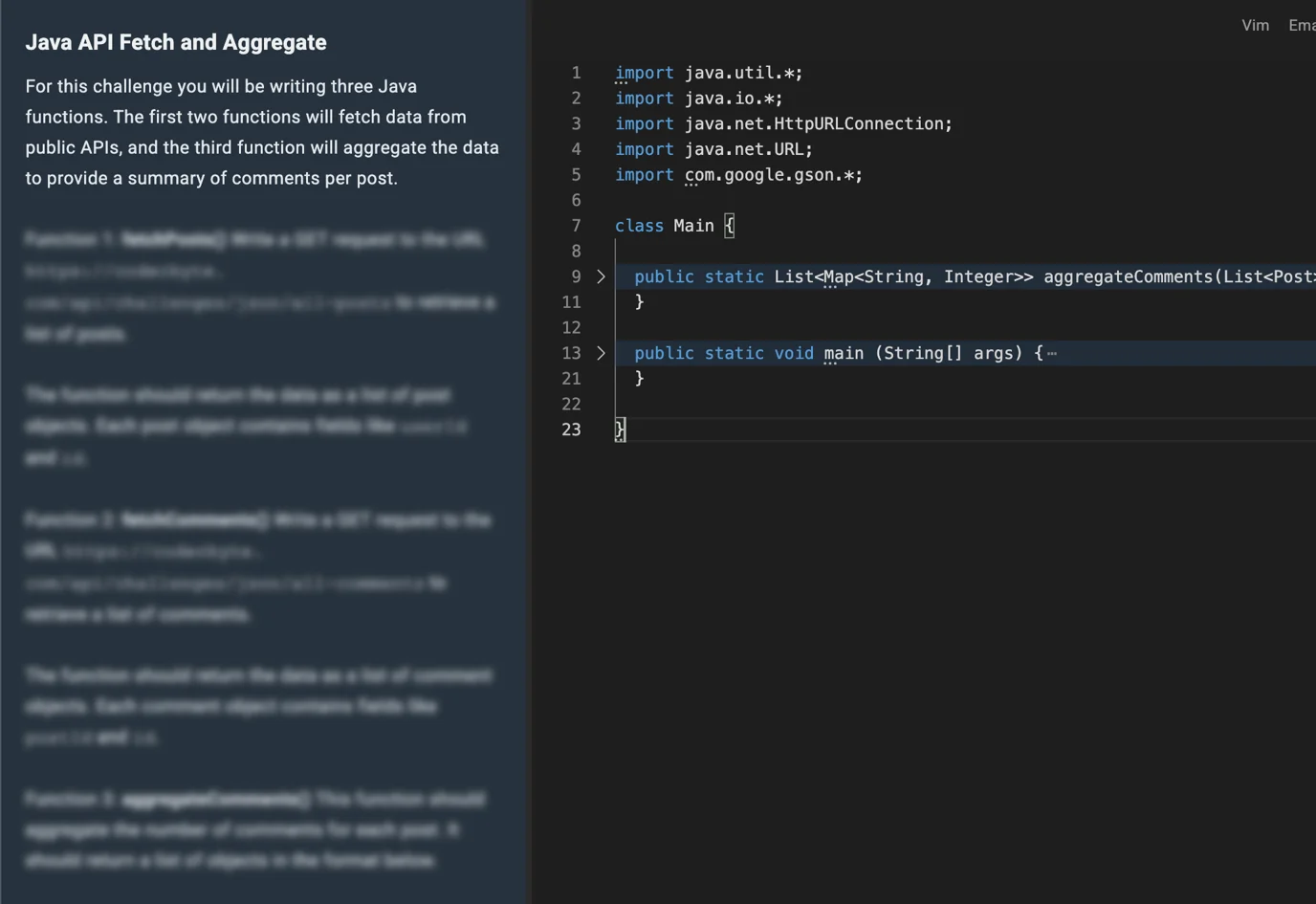
The anti-screenshot feature blurs all instruction paragraphs, and the text only becomes visible when I hover the mouse over a specific paragraph. This prevents most AI tools from capturing a screenshot of all the instructions at once. However, Linkjob does not need the mouse to take a screenshot, it can use hotkeys instead. Therefore, during the interview, I can keep the mouse on the problem description or within the answer area, which avoids triggering this detection.
Webcam proctoring
Before the interview starts, Coderbyte will prompt the candidate to turn on the webcam. Then, the following types of abnormal behavior will be flagged as suspicious of cheating:
No one visible
Multiple people appearing
External devices detected
Frequently looking away
Identity Verification
Coderbyte requires identity verification before entering the interview. They require candidates to use a government-issued ID to verify their identity on the same device and browser used for the assessment. Therefore, finding someone else to take the test for me has also become an impossible option.
Copy and Paste Detection
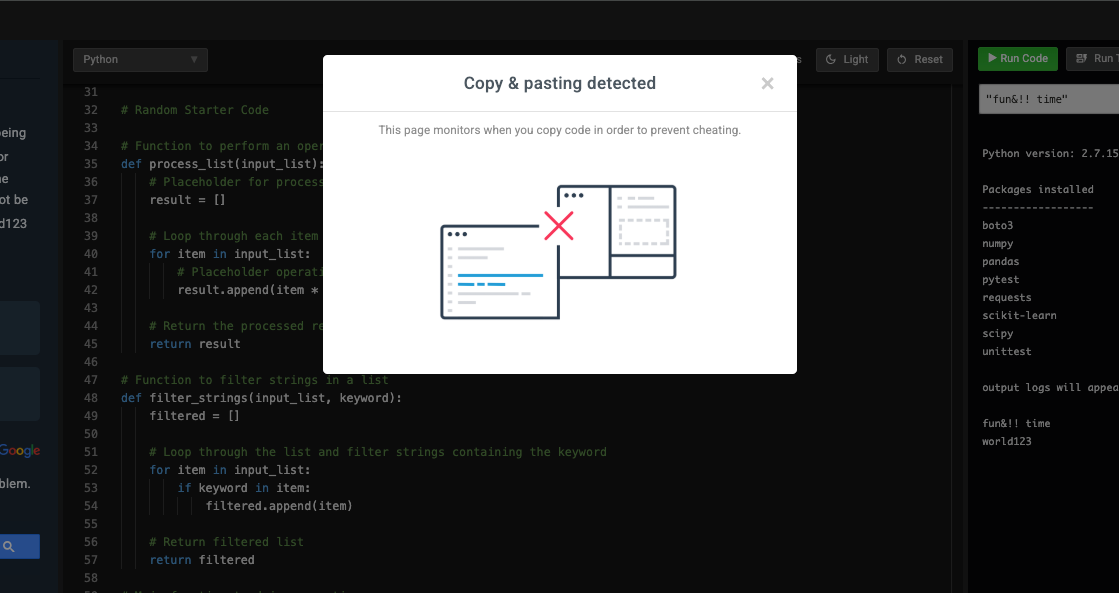
If an answer is copied and pasted from an external source, Coderbyte will trigger a warning and flag this behavior as cheating:
Tab Leaving Detection
If a candidate leaves the tab for a long time during the interview, it will also be flagged. However, some interviews actually require leaving the tab. For example, some companies believe that in real-world work, programmers cannot avoid checking APIs or documentation, so they offer an open-book assessment format. In other cases, system design interviews require using online drawing tools. Therefore, in these situations, leaving the tab is allowed, and detection will be turned off.
Even so, I still suggest that if you feel the need to leave the tab during the interview, it is best to communicate with the interviewer first. You should not leave the tab without permission to prevent being wrongly flagged.
ChatGPT Usage Detection
Coderbyte automatically detects suspicious behavior and compares the candidate’s answers with ChatGPT’s answers. If the similarity ratio is too high, it may be flagged. This is just like checking a paper for plagiarism.
Hide Code Challenge Names with Masking
Coderbyte can hide the names of coding challenges. This way, it is impossible to quickly find answers by directly searching for the problem name on Google.
Coding Video Recordings and Playback
Finally, and most importantly, Coderbyte records the entire session, so interviewers can review any segment of the video at will. At the same time, Coderbyte assists interviewers by summarizing and submitting any detected abnormal segments to them:
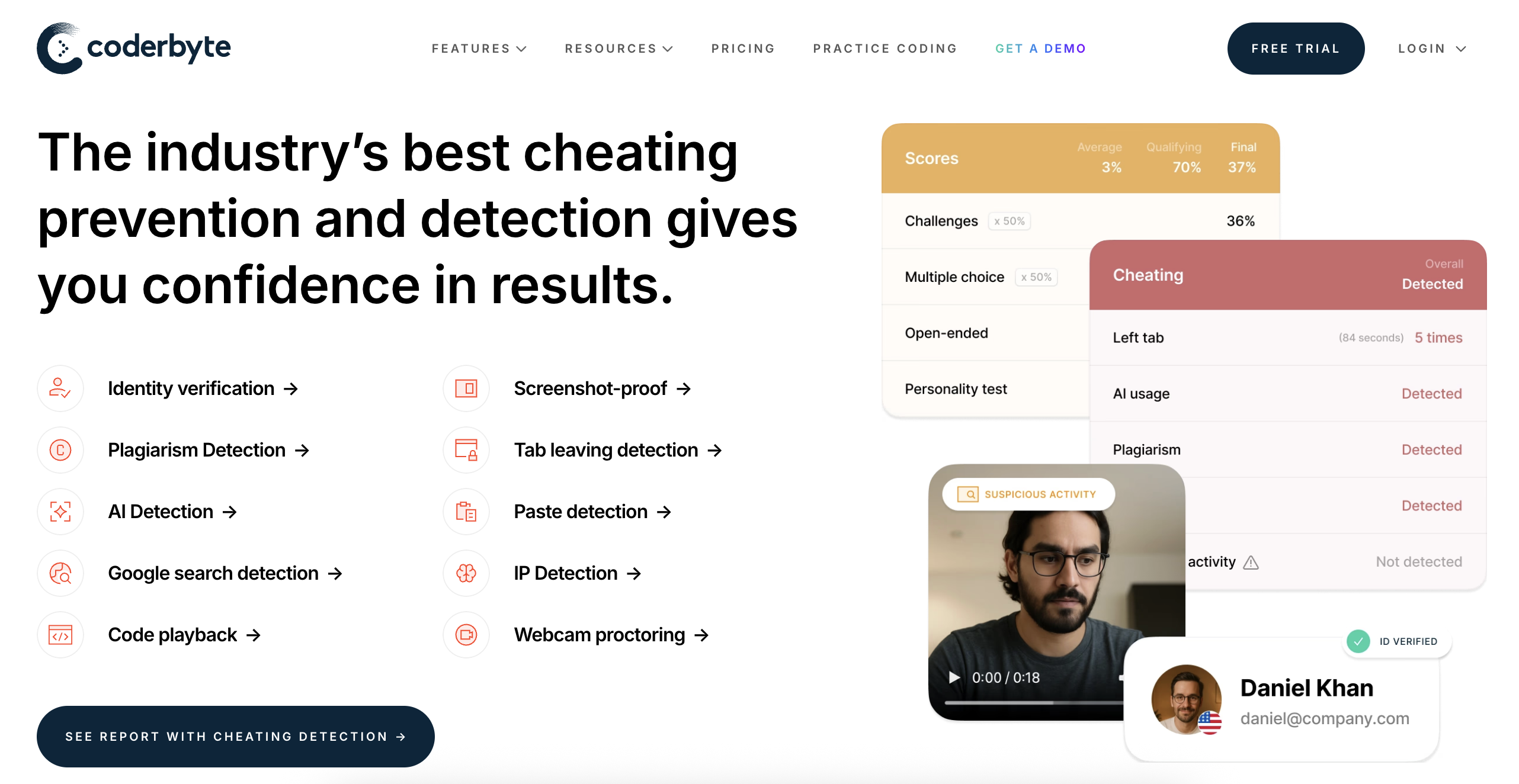
How to Cheat on Coderbyte Using Undetectable AI
Now, using Linkjob AI as an example, let’s look at how AI uses various features and techniques to bypass the anti-cheating measures mentioned above.
Desktop-Native Clients
Monitoring from the Coderbyte web interface relies on APIs provided by the browser. However, because desktop native applications run outside the browser at the operating system level, their processes are completely isolated from the browser. When searching for questions or interacting with AI on a desktop application, the browser cannot detect screen switching behavior, rendering its tab switching or leaving detection completely ineffective.
Invisible Overlays
An interview is a real-time environment where candidates need to collaborate with interviewers. Therefore, it is very likely that an interviewer will request to share the screen. Since web-based monitoring can only track the current browser, interviewers are often not satisfied with sharing just a single tab; they prefer to have the entire screen shared.
However, video conferencing software (such as Zoom, Google Meet, or Microsoft Teams) typically only captures the application layer when sharing the screen. AI tools like Linkjob, on the other hand, exist on a top-level floating layer. This utilizes differences in graphical rendering layers. Even if I enable full-screen sharing, the AI's floating window remains invisible to the interviewer because that specific layer is outside the encoding range of the shared stream.
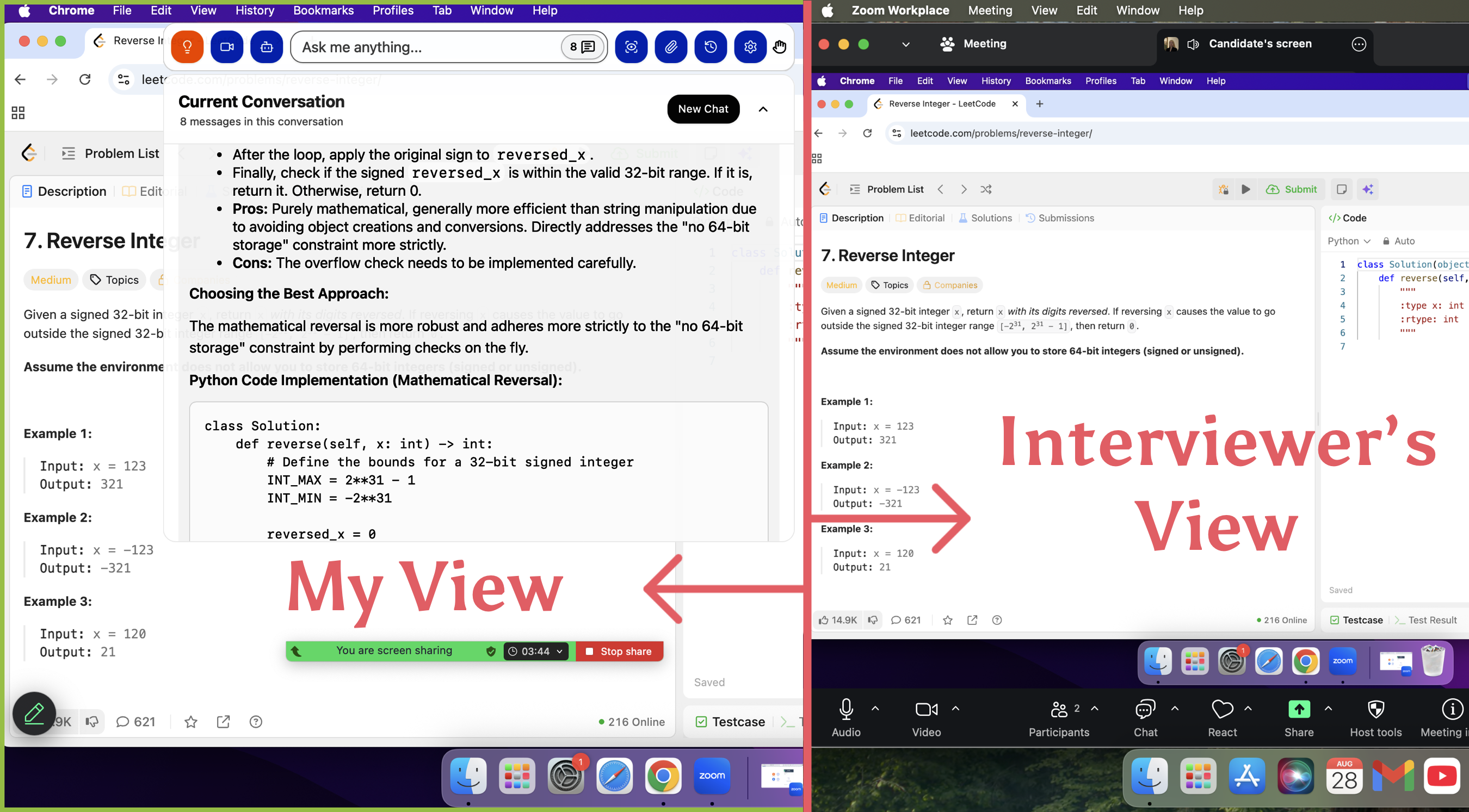
Meanwhile, the application icon for Linkjob in the Dock can also be hidden, achieving a completely invisible effect.
Live Capture
While preparing for interviews, I came across many Reddit posts and found that many candidates got caught because their frequent mouse movements to "non-answer areas" triggered screenshots. However, Linkjob AI can take screenshots using hotkeys. This means my mouse can stay within the code editor, thereby circumventing the Screenshot Proof triggered by abnormal mouse trajectories.
At the same time, this feature does not require knowing the name of the coding problem because it can "see" the question directly. Therefore, hiding the problem name has no impact on the AI.
Global Hotkeys
In addition to controlling the screenshot function, hotkeys can be used for many other features, thereby evading the monitoring of mouse trajectories. For instance, hotkeys can move the position of the answer box, trigger the AI to start listening to the system audio to answer the interviewer's questions, and more.
Real-Time Interview Assistants
This feature is designed to handle the interviewer's follow-up questions. If I authorize the AI to use System Audio Loopback to capture the interviewer's questions in real-time during the session, it can help me answer via low-latency streaming output. I keep this feature on throughout the interview so that the AI can provide key talking points the moment the interviewer finishes speaking, helping me handle unexpected follow-up questions.
Custom Prompt Settings
To evade Coderbyte’s AST Hash Matching (code similarity detection), I customize the AI’s output prompts, instructing it to include "obfuscated variables" or temporary logic blocks that change the code’s fingerprint without affecting execution efficiency. For example, I can have it refactor if-else structures into switch-case statements or ternary operators, or rewrite iteration as recursion.
Another method I can use is providing the AI with a snippet of my own actual code from the past. This allows it to mimic my personal coding habits—such as variable naming conventions and brace placement preferences—while solving the problem.
Undetectable AI Tool Features Summary
Here’s how undetectable tools stand out compared to standard ones:
Feature | Undetectable Tools | Standard Tools |
|---|---|---|
Deployment Type | Desktop-Native Client | Browser-based extensions |
Visibility | Invisible, no visual overlays | In-page DOM elements |
Detection Surface Area | Minimal visual artifacts | Higher risk of detection |
User Experience | Maintains focus, no interruptions | May require tab switching |
Operating Method | Uses global hotkeys, independent operation | Often relies on browser interactions |
Interaction with Screen Sharing | Excluded from captures and recordings | Can be captured during sharing |

Aligning Human Behavior with AI
I also have some tips to share on how to make your behavior appear more natural while using assistance. After all, it's not just Coderbyte's automated detection we have to worry about, interviewers can also directly review the playback and proctoring snapshots.
Eliminating Clipboard Traces
Key Point: Avoid copy-pasting entirely.
Action: Never copy any code snippets directly from the AI interface. Even if the AI provides the complete solution, insist on manual transcribing. Coderbyte logs all Paste Events, and a large block of code appearing instantaneously is impossible to explain away during a playback review. Typing it out manually not only allows you to control the typing rhythm but also lets you naturally add indentation adjustments or comments as you go.
Simulating Cognitive Gaps
Key Point: AI generates answers in a second, but humans need time to think.
Action: Once you receive the AI's answer, do not start writing immediately. First, write down pseudocode or logic comments in the editor, and pause for 2-3 minutes to simulate the thought process.
Intentional Debugging
Key Point: Perfect code feels unrealistic.
Action: Intentionally misspell a variable name or miss a semicolon, run the code to trigger an error, and then fix it as if you just had an "aha!" moment. This "error-correction" sequence is extremely convincing during a video playback review.
Progressive Obfuscation
Key Point: Avoid block-pasting.
Action: Start by typing out a basic, lower-performance solution and ensure it passes. Then, referring to the optimized version provided by the AI, pretend to perform a "performance refactoring" on the spot. When the interviewer sees you optimizing a solution from O(n^2) to O(n), they will perceive you as a highly capable candidate.
Eye-Tracking Deception
Key Point: Natural performance.
Action: While looking at the AI's answer, ensure your eye movement remains natural. You can look at the camera from time to time, or use gestures like resting your chin on your hand while pretending to think to mask any shifting of your gaze.
The Final Guardrail: Safety Checklist
Set up global hotkeys in advance for quick screenshots.
Test the AI tool thoroughly before the exam. Ensure it runs smoothly, remains invisible at all times, and does not interfere with the code editor window.
Hide the AI tool's application icon in the Dock.
Avoid using browser-based tools or extensions. They are highly likely to trigger cheating detection.
Launch the AI before the interview starts to avoid changing settings mid-session.
Turn off notifications and ensure the camera only shows your face.
Do not wear glasses during the interview to prevent reflections from revealing your actual computer screen.
Conduct at least one mock interview before the official session to familiarize yourself with all the AI tool's features.
Do not open any additional tabs besides Coderbyte and the required meeting platform to avoid being flagged by detection.
FAQ
Can Coderbyte detect screenshot shortcuts?
Yes, Coderbyte can flag screenshot shortcuts. That is why I set up custom hotkeys in my capture tool to stay safe and avoid detection; I use uncommon key combinations to take screenshots. For example, I customize Command + S as my AI screenshot hotkey instead of using the default Mac shortcut, Command + Shift + 3.
Does Linkjob AI support bypassing platforms other than Coderbyte?
Yes. Linkjob AI can also be used for interviews on other platforms. It supports all common meeting platforms and online testing environments. Furthermore, it frequently checks for its own invisibility to ensure it remains undetected.
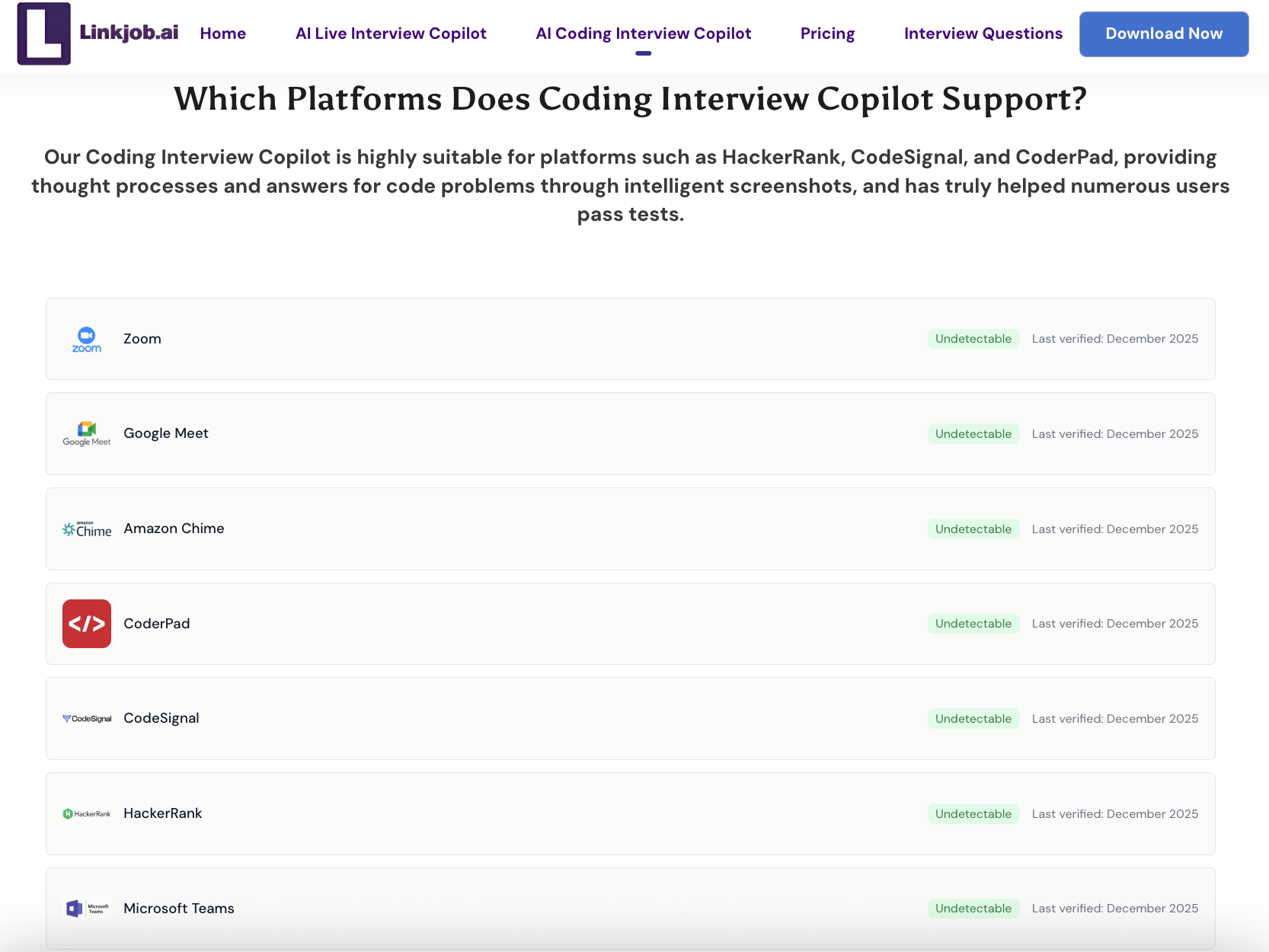
Can Linkjob AI remain undetectable if I share my entire screen?
Yes. Since Linkjob AI utilizes hardware-accelerated overlays, the AI interface exists on a separate graphics layer that is not captured by standard screen-sharing protocols (like Zoom or WebRTC). To the interviewer, your screen looks perfectly clean.
See Also
Techniques for Gaining an Edge in CodeSignal Exams
My Secret Hacks For Beating HackerRank Proctoring and Detection
© Copyright 2025 Linkjob.ai - All Rights Reserved.