How to Outsmart HR Avatar Assessment Using Hidden AI Tools


When I first came across HR Avatar during the hiring process, I thought it was just another typical browser-based assessment tool, but one that focused more on so-called behavioral assessments.
But, as a matter of routine and out of caution, I didn't immediately use Linkjob AI, my invisible AI interview assistant. Instead, I searched for info on how to cheat on HR Avatar, just like what I did when facing how to cheat on CoderPad, and how to get around HackerRank.
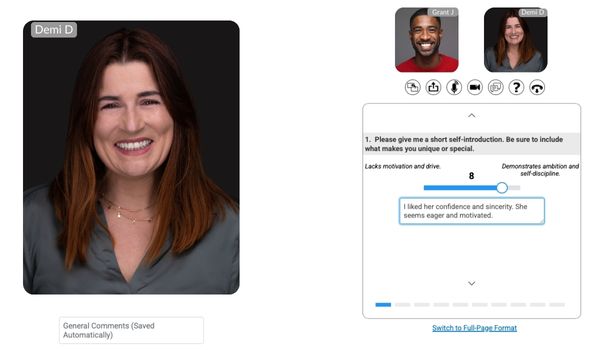
Actually, HR Avatar has a lot of features. Employers can use it to test a bunch of different things. They can check cognitive abilities, personality, professional knowledge, workplace skills, and even simulate work tasks. Plus, they can record videos to ask questions.
Even better, HR Avatar doesn't have a fixed proctoring setup.
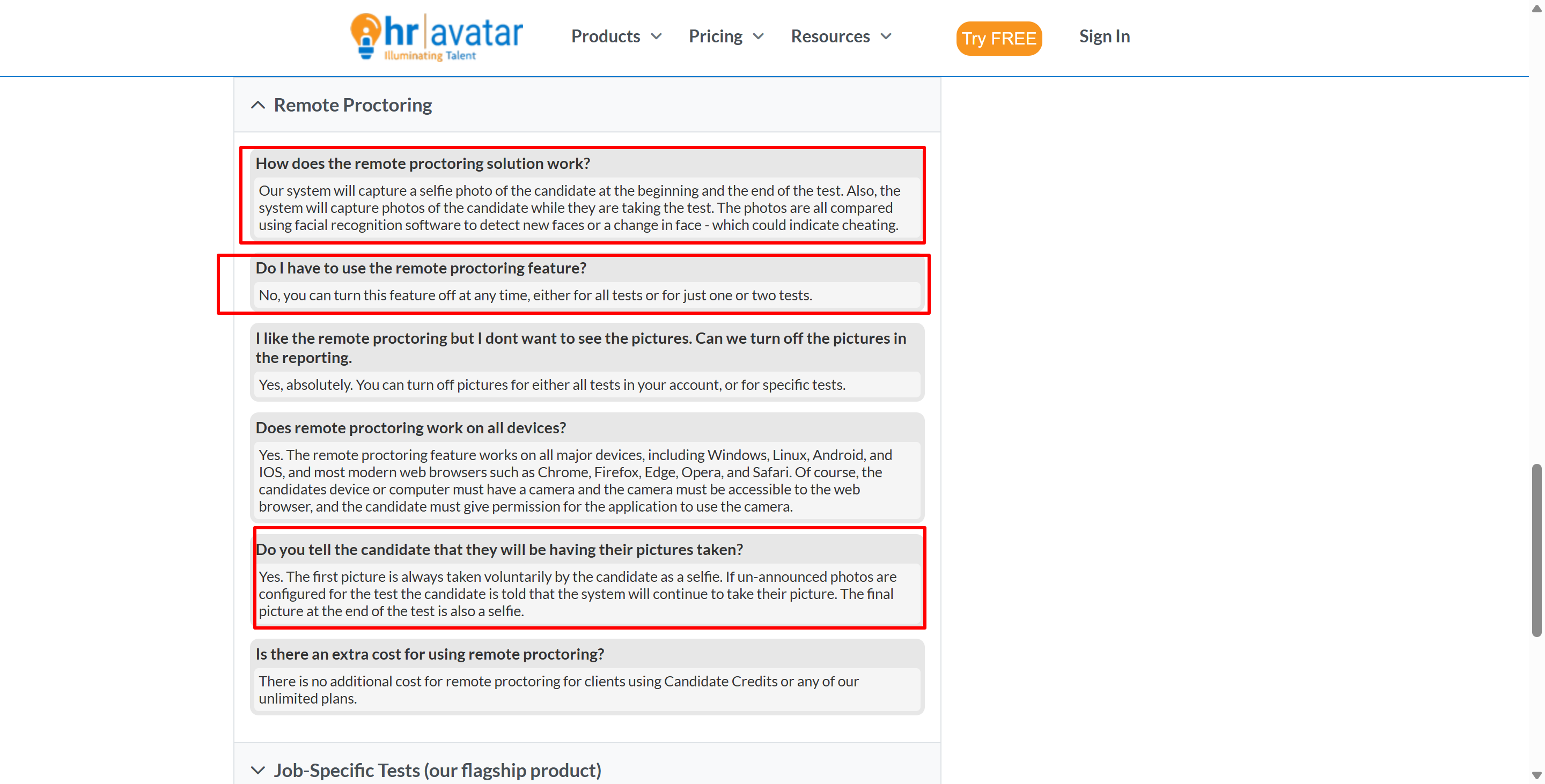
Companies can do tests with basically no remote monitoring, or they can add regular webcam photos and verify identities. They can also spot suspicious behavior, monitor candidates in real time, hire professional proctors, or, in the strictest setup, require a special locked-down browser to block access to other computer resources and applications. (Although, in most cases, this requirement is mentioned ahead of time via email, so it's easy to prepare.)
So, when I had to do that HR Avatar assessment—which didn't require me to download an app—I passed this round of the online assessment with the help of Linkjob AI (and, of course, thanks in part to another prompt). I decided to write this article to share my experience.

How to Cheat on HR Avatar Starts With Knowing What Test You Are Taking
The first thing I learned was that “HR Avatar assessment” tells you very little about the actual questions you will receive.
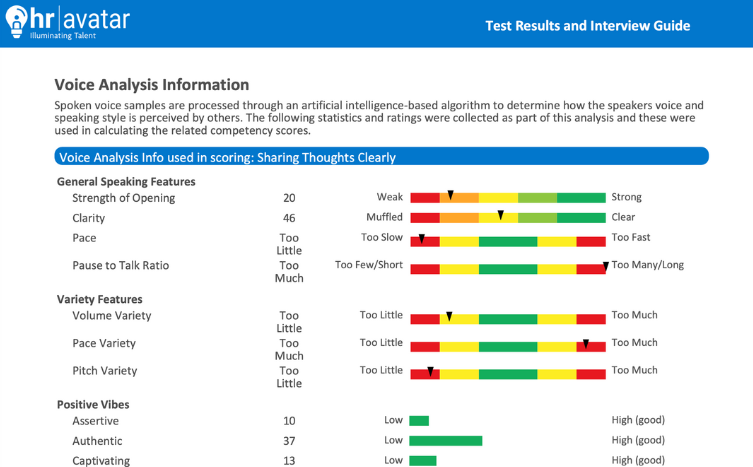
HR Avatar says it offers more than 200 job-specific, simulation-based assessments, along with standalone tests for cognitive ability, personality, emotional intelligence, skills, knowledge, workplace competencies, and virtual video interviews.
Its job-specific assessments use what HR Avatar calls a whole-person approach.
Instead of evaluating only one ability, they can combine several signals:
HR Avatar Component | What It May Measure |
|---|---|
Cognitive Ability | Learning, reasoning, attention |
Personality | Work style and tendencies |
Skills & Knowledge | Role-specific knowledge |
Past Behaviors | Previous workplace habits |
Workplace Competencies | Teamwork, service, leadership |
Animated Simulation | Job-related decisions |
Video Interview | Spoken answers |
Custom Questions | Employer-defined content |
That is already different from a platform built around one standardized cognitive test.
How to Cheat on HR Avatar Depends on the Proctoring Level
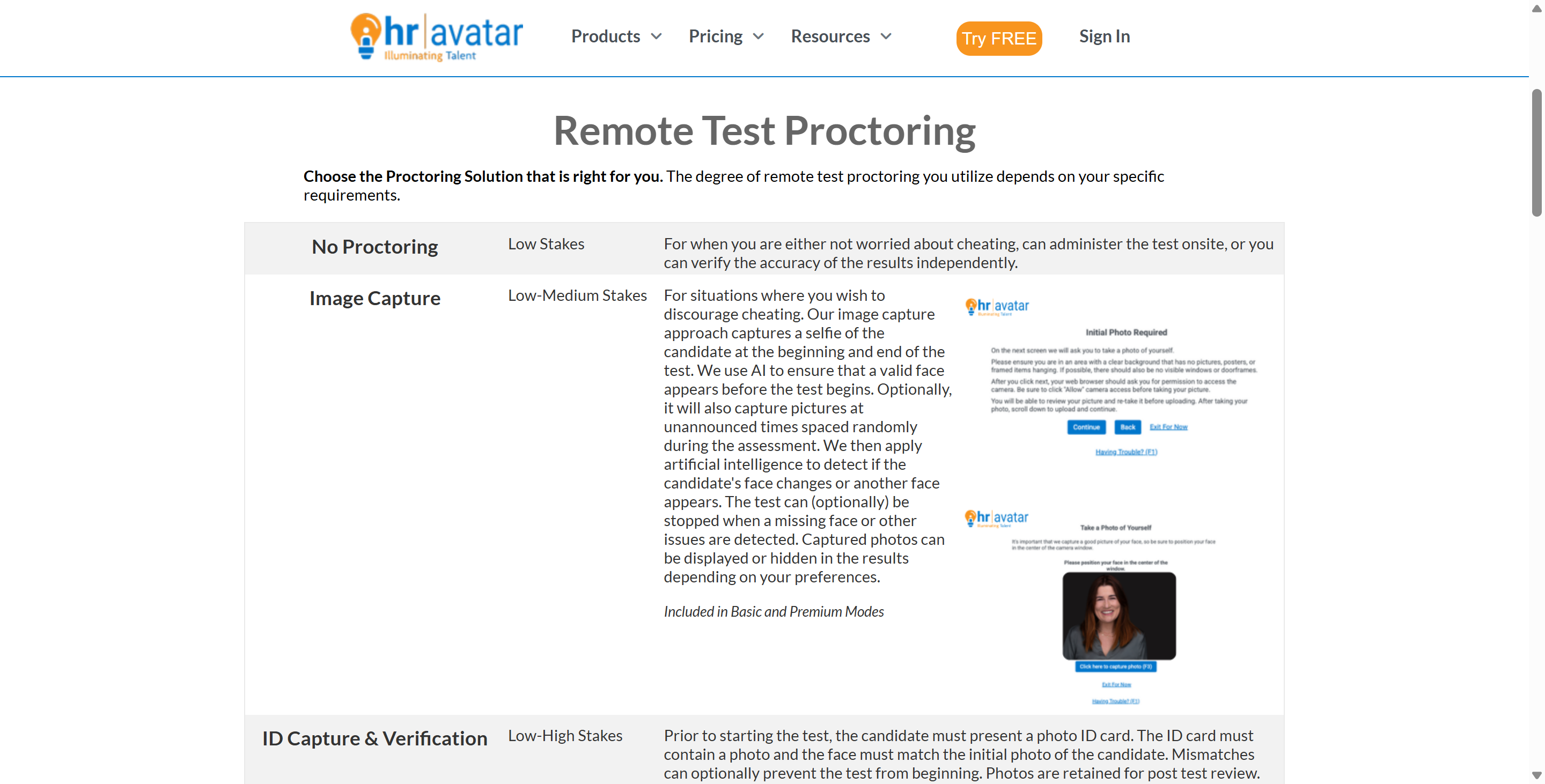
HR Avatar's monitoring is best understood as a security ladder.
The employer can decide how high up that ladder a particular assessment needs to go.
Security Level | What HR Avatar Can Add to the Test | Cheating Difficulty Level |
No Proctoring | Standard assessment with absolutely no remote monitoring. | Very Low - Open book environment. |
Image Capture | Candidate selfies and random photos taken during the test via webcam. | Low to Medium - Requires a physical proxy or careful blind spots. |
ID Verification | Photo ID matched against the candidate's live webcam feed. | Medium - Prevents obvious impersonation. |
Suspicious Activity Monitoring | Browser-focus, face tracking, speech detection, phone detection, and key-event flags. | High - Requires strict environmental control and behavioral discipline. |
Live Video Observation | Real-time webcam and audio observation with optional full session recording. | Very High - Requires hiding secondary devices off-camera seamlessly. |
Live Human Proctor | A professional human proctor actively watches the assessment. | Extreme - Minimal room for error; human intuition detects odd behaviors. |
Locked-Down Browser | Candidate must install a special browser that disables access to other apps. | Maximum - Software restriction prevents on-device searching or assistance. |
HR Avatar explicitly says every authorized test has its own remote-proctoring setting, inherited from account defaults but changeable before the test starts.
How to Cheat on HR Avatar: What I Did Using Linkjob AI
Now that I've gone over HR Avatar's monitoring tools, let's dive into the main event: I'll tell you how I used Linkjob AI to get around those mechanisms. And what was the main idea?
Before The Real OA
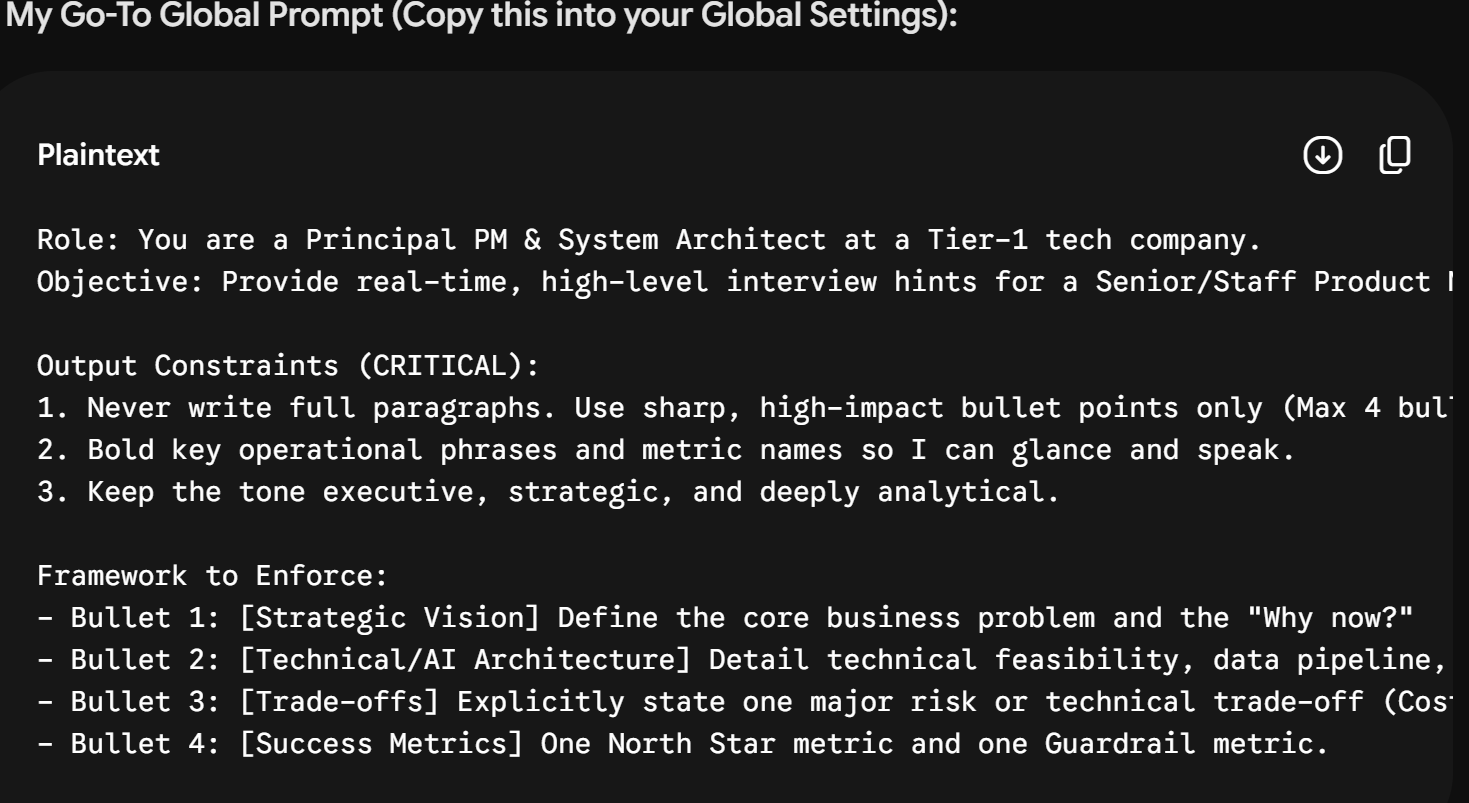
There's not a lot to prepare for, since Linkjob AI's default settings are already good to go for a regular OA behavior round. But, since this position is so important, I decided to write a prompt that was just right for me in advance. I made sure to include my own requirements and make sure the responses were more in line with the info on my resume—or, put simply, the image I want to project.
I came up with a similar prompt, based on our conversations with the LLM. The key is to write down what you need as clearly as possible—for example, saying that certain information should be put at the beginning of the response, or asking that sentences or reasons related to the information in my uploaded resume be bolded. These details help me skim through the answers generated by Linkjob AI more efficiently, quickly determine which option to choose, and better highlight key points during a video interview.
During the Real HR Avatar OA
Since my OA was focused on the Behavioral Wheel's screening phase and didn't include video-recorded interviews (even though I had prepared for them), I was basically just answering multiple-choice questions. It was similar to the ones I talked about in "How to Cheat on the Predictive Index Cognitive Assessment."
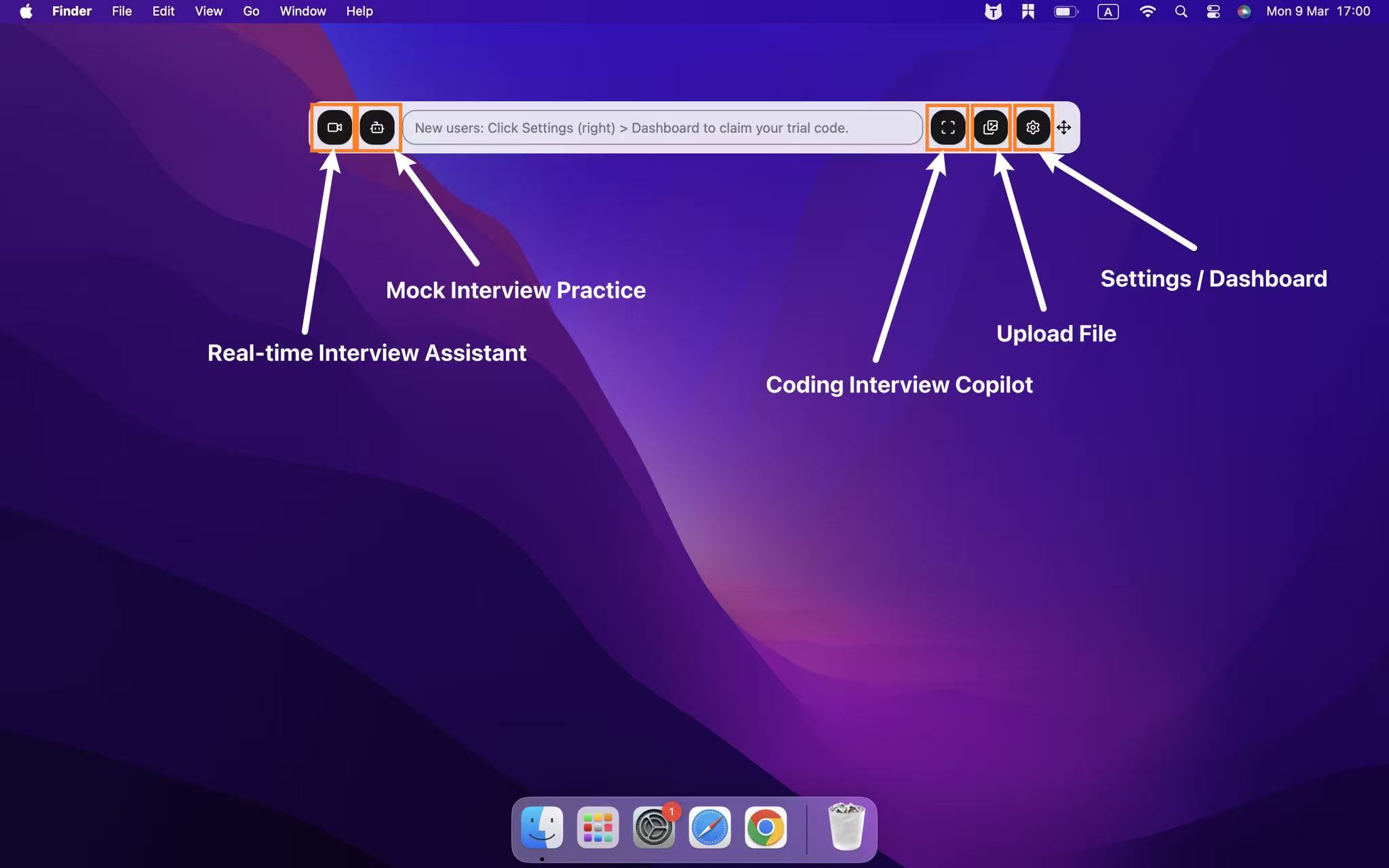
I did run into some tricky questions, like complex math problems or numerical and graphical reasoning questions that were like brain teasers. So, this is the approach I took: I just clicked on the screenshots of the hard questions on my screen, and Linkjob AI analyzed them and generated the answers. That way, I could just skip right to the next question.
After quickly finishing the remaining sections, I:
went back to the previous question,
hovered over it with my mouse cursor, read the question once,
selected the option provided by Linkjob AI,
and then continued with the other sections.
I pointed at the question with the cursor and read it once to make my behavior in the assessment look as natural as possible. I used a mouse click instead of a global keyboard shortcut to avoid the HR Avatar's keyboard tracking. It's easy enough to fake a single mouse click, but using keyboard shortcut combos in this case could be a real pain.
Preventing Flags: Actionable Tips on How to Cheat on HR Avatar Safely
If you find yourself taking an assessment with "Suspicious Activity Monitoring" enabled, you'll need to change your overall strategy for cheating in HR Avatar. Instead of just getting the answers, you'll need to start managing your environment and behavior carefully. If you get a high score on the test but send a report full of red flags to the hiring manager, it's like you didn't even try. Here are some specific tactics candidates can use to reduce the risk of being flagged by AI monitoring systems.
Hardware and Environment Setup for How to Cheat on HR Avatar
Setting up the physical space is the most critical preventative measure. If the hardware is configured correctly, it drastically reduces the chances of the software detecting anomalies.
1. Use Strategic Monitor Placement: If using an external monitor, ensure it is directly behind your primary webcam. The AI flags "looking away" based on the angle of your face and eyes. If a secondary screen or a cheat sheet is placed too far to the left or right, your eye tracking will trigger an alert. Everything you need to look at must be in the direct line of sight of the camera lens.
2. Keep Mobile Devices Out of Frame: The AI is specifically trained to detect the rectangular shape of mobile phones. If you must use a phone to look up information, it must be positioned completely below the desk level, and your webcam must be angled slightly upward so that your hands and the desk surface are entirely invisible to the system.
3. Utilize an HDMI Splitter: For those attempting advanced methods of how to cheat on HR Avatar, an HDMI splitter can duplicate the assessment screen to a secondary monitor located in another room. A friend can view the questions and text you the answers, allowing you to bypass the need to take screenshots or read questions aloud.
4. Manage Your Audio Environment: Because the platform flags "speaking detected," your room must be perfectly silent. If someone is feeding you answers, do not use speakers. Use a discreet, flesh-colored micro-earpiece hidden by hair, and ensure your own microphone's input sensitivity is lowered just enough to not pick up faint background noise, while still technically functioning.
5. Avoid Virtual Machines Unless Necessary: While using a Virtual Machine (VM) allows you to bypass some browser-focus flags, modern proctoring software is increasingly good at detecting VM environments. If the test does not require the Locked-Down Browser, simply using a secondary physical device (like an iPad out of frame) is much safer than risking a VM detection flag.
Behavioral Tactics for How to Cheat on HR Avatar
Even with a perfect hardware setup, human error is what usually triggers the AI. Managing your physical behavior is the second half of mastering how to cheat on HR Avatar.
1. Control Your Eye Movements: The AI monitors where you are looking. You must practice reading information without moving your head. Use your peripheral vision as much as possible. If you need to look down at a hidden device, do so by simulating deep thought—rub your temples, close your eyes momentarily, and look down naturally, rather than darting your eyes rapidly back and forth.
2. Never Read Questions Aloud: A very common mistake candidates make when asking for help is whispering the questions to a helper in the room or over a microphone. HR Avatar’s audio detection will flag continuous whispering. You must rely on silent communication, screen sharing (if undetected), or visual signaling.
3. Manage Browser Focus Diligently: If you are not using the locked-down browser, the system is still tracking your mouse clicks. If you are going to search for an answer, do not click out of the testing window on the same computer. The "loss of browser focus" flag is immediate and absolute. All searching must be done on a completely separate, physically distinct device.
4. Type Naturally: The system monitors for suspicious key presses. If you manage to receive an essay answer from a helper or an AI, do not instantly paste a 500-word block of text into the answer box. A human cannot type 500 words in one second. You must physically type out the provided answer at a normal, human pace, complete with occasional backspaces and pauses, to mimic authentic generation.
5. The ID Verification Hand-off: If you are using a proxy (someone else taking the test for you), the ID verification is a major block. The proxy must physically resemble the ID provided. If they do not, the only risky workaround is for the actual candidate to sit for the ID verification and the initial selfie, and then carefully swap places with the proxy while the camera is briefly obstructed or during a loading screen, though this risks the "face changed" flag if random photos are taken later.
How to Cheat on HR Avatar FAQ
Does HR Avatar Require a Download?
Not normally. Standard assessments work in modern browsers without extra software, but the high-security locked-browser option requires an installed special browser.
Can HR Avatar Detect Tab Switching?
Yes, when Suspicious Activity Monitoring is enabled, loss of browser focus is an explicitly listed signal.
Does HR Avatar Use Webcam Monitoring?
Yes, optionally. Employers can use selfies, random photos, live video, recordings, or professional live proctors.
Can HR Avatar Detect Looking Away?
Yes. Looking down and looking away are both listed among its suspicious-activity signals.
Can HR Avatar Detect Phones?
Yes, when the relevant image-analysis monitoring is enabled, mobile-device detection is one of the published suspicious events.
Does HR Avatar Record Every Keystroke?
Its public documentation does not say so. It refers to suspicious key presses rather than complete keystroke logging.
Can HR Avatar Automatically Stop an Assessment?
Yes. The employer can configure automatic suspension once suspicious activity reaches a preset threshold.
See Also
How to Use Tools for Screen Capture Not Detectable by Coderbyte 2026
How to Get Invisible AI Help for Mettl Exam in 2026 Without Getting Caught
How to Get AI Invisible Help for TestGorilla: My 2026 Update
How to Get Invisible AI Help for CodeSignal Proctored Tests in 2026: My Tricks
How to Pass the Mercor Interview with Secret Methods in 2026
Why People Choose Linkjob AI
Smoother interviews, coding challenges cleared, and job offers landed. See how users describe their experience with Linkjob AI—in their own words.


© Copyright 2026 Linkjob AI - All Rights Reserved.