How to Bypass Althire Assessment 2026 Detection Systems

I started researching how to cheat on AltHire when a friend asked me to help her prepare for her first Xpheno interview. I looked through a bunch of questions and interview experiences for her, but she wasn't happy and started asking me if there were any more convenient tools out there. She said that this interview was probably based on AI-generated questions, and she didn't want to put too much effort into it.
So, I started checking into whether Xpheno's interviews were platform-based. I read a couple of articles along the way about how to cheat on Micro1 and how to cheat on TestGorilla. That's how I found Linkjob AI—it's a hidden AI interview tool. My friend and I tried out Linkjob AI a couple of times, and she nailed it, making it straight into the interview and moving on to the next round.
I'd say using a tool to get through the initial AI interview round feels a bit like "cheating," but it doesn't really matter. After all, my friend genuinely passed, and passing itself can only lead to good news. I'm writing this article to share her experience with you, along with the details I uncovered during my research.
How AltHire’s Anti-Cheating System Works
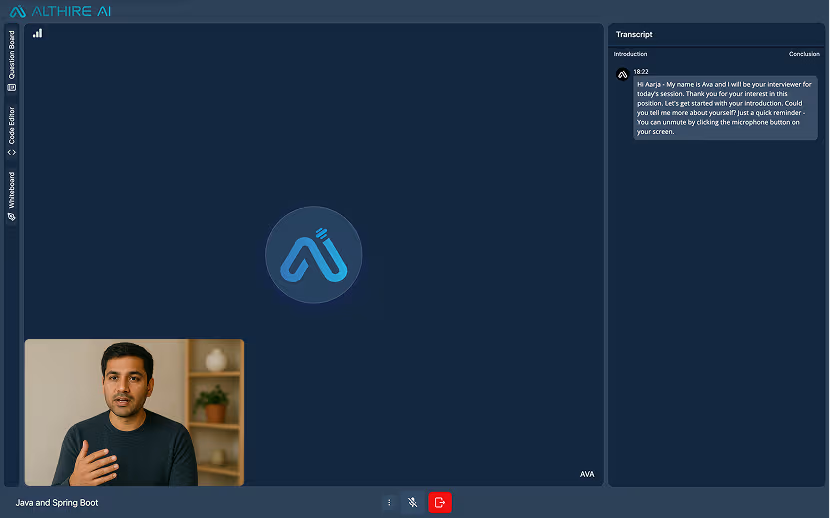
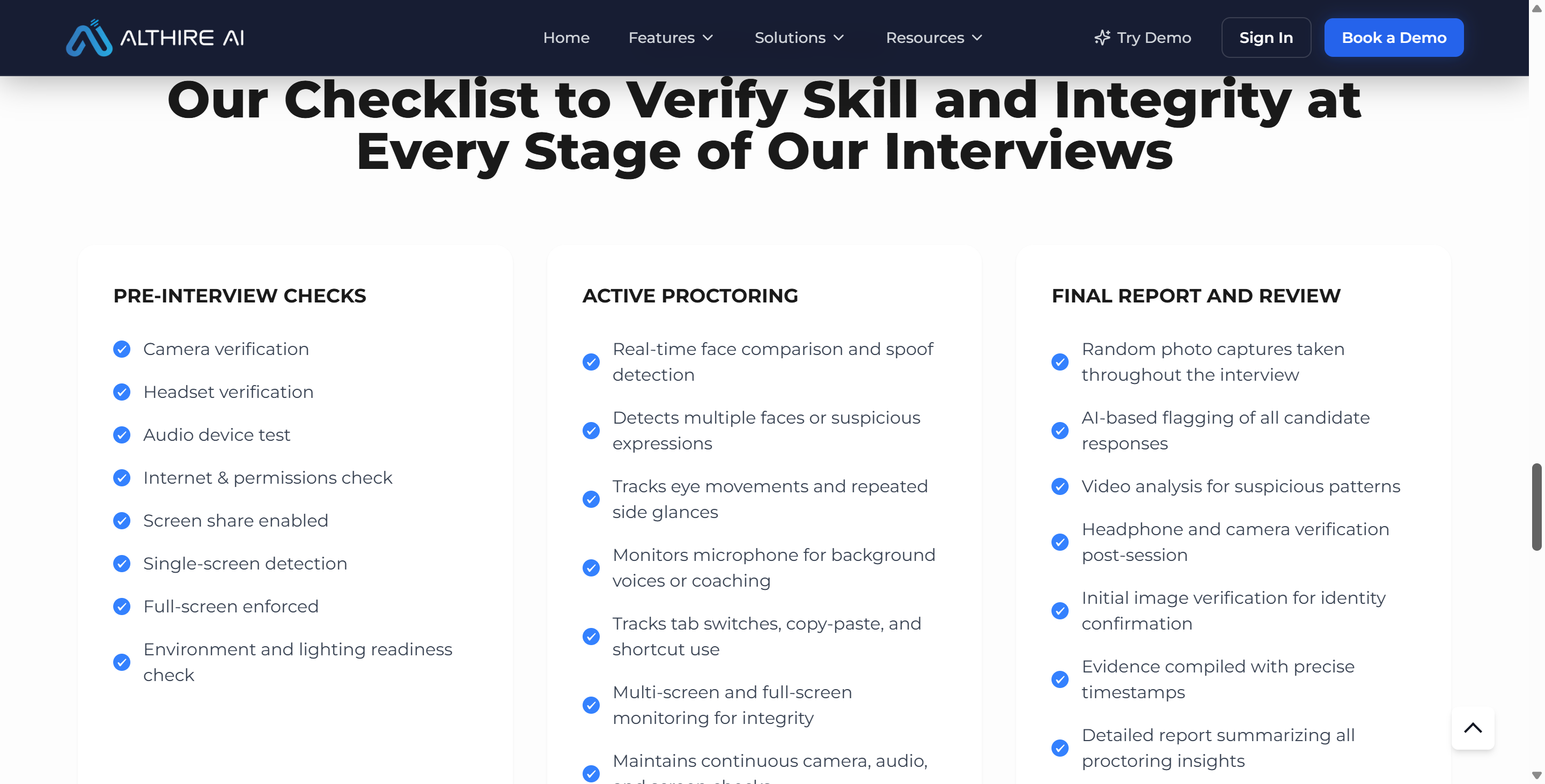
First, I should mention what my investigation is focusing on: AltHire was the service provider for Xpheno's first-round interviews, and AltHire itself is a pretty comprehensive AI interview service provider—so much so that it even has a dedicated page explaining how its entire system prevents cheating.
Based on AltHire’s current public documentation, its anti-cheating system appears to be built mainly around browser-visible signals, webcam and microphone access, screen sharing, coding telemetry, and server-side behavioral analysis.
In other words, AltHire does not appear to follow the same model as tools such as ProctorU Guardian, which use a dedicated secure browser and can inspect more of the local system environment. AltHire’s public materials do not state that candidates must install a desktop application, browser extension, kernel driver, or background process scanner.
AltHire’s Main Anti-Cheating Measures
Anti-Cheating Measure | What AltHire Says It Can Detect or Monitor | Likely Technical Basis |
|---|---|---|
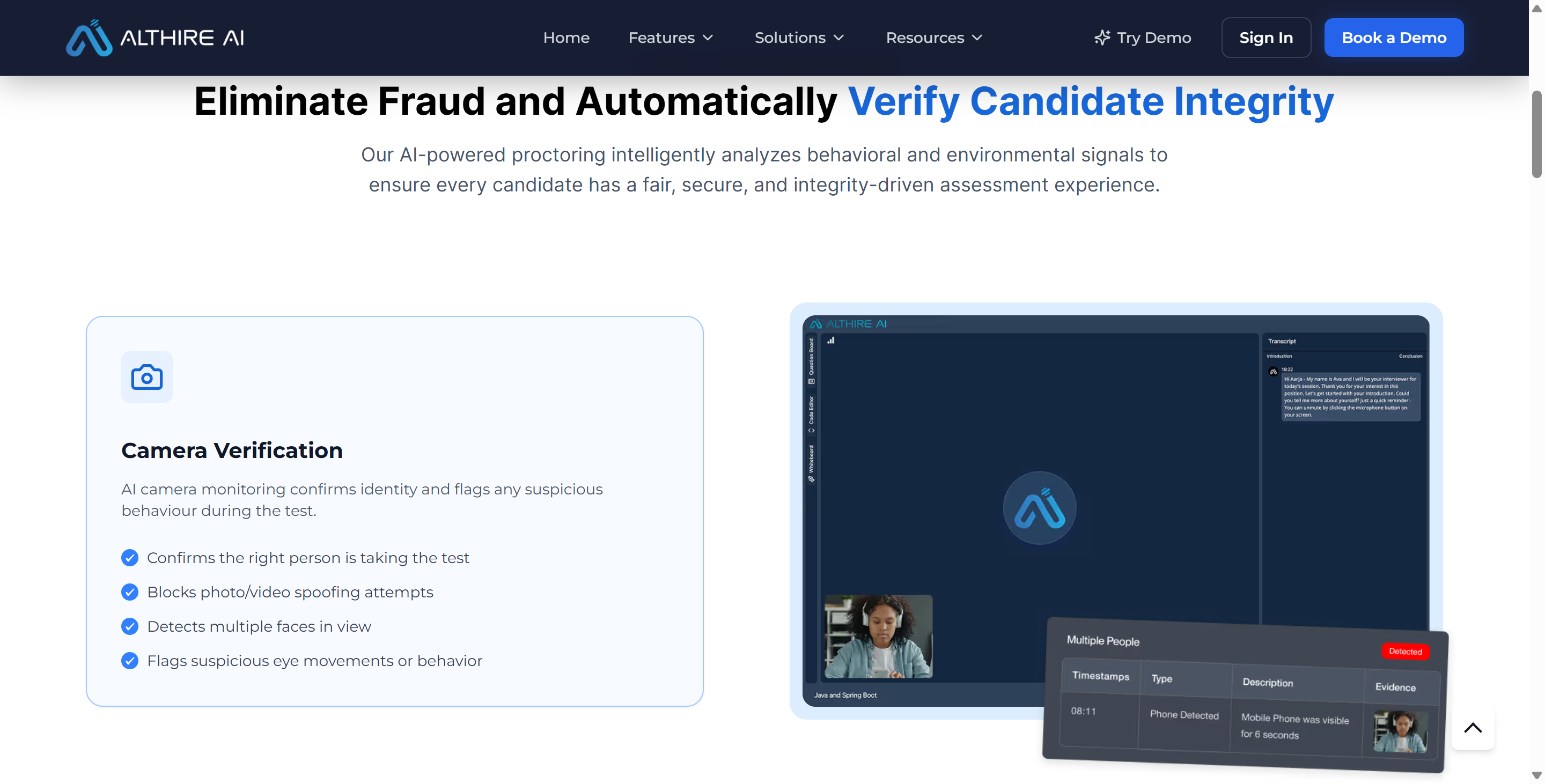
Camera verification | Identity issues, multiple faces, suspicious visual behavior, possible impersonation | Browser webcam permission + video analysis |
Audio integrity | Multiple speakers, background conversations, suspicious audio behavior | Browser microphone permission + audio analysis |
Screen monitoring | Tab switching, full-screen status, multiple displays, visible AI overlays | Browser state + screen sharing |
Copy/paste and shortcut monitoring | Paste events and some keyboard shortcuts | Browser clipboard and keyboard events |
Coding behavior analysis | Unusual paste activity, abnormal coding speed, suspicious coding patterns | Web IDE telemetry + timing analysis |
AI-generated answer detection | Answers that appear heavily influenced or generated by AI | Server-side text and behavioral analysis |
Identity and session evidence | Photos, timestamps, monitoring records, session evidence | Browser media capture + backend logging |

AltHire also says that, before or during an assessment, it can check things such as:
camera access;
microphone and audio;
screen sharing;
whether the candidate is using a single screen;
full-screen status;
tab switching;
copy/paste activity;
suspicious behavior during the session.
The Three Layers of AltHire Monitoring
1. Browser Telemetry
Here's the lowdown on the three levels of monitoring in AltHire.
These may include:
Tab switching;
Focus changes;
Exiting full-screen mode;
Copy/paste events;
Evaluating actions within the editor;
Coding timestamps and interaction modes.
This is the aspect that's most directly limited by the browser's sandbox.
2. Browser-Granted Access to the Camera, Microphone, and Screen
The second layer comes from permissions that the candidate explicitly gives.
Once the user gives it the OK, the browser can give AltHire the following:
Webcam video;
Microphone audio;
Screen-sharing video.
Then AltHire can send these streams to its servers to look at them some more.
3. Server-Side AI and Behavioral Analysis
The browser is mainly responsible for collecting data. More complex assessments are done on the server side. But AltHire says it can look at the following things:
Here are some red flags to watch out for:
Suspicious eye movements
Multiple voices
Possible impersonation
Abnormal typing speed
Suspicious answering patterns
Visible AI tools or answer overlays
AI-generated or AI-assisted answers
To me, this so-called accurate process should be:
Browser events / Screen / Webcam / Audio / Programming telemetry data → AltHire backend → Behavioral or AI analysis → Flagging or reviewing signals
Technical Workflows: How to Cheat on Althire Safely with Hotkey AI
To successfully use the Althaire proctoring system, you need a technical workflow that provides help without triggering browser DOM events or clipboard alerts. When job candidates try to find ways to game the system, certain AI interview tools (like Linkjob AI) offer a cool, asynchronous approach to easily and quickly fixing any technical issues.
OS-Level Screen Capture vs Browser DOM Focus Tracking (window.onblur)
The foundational security layer in Althire is browser focus tracking, which fires a window.onblur event whenever a user interacts with elements outside the browser viewport. Standard browser-based AI extensions or secondary tabs cause immediate focus loss:
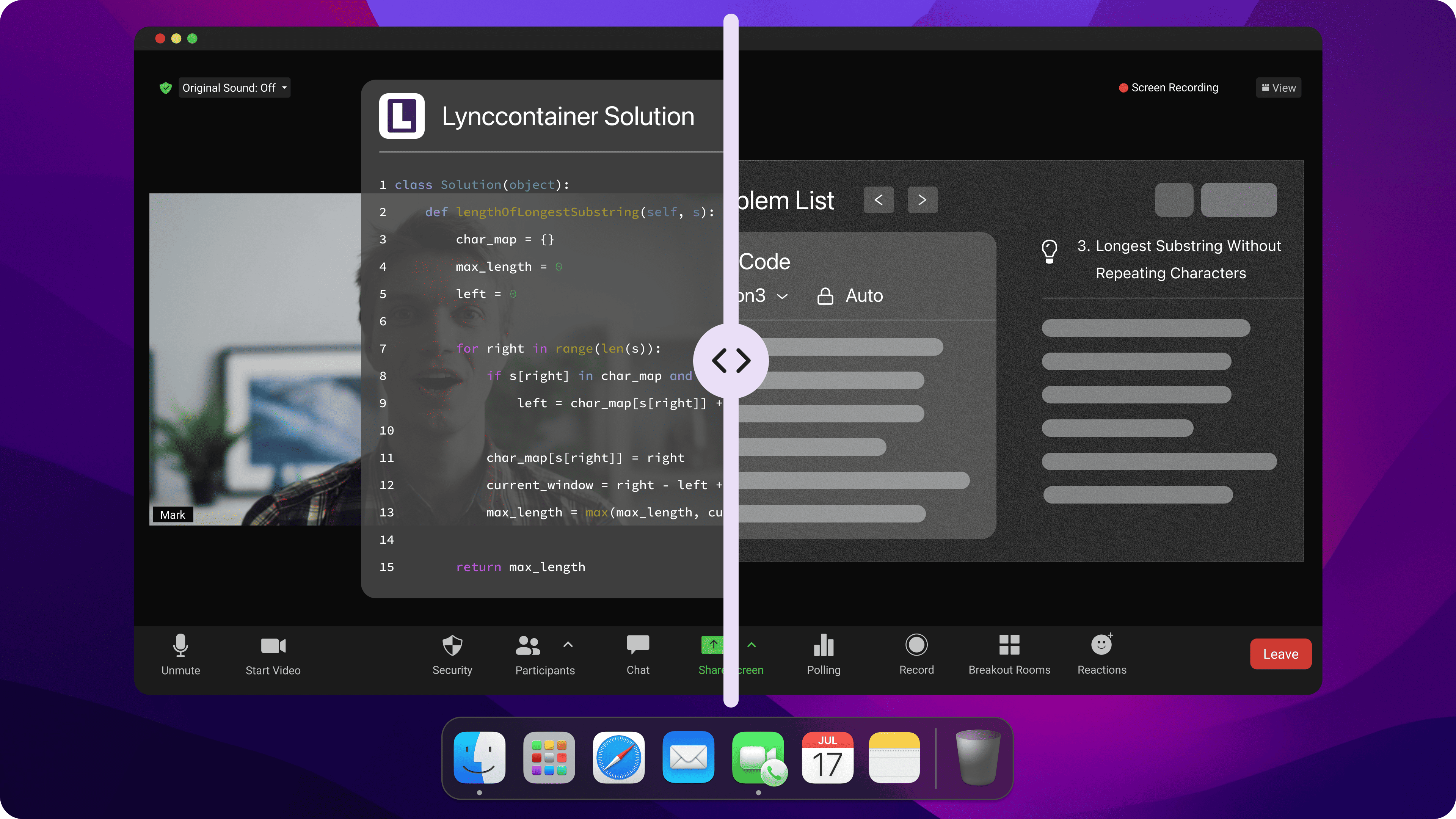
Operating System Level Capture: Tools like Linkjob AI capture screen pixels directly from the operating system graphics buffer using global system hotkeys (
Cmd + Shift + Son macOS orCtrl + Shift + Son Windows).Zero Browser Interception: Because screen capture occurs below the browser DOM level, the Althire assessment window retains active focus continuously.
Focus Event Logs: The browser event log records zero
window.onblurfocus-loss events throughout the assessment session, preserving a clean telemetry audit log in the candidate report.
Transparent Sub-Webcam HUD Overlay Integration
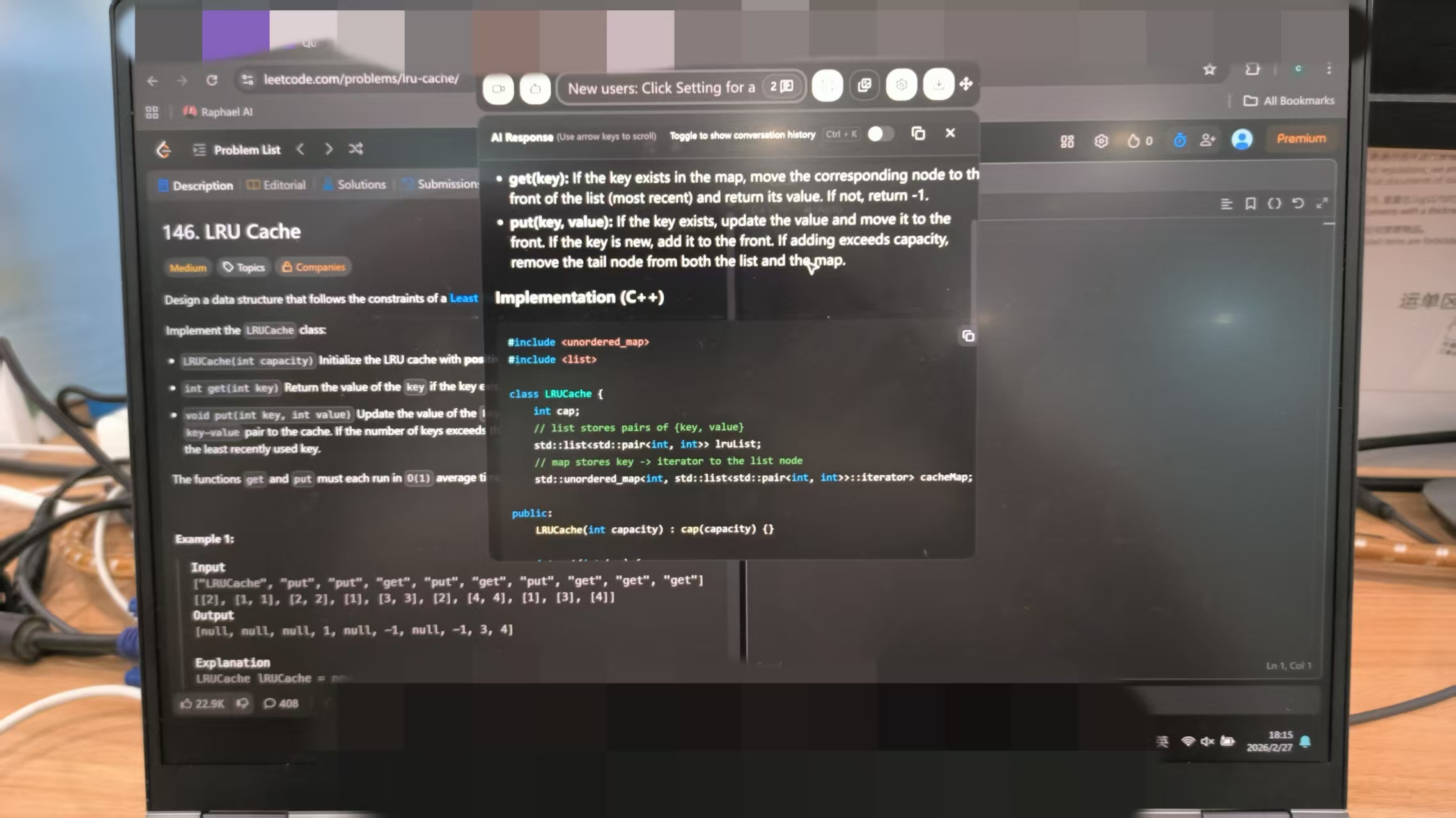
Capturing the screen is only the first step in learning how to cheat on Althire effectively; presenting the generated information naturally is equally critical:
Non-Activating Transparency: System overlays render as semi-transparent windows that hover above all active application windows without claiming OS window focus. Clicking or interacting with the overlay does not steal focus from the underlying Althire browser window.
Sub-Webcam Docking: Positioning the transparent HUD directly beneath the physical webcam lens aligns the candidate's line of sight with the top portion of the display screen.
Natural Eye Gaze Alignment: Reading logic suggestions or SQL structures off an overlay positioned under the camera lens simulates a standard screen-focused gaze, avoiding downward or lateral eye movements that trigger Althire's video orientation alerts.
Asynchronous Problem Solving and Natural Keystroke Generation
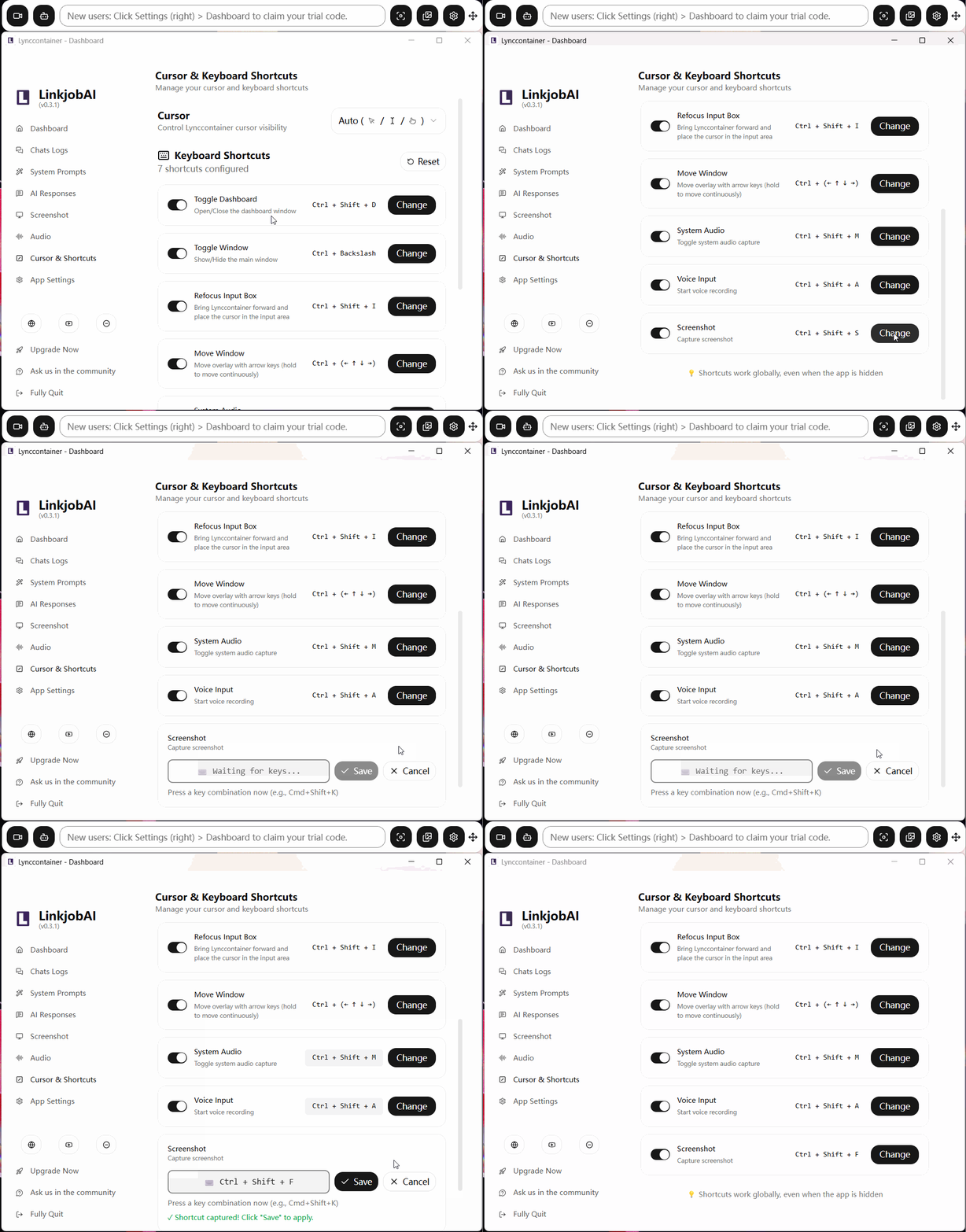
Once an OS-level screenshot is sent to an assistance tool, candidates must manage the solution execution phase carefully:
Asynchronous Question Navigation: On complex coding or data analysis problems, candidates can capture the problem statement, skip to a secondary question, and return once the HUD overlay displays the structured solution breakdown.
Manual Keystroke Reproduction: Candidates must never attempt to copy and paste code or text from the overlay into the Althire editor. Instead, they must manually type out solutions character by character.
Natural Typing Dynamics: Typing code manually generates realistic typing speed variations, backspace corrections, and line-by-line syntax construction, rendering the line-by-line code playback indistinguishable from organic human coding.
By combining OS-level capture, sub-webcam HUD docking, and manual text entry, candidates can establish a reliable workflow when researching how to cheat on Althire without exposing their session to telemetry flags.
Behavioral Guidelines: How to Cheat on Althire Without Raising Flags
Even when using covert system-level aids, it's important to act naturally and respond in a natural way so as not to raise suspicion among candidates. If you're going to cheat on Althire, you need to have total control over the environment and input habits.
Physical Workspace Setup and Camera Alignment Strategies
Single Primary Monitor Environment: Disconnect all secondary monitors, external tablets, and HDMI splitters prior to launching the Althire assessment portal. Multi-display configurations increase the risk of accidental cursor movement outside the primary display area.
Sub-Webcam HUD Positioning: Dock your transparent AI HUD overlay directly beneath your physical webcam lens. This keeps your central gaze aligned near the camera, ensuring eye movements remain centered on the screen during coding and video prompts.
Balanced Frontal Lighting: Set up direct, shadow-free lighting on your face. Strong background lighting or harsh side shadows can interfere with facial tracking algorithms and trigger snapshot orientation alerts during video modules.
Isolated Private Testing Perimeter: Complete the assessment in a quiet, closed room. Background noise, ambient chatter, or secondary individuals entering the frame will trigger Althire's audio anomaly detectors and video verification markers.
Clean Browser Workspace: Disable all third-party browser extensions, close background messaging software, and clear browser cache memory before launching the Althire test session to prevent unexpected pop-ups or performance slowdowns.
Keystroke Dynamics, Eye Tracking, and Answer Pacing Techniques
Character-by-Character Manual Entry: Always type out AI-generated code, SQL queries, spreadsheet formulas, and text answers manually. Direct copy-paste operations into Althire editors immediately generate paste violation flags in the candidate audit log.
Organic Typing Rhythms: Vary your typing speed naturally across different parts of a response. Introduce occasional minor typos, backspaces, and syntax refactoring to mirror authentic human thought and editing processes.
Controlled Gaze Alignment: Keep your eyes focused steadily on the central display area where test questions and your HUD overlay sit. Avoid abrupt downward glances toward desktop surfaces or sharp lateral head turns.
Simulated Cognitive Deliberation: On multi-step algorithmic or data interpretation challenges, allow a natural 15-to-30-second thinking pause before commencing typing. Immediate, high-speed typing right after opening a complex problem appears artificial in recruiter playback logs.
Conversational Video Explanations: When recording AI video interview responses, glance smoothly at your HUD outline notes while speaking into the microphone in an articulate, conversational tone. Treat the overlay as simple speaker notes rather than reading text verbatim.
Adhering to these physical and behavioral guidelines ensures that your session audit log remains natural and credible during recruiter reviews when evaluating how to cheat on Althire.
Module Comparison: How to Cheat on Althire Across Assessment Modules
Althire offers multiple specialized testing modules, each with distinct proctoring triggers and corresponding bypass strategies. The following tables outline how telemetry operates across these modules and how risk categories are classified in Althire’s detailed candidate reports.
Assessment Module Telemetry and Bypass Workflows
Althire Assessment Module | Primary Candidate Task | Monitored Telemetry Signals | Recommended Bypass Workflow |
Coding Assessments | Function drafting, algorithmic puzzles, SQL queries | DOM focus loss ( | OS-level hotkey screenshot → HUD overlay review → Manual line-by-line keystroke entry |
AI Video Interviews | One-way verbal answers to technical/behavioral prompts | Facial orientation, speech pause cadence, audio transcription matching | Sub-webcam HUD docking → Outline bullet point review → Conversational verbal delivery |
Data & Spreadsheet Tasks | Formula construction, data cleaning, table calculations | Cell value checks, focus logs, external paste tracking | Background screenshot capture → Formula logic display on HUD → Manual cell formula typing |
Open-Ended Text Responses | Technical essays, business scenario writing | Clipboard insertion tracking, LLM language syntax detection | Hotkey screen capture → Solution outline generation → Manual typing with human phrasing |
Candidate Integrity Report Risk Classification
Althire Report Metric | High-Risk Flag Trigger | Candidate Impact | Mitigation Strategy for How to Cheat on Althire |
Tab-Switch Log | Leaving assessment viewport for > 2 seconds | Marked as potential off-platform searching | Use OS-level hotkeys ( |
Paste Event Ledger | Direct text insertion > 20 characters | High risk marker in code playback timeline | Never copy-paste; type out code and text manually line by line |
Keystroke Burst Tracking | Unnaturally rapid typing without backspaces | Flagged for automated input macro usage | Vary typing speed organically and introduce natural backspaces/edits |
Video Gaze Deviations | Facial orientation off-center > 15% of response | Video review flagged for external reading | Dock HUD overlay directly below webcam lens to align gaze with screen |
Audio Anomaly Flags | Secondary background voices or extended silences | Speech transcript marked for manual review | Test in an isolated room with continuous, natural speech pacing |
Frequently Asked Questions About How to Cheat on Althire
Does Althire detect browser tab switching?
Yes. Althire tracks browser DOM focus loss (window.onblur) and logs every instance where a candidate leaves or clicks outside the active assessment tab.
Can Althire detect text pasted into the coding editor?
Yes. Althire actively intercepts clipboard command events and flags external text insertions inside its coding IDE and text response fields.
Does Althire flag abnormal eye movements during video interviews?
Yes. Althire evaluates webcam captures and video streams to track candidate facial orientation and flag persistent gaze deviations away from the primary display area.
Can Althire detect background AI tools like Linkjob AI?
No. Tools like Linkjob AI operate at the operating system level and render non-activating HUD overlays that do not trigger browser DOM focus events or kernel lockdown drivers.
Does Althire require downloading a lockdown browser?
No. Althire assessments run within standard modern web browsers without requiring kernel-level application installations or lockdown browser software.
Does a single tab switch result in immediate disqualification?
No. Initial tab-switch events generate warning markers in the recruiter audit report, which hiring managers review in context before making a final decision.
See Also
How I Managed to Cheat on the Wonderlic Test in 2026
Tips for Successfully Navigating HackerEarth Proctoring in 2026
How to Bypass Smowl Proctoring Safely in 2026
Why People Choose Linkjob AI
Smoother interviews, coding challenges cleared, and job offers landed. See how users describe their experience with Linkjob AI—in their own words.


© Copyright 2026 Linkjob AI - All Rights Reserved.