How I Share Screen and Get Invisible AI Help for Exams and Interviews in 2026


When I’m cheating in an online exam and interview, the most stressful moments is when the interviewer suddenly asks I to share my screen.
But I’m not afraid anymore because I found an undetectable AI interview assistant. It can collect the questions from the interviewer while simultaneously generating answers for me. Even if the interviewer asks me to share the screen, it won't be visible. Now I know how to cheat on HackerRank, and I have successfully passed the TikTok CodeSignal OA with the undetectable AI interview assistant.
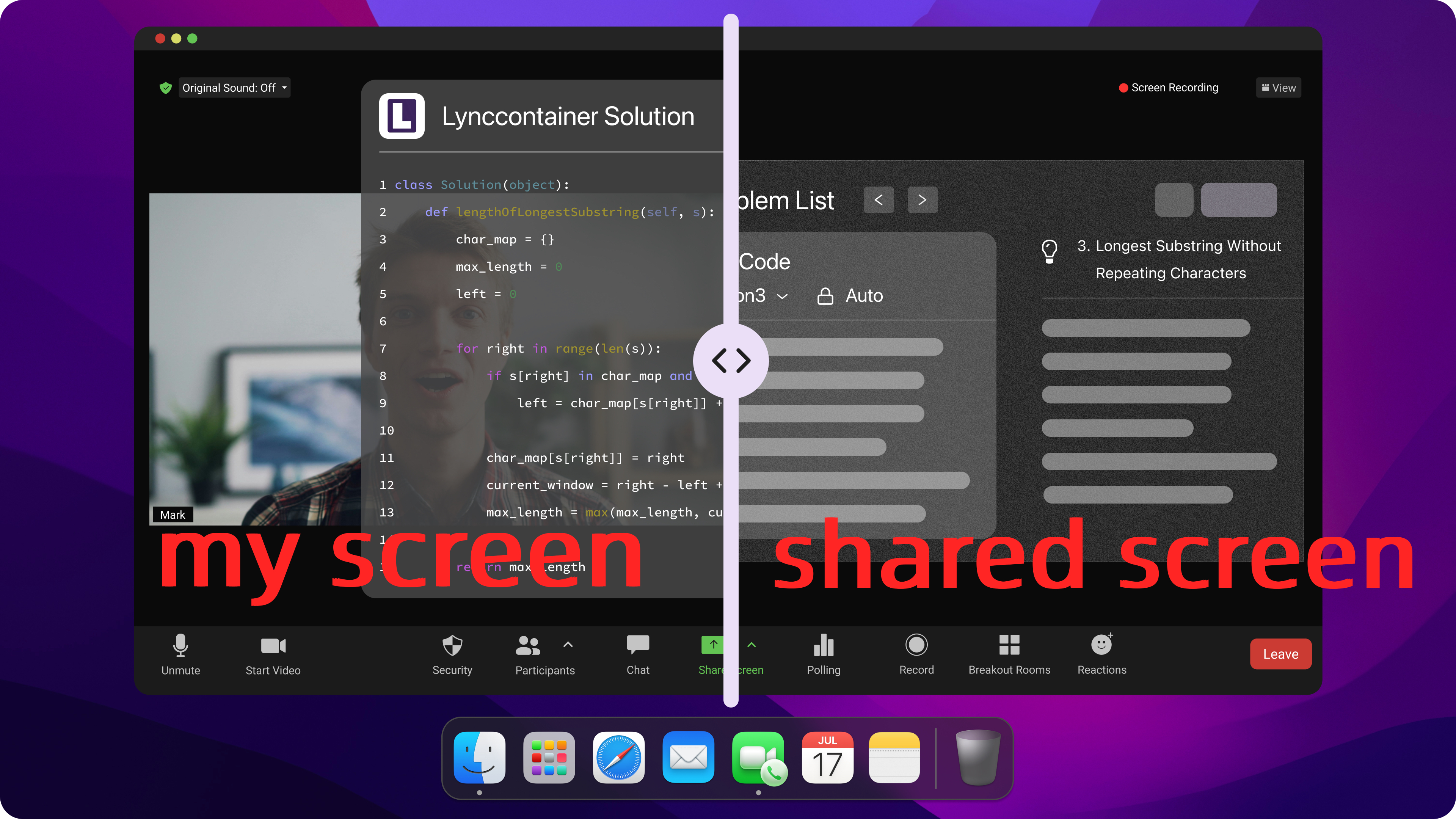
Here is a technical breakdown of highly reliable evasion architectures based on modern cybersecurity principles.
Key Takeaways
Hardware Beats Software: Ditch easily detected software cheats. Rely on hardware-level tools (like PCIe DMA or EDID splitters) or bare-metal hypervisors to bypass operating system surveillance entirely.
Maintain Air-Gapped Stealth: Keep external devices on entirely separate networks (like a 5G hotspot) and use kernel-level tactics (DKOM) to hide processes from system task managers.
Defeat Visual and Audio Scanners: Beat AI eye-tracking by reading prompts off a teleprompter placed over your webcam, and use undetectable, RF-immune magnetic micro-earpieces for audio feedback.
Use Localized AI (RAG): Avoid the delays and inaccuracies of cloud AI by using a local model pre-loaded with your specific facts and resume for instant, bulletproof answers.
Engineer a Kill Switch: Treat your setup like a cybersecurity operation. Stress-test everything before going live, and have a physical kill switch ready to instantly disconnect all hardware in an emergency.

Share Screen Cheat Tools and Methods
The detection logic of modern proctoring systems is primarily based on user-space system call scanning. To ensure absolute stealth, evasion tactics must employ a "dimensional strike"—moving the isolation down to the hardware or Hypervisor level, operating far below the OS.
ScreenHelp and AI Assistance
Common stealth software (like ScreenHelp) configured as a share screen cheat operates on the same OS layer as the proctoring software. Because they rely on API hooking, they are easily detected by the handle scanning mechanisms of modern anti-cheat engines.
The truly reliable approach is a Type-1 Hypervisor (Bare-Metal) Isolation Architecture. By using KVM/QEMU paired with PCIe Passthrough, the host OS runs the underlying architecture, while the monitored exam/interview software is completely sandboxed inside a guest OS. The host can then use Virtual Machine Introspection (VMI) to silently extract video frame data from the guest and transmit it to external devices. In this setup, the proctoring system is trapped in a logical "black box," completely unable to detect the host machine's existence.
VNC and LAN Mirroring
Attempting a traditional local network mirroring protocol (such as VNC or Miracast) as a quick share screen cheat leaves obvious TCP/UDP traffic footprints across the network stack. These patterns are easily intercepted by the Deep Packet Inspection (DPI) modules built into modern proctoring environments.
The ultimate hardware-level solution is a PCIe DMA (Direct Memory Access) Attack. By inserting a custom FPGA hardware development board (running firmware like PCILeech) into the motherboard's M.2 or PCIe slot, an external device can read physical memory at massive bandwidths without ever invoking the CPU or OS scheduler. The extracted audio/video streams are sent via fiber optic cables to an external secondary machine. This entirely bypasses software-level anti-screenshot protections, capturing real-time screen data perfectly.
HDMI Splitters and Android Cast
Software casting modifies the Windows registry and leaves distinct system logs, making it a highly vulnerable share screen cheat methodology. Even standard HDMI splitters can betray you by exposing abnormal monitor EDID signals to the graphics card.
The industrial-grade alternative is using a unidirectional hardware splitter capable of EDID (Extended Display Identification Data) Spoofing. Not only does it strip HDCP encryption, but it also forces the host graphics card to see a single, standard 1080p physical monitor. The actual video stream is seamlessly branched off to a capture card on another device, physically severing any reverse-detection link the proctoring software might try to establish.
Pros, Cons, and Detection Risks
When shifting to hardware-level evasion and bottom-layer architectures to execute a secure share screen cheat, the risk matrix changes fundamentally:
Software Isolation (Hypervisor): Lower setup cost, but defense durability relies entirely on whether guest-to-host VM Escape vulnerabilities have been patched. It requires continuous maintenance of clean kernel driver signatures.
Hardware Architecture (DMA / EDID Splitters): Universally recognized as the gold standard for a hardware-based share screen cheat. It is absolutely undetectable on a software level. The core risk shifts entirely from digital detection to physical OpSec failures—for example, your webcam accidentally catching a glimpse of the FPGA extension cables, or a room scan exposing your secondary layout wiring.
NB: At this stage, you can probably tell that a lot of these tools still require heavy technical overhead and can feel incredibly tedious to configure. If you want a more straightforward share screen cheat, Linkjob AI functions as an undetectable, all-in-one system overlay companion. You can simply deploy it and use it seamlessly without dealing with a complicated physical or virtual hardware setup process.
Environment Configuration for an Undetectable Share Screen Cheat
When deploying low-level hardware or software tools, the absolute gold standard for environment isolation is achieving what information security professionals refer to as "Air-Gap Isolation." If you want to establish a completely bulletproof share screen cheat framework, you must separate your execution environment from your monitoring environment.
Device and Network Preparation
The secondary machine handling your external processing models or communication channels must be physically severed from the monitored host's local network.
The Host Machine: Runs on a dedicated, wired enterprise Ethernet connection to ensure stability.
The Auxiliary Devices: Must operate on an completely independent cellular 5G mobile hotspot. This prevents proctoring systems from running local subnet scans to detect side-channel traffic or adjacent active devices on the same IP.
The Router Layer: Should be configured with hardware-level DNS Sinkholing. This actively intercepts and drops outbound telemetry requests destined for known proctoring analytics domains, preventing environmental telemetry data from calling home.
Software Configuration
To pull off a seamless share screen cheat, you must completely abandon consumer-grade stealth software that registers easily flagged virtual drivers (such as virtual webcams or software-based display mirrors) in the operating system.
Instead, advanced environments borrow from the BYOVD (Bring Your Own Vulnerable Driver) methodology. By leveraging older, legitimate hardware drivers that possess valid, trusted digital signatures, you can execute direct IOCTL (Input/Output Control) communications at the kernel layer. This allows you to register spoofed display or input endpoints directly in the Device Manager, making your auxiliary text overlays appear to the OS as completely standard, compliant physical peripherals.
Privacy and Stealth Settings
Standard OS privacy toggles and user-space window-cloaking methods are completely useless against modern Ring 0, kernel-level anti-cheat drivers. If your specific configuration requires running a micro-relay script directly on the host machine, you must employ Direct Kernel Object Manipulation (DKOM).
By utilizing a custom, signed kernel driver, your background process is manually unlinked from the Windows ActiveProcessLinks doubly linked list. Once unlinked, the process becomes entirely invisible to both the native Windows Task Manager and the proctoring software's API memory traversals, completely erasing its footprint from the active memory space.
Secure Out-of-Band Routing During a Share Screen Cheat Session
The core objective of this architecture is to establish a completely unidirectional, ultra-low-latency, and covert data-receiving channel—conceptually known as Out-of-Band (OOB) communication.
Secure Channels and Real-Time Assistance
Allowing any assistive text to pop up dynamically on your primary display introduces an immediate risk of triggering the screen-capture anomaly detection modules of an active proctor. To execute a completely safe share screen cheat, your real-time feedback loop should transition entirely to micro-acoustic hardware channels.
Once your external team or automated language model processes the screen capture, the generated answer is instantly routed through a text-to-speech (TTS) engine. This audio stream is broadcast silently to a deep-canal magnetic micro-earpiece hidden inside your ear canal. The size of a single grain of rice, this passive device operates purely on electromagnetic induction via a hidden neck loop. Because it contains zero active Bluetooth or Wi-Fi transmitter modules, it is completely invisible to any radio frequency (RF) spectrum scanners deployed in the room.
View-Only Sync Optimization
To maintain fluid, natural collaboration during a live technical panel, the total transmission and feedback latency must sit well below the human perception threshold. The absolute latency of your data pipeline can be calculated using the following equation:

To compress Delta t to a completely imperceptible window, you should utilize professional-grade, PCIe 3.0 hardware capture cards that support uncompressed color spaces (such as YUV 4:2:2). This hardware-driven pipeline cuts your capture and encoding overhead down to the single-digit millisecond range. This guarantees that your external assistance engine receives the exact visual state of your desktop the precise millisecond an interviewer stops speaking, preserving flawless conversational synchronization.
Evading Computer Vision Traps and Masking Screen Activity
Modern automated proctoring software relies heavily on deep-learning Computer Vision (CV) models to calculate facial landmark positioning, head pose estimation, and real-time gaze tracking.
Avoiding AI Proctoring Traps
Repeatedly darting your eyes toward the margins of your screen, looking down at a physical keyboard, or shifting your head toward an external secondary monitor is a guaranteed way to trigger an automated gaze-tracking violation. The ultimate physical countermeasure to this CV tracking algorithm is utilizing an optical beam splitter, commonly known as the teleprompter principle.
                    [ Physical Webcam Lens ]
                                │
        ┌───────────────────────▼───────────────────────┐
        │  ▲                                            │
        │  │ Visual Axis (Perfect Centerline Gaze)       │
        │  │                                            │
        │  └───────► [ 70/30 Beam Splitter Glass ]      │
        │                   ▲                           │
        │                   │ Reflects Hidden Text      │
        └───────────────────┼───────────────────────────┘
                            │
               [ Hidden Prompter Overlay ]
By mounting a high-clarity 70/30 optical glass at a precise 45-degree angle directly in front of your monitored webcam lens, your external text prompts can be reflected cleanly onto the glass plane. Because of basic physical optics, your visual axis remains perfectly perpendicular to the camera sensor resting directly behind the glass while you read the prompts. To the AI proctoring model, your facial metrics match the exact feature profile of a candidate who is staring intently and focusing deeply on the center of the exam screen.
Advanced Framebuffer Hijacking
If hardware capture cards are completely restricted by your environment and you are forced to overlay your assistance data directly onto the local display, you must leverage high-privilege, low-level evasion techniques. In graphics security research, this workflow is executed via Framebuffer Hijacking.
By deploying a custom display miniport driver, you can intercept the system-level desktop duplication and screenshot API calls used by the anti-cheat software. Your driver injects a clean, completely windowless "fake desktop frame" directly into the proctor's data stream. Meanwhile, on the actual physical rendering output sent to your monitor's pixels, the graphics card safely overlays your translucent floating text blocks—allowing you to maintain a highly effective share screen cheat layout without the software ever capturing a single pixel of your assistive data.
Advanced Optimizations for a Share Screen Cheat
When designing a high-tier evasion environment, true security isn't about relying on a single workaround; it requires a highly systematized, automated engineering pipeline. Managing your hardware and data streams properly is what separates a successful deployment from an immediate system flag.
Multi-Device Coordination
In a distributed hardware architecture configured for an advanced share screen cheat (Host → Splitter → Capture Card → External Processing Unit), precise time synchronization dictates overall system stability. All devices in the processing chain must sync to a single, locally hosted NTP (Network Time Protocol) server to keep clock drift under 1 millisecond. This rigorous timing alignment ensures that the captured audio and video streams remain perfectly aligned, enabling flawless synchronization when injecting external reference data.
AI Automation for Contextual Answers
Modern technical execution relies heavily on local Large Language Models (LLMs) rather than basic web searches. To optimize a share screen cheat framework and prevent the AI from generating noticeable hallucinations, advanced environments deploy localized RAG (Retrieval-Augmented Generation) architectures.
By parsing and vectorizing target documentation, code repositories, or personal resumes into a local vector database prior to the exam, the system becomes incredibly precise. The moment a target question is captured from the display feed, the offline model queries the local database in a matter of milliseconds, rebuilding its technical responses based strictly on established data. This drastically improves answer accuracy and completely severs reliance on external cloud APIs, eliminating the risk of network latency anomalies.
Practice and Backup Plans
No matter how technically airtight a configuration seems on paper, it requires real-world, live-fire testing. In the security engineering space, this means running a comprehensive Red Team simulation.
Before launching a live share screen cheat, a full-scale hardware stress test is mandatory. I recommend utilizing a packet sniffer like Wireshark to verify that the host machine's physical network card isn't leaking unauthorized outbound telemetry traffic to the proctoring servers. You must also check whether the reflection from your optical teleprompter glass creates a noticeable moiré pattern on your eyeglasses under active room lighting.
Most importantly, you must engineer a physical Kill Switch. This ensures that if a device fails or an unexpected visual audit occurs, all external hardware links can be severed in less than a second, instantly returning your workspace to a completely standard, compliant physical state.
FAQ
How do I test my share screen cheat setup before the real exam?
I treat the evaluation exactly like an infosec Red Team simulation. I execute a full-chain stress test using network monitoring tools like Wireshark to verify that zero telemetry traffic leaks from the host machine. I also check for visual tells like glass reflections from my optical teleprompter setup and confirm that my physical hardware "Kill Switch" can instantly collapse the entire share screen cheat environment in under a second if a sudden inspection occurs.
Can proctoring software detect HDMI splitters or hardware tools?
Standard display mirrors are easily caught by abnormal EDID handshakes. To protect a hardware-based share screen cheat, I rely on an industrial-grade splitter with unidirectional EDID spoofing to force the graphics card into seeing only one standard monitor. Once the tracking software is completely blind to the physical hardware routing, surviving a 360-degree room sweep comes down to keeping your cables and FPGA boards neatly organized and hidden from the webcam's field of view.
What happens if my network drops during a share screen cheat session?
To insulate the setup from unexpected local network drops, my auxiliary processing units run on an independent, completely air-gapped 5G cellular hotspot. As an ultimate failsafe for my share screen cheat pipeline, I configure a local, offline RAG AI architecture on my secondary machine. If remote connectivity fails entirely, the local language model instantly queries my pre-loaded vector database, keeping accurate technical answers flowing directly to my micro-earpiece without a single second of lag.
Is it safe to use standard cloud AI tools for answers during interviews?
Using basic public web models carries a massive risk due to noticeable API communication lag and unpredictable text hallucinations. A secure share screen cheat architecture requires deploying a localized RAG system that maps your actual resume data, past projects, and core technical question banks into an offline vector database. This keeps your generated responses immediate, highly accurate, and perfectly matched to your personal background without sounding like a robotic script.
Will my background share screen cheat software show up in the Task Manager?
Standard user-space software will be instantly flagged by kernel-level drivers via process handle scanning. To maintain a truly undetectable share screen cheat, I avoid running local software applications entirely, opting for hardware-level PCIe DMA or bare-metal Hypervisor isolation instead. If a local script is absolutely mandatory for the environment, I use Direct Kernel Object Manipulation (DKOM) to unlink the process from the active OS memory list, making it entirely invisible to both the Task Manager and background monitoring telemetry.
See Also
Get Real-Time Help From an AI Voice Interview Assistant
How to Master DevOps Interviews Using an AI Copilot in 2026
The 6 Best AI Interview Software I've Used (2026 Update)
Why People Choose Linkjob AI
Smoother interviews, coding challenges cleared, and job offers landed. See how users describe their experience with Linkjob AI—in their own words.


© Copyright 2026 Linkjob AI - All Rights Reserved.