MeetAssist Review and Alternative: My Hands-On Test


As a full-stack engineer who's just started in the field, I've been doing interviews at a bunch of big tech companies and startups for the last three months. I've also spent a lot of time testing different real-time interview assistants. When I was just starting my job search, I saw that Parakeet AI was being promoted online, so I decided to try it out. But, as I explained in my in-depth Parakeet AI review, the overall experience was really frustrating because the transcriptions were inaccurate, the model response times were slow, and the interface was intrusive and kept taking over the browser's cursor focus.
Determined to find a more reliable Parakeet AI alternative, I continued researching modern copilot tools and how the invisible interview assistant works. until I stumbled upon MeetAssist via its official site.meetassist.io). Unfortunately, even though MeetAssist is pretty easy to set up and offers fast transcription capabilities, it's got a few issues. For example, it relies on browser extensions, doesn't have top-tier reasoning models (like Claude Opus), and its single-line transcription interface design could be improved. These things, along with other factors, make it a high-risk choice for people seeking high-value jobs.

If you're thinking of risking your next big interview, you should probably read this MeetAssist review. It's a pretty detailed breakdown that I did based on my hands-on testing. Basically, I explain how an enterprise-grade platform like Linkjob AI is the best choice for technical assistance.
MeetAssist Review and Alternative: What Is MeetAssist?
To establish an objective MeetAssist review and alternative baseline, we must first analyze what MeetAssist offers on paper versus the technical realities of its execution.
The easiest way to understand MeetAssist is to divide it into three workflows:
Mode | What it does | Where I think it makes sense |
|---|---|---|
Chrome Extension | Captures meeting-tab audio and displays assistance inside Chrome | Convenient browser-only interviews |
Desktop App | Runs as a native Windows/macOS assistant | Better option when screen sharing matters |
Phone Mode | Moves transcripts and answers to your phone | Useful when you want a completely clean computer screen |
Core Marketing Claims on Meetassist.io
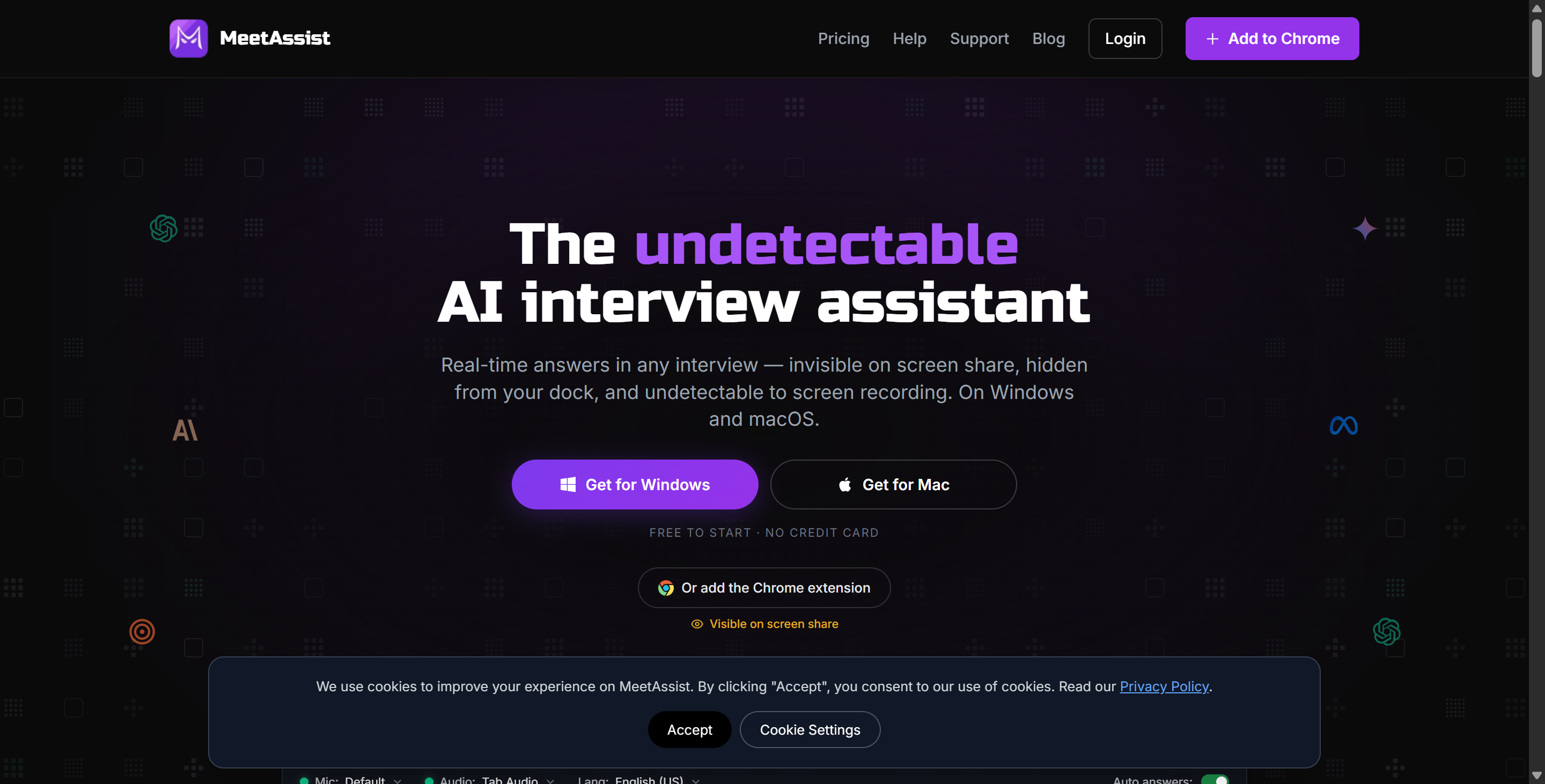
According to its official website (meetassist.io), MeetAssist positions itself as an accessible, budget-friendly AI meeting and interview copilot. Its marketing highlights four primary capabilities:
Dual Deployment Modes: Users can choose between installing a lightweight Chrome browser extension or downloading a standalone desktop client.
Real-Time Speech Transcription: Converts interviewer dialogue into text prompts using rapid speech recognition engines.
Affordable Pricing Tiers: Offers low-cost monthly subscriptions designed to appeal to entry-level developers and budget-conscious job seekers.
Secondary Device Link: Allows candidates to sync live transcription and AI response feeds to a smartphone or tablet screen to keep overlays off the primary monitor.
The Hidden Trap: The Chrome Extension Stealth Myth
The single biggest misconception uncovered during this MeetAssist review and alternative analysis surrounds its heavily marketed Chrome extension mode.
MeetAssist highlights its Chrome extension as the most convenient, recommended way to get live coding support. However, browser extension stealth only works if your interviewer allows you to share a single browser tab rather than your entire desktop screen.
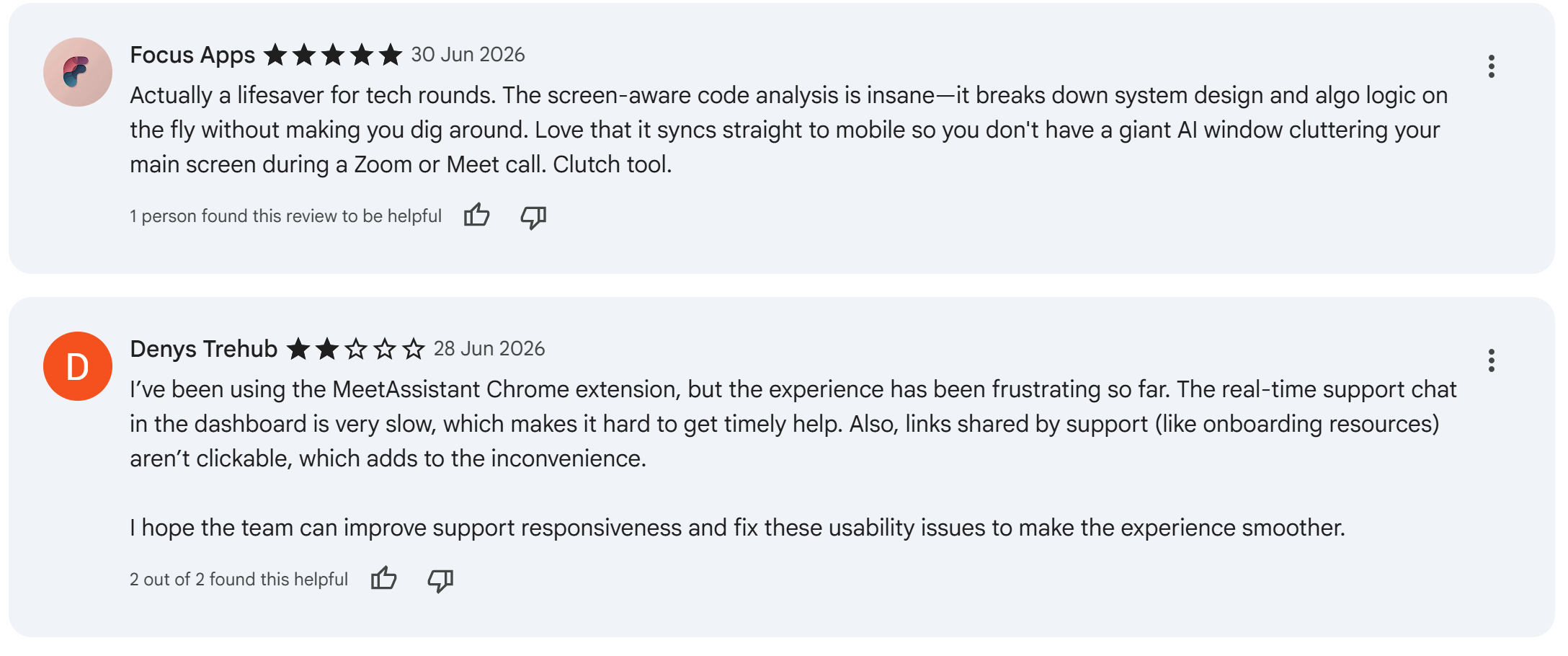
In modern technical interviews—especially on platforms like HackerRank, CodeSignal, CoderPad, Zoom, and Microsoft Teams—over 90% of interviewers explicitly require candidates to share their entire desktop screen. When you share your full desktop:
The Chrome extension's sidebars, floating widgets, and DOM overlays are fully captured by the video feed.
The interviewer can clearly see the MeetAssist interface rendering answer suggestions right beside your code editor.
Clicking on the extension panel transfers active browser focus, triggering tab-switch flags and
window.onblursecurity alerts on proctored testing portals.
MeetAssist's Google Meet guide literally labels the Chrome extension: “visible on screen share.” And its Zoom guide answers the question “Will the interviewer see the MeetAssist panel if I share my screen?” with essentially yes, unless Phone Mode is enabled.
MeetAssist Review and Alternative: Pricing and AI Models
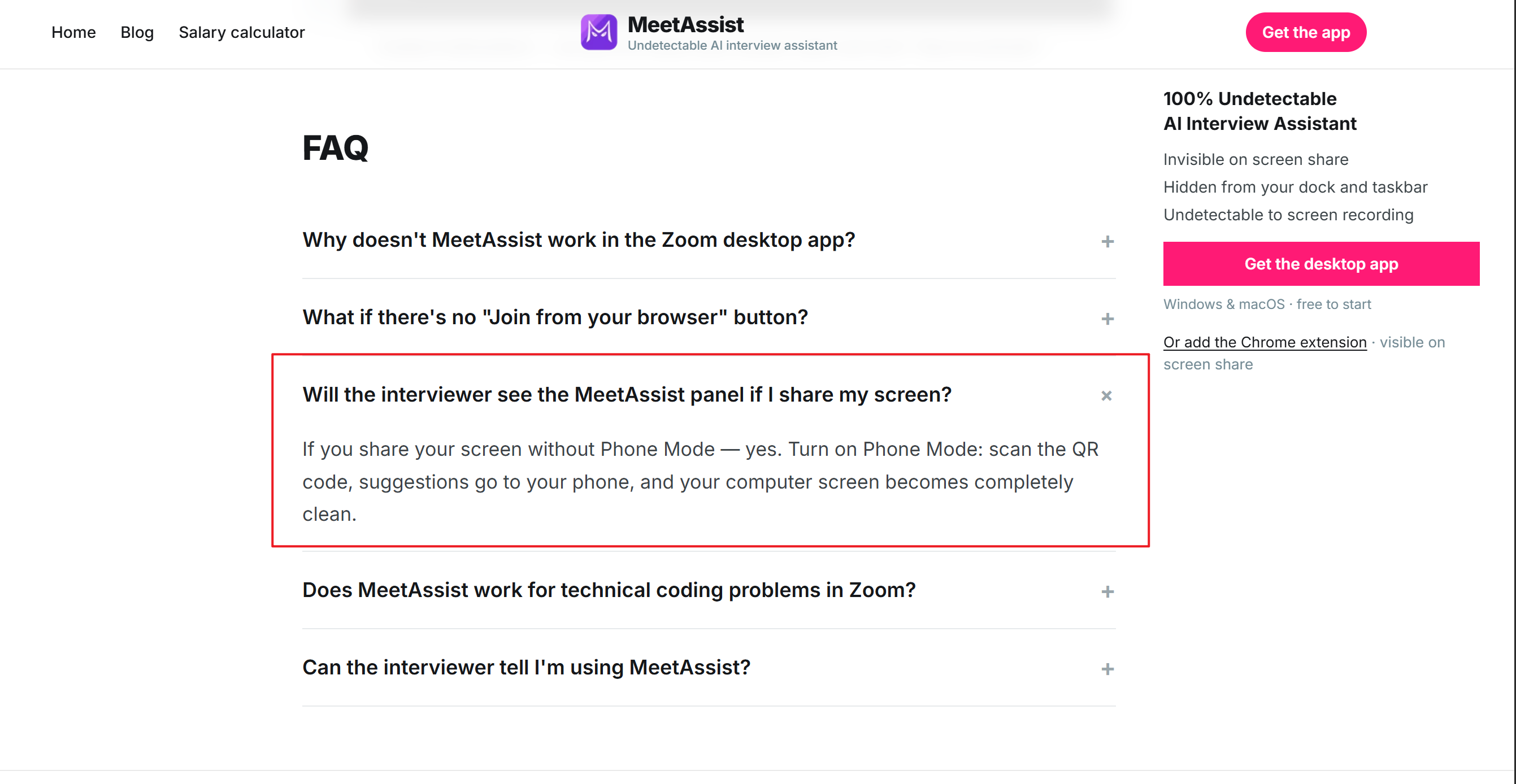
Pricing is one of the strongest arguments for MeetAssist. Unlike many competitors, MeetAssist does not currently require a recurring subscription.
MeetAssist Pricing At A Glance
Plan | Current Price | Included Usage |
|---|---|---|
Free Trial | $0 | 20 minutes |
Pro Pass | $9 one-time | 180 minutes |
Unlimited Month | $29 one-time | Unlimited for 30 days |
The $29 plan does not automatically renew, and the $9 Pro Pass provides three hours of interview assistance without an expiration-style subscription commitment.
For someone who has one interview next Thursday, this is extremely attractive. I do not need to buy a $100 monthly subscription just because I need help during two technical rounds.
The Model Lineup is Less Impressive, Though
MeetAssist currently publishes the following AI model options:
GPT-4.1
GPT-4.1 Mini
Claude Sonnet
Gemini Flash
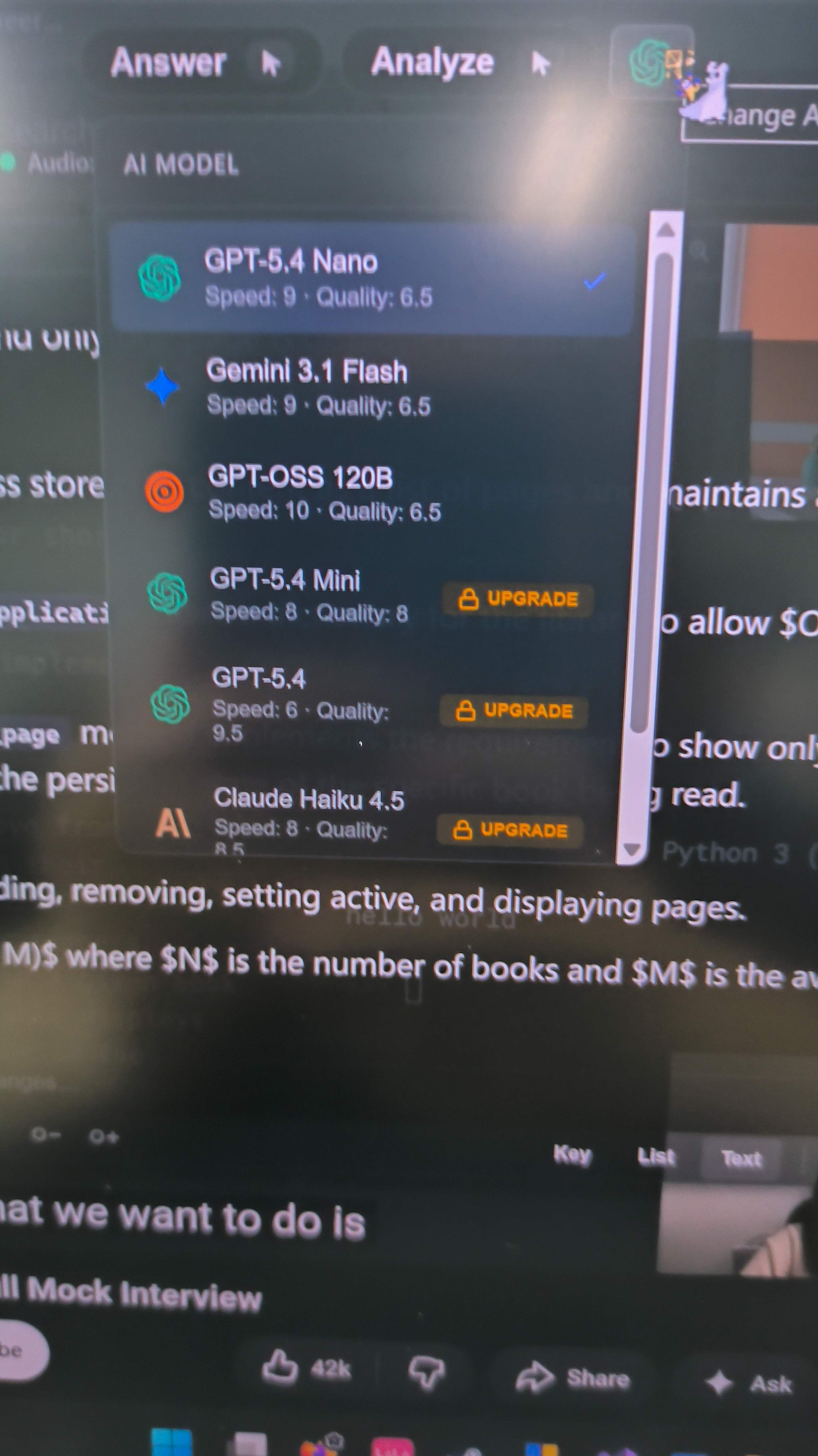
These are not bad models. For behavioral interviews, general technical questions, common SQL problems, and normal coding exercises, they are capable enough. My concern emerged when I started thinking about the questions where I actually want AI assistance the most. WHAT IF I met interviews including:
complicated dynamic-programming problems;
unusual graph algorithms;
debugging a solution that already looks correct;
system-design tradeoffs;
distributed consistency;
concurrency;
scalability bottlenecks;
unfamiliar framework internals.
At that time, the models MeetAssist provides just wouldn't be enough. For difficult coding and architectural reasoning, I generally prefer having access to the strongest reasoning model available rather than simply whichever model happens to be cheap enough for the interview assistant to bundle.
That difference becomes one of the central reasons this MeetAssist review and alternative eventually points toward Linkjob AI for higher-stakes technical interviews.
MeetAssist Review and Alternative: Chrome Extension vs Desktop App
This is probably the most important section to understand before using MeetAssist. At first glance, the Chrome extension looks like the easiest option: Install it, open your meeting in Chrome, start listening, and receive answers. The problem is screen sharing. As I said, the main problem with the extension is that it can't stay invisible when sharing in full-screen mode. Also, during more intense OA testing, the extension might trigger active tab detection or even make the browser lose focus on the current tab.
MeetAssist Itself Recommends A Solution: Phone Mode
The workflow is:
Start MeetAssist in Chrome.
Choose Sync with Phone.
Scan the QR code.
The visible extension interface disappears from the computer.
Live transcript and answer suggestions move to the phone.
You can also request analysis of a Chrome tab from the second device.
If you're the type of person who's used to putting your phone next to your computer to check it, you'll probably love this feature. But there's one big drawback to keep in mind: this approach isn't foolproof. During a high-pressure interview, it's hard to imagine that looking at a small screen wouldn't have some negative impact on my performance.
MeetAssist Review and Alternative: My Hands-On Test
I tested MeetAssist the same way I do with any real-time interview assistant. Instead of worrying about how nice the homepage looked, I was more interested in how the system would do when someone started asking questions really fast. I gave the system a test run during a practice SWE interview with some behavioral and conversational questions. There were two interviewers, so I also got to test how well MeetAssist can tell the difference between different speakers.
What Meet Assist Did Well
My overall positive results looked like this:
Test | My Result |
|---|---|
Setup difficulty | Very easy |
Transcription latency | Fast |
Transcription accuracy | Good |
Answer latency | Fast |
Desktop screenshot visibility | Not visible in my test |
Desktop screen recording visibility | Not visible in my test |
Phone Mode | Useful |
Price | Excellent |
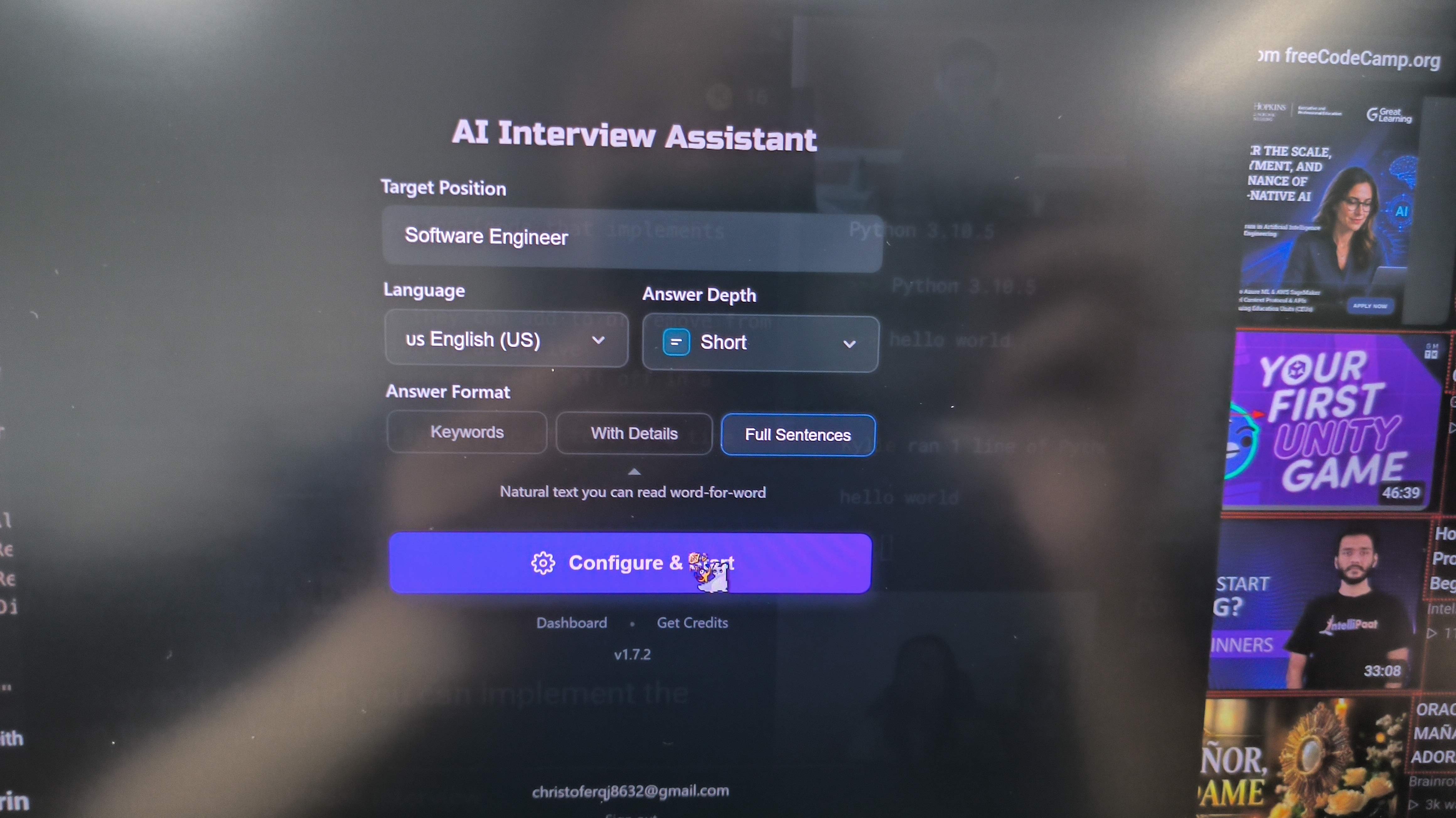
Simple, Fast Setup Process
Setting up Meet Assist takes less than three minutes. The onboarding flow is straightforward, avoiding the complex API key management and manual credit card configurations required by Bring-Your-Own-Key (BYOK) wrappers like ExtraBrain.
Baseline Desktop Window Invisibility
When using the standalone desktop app mode (rather than the Chrome extension), Meet Assist successfully hid its floating overlay from standard Zoom screen sharing and OBS display capture. The window remained visible on my physical screen while remaining unseen in the recorded video output.
Low Response Latency & Timely Transcription
Speech transcription is fast and largely accurate when capturing clear English dialogue. Furthermore, response rendering speed is impressive—text answer suggestions appear within 1.5 to 3 seconds after a question finishes, avoiding long buffer delays.
Budget-Friendly Subscription Pricing
Meet Assist is significantly cheaper than high-end interview copilots. For candidates on strict budgets who only need basic prompt lookup tools for non-proctored, single-tab interviews, the low price point is attractive.
Critical Operational Flaws: Where Meet Assist Fails in Live Interviews
Despite its fast response speed and cheap pricing, taking Meet Assist into dynamic, high-stakes technical interview simulations revealed severe operational flaws that make it unreliable for senior software engineering loops.
MeetAssist Review and Alternative: Where the Experience Broke Down
Mediocre LLM Model Selection (Capped at Claude Sonnet)
The most glaring drawback identified during this Meet Assist review and alternative is its limited model selection. I don't have high standards for the models, but I've done some tests and found that performance can differ a lot between models. For example, the accuracy rate of Gemini 3.1 Flash is about 1 in 10, while Opus is 8 in 10.
The Sonnet model from MeetAssist is good enough for basic syntax, but it doesn't have the fancy spatial reasoning, algorithm complexity, or edge-case detection that you find in the best engines like Claude Opus or these specialized models. I ran some tests on LeetCode's "Hard" level algorithms, complex dynamic programming problems, and trade-offs in distributed system design, and Meet Assist's model outputs were pretty limited. I couldn't fully trust the quality of the answers.
Speaker Diarization Failure & Single-Line Transcription UI
MeetAssist's speaker recognition feature is pretty bad. During testing, it couldn't tell the difference between the two interviewers, and it took forever to recognize the questions.
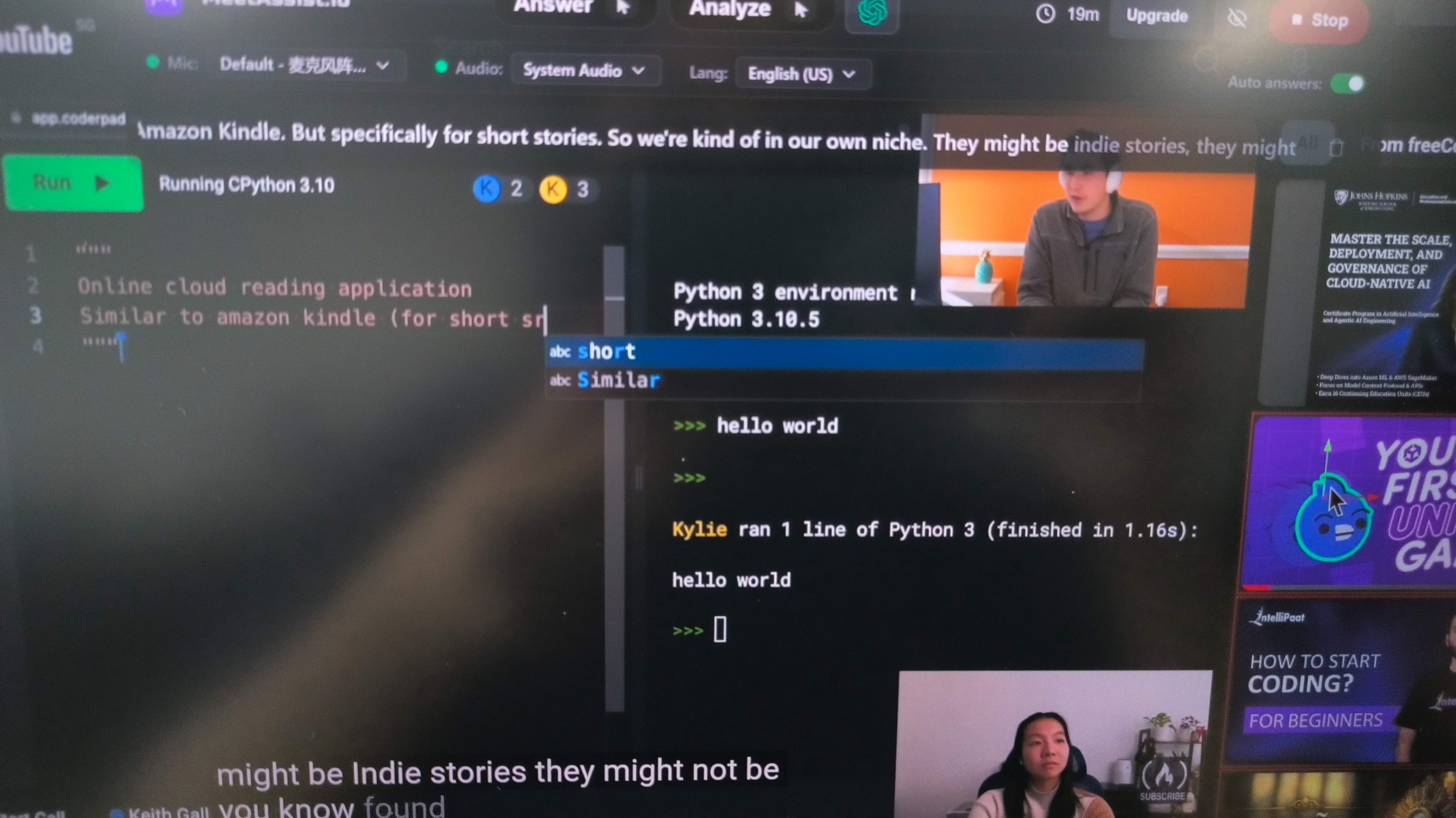
Compounding this issue is a frustrating UI design flaw: all transcribed text is squished into a single horizontal line of text. As dialogue continues, earlier parts of the interviewer's question scroll off the screen to the left. If an interviewer asks a long, multi-part scenario question, you cannot scroll back or view previous lines of context. Trying to read a moving, single-line text string while maintaining eye contact with an interviewer creates extreme cognitive strain.
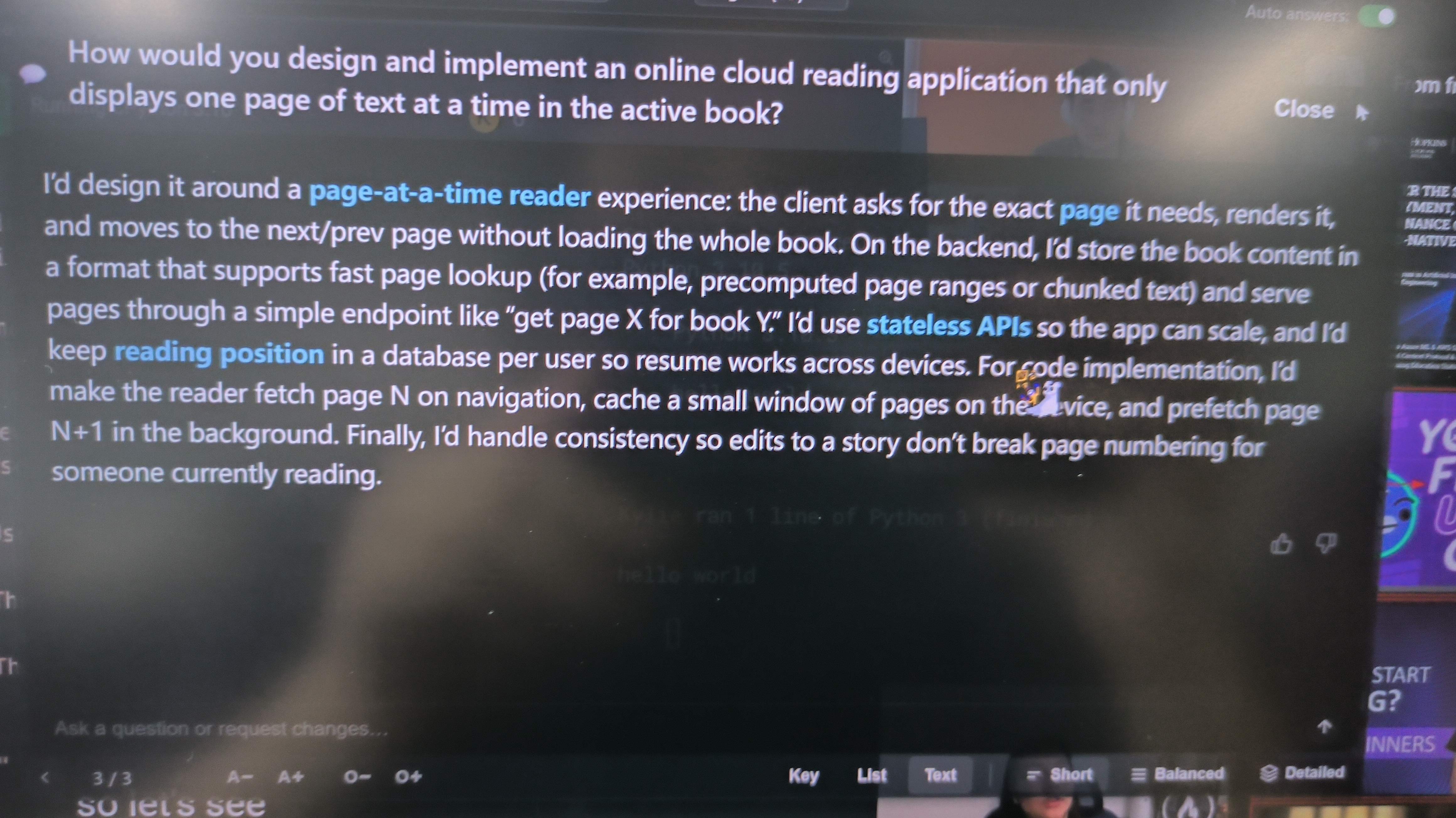
Broken "Auto-Answer" Functionality
When you launch MeetAssist, the "Auto-Reply" feature is already enabled. But when I actually tested it, I never got any "auto-replies." I had to do everything manually.
So, after MeetAssist transcribes the question, it's just like nothing happens. To get a response, I had to move the mouse cursor to the floating interface and click or hover over the "Answer" button. In a high-pressure interview, having to reach for the mouse all the time to tell the AI what to do is a big visual distraction. It can also make it hard to stay focused on the window.
Rigid, Unnatural "AI-Style" Answers
Even when configuring MeetAssist to generate "full-sentence responses," the output remains stiff, overly formal, and textbook-like. Phrases like "To optimize this database query, one must first analyze the B-Tree index structure..." sound glaringly artificial when spoken aloud. Rather than providing conversational, candidate-centric talking points, Meet Assist outputs generic textbook blocks that require heavy live editing before you can speak them naturally.
Comparing Top Copilots: Meet Assist Review and Alternative Matrix
Feature | MeetAssist | Linkjob AI | Final Round AI | Interview Coder | Parakeet AI |
|---|---|---|---|---|---|
Best for | Cheap short-term live help | Overall technical + general interviews | Full interview lifecycle | Coding specialists | General live assistance |
Native desktop app | Yes | Yes | Yes | Yes | Yes |
Browser mode | Yes | No | No main need | No | Yes |
Phone workflow | Yes | No | No | Mobile/web access | Yes |
Live transcription | Yes | Yes | Yes | Technical focus | Yes |
Coding support | Yes | Strong | Yes | Specialist | Yes |
Multi-screenshot coding context | Limited workflow | Yes | Screen help | Yes | Screenshot |
Top published model access | GPT-4.1 / Claude Sonnet / Gemini Pro | GPT-5.6 Sol / Claude Opus 5 / Gemini 3.1 Pro + more | Managed models | Claude Sonnet 4.6 | OpenAI / Anthropic / Google models |
Short-term price | $9 / 3 hrs | $99.99 monthly | $25+/mo depending cadence | $299/mo | $149.90/mo |
Longer-term value | $29 / unlimited 30 days | $29.99/mo annual equivalent | $25/mo annual | $799 lifetime | $49.99/mo annual equivalent |
Best advantage | Price + Phone Mode | Models + workflow + coding depth | Prep + live + debrief | Coding specialization | Mature multi-device product |
MeetAssist Review and Alternative: Why Linkjob AI Worked Better for Me
Linkjob AI is the alternative I would personally choose if I had an important technical interview tomorrow. I simply want the assistant to disappear from my mental workload once the interview begins.
1. I Prefer Linkjob's Model Selection
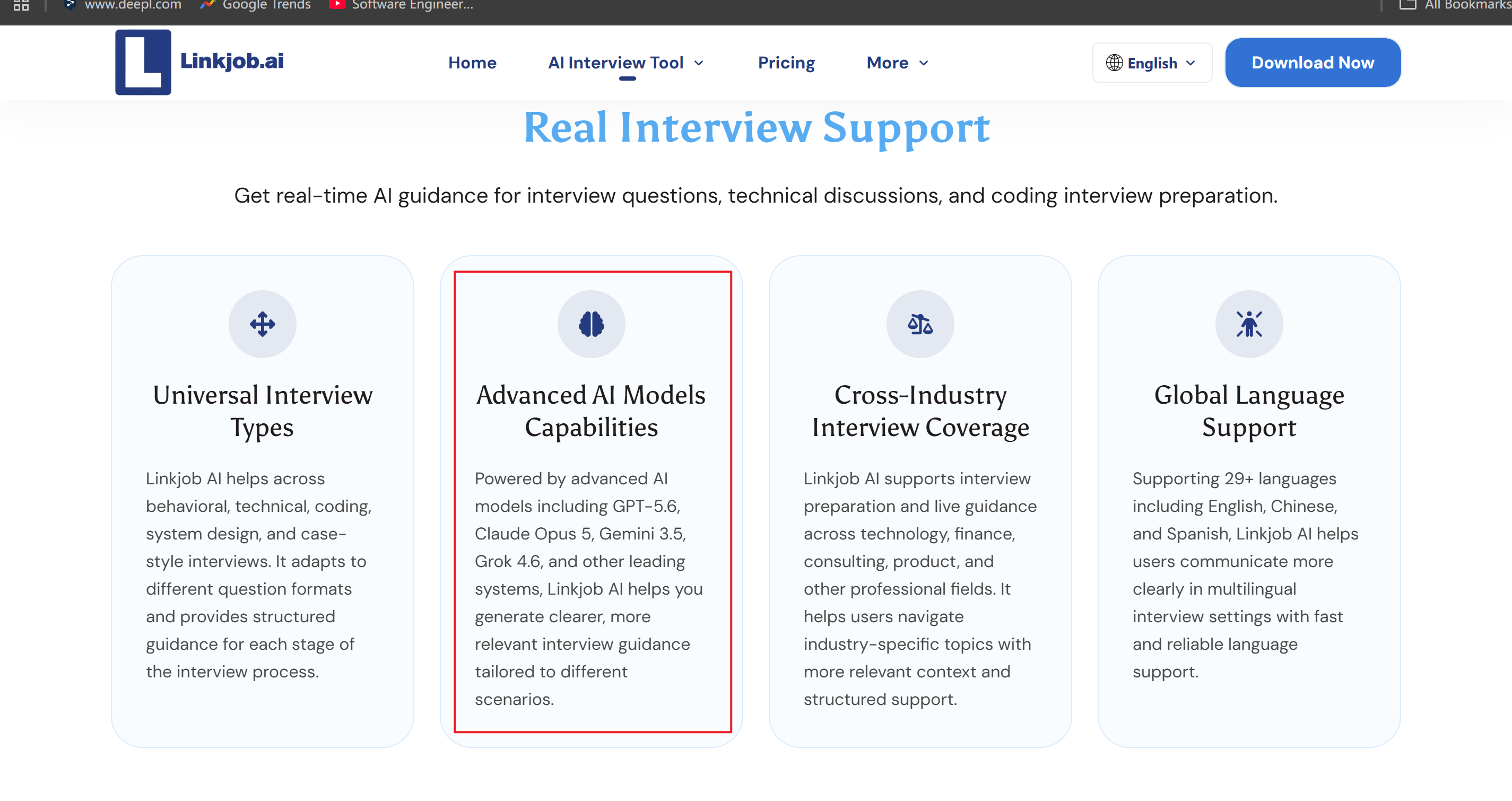
This is the most important advantage for me. My issue is that the exact Sonnet version of MeetAssist is unclear, and I could not access Claude Opus for the hardest coding and system-design rounds.
Linkjob's current premium lineup goes significantly further:
GPT-5.6 Sol
Claude Opus 5
Claude Sonnet 5
Claude Haiku 4.5
Gemini 3.1 Pro
Gemini 3.5 Flash
Grok 4.6
For behavioral interviews, that difference may not justify paying more. For difficult coding, algorithms, system design, quant, or senior technical rounds, it matters considerably more.
2. The Native Workflow Makes More Sense To Me
MeetAssist gives you three ways to solve the visibility problem: Extension → Desktop → Phone Mode
Linkjob is more straightforward: Native desktop interview copilot → visible to me while designed to stay outside supported shared captures.
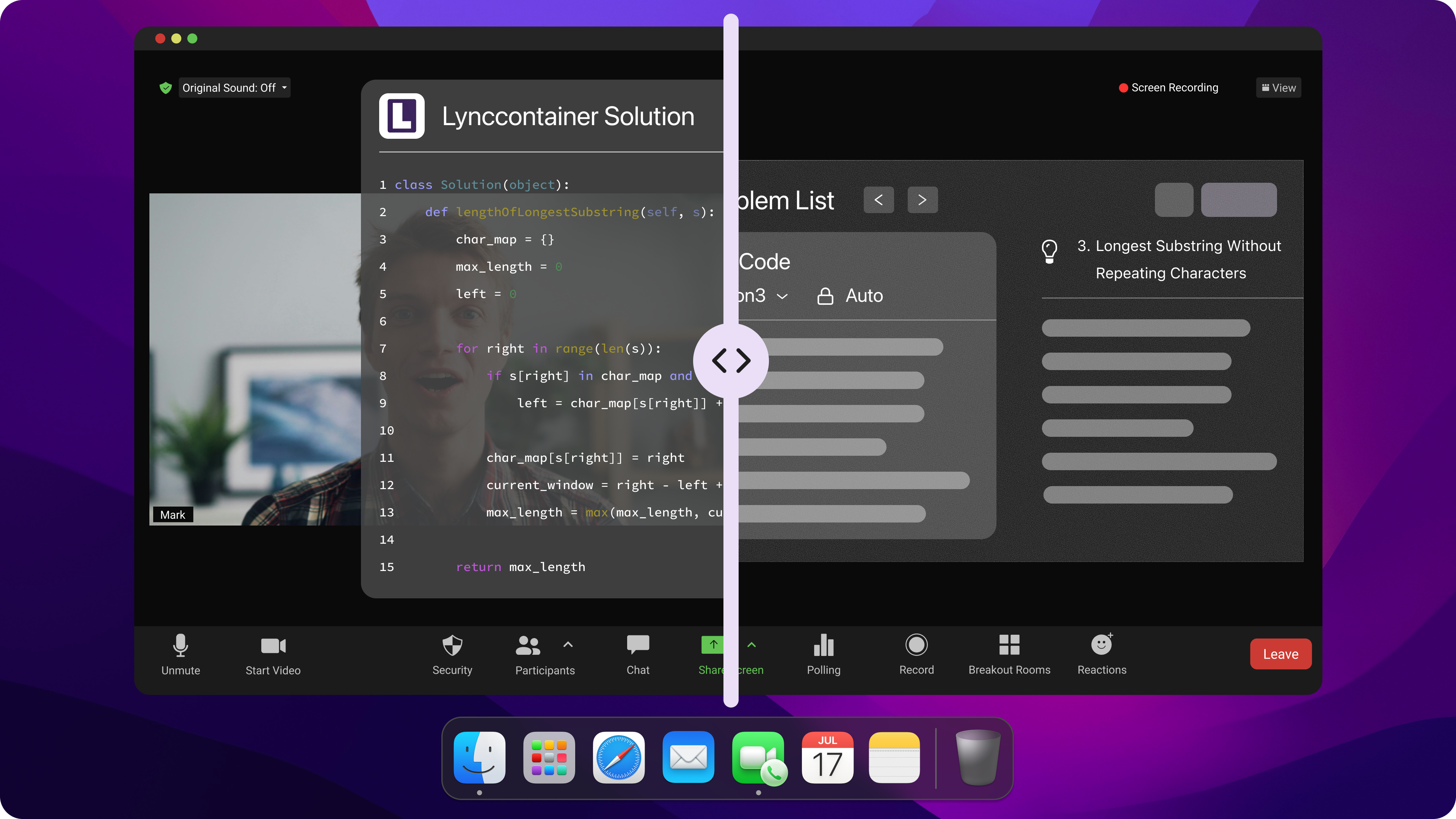
Linkjob's desktop version works with both Windows and macOS. Its main features are real-time behavioral interviews, technical interviews, coding interviews, system design interviews, and other specialized interviews. In my testing, it can handle most interview questions, no matter the round, as long as you give enough context.
If I can, I'd rather not see answer notifications on my phone. That would either make it hard for me to check the answers or distract me a lot, and I'd end up not being able to focus on answering the current question.
3. Multi-screenshot Context is Better for Difficult Coding
Coding questions do not always fit neatly in one Chrome tab.
I may need:
the problem statement;
examples;
constraints;
existing implementation;
error output;
a diagram.
Linkjob's coding assistant can do full-screen and partial screenshots, and it can mix and match multiple screenshots into a single AI conversation. This makes a big difference in real coding interviews, where the challenge is often in understanding the context. The model can only solve the problem I give it, so the more effective context I can provide, the more likely the model's answer will be correct. At least, that's my take on it.
4. The ROI Calculation Changes for High-paying Roles
MeetAssist is clearly cheaper in the short term. If I have one interview, spending $9 instead of $99.99 is an easy argument. But that is not how I evaluate a tool during a serious job search.
My calculation is: What does one additional successful interview round potentially return?
If I am interviewing for a software job worth tens of thousands of dollars more per year, the important difference is not whether my interview assistant costs $9 or $30.
It is whether I trust it on the hardest question. Linkjob's annual plan currently costs $359.88 per year, or $29.99 per month equivalent. It includes the premium reasoning models rather than charging separately for model usage.
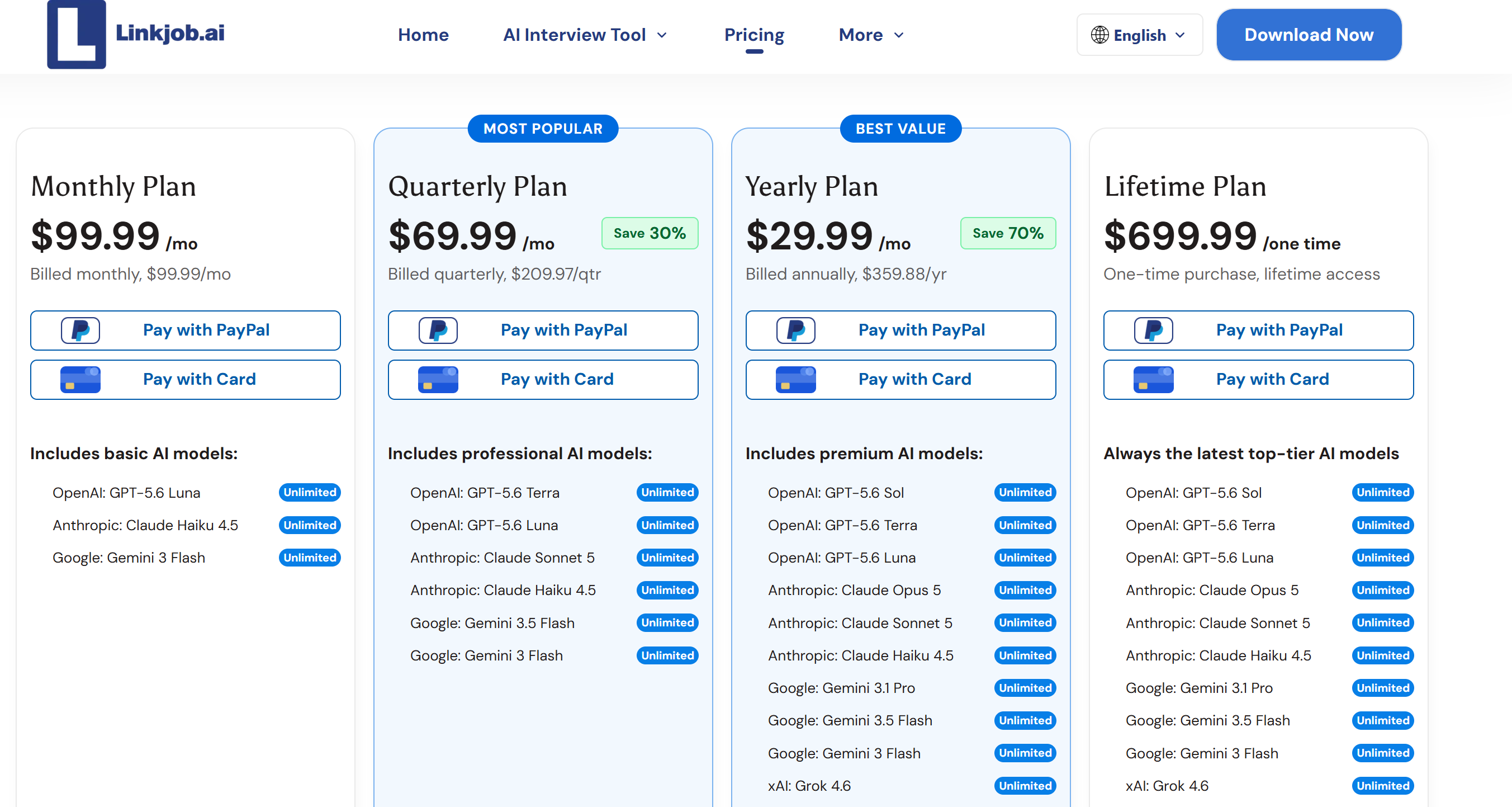
For someone interviewing across several months, that price becomes much easier to justify.
My choice after this MeetAssist review and alternative test
MeetAssist: better if your top priority is spending as little as possible for a few interviews.
Linkjob AI: better if your priority is stronger model access, technical depth, native desktop workflow, and minimizing how much attention you spend managing the assistant.
MeetAssist Review and Alternative: Other Alternatives Worth Considering
Linkjob was my overall choice, but it is not the only MeetAssist alternative worth looking at.
Final Round AI — Best if you also want interview preparation
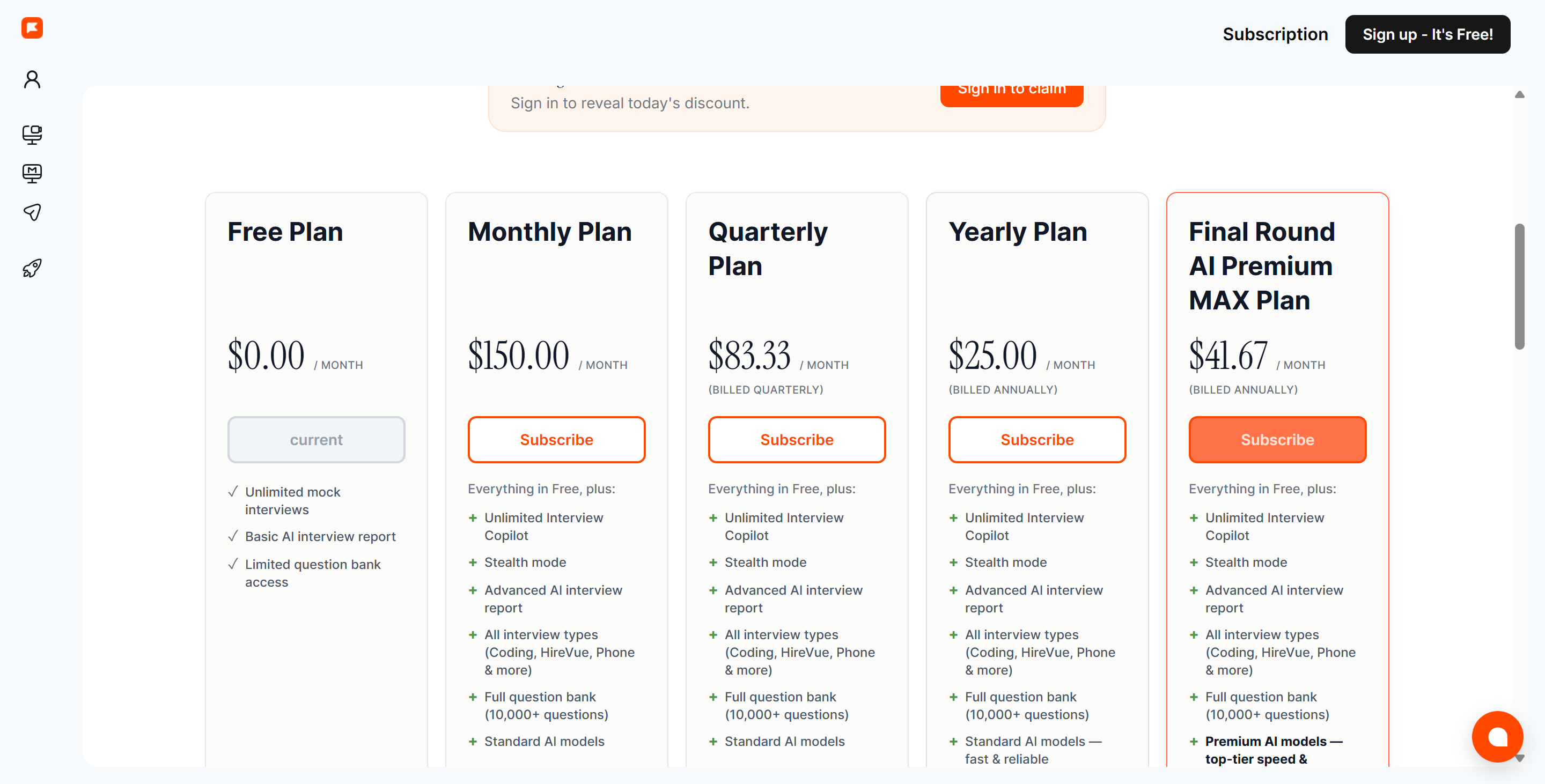
Final Round AI is much broader than MeetAssist. Its paid product currently includes:
unlimited live Interview Copilot sessions;
coding and system-design support;
Stealth Mode;
practice interviews;
automatic post-interview debriefs;
resume and Goal context.
Best for: someone who wants preparation + real interview assistance + post-interview review inside one product.
The downside is that Final Round feels more like a complete career-interview platform. If I only need quick assistance next week, MeetAssist is dramatically cheaper and simpler.
Interview Coder — Best if coding is basically your entire use case
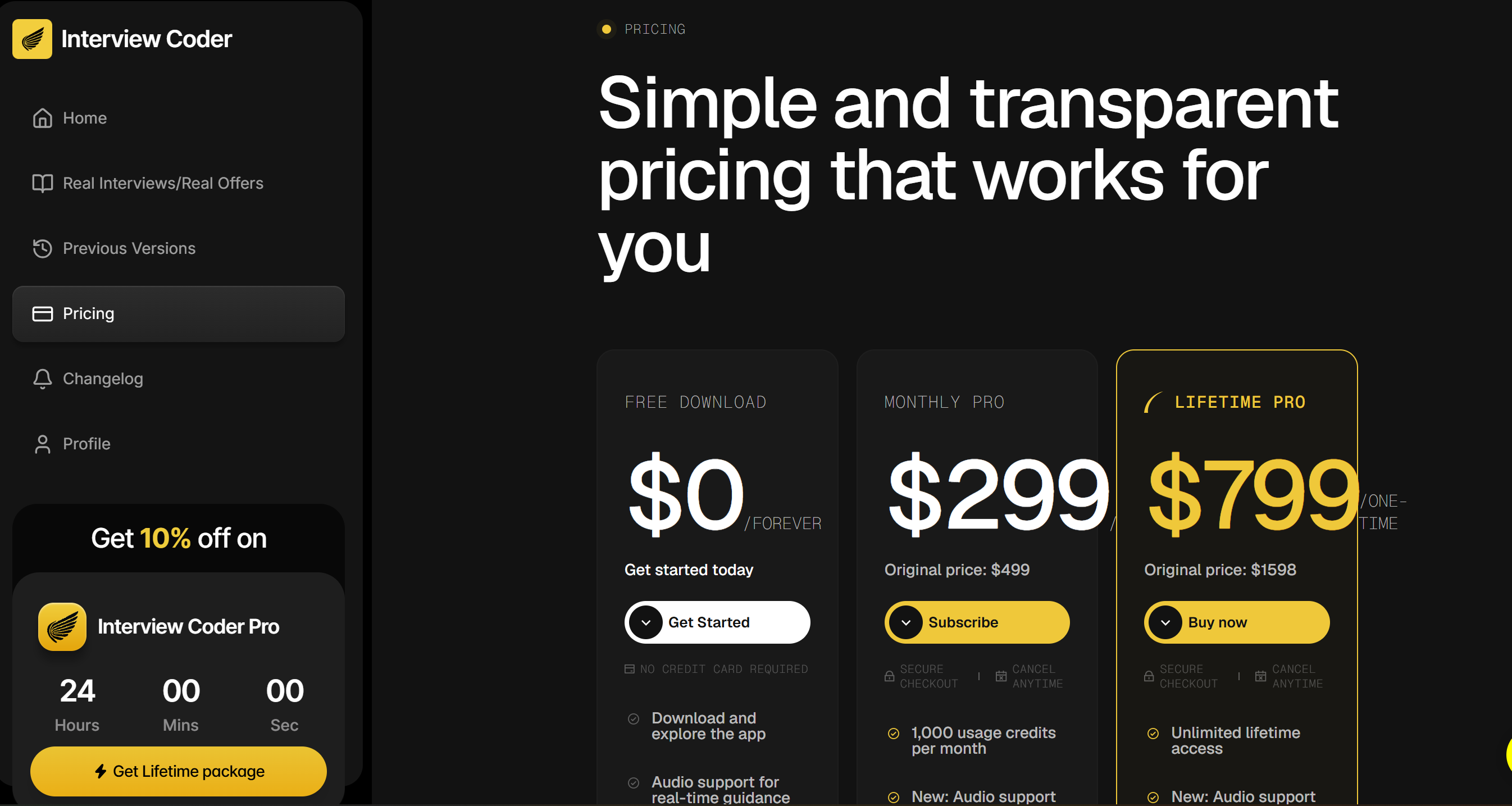
Interview Coder is positioned much more aggressively around technical interviews. Its coding stack currently uses Claude Sonnet 4.6, and its published pricing is:
Plan | Price |
|---|---|
Monthly Pro | $299 |
Lifetime Pro | $799 |
Best for: candidates who are primarily worried about difficult coding rounds and are willing to pay specialist pricing. The obvious issue is cost. At $299 for one month, Interview Coder is more than ten times MeetAssist's $29 unlimited-month pass.
Parakeet AI — Better-established, But Expensive
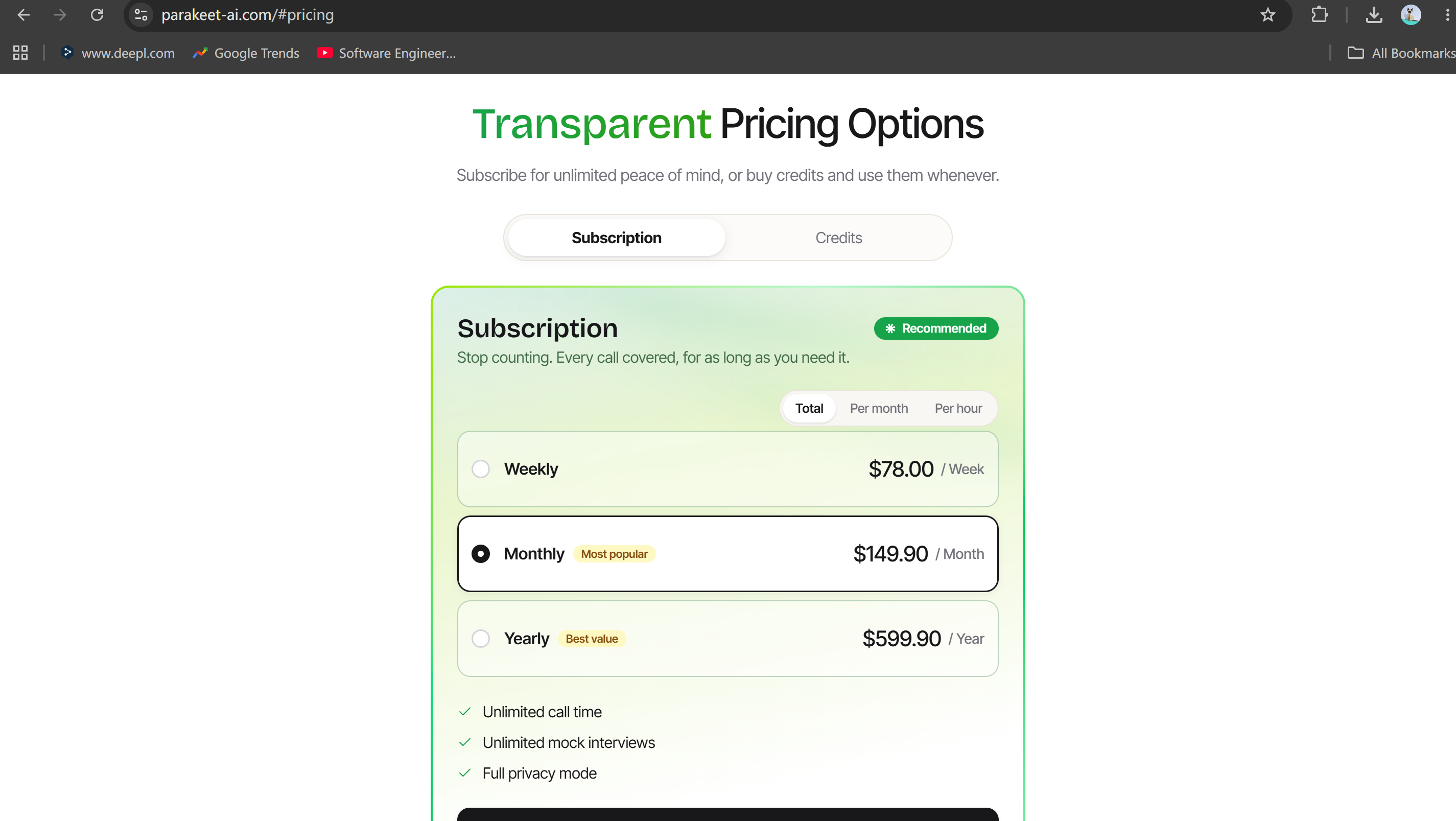
Parakeet now offers native desktop, web, and mobile experiences and says its current plans include top models from OpenAI, Anthropic, and Google.
Its pricing, however, is much higher:
$78/week;
$149.90/month;
$599.90/year;
Credit packs starting at $38 for one credit.
Given the problems I had already documented in my Parakeet AI review, I would not go back to it simply because MeetAssist has limitations.
For a wider comparison, I would also read this guide to the best AI interview tools and this breakdown of the best Interview Coder alternatives.
Frequently Asked Questions
Is MeetAssist free?
Yes, partly.
Free Trial: 20 minutes
Pro Pass: $9 for 180 minutes
Unlimited Month: $29 for 30 days
All current paid options are one-time purchases rather than auto-renewing subscriptions.
Is the MeetAssist Chrome extension invisible during screen sharing?
No, not in every sharing setup. MeetAssist's own Google Meet page labels the extension “visible on screen share,” while its Zoom guide says the panel can be seen during screen sharing unless you switch to Phone Mode.
Is the MeetAssist desktop app hidden from screen recording?
Yes, it is designed for that, and it stayed absent from the standard screenshots and recordings I tested. MeetAssist also markets the native Windows/macOS application as hidden from supported screen-share and recording workflows.
Does MeetAssist support Claude Opus?
Not in the current published model lineup I found. MeetAssist publicly lists GPT-4.1, GPT-4.1 Mini, Claude Sonnet, and Gemini Pro.
Does MeetAssist automatically answer interview questions?
Not reliably in my test. Even after enabling the automatic option, I still had to manually trigger responses in situations where I expected an answer to appear automatically.
Is MeetAssist good for coding interviews?
Yes, for basic-to-moderate coding help, but I would want stronger model options for very difficult technical rounds. Its screen-analysis workflow supports coding challenges and technical assessments, including remote tab analysis through Phone Mode.
Is MeetAssist better than Linkjob AI?
MeetAssist is cheaper; Linkjob AI is more complete for my use case. I would choose MeetAssist for a few inexpensive interview sessions and Linkjob for stronger model access, multi-screenshot technical context, and a more integrated desktop workflow.
See Also
My Hands-On Review Of Six Top AI Interview Helpers
How to Get Invisible AI Help for HackerRank With AI Assistant: My 2026 Updates
My Honest InterviewMan Review After a Month of Use
