OfferGoose Review (2026): Pros, Cons & Better Alternative

Hey guys, I've come across another AI interview assistant that might not be as useful as it seems... Just kidding! After writing my InterviewMan review and LinkedIn AI review, I was doing my usual check for the best AI interview assistants and I found OfferGoose, which had just been updated in June. I decided to test it out myself.
Unfortunately, even if you look at the big picture, OfferGoose's great front-end UI design and solid user experience can't make up for its many shortcomings: expensive pricing and plan structures, a lack of coding support, and – most importantly – its failure to remain invisible to interviewers. That's exactly why I've gone back to my top AI interview assistant, Linkjob AI.
What Is OfferGoose & My OfferGoose Review Interface Part
Platform Overview
When I checked out the OfferGoose website, I immediately noticed that the platform's interface is clean and modern – it looks superior to its competitors, at least in terms of front-end web design.
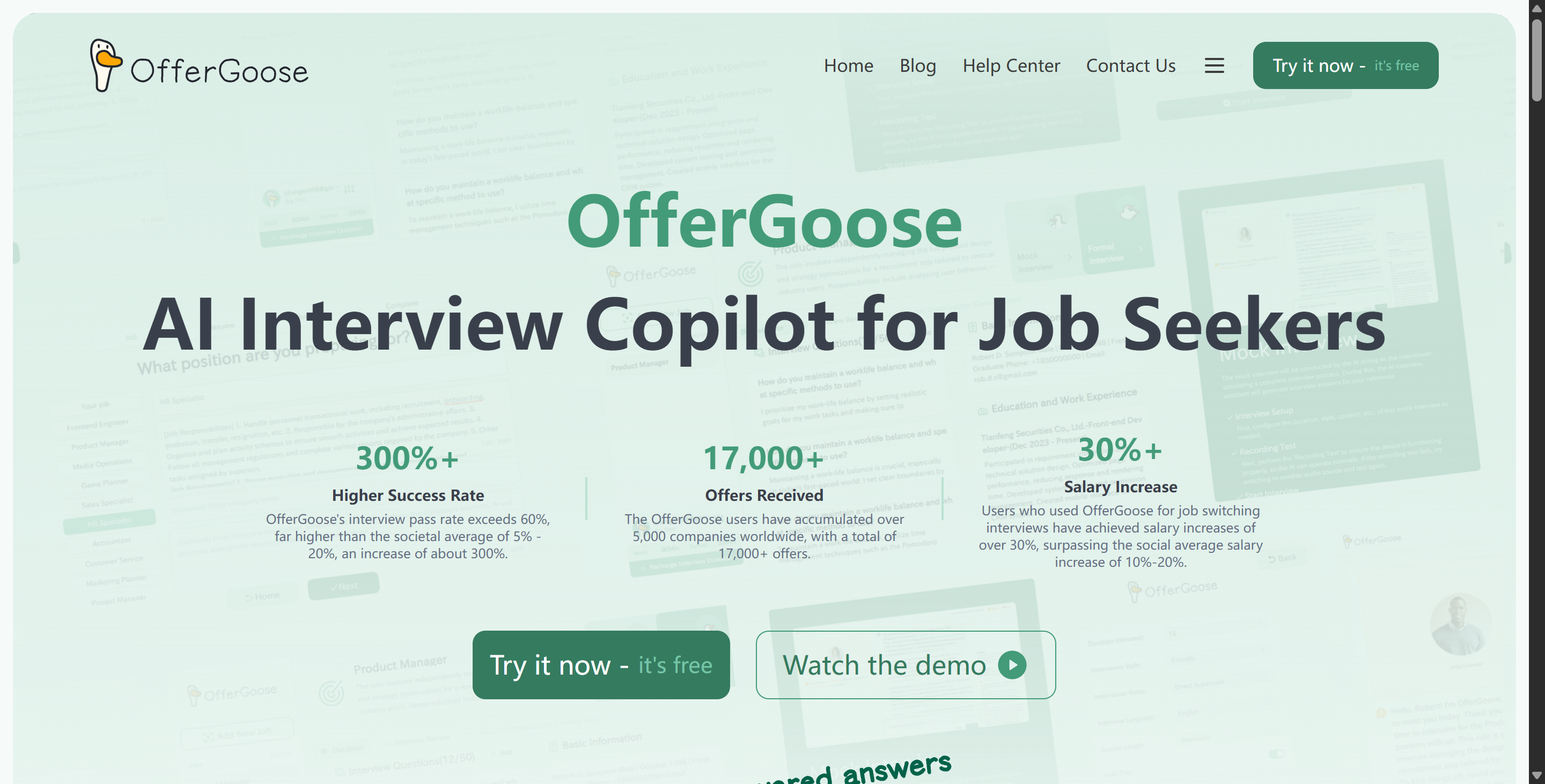
After downloading the trial app, I found the user flow to be very clear; I suspect almost no one would run into the problem of not knowing where to click.
So, here's a quick rundown of what OfferGoose can do for you:
interview question answers and assistance in real-time
mock interviews
post-interview summaries and analysis
AI-generated resumes
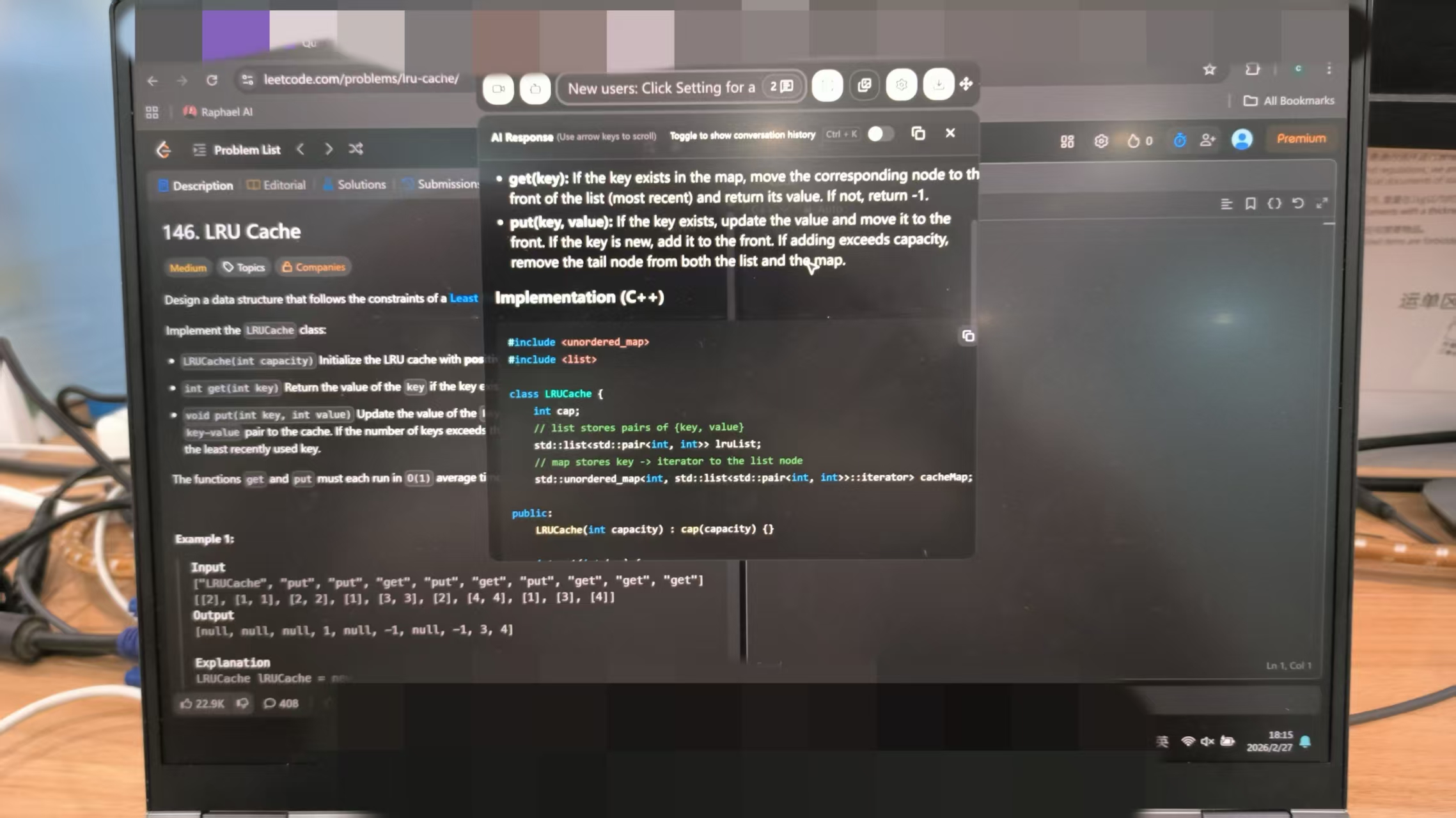
During my trial, I found that these features were generally enough to cover common interview scenarios. I wouldn't say they're outstanding, though, because OfferGoose – unlike AI interview assistants for software engineers like Linkjob AI – doesn't have features like screenshot analysis and on-site coding assessments. So, it has a bit of trouble supporting interviews that involve a lot of practical coding.
Pros & Cons Overview
Here is a quick summary of the strengths and major drawbacks discovered during this OfferGoose review:
Advantages (Pros) | Critical Drawbacks (Cons) |
Sleek, Modern UI: Clean interface with a short learning curve. | Not Invisible: Overlay is captured in screen shares and screenshots. |
Multi-Language Support: Useful for basic global language practice. | Surface-Level AI Outputs: Answers are too broad for mid/senior roles. |
Quick Resume Import: Generates basic role-tailored questions easily. | No Coding Support: Lacks live IDE parsing or algorithm solving. |
Decent Beginner Mock Practice: Good for basic entry-level behavioral prep. | High & Inflexible Pricing: Minute-based plans exhaust quickly. |
OfferGoose Review: App & Setup
I downloaded and installed the OfferGoose app, and found a major flaw: it can't provide discreet assistance. Its interface is fully visible in system screenshots, and I had to select a specific portion of the screen to share in order to capture and analyse the audio before it provides an answer.
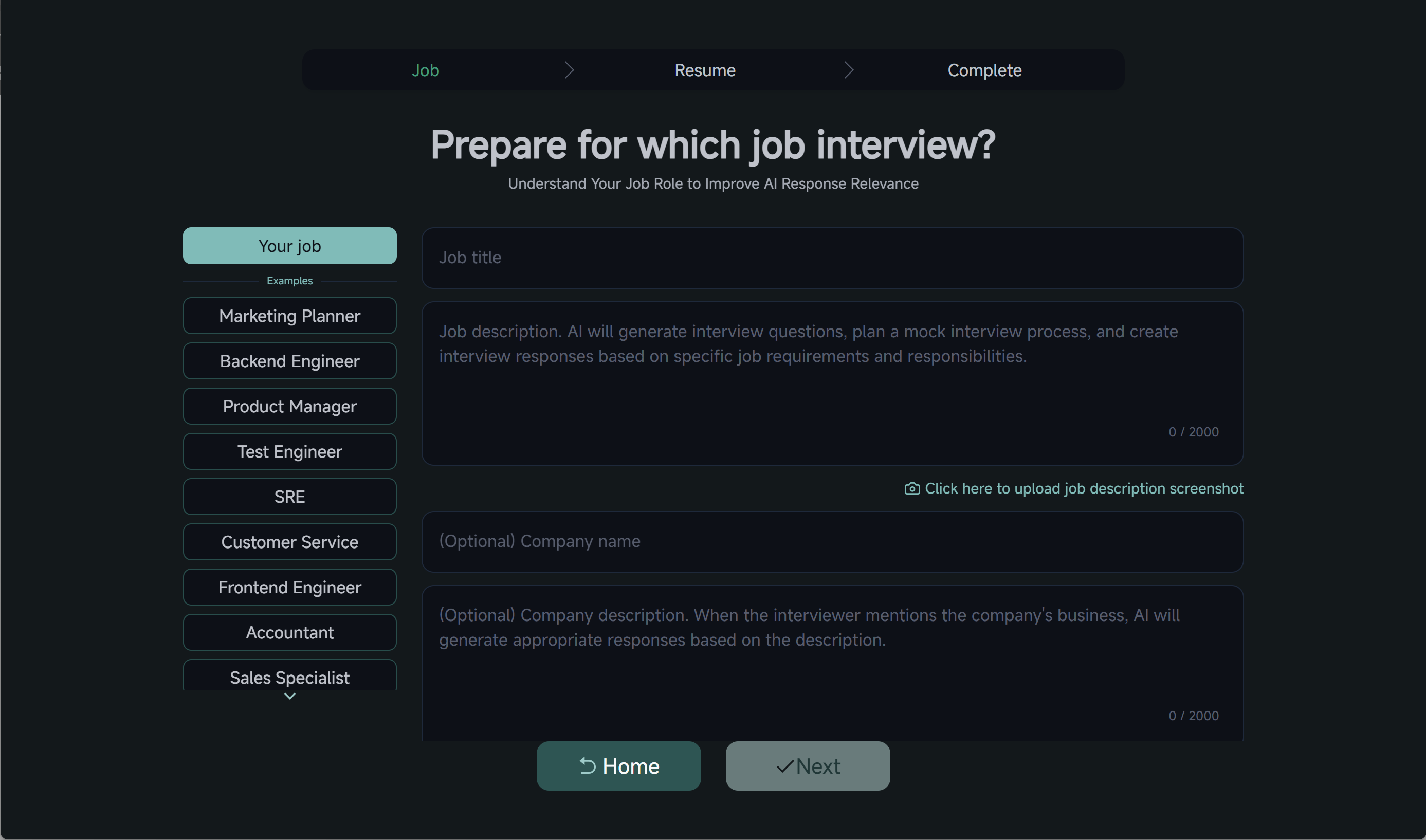
After realising this, I decided not to use it as a real-time AI interview assistant. I was going to check out the mock interview feature to see if it's really as good as they say, and if it can actually provide the kind of support they claim, like customisable tone, in-depth analysis after each interview, and top guidance.
I also checked out the actual reviews of OfferGoose on the Apple App Store and Google Play to see if I was the only one with such an extreme opinion of it. The results were pretty clear – it seems the general public's reviews of OfferGoose aren't very favourable either:
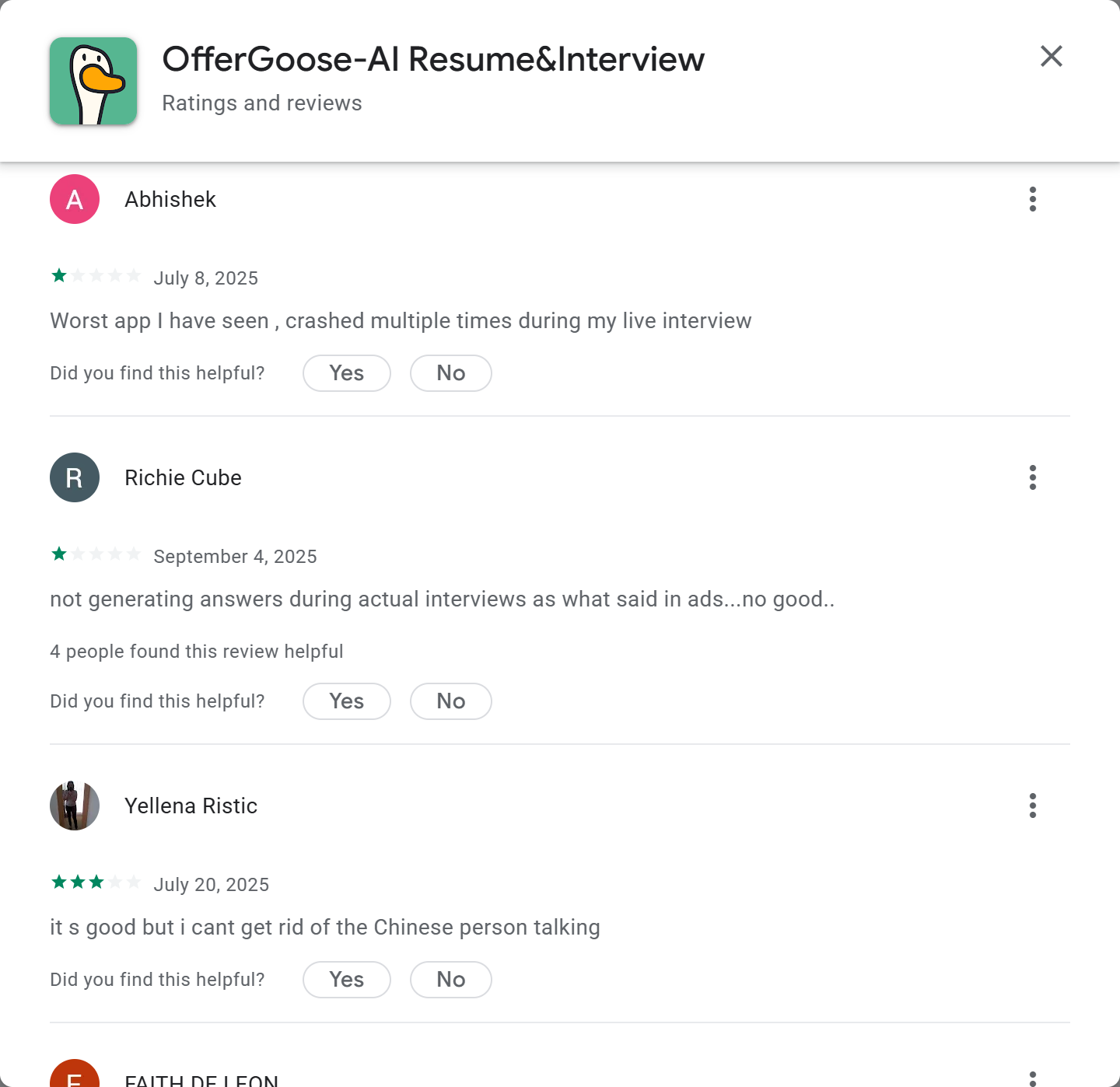
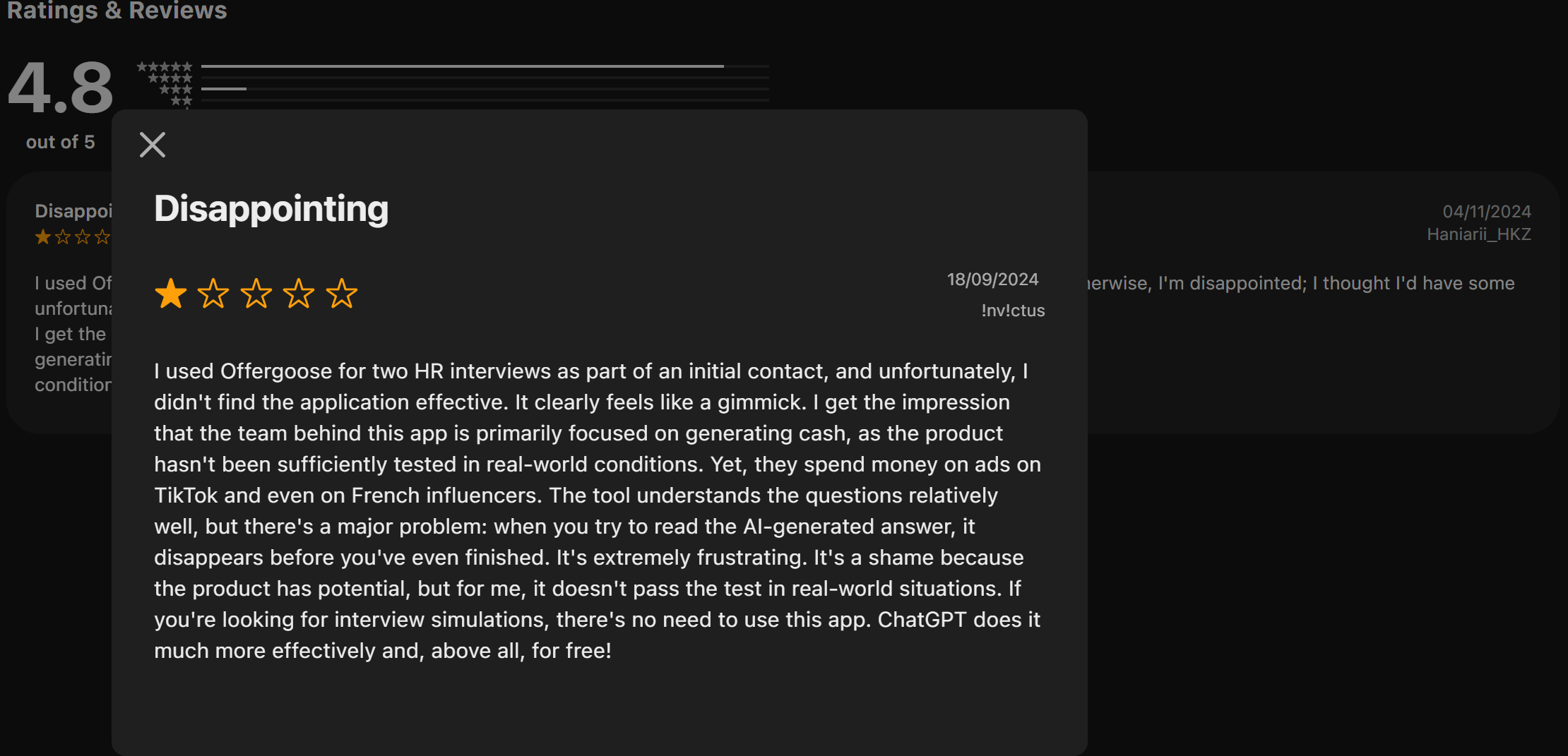
I don't think an effective AI interview assistant should market itself as a real-time assistant when it can only handle behavioural interview rounds that don't require full-screen sharing. For me, the focus of an interview should be on the hard skills sections, especially the coding interview rounds.
OfferGoose Review: Features & Performance
While OfferGoose makes a strong first impression with its sleek interface, putting its core features through a real-world evaluation reveals significant performance limitations. For job seekers targeting competitive technical or senior roles, the software leaves several critical gaps.
AI Mock Interviews: Rigid Questioning & Vague Guidance
OfferGoose heavily promotes its AI-powered mock interview feature, but in practice, the experience feels surprisingly mechanical.
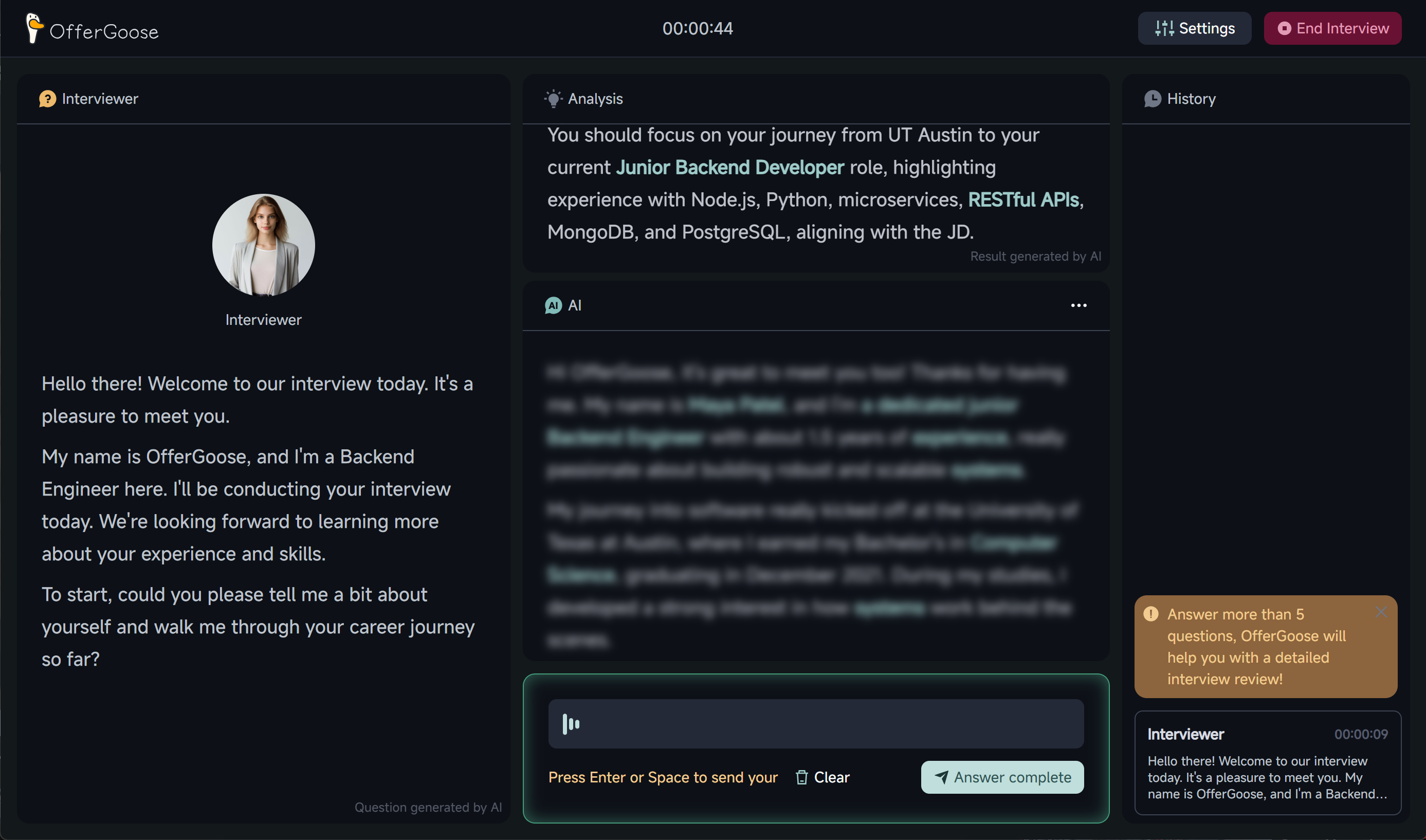
Robotic AI Questioning: This AI interviewer stuck to a strict script. It's basically just a bunch of textbook-style questions on repeat, no matter what tone I set. The whole interview scenario was the same every time.
Broad, Surface-Level Answers: When I asked for real-time advice, the AI mostly just gave me vague, general descriptions. If I'm in the interview and they ask me how to optimise a distributed database or how to handle those tricky architectural bottlenecks, I've got nothing really, just some vague answers.
Inadequate for Mid-to-Senior Roles: These suggestions might get you through an entry-level interview, but they're not going to cut it for mid- to senior-level engineers or leadership positions.
Real-Time Live Assistance: The Stealth Failure
The most glaring flaw in my OfferGoose review was its complete failure to remain invisible during live assessments.
⚠️ Critical Stealth Warning: You can see OfferGoose's floating HUD in the screenshot. If the interviewer or software on Zoom, Google Meet or Microsoft Teams needs full-screen sharing, everyone on the call will see the extra screen.
To get an answer, OfferGoose made me manually choose a specific window area for audio and video recording. This step is both awkward and easily spotted by the camera, so it's no good when taking OAs or full-screen technical tests with proctoring systems.
Opaque LLM Models & Lack of Technical Depth
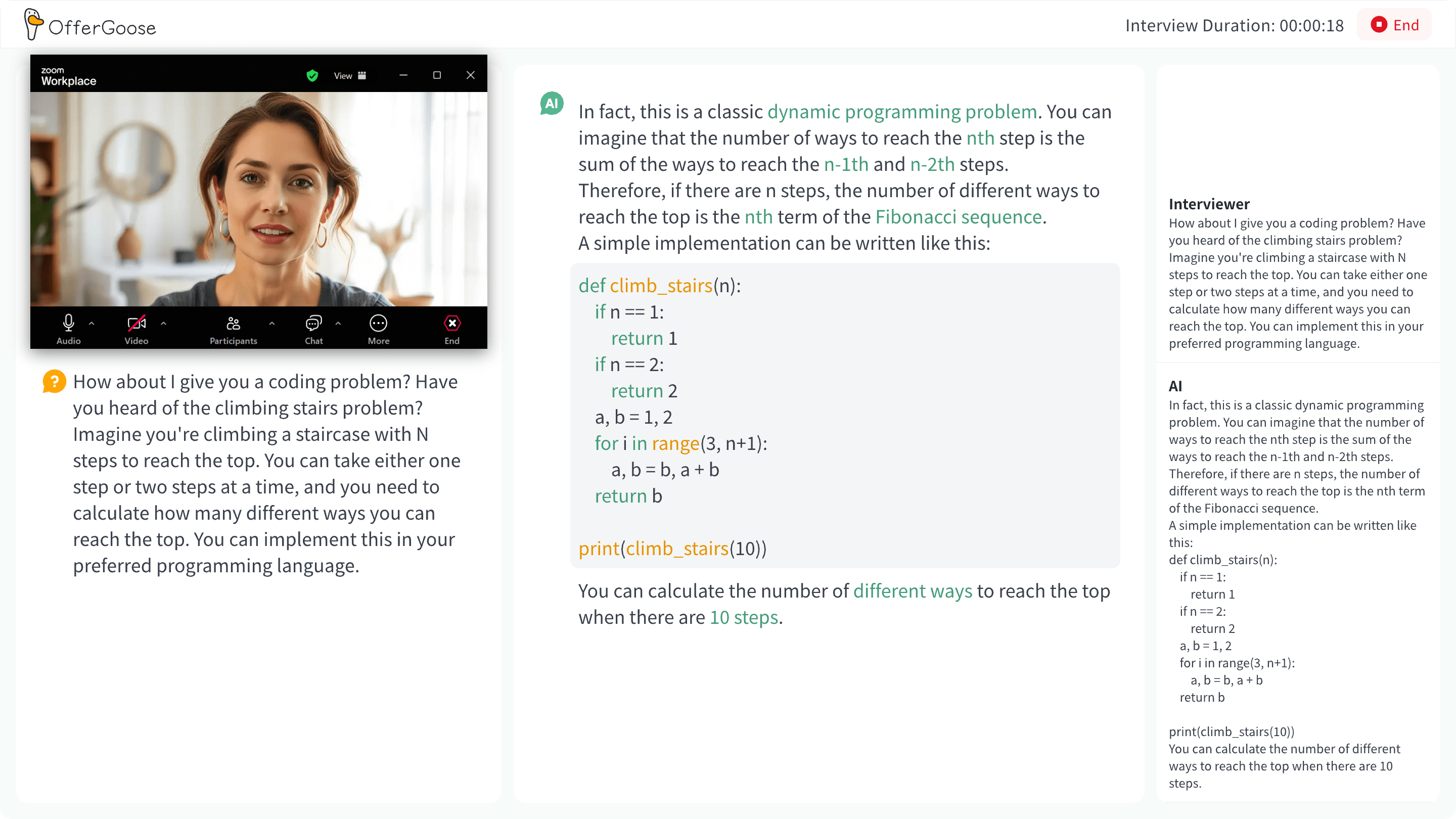
Unlike top-tier technical AI tools that explicitly detail their underlying architecture, OfferGoose provides zero transparency regarding its LLM models or data sources.
Black-Box AI Engine: It is impossible to tell which underlying model powers the suggestions, making it unreliable for complex logic or specific industry frameworks.
No Real-Time Coding Intelligence: The platform lacks dedicated IDE screenshot reading. If you encounter a complex algorithm or dynamic programming problem, OfferGoose cannot parse the code context effectively.
OfferGoose Review: Pricing & Cost-to-Value Ratio
To be honest, when you're looking for a job, every dollar and every minute counts. When you're in a bind, you need an AI tool you can count on. After finally getting OfferGoose's prices from their website (they don't list the prices on the site itself, you have to download the app or change your search terms to find them) I did a quick calculation that showed these prices can't be right.
Your OfferGoose Value for Money
Here are the 3 price plans that OfferGoose provides; a bit steep a price, I'd say:
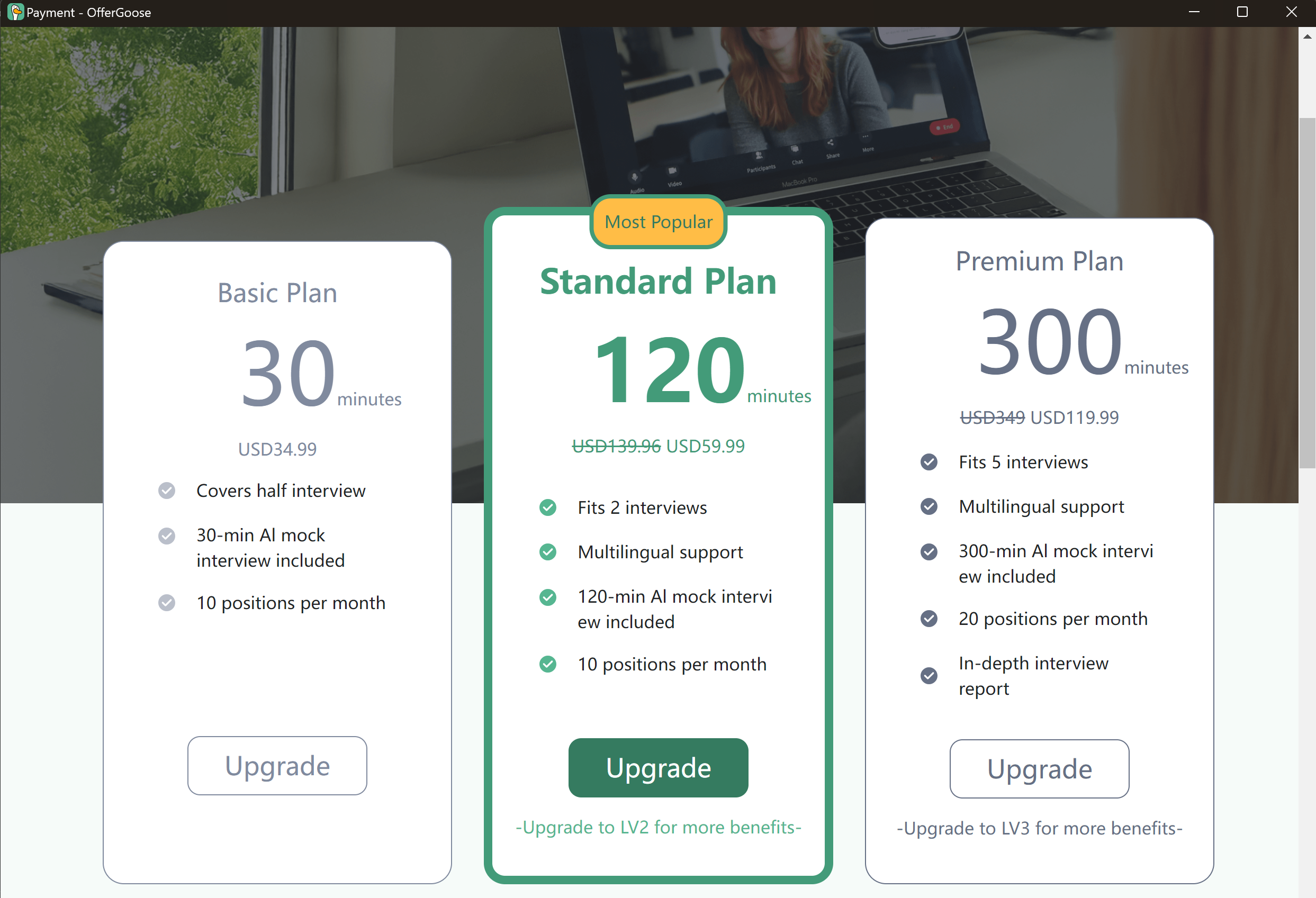
The Brutal Interview Math: A standard tech or mid-to-senior hiring pipeline usually includes a 30-minute recruiter screen, a 45-minute hiring manager chat, 1 to 2 technical or system-design rounds (60 minutes each), and a final behavioral panel. That’s easily 3 to 5 full hours of live airtime for a single company. If you’re actively interviewing with 3 or 4 companies at once, you’re looking at 12 to 20+ hours of live interview time.
The Credit-Burning Trap: OfferGoose relies heavily on minute-based credit bundles and tier packages ranging anywhere from $30–$40 for a brief 30-minute allotment up to $150–$200+ for higher tiers. In my experience, a $40 package vanishes in literally one single technical interview or a couple of quick mock prep sessions. Before you even make it to the final round, your credits are depleted, and you're forced to keep topping up.
What really bothered me while using it was wondering what I was actually getting for all that money.
If I'm going to spend over $100 on an AI assistant, I expect it to offer comprehensive features – like real-time IDE coding support, deep technical expertise, and a 100% stealth mode during screen sharing.
But since OfferGoose doesn't have real-time code analysis and is detectable during full-screen sharing, I'm basically paying for high-end software and only getting some basic behavioural prompts in return.
The Job Search Reality Gap:
├── Real Job Search Needs  ──► 10-20+ hours of live interviews + coding support + 100% stealth
└── OfferGoose Packages    ──► Minutes burn fast ($30-$200+) + visible overlay + no live code parsing
OfferGoose Pricing vs. Real-World Value Breakdown
Plan Tier | Estimated Price | What You Get | The Real-World Reality Check |
Free / Trial | $0 | ~15–30 mins of basic mock practice | Too brief to finish even a single full mock interview; generic feedback. |
Pay-Per-Minute Bundles | $30 – $60 | Limited live minute credits | Depletes within 1–2 full interview loops; forces frequent, expensive top-ups. |
Premium Tiers | Up to $200 | Larger credit pools & extra prep tools | Pricey, yet still fails on full-screen stealth protection and live coding assistance. |
The Superior OfferGoose Alternative: Why I Switched to Linkjob AI
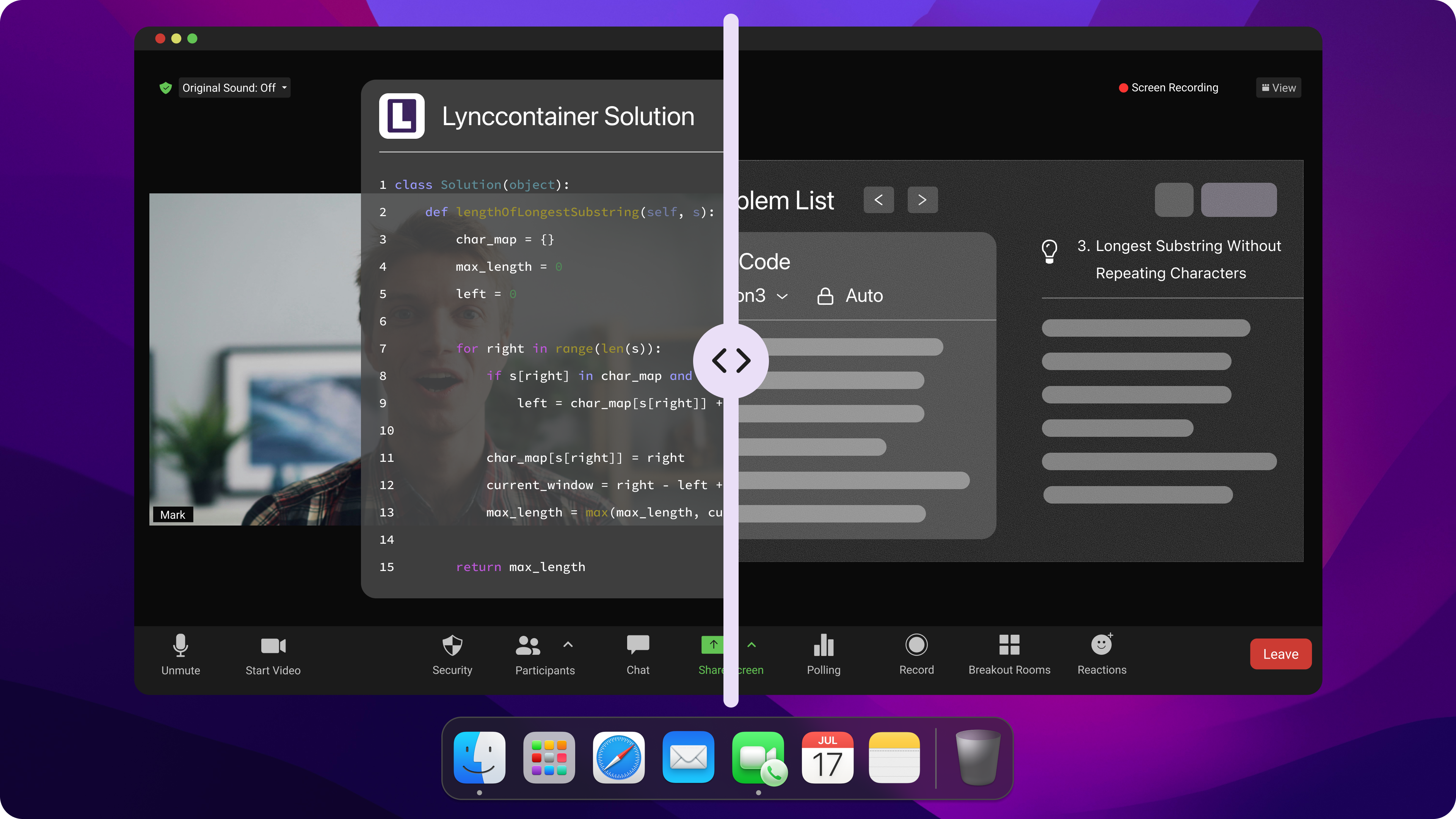
If you need a reliable OfferGoose alternative that actually delivers undetectable live support and handles deep technical interviews, Linkjob AI is in a completely different league.
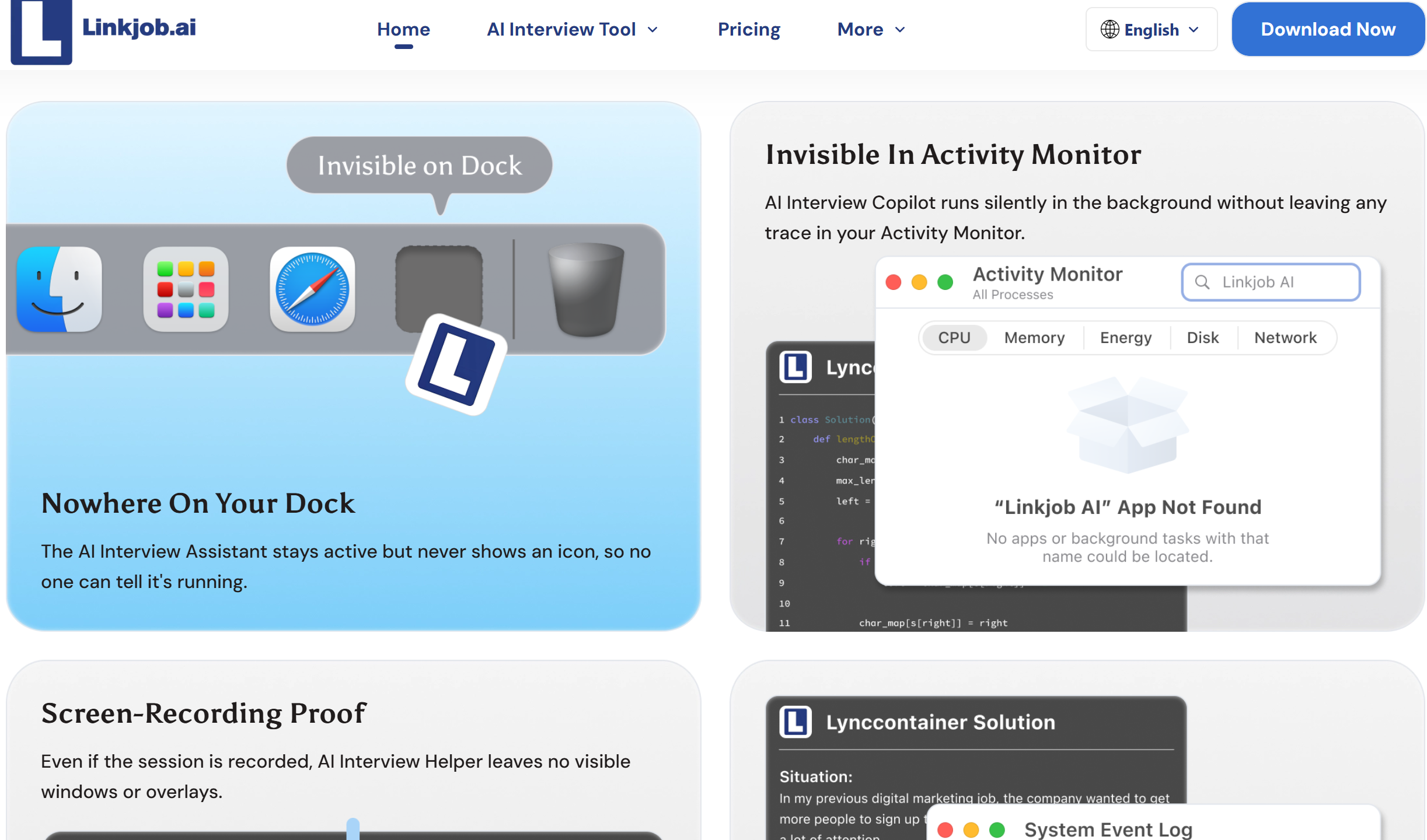
Unlike OfferGoose, which relies on visible screen regions and generic LLM prompts, Linkjob AI uses a system-level hardware overlay that remains 100% invisible to screen sharing tools, system screenshots, and proctoring engines like HirePro or iMocha.
Feature Comparison Matrix
Feature / Capability | OfferGoose | Linkjob AI (Recommended) |
Full Stealth & Invisibility | ❌ Visible in screenshots & screen share | 100% Invisible System-Level HUD |
Proctored OA Compatibility | ❌ Fails background process checks | Bypasses HirePro, iMocha, SEB |
Technical & Coding Analysis | ❌ No code execution or IDE reading | Live IDE & DSA Problem Solving |
Response Depth & Precision | ⚠️ Generic, surface-level descriptions | Senior/Lead-Level Technical Depth |
LLM Transparency | ❌ Opaque black-box data sources | Optimized, High-Performance LLMs |
Pricing Model | ⚠️ Expensive minute credits ($30–$200) | Affordable, Unlimited Practice Plans |
Burning 39.99 USD in Half an Hour Shaped My OfferGoose Review
Scrolling through career TikToks earlier this fall pushedoffergoose.com straight onto my testing shortlist for a hands-on OfferGoose review. Dozens of viral short-form clips showed candidates propping a smartphone beside a laptop keyboard while spoken recruiter questions triggered instant behavioral scripts on the mobile screen. At first glance, two separate impressions tripped me up before I even created an account. First, judging by the brand name alone, I half expected a post-interview salary negotiation calculator or compensation benchmarking suite—something OfferGoose does not offer at all. Second, older promotional blog posts scattered across search results advertised tiny regional subscriptions around 69 CNY per month, roughly 9.99 USD, making it look like the cheapest live copilot on earth. Once I opened the international live session checkout in late 2026, reality looked completely different: real-time session packages started at 39.99 USD for just 30 minutes of live call time, climbing to 69.99 USD for 60 minutes and 199.99 USD for 300 minutes.
Paying more than one USD per minute demanded serious engineering justification, so I installedOfferGoose-AIResume&Interview across Android and iOS alongside its desktop browser workspace on macOS Sonoma and Windows 11. Over two weeks, I tested its JD-matched resume rewriter, Chain-of-Thought mock drills, and live answer cues across Zoom behavioral calls, timed HackerRank coding sandboxes, and dual-laptop screen-share checks. My honest verdict splits sharply between low-pressure solo rehearsal and live technical execution. As a zero-embarrassment warmup coach for rusty behavioral stories across its six supported languages, OfferGoose helps nervous applicants structure STAR narratives cleanly. As a live software engineering copilot, however, paying 39.99 USD for a 30-minute block that cannot read a single line of on-screen CoderPad code, exposes a visible web panel during full-desktop screen shares, and streams wordy, impersonal paragraphs felt painfully overpriced.
When my actual senior backend onsite loops combined four-hour virtual panels with strictly proctored online assessments, I ran everything on Linkjob AI instead. Trading a 1.33-USD-per-minute behavioral meter for unlimited live hours, six-screenshot frontier coding OCR, and camera-aligned two-device isolation fixed every cost and stealth failure I hit during my audit. Below, I break down every metric from my dual-machine test bench before you burn forty USD on a single recruiter call.
Inside the Second Brain Pitch: TikTok Demos vs Desktop and Mobile Reality
Marketed across Google Play (com.offergoose.android.offergoose, holding roughly a 4.2 store rating) and the Apple App Store as an all-in-one career "Second Brain," OfferGoose bundles pre-interview document prep with live voice reminders while stopping completely before offer-letter or compensation negotiation begins. Walking through onboarding from a clean laptop and smartphone exposed four core product mechanics.
JD Keyword Clustering and STAR Resume Rewrites: Before entering mock or live sessions, OfferGoose scans uploaded resumes against target job descriptions to extract recurring skill clusters. In roughly forty minutes of setup, I generated three role-tailored resume drafts where vague bullet points were rewritten into quantified STAR achievements that remained editable line by line before export. Free users can sample basic resume analysis and a tiny handful of warmup mocks, whereas deep review analytics, multi-role resume versions, and live interview assistance sit behind paid gates.
5-Minute Quick Mocks and Chain-of-Thought Feedback: Where OfferGoose genuinely earns positive marks is easing interview anxiety during solo practice. You can configure the AI interviewer's demeanor—choosing a supportive tone for early 5-minute quick warmups on prompts like introducing yourself, or switching to a challenging style for 15-minute deep-dive rounds where shallow replies trigger probing follow-ups. Within twenty seconds of ending a practice run, its Chain-of-Thought review grades structure, evidence specificity, and filler-word habits.
Six-Language Voice Scope Across Mobile and Web: Live assistance centers on ambient voice recognition across six core languages: English, Chinese, Spanish, German, Japanese, and Korean. On mobile devices—the setup featured heavily in OfferGoose's TikTok promotional clips—your phone microphone listens to laptop speaker output during unheadphoned calls. On a computer, OfferGoose runs inside a visible web or desktop panel alongside your meeting window rather than operating as an OS-filtered invisible engineering cockpit.
Conceptual SWE Talk Tracks Without Visual Code Capture: Read OfferGoose's software engineering FAQ closely before paying. While company blog posts state that OfferGoose includes a mode for software engineering discussions—covering verbal explanations of common algorithms or high-level system concepts—it has zero visual screen-reading or OCR code solver. It cannot see, parse, or debug code sitting inside an IDE or browser coding pad.
Five Stress-Test Benchmarks From My 2026 Sandbox
Self-published blog posts onblog.offergoose.com boast unaudited claims of 1-second response generation, 95 percent question recognition, and a 300 percent jump in pass rates, so I measured actual real-world behavior across five controlled engineering benchmarks inside my two-computer test lab.
Fast Question Pickup vs Lengthy, Impersonal Answer Blocks: Testing clear speakerphone audio across English and Mandarin mock calls confirmed brisk initial speech recognition—simple HR prompts like explaining a career transition began streaming text cues within roughly 1.4 to 2.5 seconds. Quality and ergonomics broke down once the full response filled the pane. Even after importing my quantified backend engineering resume, live generated answers consistently came out overly lengthy, stiff, and poorly personalized—reading like polished corporate essays rather than natural spoken anchor points. When my mock interviewer stacked two rapid architecture follow-ups on database connection pooling and retry storms, skimming walls of generic prose introduced three-second reading freezes that sounded scripted aloud.
Zero Screen-Code Parsing on CoderPad, HackerRank, and LeetCode: This benchmark ended OfferGoose's candidacy for technical software roles immediately. During real engineering interviews in 2026, interviewers do not read 90 lines of buggy Python or four PostgreSQL table schemas out loud into a microphone; they paste starter code into CoderPad, HackerRank, or CodeSignal and watch you solve it live. Because OfferGoose cannot capture screenshots, interpret tree diagrams, or analyze visual code constraints on screen, it delivered zero assistance the moment a live coding pad opened. Furthermore, without an explicit model switcher enabling me to select late-2026 frontier engines like Claude Opus 4.6 or Gemini 3.1 Pro Preview, even purely verbal system design questions stayed trapped at surface textbook summaries.
Visible Web Panels on Full-Screen Share and TikTok Phone Traps: Running a two-laptop Zoom observer check exposed two major stealth hazards. First, on a computer, OfferGoose displays its interface inside a standard visible panel. While manageable if you only ever share one isolated Chrome tab, switching to
EntireScreendesktop sharing—mandatory in almost every technical round—exposes the OfferGoose panel directly to your interviewer. Second, replicating the viral TikTok setup by laying a phone next to my keyboard forced two compromises at once: I had to unplug my headphones so my phone mic could hear laptop speakers (causing room echo on sensitive mics), and glancing 35 degrees downward at my desk triggered obvious eye-gaze drops on webcam. Against strict kernel kiosk browsers like Safe Exam Browser (SEB) or RespondusLockDownBrowserthat lock down host displays and scan processes, computer panels fail outright—a barrier I proved step by step in my Safe Exam Browser online assessment survival guide.The Brutal Per-Minute Cost of Multi-Round Tech Loops: Run the arithmetic on OfferGoose's USD minute packs across a realistic software engineering job search and the numbers get painful fast. A single first-round recruiter or hiring-manager call scheduled for 30 minutes routinely runs 35 minutes with Q and A—meaning the 39.99 USD 30-minute plan cuts off before wrap-up unless you buy another pack. Worse, a standard five-round virtual onsite loop at Google, Amazon, Meta, or a Series C fintech spans 225 to 300 minutes. Covering just one company onsite loop plus one warmup screen burns almost an entire 199.99 USD 300-minute package—and if you are actively interviewing across four companies in one month, per-minute charges skyrocket past five hundred USD without delivering a single line of coding OCR.
Conflicting Regional Stickers, USD Minute Packs, and Legal Disclaimers: Audited across
offergoose.com, October and November 2026 independent pricing checks, and Google Play / App Store listings, buyers encounter sharply split pricing tiers alongside tough legal terms:International Live Session Packs in USD: 30-minute plan at 39.99 USD (
~1.33USDper active minute), 60-minute plan at approximately 69.99 USD (~1.17USDper minute), and 300-minute premium plan at 199.99 USD (~0.67USDper minute), contrasted against legacy regional blog promos quoting69CNY/month(~9.99USD) or credit-based monthly/299 USD career-prep tiers that differ by storefront.Zero Salary Negotiation Tools: Despite search-engine confusion around the word "Offer" in OfferGoose, zero comp benchmarking, equity analysis, or counter-offer script tools are included in any tier.
Broad Warranty Disclaimers and App-Store Refund Walls: Under
offergoose.com/serviceAgreement.html, OfferGoose expressly disclaims all warranties regarding fitness for a particular purpose, timeliness, or output accuracy (support@offergoose.com), while purchases made inside the Apple App Store (id6572284517) or Google Play (com.offergoose.android.offergoose) lock buyers behind strict mobile app-store refund policies rather than unconditional web guarantees once live session minutes are consumed.
Three Live Scenarios Where OfferGoose Burned My Loop
Even if 5-minute solo mock drills help shake off morning jitters, bringing a 1.33-USD-per-minute audio-only tool into real 2026 hiring loops creates three immediate failure traps.
Running Over Minute 30 During a Hiring-Manager Screen: Picture paying 39.99 USD for a 30-minute pack ahead of a scheduled half-hour behavioral screen. Ten minutes go to introductions and project background, fifteen minutes go to leadership stories, and at minute thirty-one—right when the manager asks their decisive tie-breaker question—your 39.99 USD timer expires mid-sentence unless you buy more time at
69.99USDor199.99USD.Unplugging Headphones and Failing Gaze Checks Under Proctors: Because OfferGoose's standalone mobile app listens to room speaker audio rather than pairing silently with headphone loopback and OS accessibility capture, ditching your headset in a quiet home office risks speaker bleed back into your mic. Simultaneously, corporate assessments increasingly deploy webcam eye-tracking and periodic full-desktop snapshot monitors—an exact surveillance pipeline I dissected step by step in my guide on how to get invisible AI help for Smowl. Leaving OfferGoose's visible web panel open on your desktop or staring downward at a desk-mounted phone gets flagged fast.
Going Completely Blind When Behavioral Calls Pivot to Code: Hybrid technical screens routinely open with fifteen minutes of resume discussion before the interviewer drops a live CoderPad or HackerRank link into Zoom chat. Having already spent 69.99 USD for that 60-minute hour, watching OfferGoose sit completely helpless while unspoken Python starter code and SQL schemas fill your screen wastes both your money and your interview slot.
Why I Moved My Coding OAs and Full Loops to Linkjob AI
After experiencing OfferGoose's 39.99 USD half-hour burn rate, missing visual coding OCR, visible desktop panel, and wordy essay output, I ran the exact same multi-round engineering suite on the Linkjob AI real-time interview copilot. Moving to an unlimited, dual-mode engineering architecture solved every single financial and technical wall I hit during my audit.
Silent Six-Screenshot Coding OCR Plus Headphone-Safe
Dual-DeviceMode: Unlike OfferGoose going blind on visual code and forcing speakerphone audio on mobile, Linkjob AI captures clean system loopback audio even while you wear wired or Bluetooth headphones, paired with silent multi-region visual coding analysis. Whenever I face strict proctored online assessments (HackerRank,CodeSignal,Codility), randomized snapshot agents (Smowl), forcedEntireScreenshares, or locked kiosk clients (SEBandLockDownBrowser), I engageDual-DeviceMode: launch the lightweight native Linkjob AI desktop client before opening my exam browser (using one-time OS accessibility permissions for silent zero-keystroke capture), scan the QR code with any iPhone or Android camera to open themobile webpage, and turn OFF the desktop answer-display toggle. Once that toggle is off, my Mac or Windows monitor stays 100 percent bare—zero visible panels, zero host keyboard shortcuts, zerowindow.onblurfocus shifts, and zero clipboard paste flags. Mounting my phone horizontally 1 inch directly beneath my webcam lens lets me batch up to six scrolling coding screenshots silently from themobile webpagewhile keeping centered eye contact and wearing headphones normally.Terse Sub-Second Cues + 80+ Frontier Models Across 29+ Languages: Where OfferGoose restricts live coverage to six languages and outputs lengthy, impersonal paragraphs, Linkjob AI v5.0 pairs enterprise Deepgram speech transcription and customizable Voice Activity Detection presets (Low, Normal, and High noise gating) across 29-plus global languages with explicit per-round frontier model selection. I route rapid verbal behavioral follow-ups to ultra-low-latency Gemini 3.5 Flash or GPT-5.6 Luna configured to output three five-word resume-grounded anchors—eliminating long reading pauses—and route LeetCode Hard bitmask DP, C++ concurrency bugs, and distributed system design schemas directly to Claude Opus 4.6, Claude Sonnet 4.6, GPT-5.6 Sol, or Gemini 3.1 Pro Preview.
Native OS Window Filtering When You Want Single-Screen Comfort: You do not always want to glance at a phone during casual unproctored calls. For daily practice or standard Zoom interviews configured once with Zoom desktop
"Advanced Capture with Window Filtering", Desktop Floating Window Mode hides cleanly at the operating-system capture layer on macOS, Windows, and Linux—unlike OfferGoose's exposed web panel—while grabbing silent coding screenshots mid-discussion. Just finalize all prompts and audio routing before opening any browser tab, and never clickSettingsor pressCmd+\orCtrl+\mid-round.75 Free Live Minutes—Worth Nearly 100 USD at OfferGoose Rates!: Pause and compare trial generosity alone: Linkjob AI gives new users 30 continuous free live minutes immediately upon downloading the desktop client plus 45 extra free minutes via community onboarding—75 free live minutes total, whereas buying 75 live minutes on OfferGoose costs more than 69.99 USD! Every paid Linkjob AI tier unlocks unlimited live interview hours, adaptive AI mock interviews, and an AI resume builder (offering both recurring subscriptions and non-renewing one-time passes): 99.99 USD for an entire unlimited month (half the price of OfferGoose's 199.99 USD 300-minute cap!), 209.97 USD for an entire unlimited quarter (and promo code
job20drops three full months to167.98USD—32 USD cheaper than just five hours on OfferGoose!), 359.88 USD annually, or 699 USD once for lifetime access. You can also see how per-minute versus unlimited architectures compare across five tools in my guide to the best InterviewMan alternative in 2026.
Who OfferGoose Minute Packs Fit vs Who Needs Linkjob AI
Deciding between a per-minute behavioral warmup app and an unlimited dual-mode engineering copilot comes down to whether you write code and how many interviews sit on your calendar.
When OfferGoose Can Make Sense: If you are a non-technical candidate interviewing in one of its six supported languages (
EN,ZH,ES,DE,JP,KR), mainly want low-pressure 5-minute solo mock drills with Chain-of-Thought speaking feedback and JD-matched STAR resume edits, or only face one single unmonitored 25-minute phone screen over the next six months with zero screen sharing and zero coding, OfferGoose's behavioral warmup tools can help organize your stories. Test free mock tools thoroughly before buying international USD minute packs or mobile in-app credits.When You Should Choose Linkjob AI Immediately: If you are a software engineer, quantitative developer, data scientist, machine learning engineer, or active job seeker running two or more interviews in a month (where two 60-minute OfferGoose packs already cost ~140 USD!), facing CoderPad, HackerRank, CodeSignal, Codility, Smowl,
SEB, orLockDownBrowser, or wearing headphones during camera-on Zoom calls, skip per-minute audio wrappers. Run Linkjob AI for 75 free live test minutes, unlimited monthly/quarterly sessions,ClaudeOpus4.6six-screenshot coding OCR, and headphone-compatibleDual-DeviceModevia your smartphonemobile webpage.
Four Camera-Safe Habits Replacing Sideways Phone Glances
Viral TikTok videos showing phones propped beside laptop trackpads teach the single worst physical habit in remote interviewing. Follow these four camera-safe rules before every live round in 2026.
Keep Your Headphones On With System Loopback Capture: Never blast interviewer audio through laptop speakers just so a standalone phone app can hear the room. Linkjob AI captures internal system audio cleanly while you wear headphones, eliminating mic echo and pairing silently with your phone
mobile webpage.Mount Your Phone 1 Inch Directly Below the Webcam Lens: Move your phone off your desk surface and rest it horizontally on a slim stand 1 inch beneath your camera lens at 25 percent dark-mode brightness so reading concise cues aligns naturally with direct eye contact.
Turn OFF Desktop Answer Rendering Before Opening Proctored Links: Launch the native Linkjob AI desktop client first, scan the QR code onto your smartphone
mobile webpage, and confirm the desktop answer-display toggle is turned OFF before launching Chrome,SEB, orLockDownBrowser—avoiding visible browser panels completely.Enforce 3-Bullet Anchors Over Essay Paragraphs: Configure your custom prompt ahead of time to return three five-word bullet cues grounded in your real resume metrics rather than lengthy paragraphs, speaking naturally in your own cadence.
Frequently Asked Questions
How much does OfferGoose really cost in USD for live interviews in 2026?
While older regional blog posts reference69CNY/month (~9.99USD) for basic coaching promotions, audited 2026 international USD live session time runs on steep per-minute tiers: 39.99 USD for 30 minutes, approximately 69.99 USD for 60 minutes, and 199.99 USD for 300 minutes (5 hours). By comparison, Linkjob AI provides 75 free trial minutes upfront and unlimited live hours for 99.99 USD per month (or~55.99USD/mo quarterly with promo codejob20).
Does OfferGoose help with salary negotiation or job offer letters?
No. Despite widespread search confusion triggered by the word "Offer" in OfferGoose, the platform includes zero salary negotiation scripts, compensation benchmarking, or offer-letter review features—stopping strictly at resume prep, mock practice, and interview cues.
Can OfferGoose solve live coding problems on HackerRank, CodeSignal, or CoderPad?
No. Independent October and November 2026 reviews confirm that while OfferGoose can discuss high-level verbal engineering concepts, it cannot read, capture, or analyze visual code problems or diagrams on screen. Software engineers facing live coding editors or online assessments need vision-based multi-screenshot OCR such as Linkjob AI routed toClaudeOpus4.6 andClaudeSonnet4.6.
Is OfferGoose invisible during Zoom Entire Screen sharing and proctored tests?
Not on desktop full-screen shares. OfferGoose's computer interface sits inside a visible panel that can appear to interviewers whenever you share yourEntireScreen, while using its standalone mobile app by placing a phone beside your laptop forces speakerphone audio and downward eye-gaze drops on webcam. Using Linkjob AI inDual-DeviceMode with the desktop answer-display toggle turned OFF keeps 100 percent of UI rendering off your computer while maintaining headphone loopback audio.
How many languages does OfferGoose support, and how do refunds work?
OfferGoose lists 6 supported languages (English, Chinese, Spanish, German, Japanese, and Korean—versus 29-plus languages on Linkjob AI). Underoffergoose.com/serviceAgreement.html, the vendor expressly disclaims accuracy and fitness warranties, and in-app purchases billed through the Apple App Store or Google Play follow strict mobile store refund rules once session credits are used.
Is OfferGoose invisible during Zoom or Microsoft Teams screen sharing?
No. During testing for this OfferGoose review, the overlay was fully visible in screenshots and full-screen video shares. If an interviewer asks you to share your screen, OfferGoose will be seen.
Can OfferGoose help me pass technical coding assessments?
No. OfferGoose is strictly designed for conversational and behavioral interviews. It lacks real-time code parsing, IDE screenshot analysis, and dynamic programming support needed for technical rounds.
Is the OfferGoose pricing worth it for senior-level candidates?
No. Senior and mid-level roles require deep, contextual answers with specific metrics and technical depth. OfferGoose provides broad, generalized descriptions that fail to impress technical hiring managers, making its high price tag ($30–$200) hard to justify.
What is the best undetectable OfferGoose alternative for live interviews?
Linkjob AI is the top alternative. It operates at a system-level layer, making it completely invisible to full-screen sharing, proctoring software, and background screenshot monitors while delivering deep technical accuracy.
See Also
My Genuine Experience With OfferGenie: A Detailed Review
A Candid Review Of InterviewBee: Insights From 2026
An In-Depth Look At JobJump: Benefits And Drawbacks
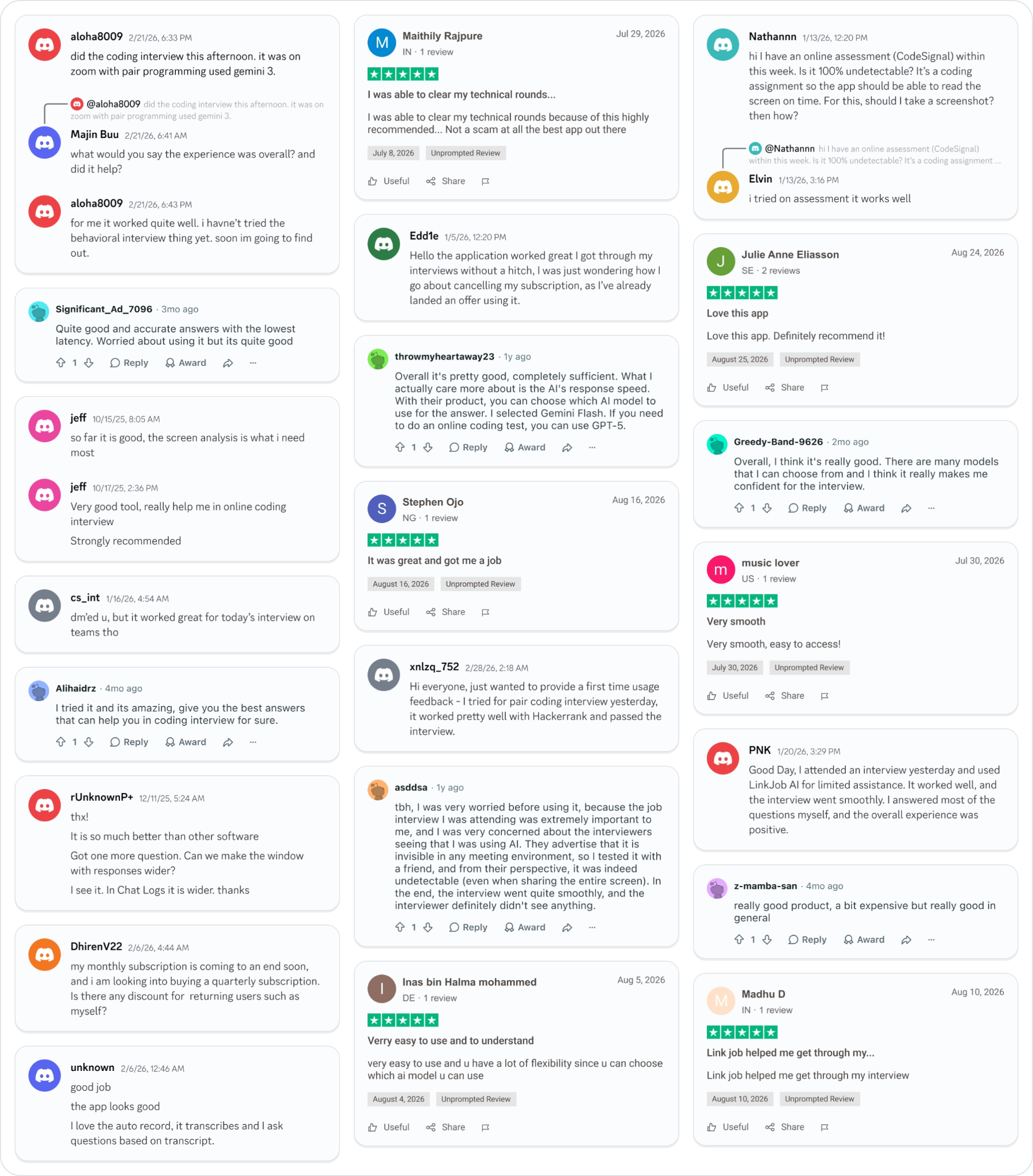
Why People Choose Linkjob AI
Smoother interviews, coding challenges cleared, and job offers landed. See how users describe their experience with Linkjob AI—in their own words.
© Copyright 2026 Linkjob AI - All Rights Reserved.